
Home › Project Management › Impact Effort Matrix Template Excel
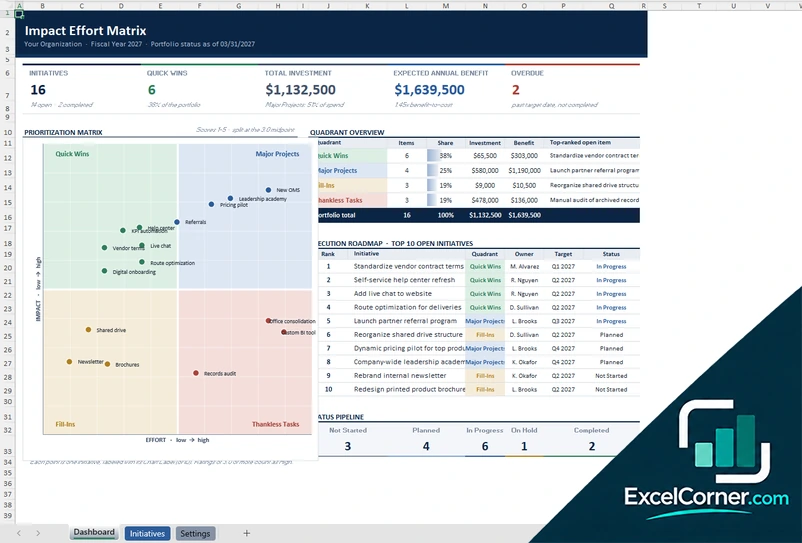
Previewing: Version 1 · Initiative Matrix. Pick another version on the right.
Instant download · No sign-up · No email
Use this free impact effort matrix template for Excel to decide what to do first. Score each initiative on impact and effort, see it plotted as a quick win, a major project, a fill-in or a thankless task, and rank your priorities. Pick the version that fits how you work.
Choose your version
- File
- .xlsx · 40 KB · 3 sheets
- Works with
- Microsoft Excel (.xlsx)
- Macros
- None · formulas only
- Price
- Free
Prioritize initiatives with an impact effort matrix in Excel
An impact effort matrix, also called an effort impact matrix, compares ideas by the value they create and the work they need. Quick wins have high impact and low effort, so you start there. Major projects have high impact and high effort, so you plan them. Fill-ins are low impact and low effort, and thankless tasks have low impact and high effort, so you avoid or rescope them.
These Excel impact effort matrix templates cover three ways to use the idea. The first is an initiative portfolio with a plotted matrix, investment, expected benefit and a roadmap. The second is a weighted scorecard that calculates impact and effort from several criteria. The third is an action board that lays out your actions in four quadrants with owners, budget, hours and health.
Best for
- Product, operations and project teams that must choose among many ideas
- Managers who run a prioritization workshop and want to keep the results
- Teams that want a visual 2×2 matrix and a ranked list of priorities
Maybe not for
Financial investment appraisal with discounting. The templates compare initiatives by scores, investment and expected benefit, not by net present value.
Which version is right for you?
All three are free, formula-driven Excel files with sample data you can replace. They are independent, so you can download more than one.
Version 1
Initiative Matrix
Score initiatives on impact and effort, plot them on a matrix and see the investment, expected benefit and roadmap.
DashboardInitiativesSettings
.xlsx · 40 KB
Version 2
Weighted Scorecard
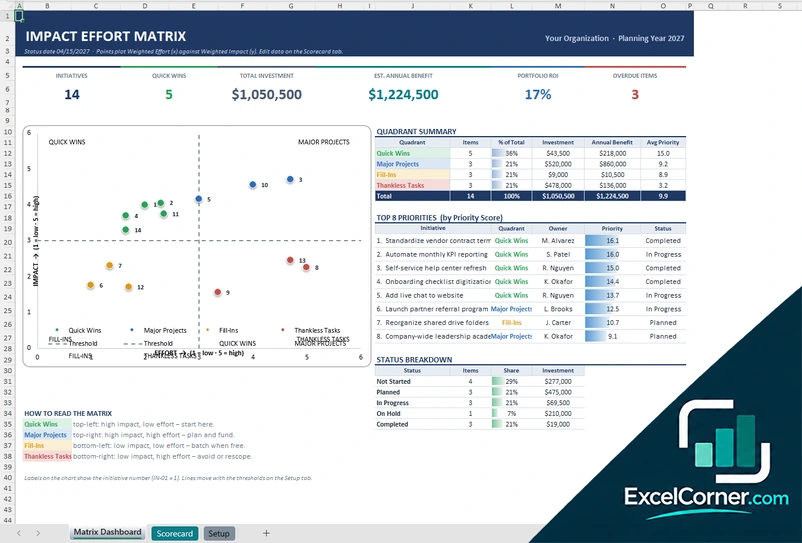
Score each initiative against weighted criteria, and plot the weighted effort and impact on a matrix with ranked priorities.
Matrix DashboardScorecardSetup
.xlsx · 27 KB
Version 3
Action Board
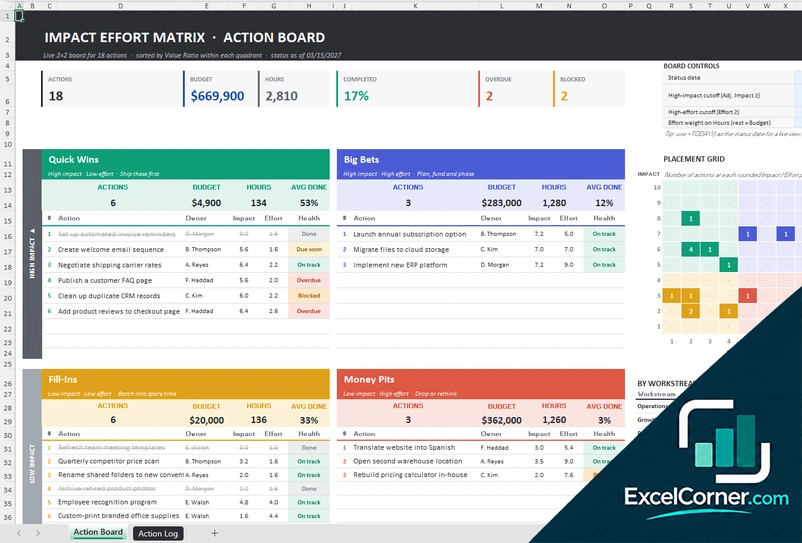
Lay out your actions in quick wins, big bets, fill-ins and money pits, with the owner, the budget, the hours and the health of each.
Action BoardAction Log
.xlsx · 29 KB
What is inside the impact effort matrix Excel templates
Version 1: Initiative Matrix
On the Initiatives sheet you add each initiative with the owner, the impact and effort scores, the investment, the expected annual benefit, the target date and the status, and the Settings sheet holds the thresholds and the lists. The Dashboard shows the number of initiatives, the quick wins, the total investment, the expected annual benefit, the portfolio return and the overdue items, with a prioritization matrix that plots every initiative in its quadrant, a quadrant overview with the share, the investment and the top-ranked open initiative, an execution roadmap of the top 10 open initiatives and a status pipeline.
Version 2: Weighted Scorecard
On the Setup sheet you define the impact and effort criteria with their weights and the thresholds, and on the Scorecard you score every initiative against each criterion, together with its owner, investment, expected benefit and status. The sheet calculates the weighted effort and the weighted impact, the quadrant and the priority score. The Matrix Dashboard shows the initiatives, the quick wins, the total investment, the expected annual benefit, the portfolio return and the overdue items, with a chart of weighted effort against weighted impact, a quadrant summary, the top 8 priorities by priority score and a status breakdown.
Version 3: Action Board
On the Action Log you add each action with the workstream, the owner, the impact and effort scores, the budget, the hours, the percent done, the due date and the status. The Action Board places every action in its quadrant according to the cut-offs for high impact and for effort that you set, with the number of actions, the budget, the hours and the average percent done for each quadrant, and a health flag for each action such as on track, due soon, overdue or blocked. The top shows the actions, the budget, the hours, the percent completed, the overdue actions and the blocked actions, with a placement grid and a summary by workstream.
How to use the impact effort matrix template in Excel
- Download
Pick the version you want and open it in Excel. - Set up your scales
Enter the thresholds for high and low impact and effort, and the criteria and weights if you use a weighted version. Fill in the input cells; formula cells calculate on their own. - List your initiatives
Add each initiative with its owner, the impact and effort scores, the cost, the expected benefit and the status. - Read the matrix
Check the chart, the quadrants and the ranked priorities, then start with the quick wins and plan the major projects.
Review the scores with your team and revisit the matrix when priorities, budgets or resources change.
Which impact effort matrix template do you need?
| Initiative Matrix | Weighted Scorecard | Action Board | |
|---|---|---|---|
| Scoring | Impact and effort scores | Weighted criteria | Impact and effort per action |
| Best for | A portfolio with investment and benefit | A fair, criteria-based ranking | Running a list of actions in four quadrants |
| You get | Plotted matrix, quadrant summary and roadmap | Plotted matrix and top priorities by score | Quadrant boards with budget, hours and health |
They are separate files, so you can use more than one.
Tips for using an impact effort matrix
- Score impact and effort with the whole team, and agree what the scores mean.
- Use the same scale for every initiative so the chart is fair.
- Start with the quick wins to build momentum, and plan the major projects.
- Challenge anything in the thankless tasks quadrant: drop it or rescope it.
- Add cost and expected benefit, so you can see the return of the portfolio.
- Update the matrix when the status of the initiatives changes.
Frequently asked questions
Is this impact effort matrix template for Excel free?
Yes. All three versions are free to download as .xlsx files. You do not need an account or an email address.
Which version should I choose?
Choose the Initiative Matrix (Version 1) for a portfolio with investment, benefit and a roadmap. Choose the Weighted Scorecard (Version 2) when you want impact and effort to come from several weighted criteria. Choose the Action Board (Version 3) to manage actions in four quadrants with owners and progress. They are separate files, so you can use more than one.
What are the four quadrants?
The quadrants are quick wins (high impact, low effort), major projects or big bets (high impact, high effort), fill-ins (low impact, low effort) and thankless tasks or money pits (low impact, high effort).
How is the position on the chart calculated?
In the weighted version, impact and effort are weighted averages of your criteria scores. In the other versions you enter the scores directly, and thresholds that you can change decide the quadrant.
Can I rank initiatives?
Yes. The templates calculate a priority score from impact and effort and show the top priorities, with the quadrant, the owner and the status.
Does the template work in Google Sheets?
The files are made for Microsoft Excel and use standard formulas with no macros. You can upload them to Google Drive and open them with Google Sheets, but some formatting or charts may look different.
Is my data stored online?
No. The templates are plain Excel files, so the information you type stays in your own file on your own computer.
More free project cost and budget templates
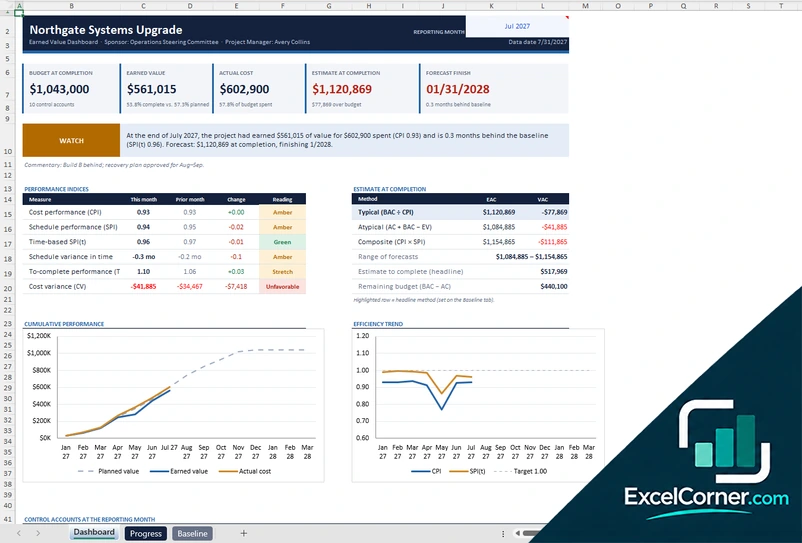
These templates are planning tools with sample data. Replace the figures with your own and check the assumptions before you use them for decisions or reporting. Excel is a trademark of Microsoft Corporation; Excel Corner is not affiliated with Microsoft.