
Home › HR & Workforce Management › Leave Tracker Excel Template 2026
Previewing: Version 1 · Leave Tracker. Pick another version on the right.
Instant download · No sign-up · No email
Use this free leave tracker for Excel to keep track of employee leave for 2026 or any plan year. Record vacation, sick, personal and other leave, see each employee’s balance, approve requests and view a calendar. The files come with sample data and a plan year that you set in the setup sheet. Pick the version that fits your team.
Choose your version
- File
- .xlsx · 296 KB · 4 sheets
- Works with
- Microsoft Excel (.xlsx)
- Macros
- None · formulas only
- Price
- Free
Track employee leave in an Excel leave tracker
A leave tracker records every day of leave taken by each employee, by type, and compares it with their entitlement. It tells you the balance of each person, who is off and when, and where a policy limit has been exceeded.
These Excel leave tracker templates cover three situations. The first is a leave tracker with a team summary and an employee statement. The second is a leave workflow with requests, approvers, a timeline and capacity limits. The third is a leave balance summary with a calendar where you type leave codes. The sample data uses 2027, and you set the plan year and your own data in the setup sheet.
Best for
- HR teams and managers who track leave of absence for a team
- Small businesses that approve leave requests and need to see capacity
- Employees who want an employee statement of their leave
Maybe not for
Legal leave compliance such as FMLA eligibility. These templates track leave days and balances, and legal rules must be checked separately.
Which version is right for you?
All three are free, formula-driven Excel files with sample data you can replace. They are independent, so you can download more than one.
Version 1
Leave Tracker
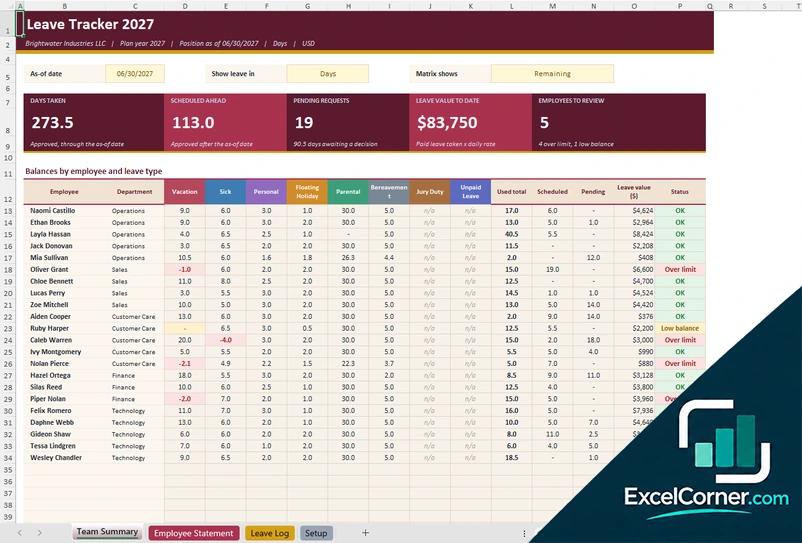
Log leave in one place and see the balance of each employee by leave type, with a team summary and a printable employee statement.
Team SummaryEmployee StatementLeave LogSetup
.xlsx · 296 KB
Version 2
Leave Workflow
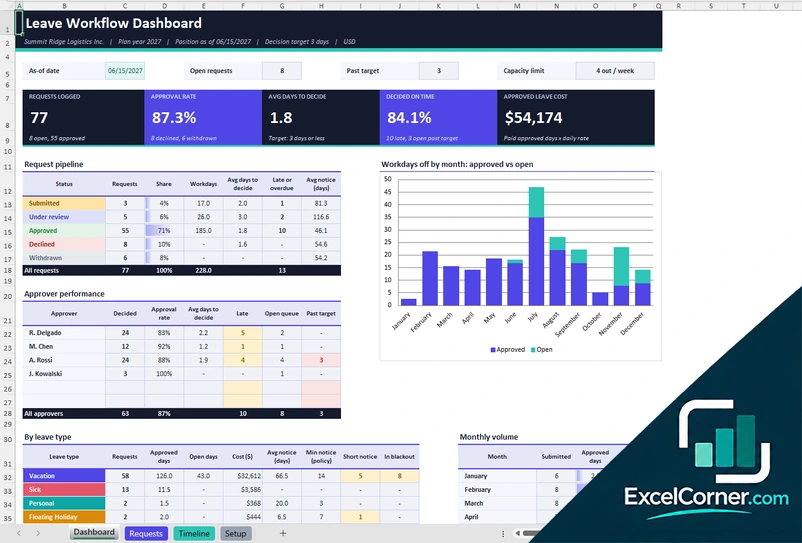
Manage leave requests from submission to approval, and see approval rates, decision times, approver performance and capacity.
DashboardRequestsTimelineSetup
.xlsx · 301 KB
Version 3
Leave Balance Summary
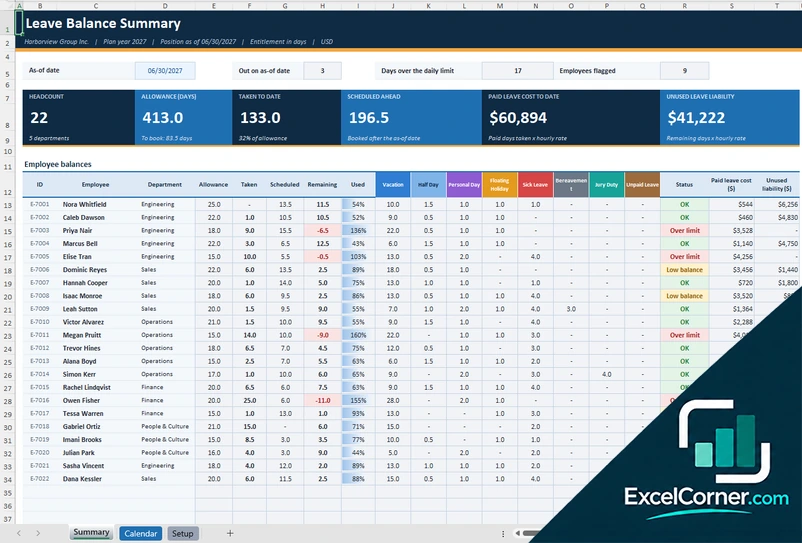
Type leave codes on a calendar and see each employee’s allowance, leave taken, leave scheduled and unused balance.
SummaryCalendarSetup
.xlsx · 186 KB
What is inside the leave tracker Excel templates
Version 1: Leave Tracker
On the Setup sheet you enter the company, the plan year, the leave types with their entitlements, the carryover rules and the holidays, and a roster of up to 30 employees with their department, hire date and rate. On the Leave Log you record each leave with the employee, the type, the dates and the status. The Team Summary shows the days taken, the days scheduled ahead, the pending requests, the value of the leave taken to date and the employees to review, with a matrix of balances by employee and leave type that you can show in days or hours, and a status such as OK, low balance or over limit. The Employee Statement shows the leave history and the balances of one employee.
Version 2: Leave Workflow
On the Setup sheet you enter the policies, such as the decision target in days and the maximum number of people out in one week, the leave types with their minimum notice, the approvers, the blackout periods, the holidays and the employees. Each request goes on the Requests sheet with the employee, the type, the dates, the submitted date, the approver and the status. The Dashboard shows the requests logged, the approval rate, the average days to decide, the share decided on time and the approved leave cost, with a request pipeline by status, the performance of each approver, a chart of workdays off by month, a table by leave type with the notice given and the monthly volume. The Timeline sheet shows the leave over time.
Version 3: Leave Balance Summary
On the Setup sheet you enter the policy, the leave codes with their day value and whether they deduct from the allowance, the departments, the holidays and an employee roster with the annual entitlement and the carryover. On the Calendar you type a leave code, such as V for vacation, on the day of each employee, and the daily limit marks the days with too many people out. The Summary shows the headcount, the total allowance, the leave taken to date, the leave scheduled ahead, the paid leave cost and the unused leave liability, with a table of employee balances that shows the allowance, the days taken, the days scheduled, the days remaining and the use by leave type, and a status for each employee.
How to use the leave tracker template in Excel
- Download
Pick the version you want and open it in Excel. - Set up the policy
Enter the plan year, the leave types, the entitlements, the carryover rules, the holidays and your employees. Fill in the input cells; formula cells calculate on their own. - Record the leave
Add each leave request or leave day with the employee, the type, the dates and the status, or type leave codes on the calendar. - Review balances
Check the remaining balance of each employee, the pending requests and the employees who are over their limit or low on balance.
Update the tracker as leave is approved, and review balances at the end of the plan year for carryover.
Which leave tracker do you need?
| Leave Tracker | Leave Workflow | Leave Balance Summary | |
|---|---|---|---|
| Best for | Balances by employee and leave type | Requests, approvals and capacity | A balance summary with a calendar |
| You enter | A leave log and a policy | Leave requests and approvers | Leave codes on a calendar |
| You get | Team summary and an employee statement | Approval rate, decision time and a timeline | Allowance, taken, scheduled and unused liability |
They are separate files, so you can use more than one.
Tips for tracking leave
- Define each leave type, its entitlement and whether it is paid.
- Count only working days, and leave out weekends and holidays.
- Set a decision target for requests, so employees get an answer in time.
- Watch the capacity, such as the number of people out in the same week.
- Check low balances early, so employees can plan their time off.
- Keep leave of absence records confidential.
Frequently asked questions
Is this leave tracker for Excel free?
Yes. All three versions are free to download as .xlsx files. You do not need an account or an email address.
Does it work for 2026?
Yes. The sample data covers 2027, but you set the plan year in the setup sheet and enter your own employees, entitlements and leave dates for 2026 or any other year.
Which version should I choose?
Choose the Leave Tracker (Version 1) for balances by employee and leave type with an employee statement. Choose the Leave Workflow (Version 2) if you approve requests and want to monitor decision times and capacity. Choose the Leave Balance Summary (Version 3) to type leave codes on a calendar and see balances. They are separate files, so you can use more than one.
Which leave types are included?
The samples include vacation, sick, personal, floating holiday, parental, bereavement, jury duty and unpaid leave. You can rename the types and set the entitlement and the carryover for each.
Does it count weekends and holidays as leave?
No. Weekends and the company holidays that you list are not counted as leave days.
Does the template work in Google Sheets?
The files are made for Microsoft Excel and use standard formulas with no macros. You can upload them to Google Drive and open them with Google Sheets, but some formatting or charts may look different.
Is my employee information stored online?
No. The templates are plain Excel files, so the names and dates you type stay in your own file on your own computer.
Is my data stored online?
No. The templates are plain Excel files, so the numbers you type stay in your own file on your own computer.
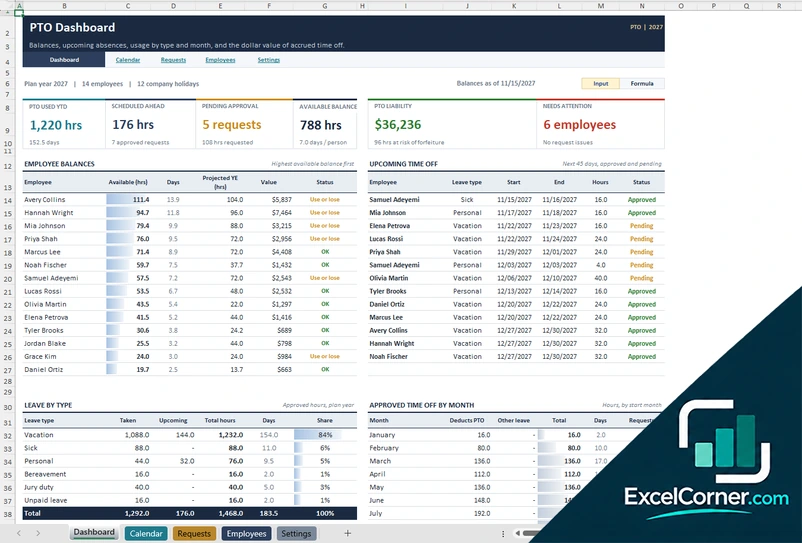
More free attendance, PTO and leave templates
These templates are planning and record-keeping tools with sample data. Leave, PTO and attendance rules vary by employer and by state, so check your policies and the laws that apply to you. Excel is a trademark of Microsoft Corporation; Excel Corner is not affiliated with Microsoft.