
Home › Project Management › Lessons Learned Template Excel
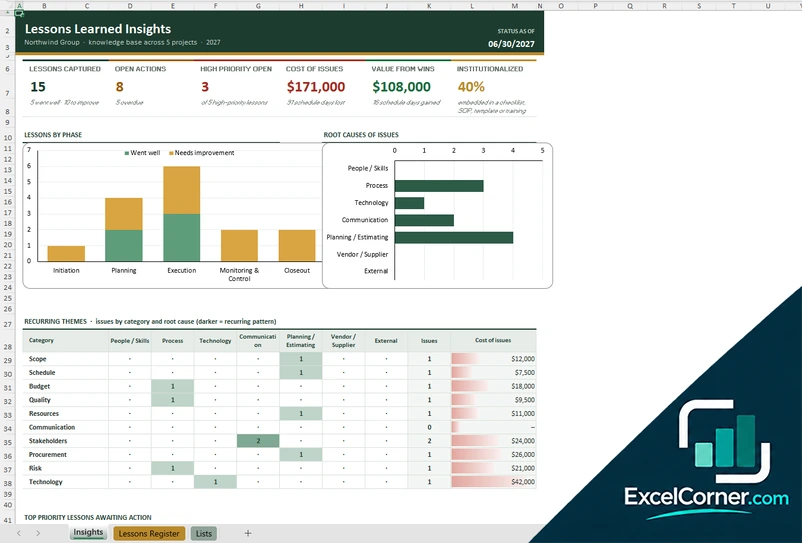
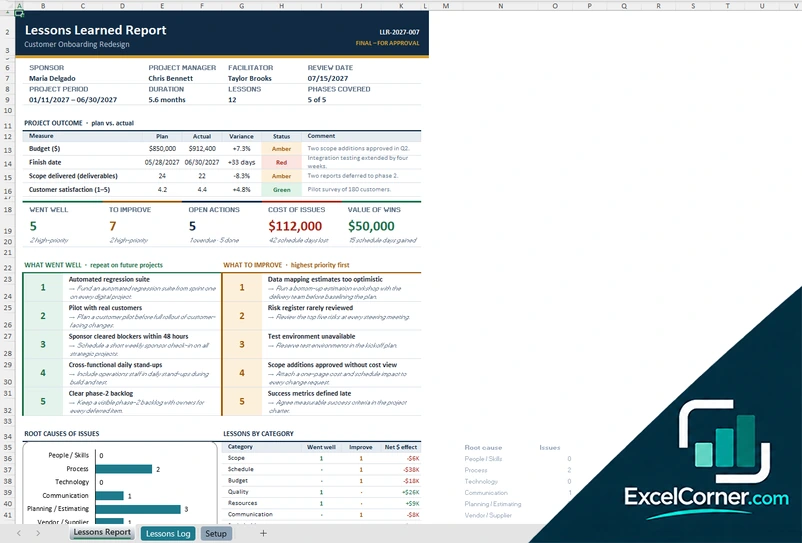
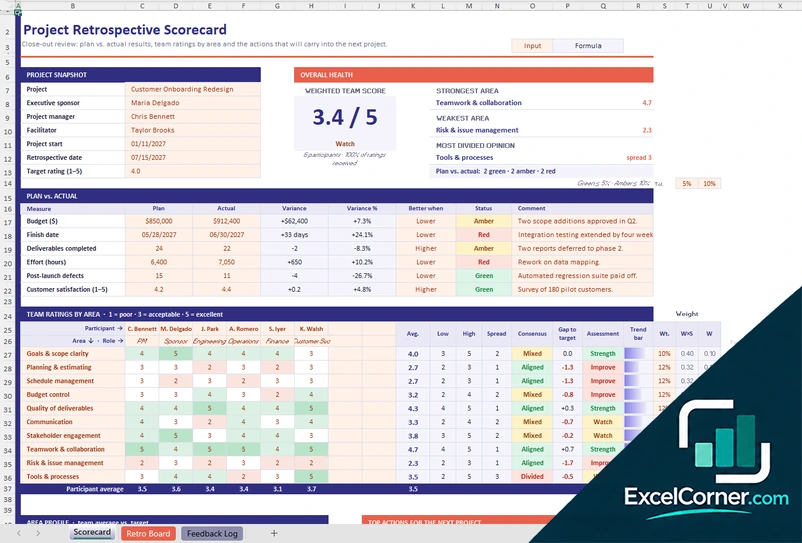
Previewing: Version 1 · Lessons Learned Insights. Pick another version on the right.
Instant download · No sign-up · No email
Use this free lessons learned template for Excel to turn project experience into improvement. Capture what went well and what to improve, find the root causes and recurring themes, and track the actions that make sure the lessons are used. Pick the version for one project, for your whole portfolio, or for a team retrospective.
Choose your version
- File
- .xlsx · 62 KB · 3 sheets
- Works with
- Microsoft Excel (.xlsx)
- Macros
- None · formulas only
- Price
- Free
Capture and use lessons learned in an Excel spreadsheet
A lessons learned review records what a project taught you: what went well and should be repeated, what went wrong and how to avoid it next time. The value comes only if the lessons are specific, have an owner and an action, and are shared with the next project.
These Excel lessons learned templates cover three needs. The first is a register and insights workbook that builds a knowledge base across projects, with causes and recurring themes. The second is a lessons learned report for a single project, with the plan against the actual results. The third is a project retrospective scorecard that collects the ratings of the team by area.
Best for
- Project managers who close a project with a lessons learned review
- PMOs that build a knowledge base from many projects
- Teams that run retrospectives and want to track the follow-up
Maybe not for
A knowledge management system with search across thousands of documents. These templates keep a structured register that you maintain.
Which version is right for you?
All three are free, formula-driven Excel files with sample data you can replace. They are independent, so you can download more than one.
Version 1
Lessons Learned Insights
Keep a register of lessons across projects and see the cost of issues, the value of wins, the root causes and the recurring themes.
InsightsLessons RegisterLists
.xlsx · 62 KB
Version 2
Lessons Learned Report
Summarize one project with its plan against actual results, the top lessons, the root causes and the open actions.
Lessons ReportLessons LogSetup
.xlsx · 43 KB
Version 3
Project Retrospective Scorecard
Collect the ratings of the team by area and see the weighted score, the strongest and weakest areas and the actions for the next project.
ScorecardRetro BoardFeedback Log
.xlsx · 35 KB
What is inside the lessons learned Excel templates
Version 1: Lessons Learned Insights
On the Lessons Register you add each lesson with the project, the phase, the category, whether it went well or needs improvement, the root cause, the impact, the recommendation, the owner and the status of the action. The Lists sheet holds the projects, phases, categories and causes. The Insights sheet shows the lessons captured, the open actions, the high-priority lessons that are still open, the cost of issues, the value from wins and the share of lessons that were institutionalized, with charts of the lessons by phase and the root causes of issues and a heatmap of the recurring themes by category and root cause with the cost of each.
Version 2: Lessons Learned Report
On the Setup sheet you enter the project, the sponsor, the project manager, the facilitator, the review date and the phases, and on the Lessons Log you add each lesson with its category, whether it went well or needs improvement, the root cause, the impact and the recommended action. The Lessons Report brings it together on one page: a project outcome table that compares the plan with the actual budget, finish date, deliverables and customer satisfaction, the counts of what went well, what to improve and the open actions, the cost of issues and the value of wins, the top lessons in each list, the root causes of issues and the lessons by category.
Version 3: Project Retrospective Scorecard
The Scorecard shows the project snapshot, the overall health with a weighted team score, the strongest area, the weakest area and the most divided opinion, a plan against actual table with a status for each measure and a table of team ratings by area from 1 to 5 for each participant, with the average, the low and high scores, the spread, the consensus, the gap to target and an assessment. The Retro Board lists what went well, what to improve and the actions for the next project, and the Feedback Log records the comments of each participant.
How to use the lessons learned template in Excel
- Download
Pick the version you want and open it in Excel. - Set up the project
Enter the project, the sponsor, the dates and the plan against the actual results. Fill in the input cells; formula cells calculate on their own. - Capture the lessons
Add each lesson with its phase, category, root cause, impact, recommendation and owner, or collect the team’s ratings. - Follow up
Review the dashboard, assign the actions and share the lessons before the next project starts.
Hold the review soon after a milestone or at project close, while the details are fresh, and revisit the open actions later.
Which lessons learned template do you need?
| Lessons Learned Insights | Lessons Learned Report | Project Retrospective Scorecard | |
|---|---|---|---|
| Scope | Many projects | One project | One project and team |
| Best for | A knowledge base with recurring themes | A closing report with outcomes | A team retrospective with ratings |
| You get | Cost of issues, value of wins and root causes | Plan versus actual and top lessons | Team score, strengths and areas to improve |
They are separate files, so you can use more than one.
Tips for useful lessons learned
- Write lessons that are specific and actionable, not general statements.
- Record the root cause, not only the symptom.
- Give every improvement an owner and a date.
- Include what went well, so you repeat it.
- Estimate the cost of issues and the value of wins, to show why the lessons matter.
- Share the lessons at the start of the next project.
Frequently asked questions
Is this lessons learned template for Excel free?
Yes. All three versions are free to download as .xlsx files. You do not need an account or an email address.
Which version should I choose?
Choose the Lessons Learned Insights (Version 1) to build a register across projects with root causes and recurring themes. Choose the Lessons Learned Report (Version 2) for a report on one project. Choose the Project Retrospective Scorecard (Version 3) to collect team ratings and feedback. They are separate files, so you can use more than one.
When should I do a lessons learned review?
Many teams hold one at the end of a project and also after key milestones. Doing it soon after the event captures more detail.
What is a root cause?
A root cause is the underlying reason an issue happened, such as planning and estimating or communication. The templates group lessons by category and root cause, so you can see which causes repeat.
Can I track the actions from the lessons?
Yes. The templates list the open actions with an owner, and the dashboards show how many are open, how many are overdue and how many lessons have been institutionalized.
Does the template work in Google Sheets?
The files are made for Microsoft Excel and use standard formulas with no macros. You can upload them to Google Drive and open them with Google Sheets, but some formatting or charts may look different.
Is my data stored online?
No. The templates are plain Excel files, so the information you type stays in your own file on your own computer.
More free project risk, issue and change templates
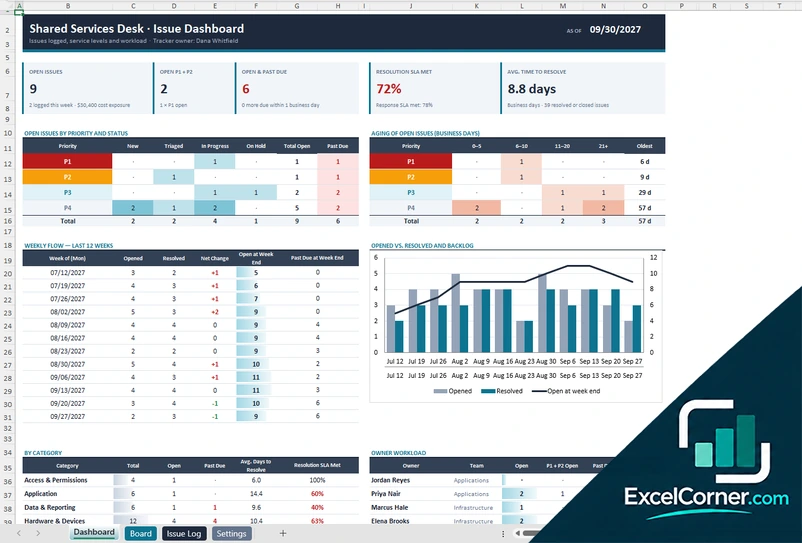
These templates are planning tools with sample data. Adapt the categories, thresholds and approval rules to your own organization and project governance. Excel is a trademark of Microsoft Corporation; Excel Corner is not affiliated with Microsoft.