
Home › Project Management › Issue Tracker Excel Template
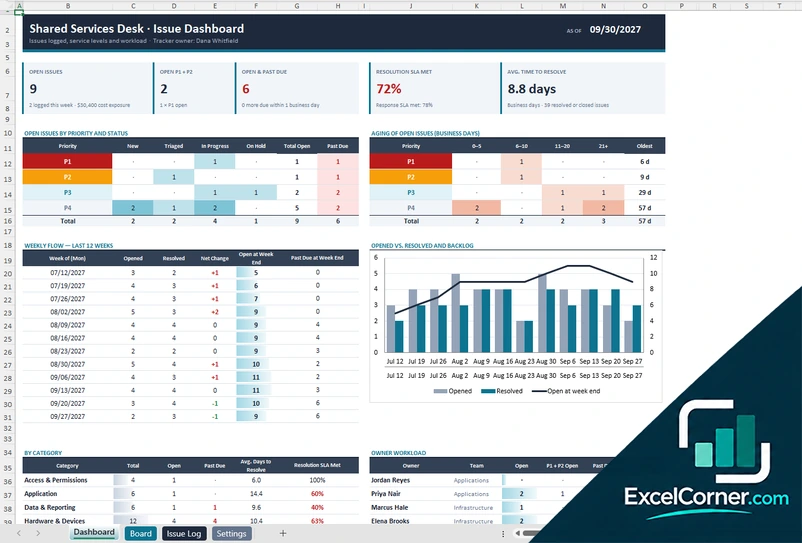
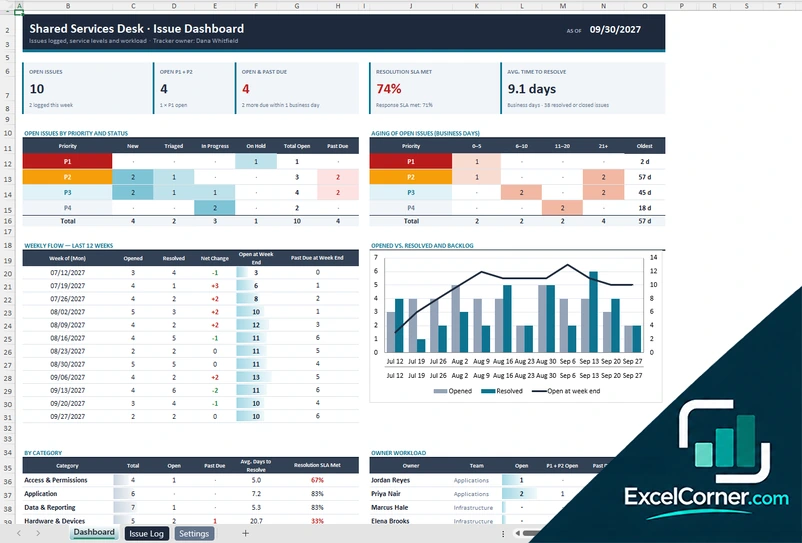
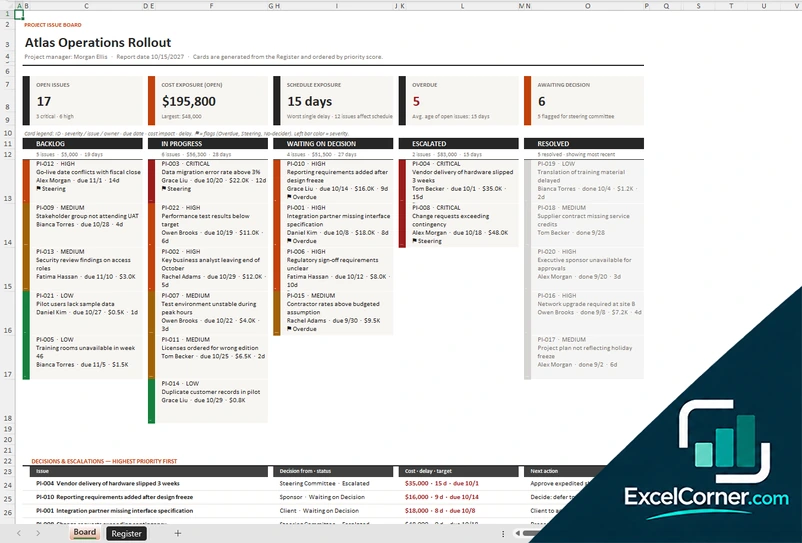
Previewing: Version 1 · Issue Tracker with Board. Pick another version on the right.
Instant download · No sign-up · No email
Use this free issue tracker for Excel to log, prioritize and close issues. Record each issue with a priority, an owner and a due date, track response and resolution against SLAs, and see what is open, overdue and ageing on a dashboard. Or run a project issue board with cost and schedule exposure. Pick the version that fits your team.
Choose your version
- File
- .xlsx · 117 KB · 4 sheets
- Works with
- Microsoft Excel (.xlsx)
- Macros
- None · formulas only
- Price
- Free
Track and resolve issues in an Excel issue tracker
An issue tracker is a list of problems that need action: what happened, how serious it is, who owns it and when it must be solved. In a spreadsheet, the key is one clean log and a few views on top of it, so that nothing is forgotten and managers can see the backlog at a glance.
These Excel issue tracking templates cover three situations. The first is a service desk style tracker with a dashboard, an issue board and a log, built around priorities and SLAs. The second is the same dashboard and log focused on SLA tracking. The third is a project issue board for a program, with kanban columns, cost exposure and the decisions and escalations that need a sponsor.
Best for
- IT, support and operations teams that log and resolve issues
- Project managers who track project issues and escalations
- Teams that need an issue log with SLAs and ageing without buying software
Maybe not for
A full ticketing system with email integration and automation. These templates track issues you enter yourself.
Which version is right for you?
All three are free, formula-driven Excel files with sample data you can replace. They are independent, so you can download more than one.
Version 1
Issue Tracker with Board
Log issues with priority and owner, and see open issues, ageing, SLA results and the weekly flow of issues opened and resolved.
DashboardBoardIssue LogSettings
.xlsx · 117 KB
Version 2
Issue Tracker with SLA
Track every issue against its SLA and see the backlog, the ageing and the trend in one dashboard.
DashboardIssue LogSettings
.xlsx · 80 KB
Version 3
Project Issue Board
Run a project issue board with cost and schedule exposure and a list of the decisions and escalations that need action.
BoardRegisterLists
.xlsx · 55 KB
What is inside the issue tracker Excel templates
Version 1: Issue Tracker with Board
On the Issue Log you add one row per issue with the date opened, the category, the priority, the owner, the status and the dates of the response and the resolution, and the sheet calculates the age, the days to resolve, whether the SLA was met and whether the issue is past due. The Settings sheet holds the as-of date, the owners and teams, the categories and the SLA targets for each priority. The Dashboard shows the open issues, the open P1 and P2 issues, the issues past due, the resolution SLA met and the average time to resolve, with open issues by priority and status, ageing buckets, the weekly flow for the last 12 weeks with a chart of opened against resolved issues, a breakdown by category and the workload of each owner. The Board sheet shows the open issues by status.
Version 2: Issue Tracker with SLA
The Issue Log holds one row per issue, with the priority, the owner, the dates and the status, and the calculated columns show the age, the days to resolve and the SLA result. On the Settings sheet you set the SLA targets for each priority and the as-of date. The Dashboard shows the open issues, the open P1 and P2 issues, the issues past due, the response SLA met, the resolution SLA met and the average time to resolve, with a table of open issues by priority and status, an ageing table that shows the oldest issue, the issues opened and resolved each week with a chart, and the issues by category and by owner.
Version 3: Project Issue Board
On the Register sheet you log each project issue with the title, the owner, the priority, the dates, the status, the cost exposure, the schedule impact and the decision needed, and the Lists sheet holds the owners, statuses and priorities. The Board turns the register into cards that are generated and ordered by priority score, in columns for backlog, in progress, waiting on decision, escalated and resolved. The top shows the open issues, the cost exposure, the schedule impact, the overdue issues and the issues awaiting a decision, and a table lists the decisions and escalations with the highest priority first, with the decision forum, the cost of delay and the next action.
How to use the issue tracker template in Excel
- Download
Pick the version you want and open it in Excel. - Set up your lists
Enter your owners, teams, categories, priorities and SLA targets on the Settings or Lists sheet. Fill in the input cells; formula cells calculate on their own. - Log each issue
Add one row per issue with the date opened, the category, the priority, the owner, the due date and the status. - Review the dashboard
Check the open issues by priority, the ageing, what is past due and the trend of issues opened and resolved.
Update the status of each issue as soon as it changes, and review the open issues in a weekly meeting.
Which issue tracker template do you need?
| Issue Tracker with Board | Issue Tracker with SLA | Project Issue Board | |
|---|---|---|---|
| Best for | A desk or team with a dashboard and a board | SLA and ageing reporting | A project or program |
| You enter | Issues, owners and categories | Issues, owners and SLA targets | Issues, costs, delays and decisions |
| You get | Backlog, ageing, trend and owner workload | Response and resolution SLA and ageing | Kanban board, cost exposure and escalations |
They are separate files, so you can use more than one.
Tips for tracking issues
- Give every issue a unique ID, a clear title and one owner.
- Define priorities, for example P1 to P4, and the time to respond and resolve for each.
- Close issues with a resolution note, so the knowledge is not lost.
- Look at ageing, since old issues are often the real problem.
- Escalate issues that are blocked or that put a deadline or budget at risk.
- Review the trend of opened and resolved issues to see whether the backlog is growing.
Frequently asked questions
Is this issue tracker template for Excel free?
Yes. All three versions are free to download as .xlsx files. You do not need an account or an email address.
Which version should I choose?
Choose the Issue Tracker with Board (Version 1) for a dashboard, a board and a log. Choose the Issue Tracker with SLA (Version 2) if you mainly report on SLAs and ageing. Choose the Project Issue Board (Version 3) for a project with cost and schedule exposure and decisions to escalate. They are separate files, so you can use more than one.
How does the SLA tracking work?
Each priority has a target time to respond and to resolve, measured in business days. The template compares the dates of each issue with the targets and shows the percentage of issues that met the response SLA and the resolution SLA.
Can I see issues by owner or category?
Yes. The dashboard shows the open issues by priority and status, by category and by owner, with the issues past due and the average days to resolve.
Does it include a kanban board?
The Issue Tracker with Board and the Project Issue Board show issues in columns such as backlog, in progress, waiting on decision, escalated and resolved.
Does the template work in Google Sheets?
The files are made for Microsoft Excel and use standard formulas with no macros. You can upload them to Google Drive and open them with Google Sheets, but some formatting or charts may look different.
Is my data stored online?
No. The templates are plain Excel files, so the information you type stays in your own file on your own computer.
More free project risk, issue and change templates
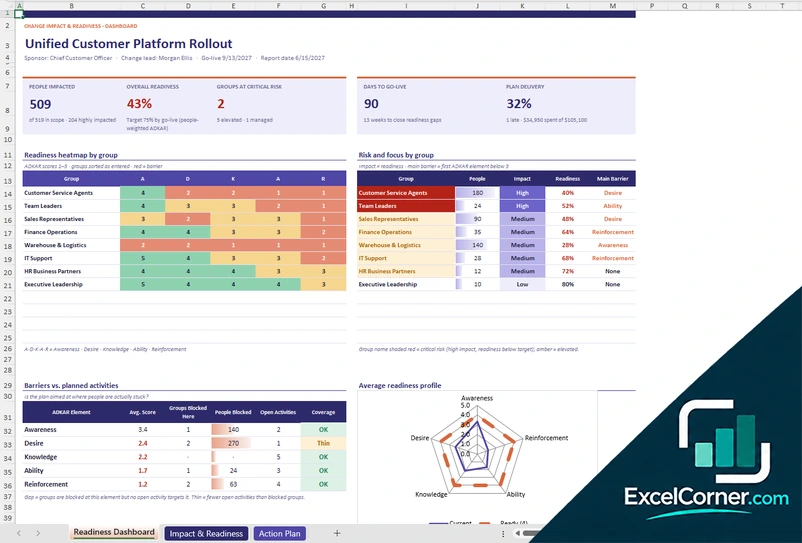
These templates are planning tools with sample data. Adapt the categories, thresholds and approval rules to your own organization and project governance. Excel is a trademark of Microsoft Corporation; Excel Corner is not affiliated with Microsoft.