
Home › Project Management › Change Management Template Excel
Previewing: Version 1 · Change Readiness Plan. Pick another version on the right.
Instant download · No sign-up · No email
Use this free change management template for Excel to manage change on both sides: the changes to a project and the people who have to adopt them. Log change requests, approvals, cost and schedule impact, or measure the readiness of each group and plan the actions that close the gaps. Pick the version that fits your change.
Choose your version
- File
- .xlsx · 55 KB · 4 sheets
- Works with
- Microsoft Excel (.xlsx)
- Macros
- None · formulas only
- Price
- Free
Manage change requests and change readiness in Excel
Change management has two sides. Project change control decides which changes to scope, budget and schedule are approved, by whom and at what cost. Organizational change management makes sure that the people affected are aware, willing and able to adopt the change. A spreadsheet can support both with a register, a dashboard and clear rules.
These Excel change management templates cover them. Two are change control registers, with a log, approval routing, and the effect of approved changes on the budget baseline, the contingency and the finish date. The third is a change readiness plan that scores groups on the ADKAR elements, shows the risk by group and tracks the actions.
Best for
- Project managers and PMOs that control scope, budget and schedule changes
- Change managers who plan communication, training and adoption
- Sponsors and steering committees that approve changes
Maybe not for
A formal ITIL change enablement process with automation. These templates are registers and dashboards that you maintain yourself.
Which version is right for you?
All three are free, formula-driven Excel files with sample data you can replace. They are independent, so you can download more than one.
Version 1
Change Readiness Plan
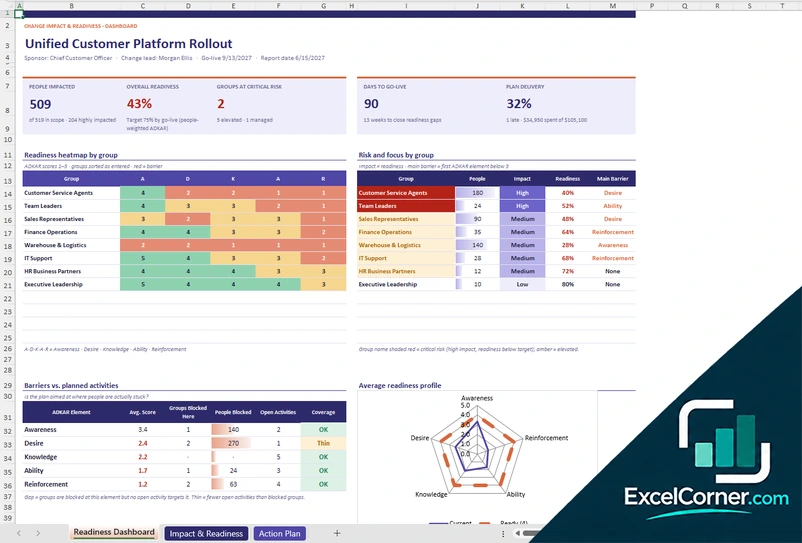
Score the readiness of each group affected by a change and plan the actions that close the gaps before go-live.
Readiness DashboardImpact & ReadinessAction PlanLists
.xlsx · 55 KB
Version 2
Change Control Dashboard
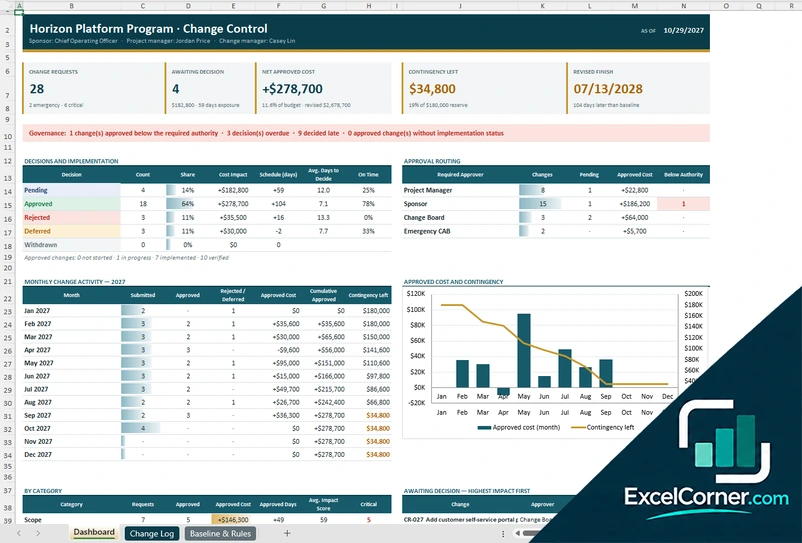
Control project changes with an approval routing table, governance alerts and a view of the approved cost against the contingency.
DashboardChange LogBaseline & Rules
.xlsx · 74 KB
Version 3
Change Control Register
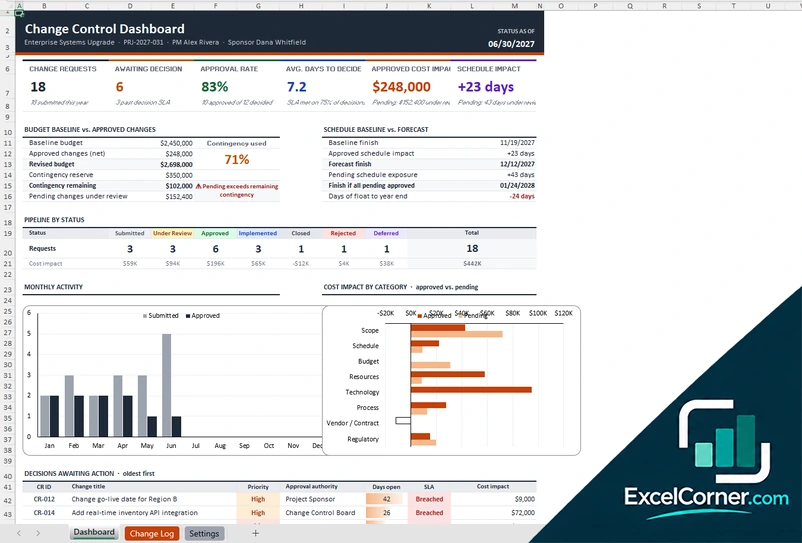
Log change requests and see their effect on the budget baseline, the contingency and the finish date.
DashboardChange LogSettings
.xlsx · 51 KB
What is inside the change management Excel templates
Version 1: Change Readiness Plan
On the Impact and Readiness sheet you list the groups affected by the change with the number of people, the level of impact and a score from 1 to 5 for each of the five ADKAR elements, awareness, desire, knowledge, ability and reinforcement. The Action Plan lists the actions with the element they address, the group, the owner, the dates and the status, and the Lists sheet holds the dropdown values. The Readiness Dashboard shows the number of people impacted, the overall readiness, the groups at critical risk, the days to go-live and the risk of delivery, with a readiness heatmap by group, the risk and focus by group with the main barrier, a comparison of barriers against planned activities and a radar chart of the average readiness profile.
Version 2: Change Control Dashboard
The Change Log holds one row per change with the type, the description, the cost and schedule impact, the required approver, the decision and the implementation status, and the Baseline and Rules sheet holds the baseline, the contingency and the approval limits. The Dashboard shows the change requests, the changes awaiting a decision, the net approved cost, the contingency left and the revised finish date, with governance alerts for changes approved below the required authority or decided late, a table of decisions and implementation, an approval routing table by required approver, monthly change activity and a chart of the approved cost against the contingency that is left.
Version 3: Change Control Register
On the Settings sheet you enter the budget baseline, the contingency reserve, the schedule baseline and the lists. The Change Log records each change request with the title, the category, the requester, the dates, the priority, the approval authority, the cost impact, the schedule impact and the status. The Dashboard shows the change requests, the changes awaiting decision, the approval rate, the average days to decide, the approved cost impact and the schedule impact, with the budget baseline against approved changes, the contingency used, the schedule baseline against the forecast, a pipeline by status, monthly activity, the cost impact by category and a list of decisions awaiting action with their SLA.
How to use the change management template in Excel
- Download
Pick the version you want and open it in Excel. - Set the baseline and rules
Enter the project baseline, the contingency, the approval authority limits and the lists. Fill in the input cells; formula cells calculate on their own. - Log the changes
Add each change request with its type, cost, schedule impact, approver and status, or enter the groups affected and their ADKAR scores. - Review and decide
Check the pending decisions, the effect on the budget and the finish date, or the readiness gaps and the actions to close them.
Review pending changes at every change board meeting and update the readiness scores as you survey the people affected.
Which change management template do you need?
| Change Readiness Plan | Change Control Dashboard | Change Control Register | |
|---|---|---|---|
| Focus | People adoption | Project change control | Project change control |
| You enter | Groups, impact and ADKAR scores | Change requests and approval rules | Change requests and baselines |
| You get | Readiness heatmap, risk by group and action plan | Governance alerts, approval routing and contingency | Budget and schedule baseline against approved changes |
They are separate files, so you can use more than one.
Tips for managing change
- Describe every change request with its reason, its cost and its effect on the schedule.
- Define who can approve what, based on the cost or the schedule impact.
- Track the contingency, since approved changes use it up.
- Decide changes within an agreed number of days, and report the ones that are late.
- Measure readiness before go-live and not only after it.
- Plan actions for the groups with high impact and low readiness first.
Frequently asked questions
Is this change management template for Excel free?
Yes. All three versions are free to download as .xlsx files. You do not need an account or an email address.
Which version should I choose?
Choose the Change Readiness Plan (Version 1) to plan the people side of a change with ADKAR scores. Choose the Change Control Dashboard (Version 2) or the Change Control Register (Version 3) to log and approve project change requests and see their effect on the baseline. They are separate files, so you can use more than one.
What is ADKAR?
ADKAR is a model for individual change with five elements: Awareness, Desire, Knowledge, Ability and Reinforcement. The readiness plan scores each group on the five elements and highlights the weakest ones.
What is a change control register?
It is a log of every change request to a project, with the reason, the cost and schedule impact, the approver and the decision. It helps control scope, budget and schedule.
How does the template use approval authority?
The Change Control Dashboard routes each change to the approver required for its cost or schedule impact, such as the project manager, the sponsor, the change board or an emergency board, and flags changes that were approved below the required authority.
Does the template work in Google Sheets?
The files are made for Microsoft Excel and use standard formulas with no macros. You can upload them to Google Drive and open them with Google Sheets, but some formatting or charts may look different.
Is my data stored online?
No. The templates are plain Excel files, so the information you type stays in your own file on your own computer.
More free project risk, issue and change templates
These templates are planning tools with sample data. Adapt the categories, thresholds and approval rules to your own organization and project governance. Excel is a trademark of Microsoft Corporation; Excel Corner is not affiliated with Microsoft.