
Home › Project Management › ROM Template Excel
Previewing: Version 1 · ROM Estimate. Pick another version on the right.
Instant download · No sign-up · No email
Use this free ROM template for Excel to estimate a project early, when you only need a rough range. Build a rough order of magnitude estimate with a low, a point and a high value, add escalation, risk contingency and a management reserve, and see how confident the estimate is. Pick the method that fits what you know.
Choose your version
- File
- .xlsx · 34 KB · 3 sheets
- Works with
- Microsoft Excel (.xlsx)
- Macros
- None · formulas only
- Price
- Free
Build a rough order of magnitude estimate in Excel
A rough order of magnitude, or ROM, estimate is an early estimate of cost with a wide range, for example minus 25 percent to plus 75 percent. It is not a budget: its purpose is to decide whether an idea is worth studying and to give a first idea of the funding needed.
These Excel ROM templates give you three methods. The first is an estimate detail with a summary, cost by category and confidence. The second is a bottom-up estimate built from line items with expected values, escalation, risk and a statistical check. The third is a top-down planner that scales from a similar completed project and from unit rates, with a phased cash flow.
Best for
- Project managers and PMOs that give a first cost range for new ideas
- Finance teams that need a rough funding request
- Consultants and estimators that prepare early estimates and want to show the assumptions
Maybe not for
A definitive budget or a bid. A ROM has a wide accuracy range, and a budget estimate needs more detailed scope and quotes.
Which version is right for you?
All three are free, formula-driven Excel files with sample data you can replace. They are independent, so you can download more than one.
Version 1
ROM Estimate
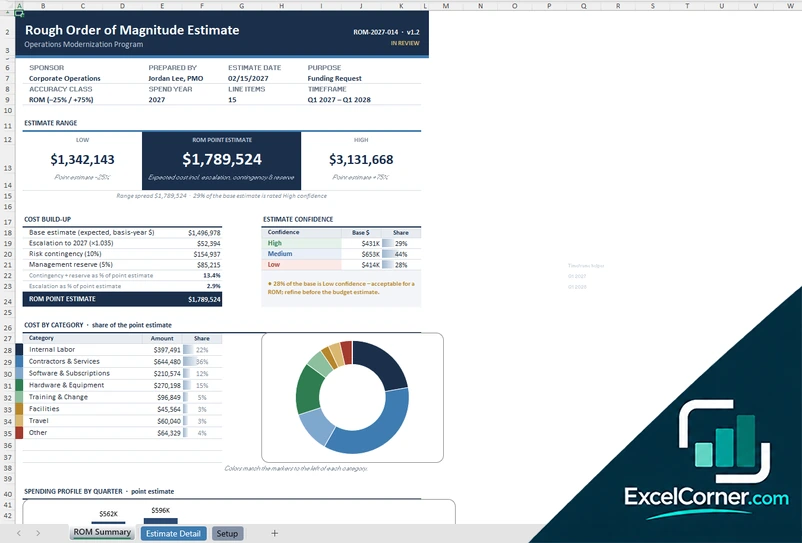
Build a ROM estimate with a low, a point and a high value, a cost build-up, the confidence of the estimate and the cost by category.
ROM SummaryEstimate DetailSetup
.xlsx · 34 KB
Version 2
Bottom-Up ROM Estimate
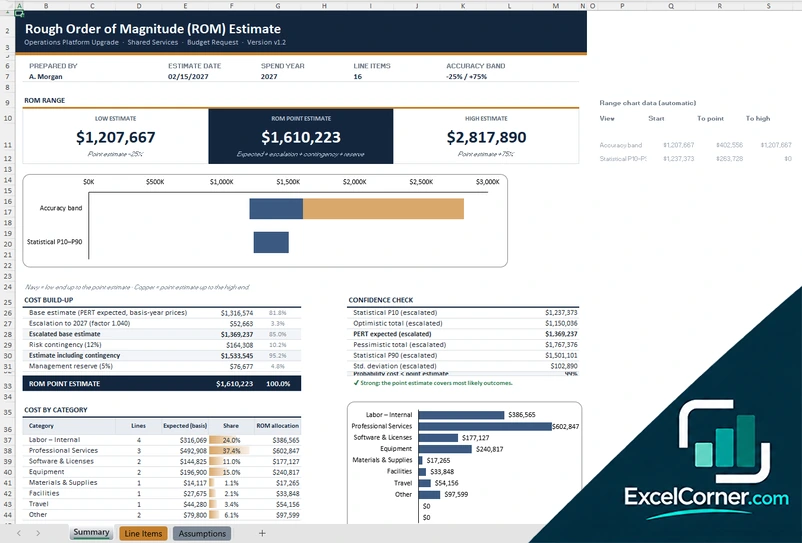
Add up line items with expected values and see the ROM range, the build-up, the statistical P10 to P90 range and the cost by category.
SummaryLine ItemsAssumptions
.xlsx · 30 KB
Version 3
Top-Down ROM Planner
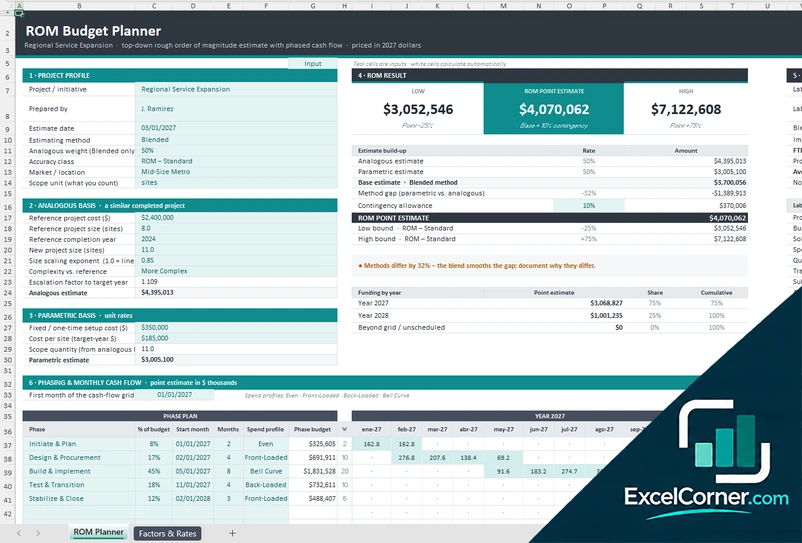
Estimate from a similar completed project and from unit rates, blend the two methods and phase the result into a monthly cash flow.
ROM PlannerFactors & Rates
.xlsx · 29 KB
What is inside the ROM Excel templates
Version 1: ROM Estimate
On the Setup sheet you enter the sponsor, the preparer, the estimate date, the accuracy class, the spend year and the escalation, contingency and reserve percentages, and on the Estimate Detail sheet you list the line items with the category, the basis and the confidence. The ROM Summary shows the estimate range from the low to the high estimate around the point estimate, the cost build-up from the base estimate through escalation, risk contingency and management reserve, the estimate confidence by share of the base, a cost by category chart and the spending profile by quarter.
Version 2: Bottom-Up ROM Estimate
On the Line Items sheet you list the work items with the category, the optimistic, most likely and pessimistic cost and the confidence, and the template calculates a PERT expected value for each. The Assumptions sheet holds the escalation, the risk contingency and the management reserve. The Summary shows the low, the point and the high ROM estimate, a chart of the accuracy band, a cost build-up from the base estimate through escalation, contingency and reserve, a confidence check that compares the optimistic and pessimistic totals with statistical P10 and P90 values, and the cost by category with the expected value, the share and the ROM allocation.
Version 3: Top-Down ROM Planner
On the ROM Planner you enter the project profile, the estimating method and the accuracy class, then an analogous basis with the cost and size of a similar completed project, the size of the new project, a scaling exponent, a complexity factor and an escalation factor, and a parametric basis with a fixed cost, a cost per unit and the quantity. The ROM result shows the low, the point and the high estimate, the blended estimate and the gap between the methods, a contingency allowance and the funding by year. The planner also phases the estimate into a monthly cash flow with front-loaded, even and bell-curve profiles, and estimates the effort and staffing. The Factors and Rates sheet holds the accuracy classes and the rates.
How to use the ROM template in Excel
- Download
Pick the version you want and open it in Excel. - Set the basis
Enter the project profile, the accuracy range, the escalation and the contingency rules. Fill in the input cells; formula cells calculate on their own. - Enter the estimate
Add line items with a cost basis and a confidence level, or enter the reference project and the unit rates. - Read the range
Check the low, point and high estimate, the cost by category, the confidence and the spending profile.
State the accuracy range whenever you share the estimate, and replace the ROM with a budget estimate as the scope becomes clear.
Which ROM template do you need?
| ROM Estimate | Bottom-Up ROM Estimate | Top-Down ROM Planner | |
|---|---|---|---|
| Method | Estimate detail by line | Line items with expected values | Analogous and parametric |
| Best for | A ROM with a summary and confidence | A ROM with a statistical range | A ROM from similar projects |
| You get | Range, cost build-up and spending profile | PERT estimate, escalation and risk | ROM result and a phased cash flow |
They are separate files, so you can use more than one.
Tips for a ROM estimate
- State the range and the assumptions every time you share the number.
- Use a similar completed project as a reference when you have one.
- Add escalation, a risk contingency and a management reserve, and show them separately.
- Mark the confidence of each line, so you can see how much of the estimate is uncertain.
- Cross-check with a second method, for example top-down against bottom-up.
- Update the estimate as the scope gets clearer.
Frequently asked questions
Is this ROM template for Excel free?
Yes. All three versions are free to download as .xlsx files. You do not need an account or an email address.
Which version should I choose?
Choose the ROM Estimate (Version 1) for a line-by-line estimate with a summary and confidence. Choose the Bottom-Up ROM Estimate (Version 2) for expected values and a statistical range. Choose the Top-Down ROM Planner (Version 3) to scale from a similar project and unit rates and to phase the cash flow. They are separate files, so you can use more than one.
What does ROM stand for?
ROM stands for rough order of magnitude. A ROM estimate is an early, approximate estimate that comes with a wide range, such as minus 25 percent to plus 75 percent.
What is the difference between top-down and bottom-up estimating?
A top-down estimate scales from a similar past project or from unit rates, and is quick. A bottom-up estimate adds up the cost of the individual work items, and is more detailed. The templates support both, and you can compare them.
What is a management reserve?
A management reserve is an amount set aside for unknown risks that is controlled by management, in addition to the contingency for identified risks. The ROM estimates show both separately.
Does the template work in Google Sheets?
The files are made for Microsoft Excel and use standard formulas with no macros. You can upload them to Google Drive and open them with Google Sheets, but some formatting or charts may look different.
Is my data stored online?
No. The templates are plain Excel files, so the information you type stays in your own file on your own computer.
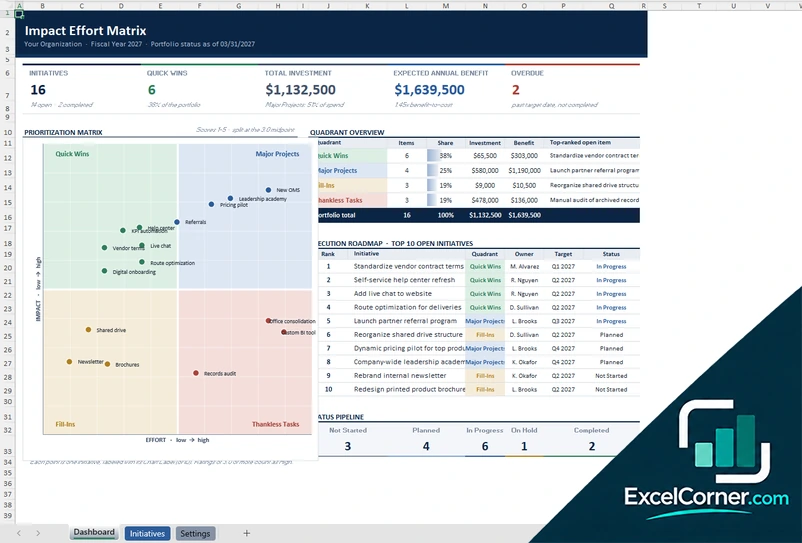
More free project cost and budget templates
These templates are planning tools with sample data. Replace the figures with your own and check the assumptions before you use them for decisions or reporting. Excel is a trademark of Microsoft Corporation; Excel Corner is not affiliated with Microsoft.