
Home › HR & Workforce Management › PTO Tracker Excel Template
Previewing: Version 1 · Team PTO Manager. Pick another version on the right.
Instant download · No sign-up · No email
Use this free PTO tracker for Excel to keep track of paid time off. See each employee’s balance, record vacation, sick and personal days, approve requests and view the team calendar. One version tracks a whole team, one tracks a single employee’s vacation and accruals, and one combines a PTO overview with a calendar. Pick the version that fits.
Choose your version
- File
- .xlsx · 137 KB · 5 sheets
- Works with
- Microsoft Excel (.xlsx)
- Macros
- None · formulas only
- Price
- Free
Track PTO and vacation balances in an Excel spreadsheet
A PTO tracker answers three questions: how much paid time off each person has left, who is away and when, and what accrued but unused time costs the company. Doing this in a spreadsheet works well for small and mid-size teams if balances are calculated from a leave log instead of typed by hand.
These Excel PTO and vacation tracker templates cover three needs. The first is a team PTO manager with a dashboard, a calendar, a requests sheet and a PTO liability. The second is an employee vacation tracker with a yearly calendar, accruals and a sick bank. The third is a PTO overview with balances by employee, use-it-or-lose-it days and a team calendar.
Best for
- Small businesses and HR teams that manage PTO without special software
- Managers who approve time off and want to see who is out
- Employees who want to track their own vacation, accruals and carryover
Maybe not for
Payroll processing. The templates track the time off and the value of the balance, but they do not pay employees.
Which version is right for you?
All three are free, formula-driven Excel files with sample data you can replace. They are independent, so you can download more than one.
Version 1
Team PTO Manager
Manage PTO for a team with requests, a calendar and a dashboard of balances, upcoming time off and the value of accrued PTO.
DashboardCalendarRequestsEmployeesSettings
.xlsx · 137 KB
Version 2
Employee Vacation Tracker
Track one employee’s vacation with accruals, carryover, a sick bank and a color-coded yearly calendar.
PlannerLeave LogAccrual Ledger
.xlsx · 60 KB
Version 3
PTO Overview and Calendar
See the PTO bank of every employee, the days at risk of forfeiture and the accrued PTO liability, with a team calendar.
OverviewTeam CalendarRequestsSetup
.xlsx · 263 KB
What is inside the PTO tracker Excel templates
Version 1: Team PTO Manager
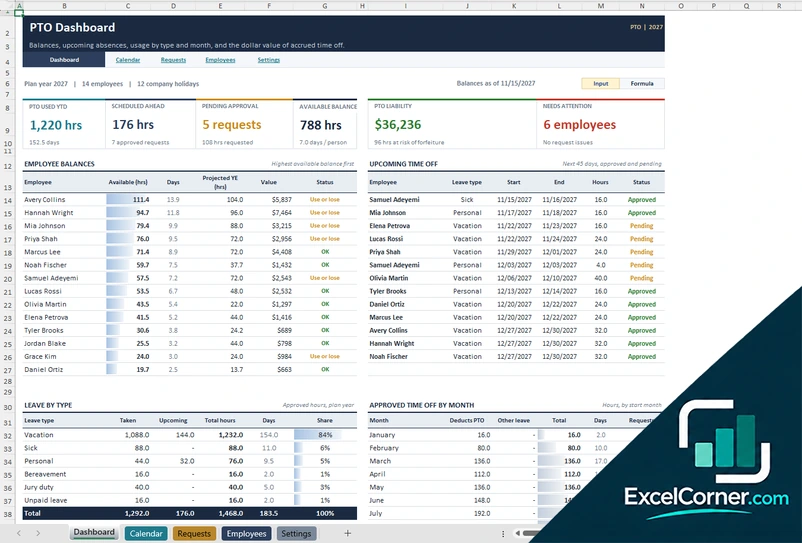
On the Employees sheet you list each person with the hire date and the PTO policy, and on the Settings sheet you enter the plan year, the leave types, the accrual rules and the company holidays. Time off is logged on the Requests sheet with the employee, the leave type, the dates, the hours and the status, and the Calendar sheet shows the team’s time off. The Dashboard shows the PTO used year to date, the time scheduled ahead, the requests pending approval, the available balance, the PTO liability in dollars and the employees that need attention, with the balance of each employee, the upcoming time off for the next 45 days, leave by type and the approved time off by month.
Version 2: Employee Vacation Tracker
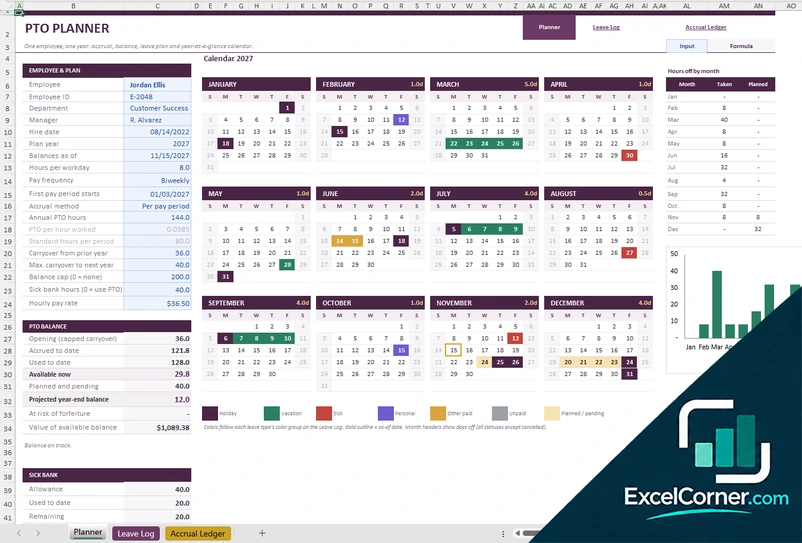
The Planner holds the employee and plan details, such as the hire date, the plan year, the hours per workday, the pay frequency, the accrual method, the annual PTO hours, the carryover from the prior year, the maximum carryover and the balance cap. It shows the opening balance, the time accrued to date, the time used, the available now, the planned and pending time and the projected year-end balance, with the value of the available balance, a sick bank and a calendar for each month that marks vacation, sick days, personal days and holidays with colors, and a chart of the hours off by month. The Leave Log records each leave day and the Accrual Ledger records the accrual for each pay period.
Version 3: PTO Overview and Calendar
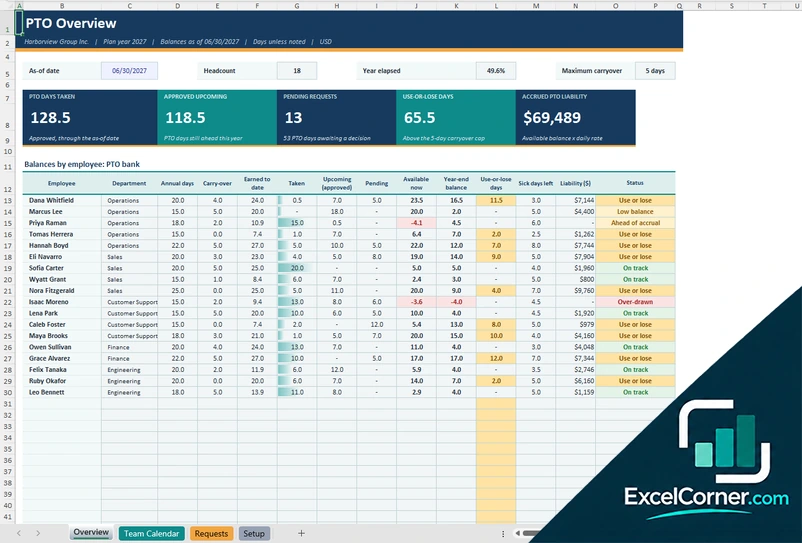
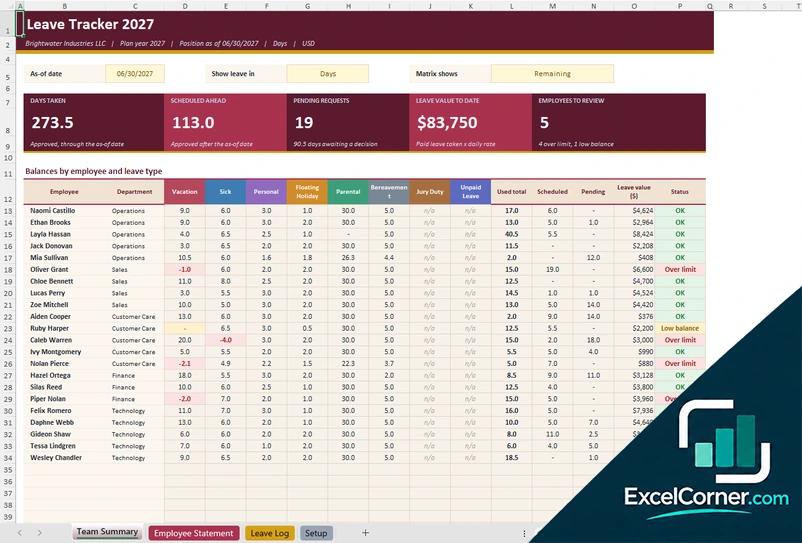
On the Setup sheet you enter the company, the plan year, the as-of date, the accrual rules and the holidays, and on the Requests sheet you log each request with the employee, the dates, the leave type and the status. The Team Calendar shows who is out each day. The Overview shows the PTO days taken, the approved upcoming days, the pending requests, the use-it-or-lose-it days and the accrued PTO liability, with a table of balances by employee that shows the annual days, the carryover, the days earned to date, the days taken, the upcoming and pending days, the available balance, the projected year-end balance, the days at risk, the sick days left, the liability in dollars and a status such as on track, low balance, use or lose or over-drawn.
How to use the PTO tracker in Excel
- Download
Pick the version you want and open it in Excel. - Set up the policy
Enter the plan year, the accrual or annual allowance, the carryover limit, the leave types and the company holidays. Fill in the input cells; formula cells calculate on their own. - Log the time off
Add each request or leave day with the employee, the type and the dates, and set the status to pending, approved or declined. - Check balances
Review each person’s available balance, the time off scheduled ahead and the people who need attention.
Update the log as requests are approved, and review the use-it-or-lose-it balances before the end of the plan year.
Which PTO tracker do you need?
| Team PTO Manager | Employee Vacation Tracker | PTO Overview and Calendar | |
|---|---|---|---|
| For | A team | One employee | A team |
| Best for | Requests, a calendar and the PTO liability | Accruals, carryover and a yearly calendar | Balances, use-or-lose days and a team calendar |
| You get | Dashboard, upcoming time off and leave by type | Balance, projected year-end and hours by month | PTO bank for each person and a team calendar |
They are separate files, so you can use more than one.
Tips for tracking PTO
- Write down your PTO policy and enter it in the template, so the rules are applied the same way for everyone.
- Record every request, with its status, so the calendar shows who is out.
- Decide how accruals, carryover and balance caps work before you start.
- Review balances before the end of the year to avoid use-it-or-lose-it surprises.
- Track the cash value of accrued PTO, since it may be a liability.
- Keep sick time separate from vacation if your policy does.
Frequently asked questions
Is this PTO tracker for Excel free?
Yes. All three versions are free to download as .xlsx files. You do not need an account or an email address.
Which version should I choose?
Choose the Team PTO Manager (Version 1) to manage requests and see a dashboard and a calendar for a team. Choose the Employee Vacation Tracker (Version 2) to track one person’s vacation, accruals and carryover. Choose the PTO Overview and Calendar (Version 3) for balances by employee with a team calendar. They are separate files, so you can use more than one.
How does the template calculate the PTO balance?
The balance is the opening balance plus the carryover and the time accrued to date, minus the time taken. Some versions also show the time scheduled ahead and the time pending approval, and project the year-end balance.
Can I track accruals per pay period?
Yes. The Employee Vacation Tracker has an accrual ledger and lets you choose the pay frequency, the accrual method and a maximum carryover and balance cap.
Does it work for 2026 or other years?
The sample data uses 2027. You set the plan year in the setup sheet and enter your own dates and balances.
Does the template work in Google Sheets?
The files are made for Microsoft Excel and use standard formulas with no macros. You can upload them to Google Drive and open them with Google Sheets, but some formatting or charts may look different.
Is my employee information stored online?
No. The templates are plain Excel files, so the names and dates you type stay in your own file on your own computer.
Is my data stored online?
No. The templates are plain Excel files, so the numbers you type stay in your own file on your own computer.
More free attendance, PTO and leave templates
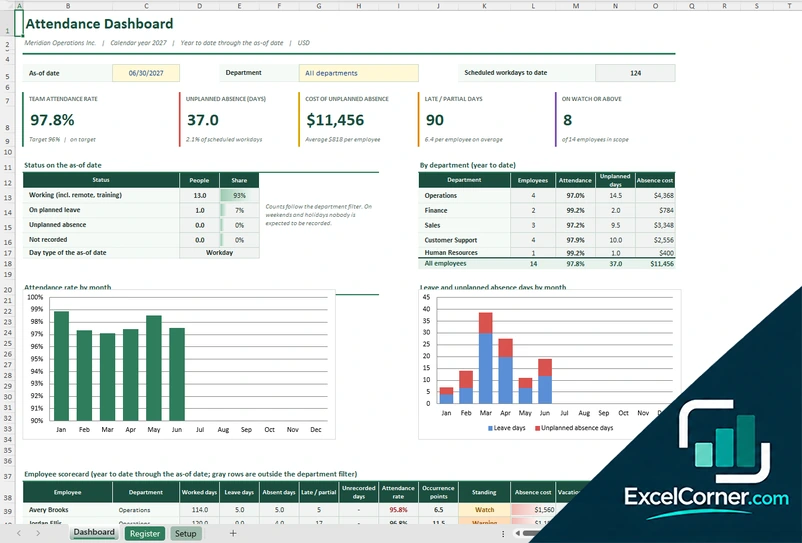
These templates are planning and record-keeping tools with sample data. Leave, PTO and attendance rules vary by employer and by state, so check your policies and the laws that apply to you. Excel is a trademark of Microsoft Corporation; Excel Corner is not affiliated with Microsoft.