
Home › HR & Workforce Management › Attendance Template Excel
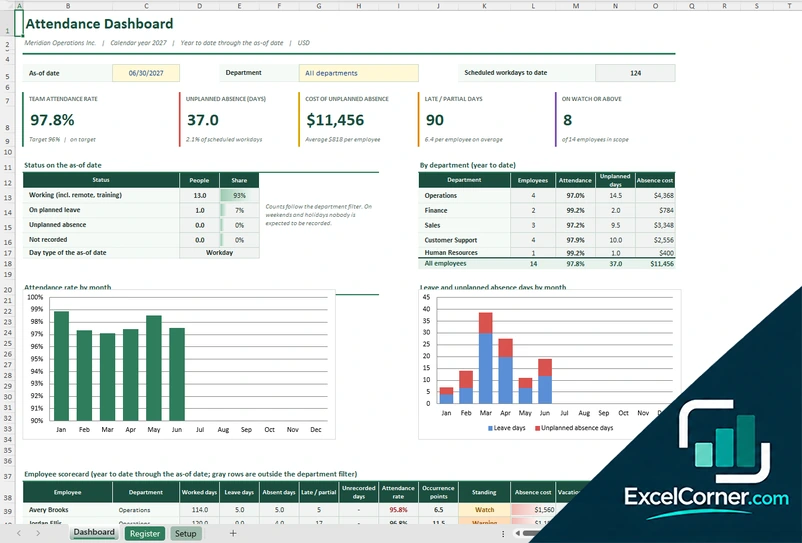
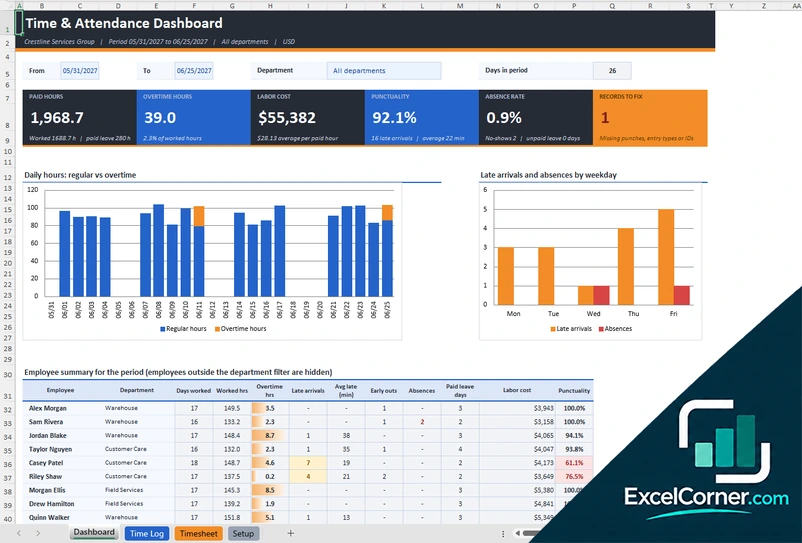
Previewing: Version 1 · Attendance Register. Pick another version on the right.
Instant download · No sign-up · No email
Use this free attendance template for Excel to record who was at work and who was not. Log attendance each day, track absences, late arrivals and overtime, and see attendance rates, the cost of absence and the employees to watch on a dashboard. Pick the version that fits how you track attendance.
Choose your version
- File
- .xlsx · 82 KB · 3 sheets
- Works with
- Microsoft Excel (.xlsx)
- Macros
- None · formulas only
- Price
- Free
Track employee attendance in an Excel attendance sheet
An attendance sheet records, for each employee and day, whether they worked, took planned leave, or were absent without notice, and when they arrived and left. From that record a spreadsheet can calculate attendance rates, late arrivals, unplanned absence and overtime, and show where a pattern needs attention.
These Excel attendance templates cover two needs. The first is an attendance register with a dashboard of attendance rate, unplanned absence and a scorecard for each employee. The second is a time and attendance log, where you record clock-in and clock-out times by day and get paid hours, overtime, punctuality and labor cost for a period.
Best for
- Small businesses and teams that track daily attendance
- HR and managers who monitor absence and punctuality
- Supervisors who need paid hours and overtime for a period
Maybe not for
A biometric clock or a payroll system. These templates record the data you type and calculate the results.
Which version is right for you?
Both are free, formula-driven Excel files with sample data you can replace. They are independent, so you can download both.
Version 1
Attendance Register
Record each employee’s attendance status by day and see attendance rates, absence cost, patterns and a scorecard.
DashboardRegisterSetup
.xlsx · 82 KB
Version 2
Time and Attendance Log
Record clock-in and clock-out times and get paid hours, overtime, late arrivals, absences and labor cost for any period.
DashboardTime LogTimesheetSetup
.xlsx · 279 KB
What is inside the attendance Excel templates
Version 1: Attendance Register
On the Setup sheet you enter the company, the calendar year, the employees with their department and pay, the holidays and the rules for absence cost and warnings. The Register records the status of each employee for each day, such as worked, planned leave or unplanned absence, with late and partial days. The Dashboard shows, for a date you choose and an optional department, the team attendance rate, the unplanned absence days, the cost of unplanned absence, the late or partial days and the number of employees on watch, the status of everyone on the as-of date, a table by department, charts of the attendance rate by month and of leave and unplanned absence days by month, and an employee scorecard with the attendance rate, the occurrence points and the standing.
Version 2: Time and Attendance Log
On the Time Log you record each shift with the employee, the date, the clock-in and clock-out times, the break and any absence, and the sheet calculates the worked hours, the overtime and the late arrival. The Setup sheet holds the company, the employees with their departments and rates, the working hours and the overtime rule, and the Timesheet sheet shows a timesheet for one employee. The Dashboard lets you choose a period and a department and shows the paid hours, the overtime hours, the labor cost, the punctuality, the absence rate and the records to fix, with a chart of regular and overtime hours by day, a chart of late arrivals and absences by weekday and an employee summary for the period.
How to use the attendance template in Excel
- Download
Pick the version you want and open it in Excel. - Set up your team
Enter your employees, departments, holidays and the rules for lateness and overtime. Fill in the input cells; formula cells calculate on their own. - Record attendance
Log each day’s status for each employee, or enter the clock-in and clock-out times. - Review the dashboard
Check attendance rates, absences, late arrivals, overtime and the employees who are on watch.
Record attendance every day or week, so the dashboard reflects the real situation.
Which attendance template do you need?
| Attendance Register | Time and Attendance Log | |
|---|---|---|
| You record | Daily status for each employee | Clock-in and clock-out times |
| Best for | Attendance rate and absence tracking | Paid hours, overtime and punctuality |
| You get | Rates by department and month, and an employee scorecard | Hours, overtime, late arrivals and labor cost |
They are separate files, so you can use both.
Tips for tracking attendance
- Record attendance daily, since memory is not reliable after a week.
- Separate planned leave from unplanned absence.
- Define what counts as late and as a partial day, and apply it in the same way for everyone.
- Look at patterns by weekday and by department, not only at totals.
- Track the cost of absence to show its impact.
- Protect the file, because it contains personal information.
Frequently asked questions
Is this attendance template for Excel free?
Yes. Both versions are free to download as .xlsx files. You do not need an account or an email address.
Which version should I choose?
Choose the Attendance Register (Version 1) to record daily status and see attendance rates, unplanned absence and an employee scorecard. Choose the Time and Attendance Log (Version 2) to record clock times and calculate paid hours, overtime and punctuality for a period. They are separate files, so you can use both.
Can I use it as a weekly attendance sheet?
Yes. Both versions work with any period. The Time and Attendance Log lets you choose a start and an end date, so you can review a single week or a month.
How is the attendance rate calculated?
The attendance rate is the days worked divided by the scheduled workdays for the period, after leaving out planned leave and holidays, as set in the template.
Does it calculate overtime?
Yes. The Time and Attendance Log calculates regular and overtime hours from the times you record and the overtime rule that you set, and shows the labor cost.
Does the template work in Google Sheets?
The files are made for Microsoft Excel and use standard formulas with no macros. You can upload them to Google Drive and open them with Google Sheets, but some formatting or charts may look different.
Is my employee information stored online?
No. The templates are plain Excel files, so the names and dates you type stay in your own file on your own computer.
Is my data stored online?
No. The templates are plain Excel files, so the numbers you type stay in your own file on your own computer.
More free attendance, PTO and leave templates
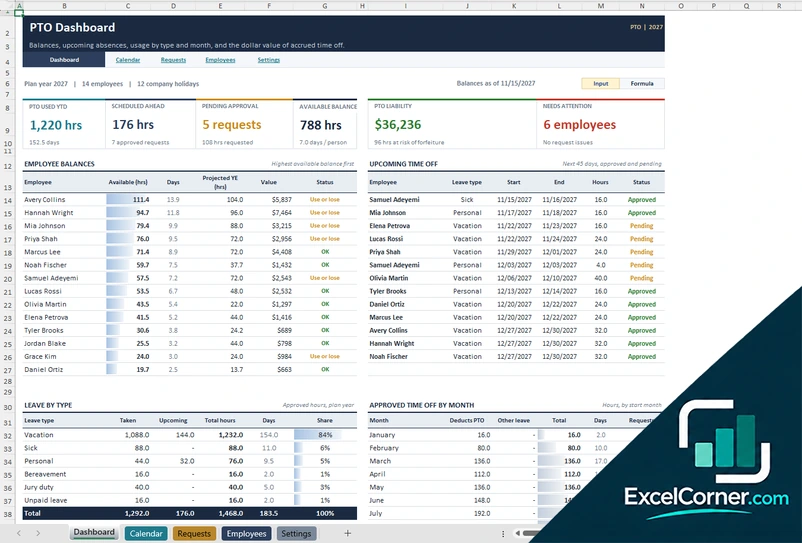
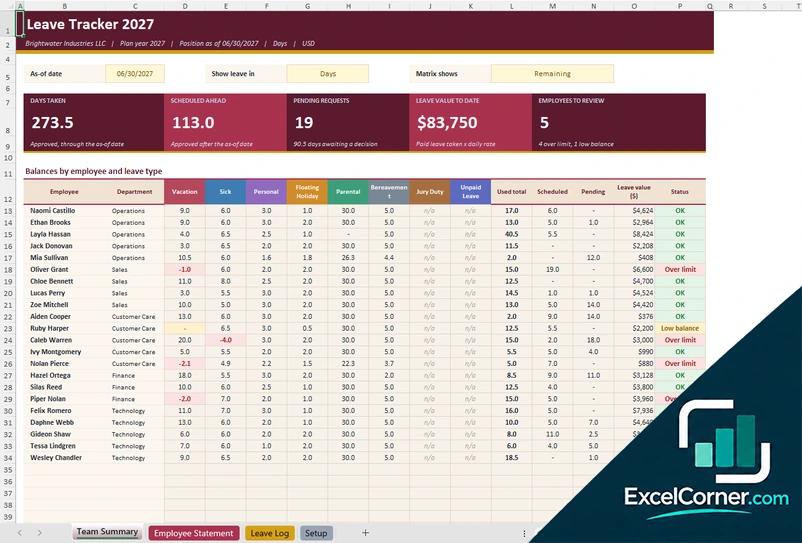
These templates are planning and record-keeping tools with sample data. Leave, PTO and attendance rules vary by employer and by state, so check your policies and the laws that apply to you. Excel is a trademark of Microsoft Corporation; Excel Corner is not affiliated with Microsoft.