
Home › Accounting & Business Finance › Cost Segregation Excel Template
Previewing: Version 1 · Cost Segregation Workbook. Pick another version on the right.
Instant download · No sign-up · No email
Use this free cost segregation Excel template to estimate what a cost segregation study could be worth. Allocate the basis of a property to asset classes, calculate first-year depreciation and tax savings, and compare them with the study fee. Pick the version that fits the stage of your analysis.
Choose your version
- File
- .xlsx · 68 KB · 5 sheets
- Works with
- Microsoft Excel (.xlsx)
- Macros
- None · formulas only
- Price
- Free
Estimate the benefit of cost segregation in Excel
A cost segregation study splits the cost of a building into components with different tax lives, such as flooring, cabinets, site work and the structure. Components with shorter lives, like five, seven or fifteen years, can be depreciated faster, which can increase deductions in the early years. A spreadsheet helps you model the allocation and see the effect on taxes before you commit to a study.
These Excel cost segregation templates support three approaches. The first is a complete workbook with a component register, a depreciation schedule and a dashboard that values the study. The second is a component worksheet with the asset class library and MACRS rate tables. The third is a quick benefit analyzer that starts from percentage allocations by asset class.
Best for
- Property owners and investors who want to estimate the benefit of a study
- CPAs and advisors who model allocations and depreciation for clients
- Engineers and analysts who build a component register
Maybe not for
Anyone who needs a formal cost segregation study. These templates are for estimates and planning, and they do not replace an engineering-based study or tax advice.
Which version is right for you?
All three are free, formula-driven Excel files with sample data you can replace. They are independent, so you can download more than one.
Version 1
Cost Segregation Workbook
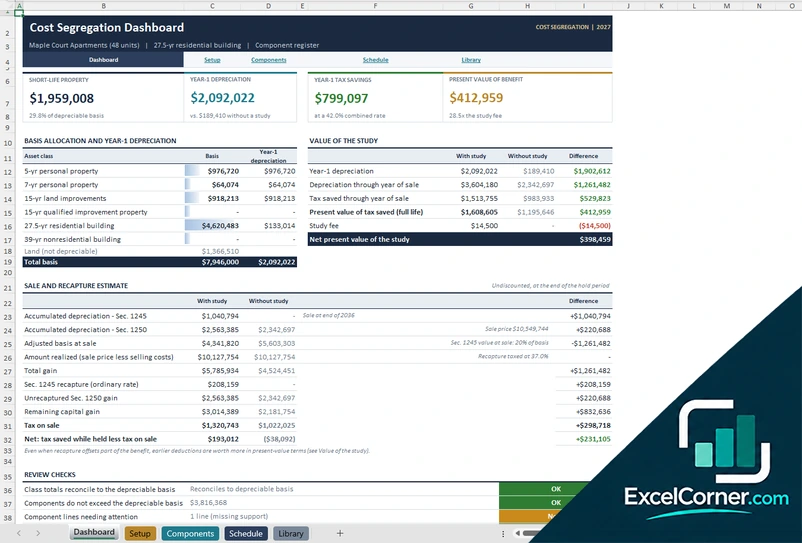
Model a property from its components to the year-1 depreciation, the tax savings, the value of the study and the sale recapture.
DashboardSetupComponentsScheduleLibrary
.xlsx · 68 KB
Version 2
Component Worksheet
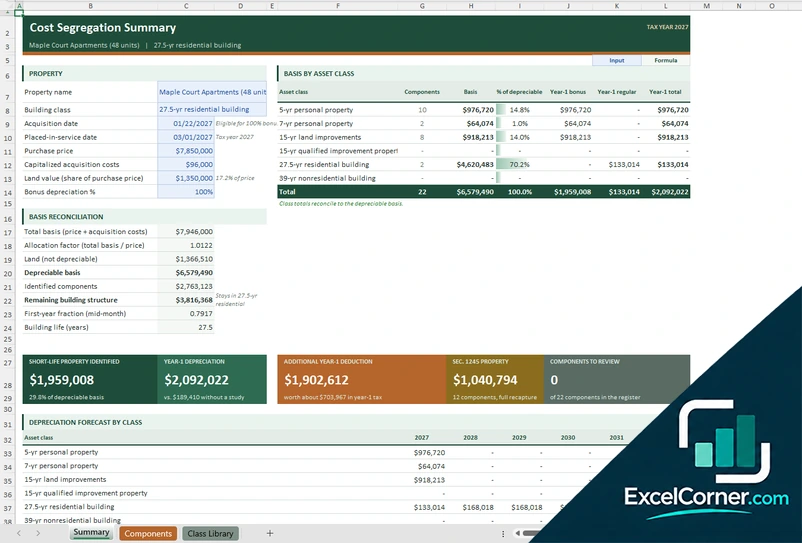
List the components of a property, assign asset classes and reconcile the basis, with a library of recovery periods and MACRS rate tables.
SummaryComponentsClass Library
.xlsx · 51 KB
Version 3
Benefit Analyzer
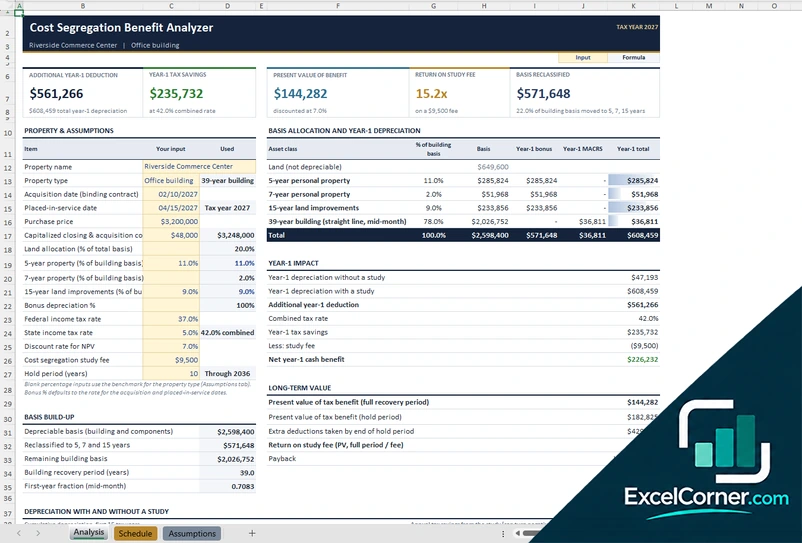
Enter the property and the share of basis for each asset class to see the extra year-1 deduction, the tax savings and the return on the study fee.
AnalysisScheduleAssumptions
.xlsx · 30 KB
What is inside the cost segregation Excel templates
Version 1: Cost Segregation Workbook
On the Setup sheet you enter the property, the purchase price, the acquisition costs, the land value, the dates, the bonus percentage, the tax rate, the discount rate, the study fee and the sale assumptions. The Components sheet is the register from the study, where each component has a building system, an asset class, a basis method, a quantity, a unit cost, an allocated basis, a life, the year-1 depreciation and the recapture type. The Schedule sheet projects depreciation by year and the Library sheet holds the asset classes. The Dashboard shows the short-life property, the year-1 depreciation, the year-1 tax savings and the present value of the benefit, compares the results with and without a study, and estimates the sale and recapture.
Version 2: Component Worksheet
The Class Library lists the asset classes with the recovery period, the method, the convention, whether the class is eligible for bonus depreciation, the recapture section and typical components, together with half-year MACRS rate tables. On the Components sheet you register each component with its asset class and cost. The Summary shows the property, the purchase price, the capitalized acquisition costs, the land value and the bonus percentage, a table of basis by asset class with the number of components, the share of the depreciable basis, the year-1 bonus, the year-1 regular depreciation and the total, and a basis reconciliation that checks the class totals against the depreciable basis.
Version 3: Benefit Analyzer
On the Assumptions sheet you enter the property name and type, the acquisition date, the purchase price, the land value, the tax rate, the discount rate, the study fee and the bonus percentage. The Analysis sheet shows a basis allocation table, where you enter the percentage of the building basis for the five-year, seven-year and fifteen-year classes, and it calculates the basis and the year-1 bonus and regular depreciation for each class. The top of the sheet shows the additional year-1 deduction, the year-1 tax savings, the present value of the benefit, the return on the study fee and the basis reclassified, and the Schedule sheet shows the depreciation by year.
How to use the cost segregation template in Excel
- Download
Pick the version you want and open it in Excel. - Enter the property
Add the purchase price, the dates, the land value, the building class and your tax assumptions. Fill in the input cells; formula cells calculate on their own. - Allocate the basis
List the components with their cost and asset class, or enter the percentage of the basis allocated to each class. - Read the results
Check the year-1 depreciation, the tax savings, the present value of the benefit and the return on the study fee.
Confirm the depreciation rules, the bonus percentage and the tax rates for your tax year with a tax professional before you rely on the results.
Which cost segregation template do you need?
| Cost Segregation Workbook | Component Worksheet | Benefit Analyzer | |
|---|---|---|---|
| Method | Component register with a dashboard | Component register with MACRS tables | Percentage allocation by asset class |
| Best for | A full model of a property | Building and checking the component list | A quick estimate of the benefit |
| You get | Year-1 depreciation, tax savings and sale recapture | Basis by class, bonus and regular depreciation | Year-1 deduction, tax savings and return on the study fee |
They are separate files, so you can use more than one.
Tips for a cost segregation analysis
- Start with the purchase price and the land value, because land is not depreciable.
- Add acquisition costs to the basis and allocate them across the components.
- Use asset classes that match the components, such as five-year, seven-year and fifteen-year property.
- Check the bonus depreciation percentage that applies to the placed-in-service date.
- Think about recapture when you sell, because faster depreciation can create ordinary income later.
- Compare the tax savings with the cost of the study before you order one.
Frequently asked questions
Is this cost segregation Excel template free?
Yes. All three versions are free to download as .xlsx files. You do not need an account or an email address.
Which version should I choose?
Choose the Cost Segregation Workbook (Version 1) for a full model with a component register, a schedule and a dashboard. Choose the Component Worksheet (Version 2) to build and check the component list with the asset class library and MACRS rates. Choose the Benefit Analyzer (Version 3) for a quick estimate from percentage allocations. They are separate files, so you can use more than one.
What is cost segregation?
Cost segregation is a tax planning method that identifies the parts of a property that qualify for shorter depreciation periods than the building itself. It can move deductions to earlier years, which can improve cash flow.
Does the template include bonus depreciation?
Yes. You enter the bonus depreciation percentage, and the templates apply it to the eligible asset classes in the first year. Bonus rules change, so confirm the percentage for your tax year.
Does it estimate recapture?
The Cost Segregation Workbook includes a sale and recapture estimate that compares depreciation, gain and recapture with and without a study. The result is an estimate based on your assumptions.
Does the template work in Google Sheets?
The files are made for Microsoft Excel and use standard formulas with no macros. You can upload them to Google Drive and open them with Google Sheets, but some formatting or charts may look different.
Is my data stored online?
No. The templates are plain Excel files, so the numbers you type stay in your own file on your own computer.
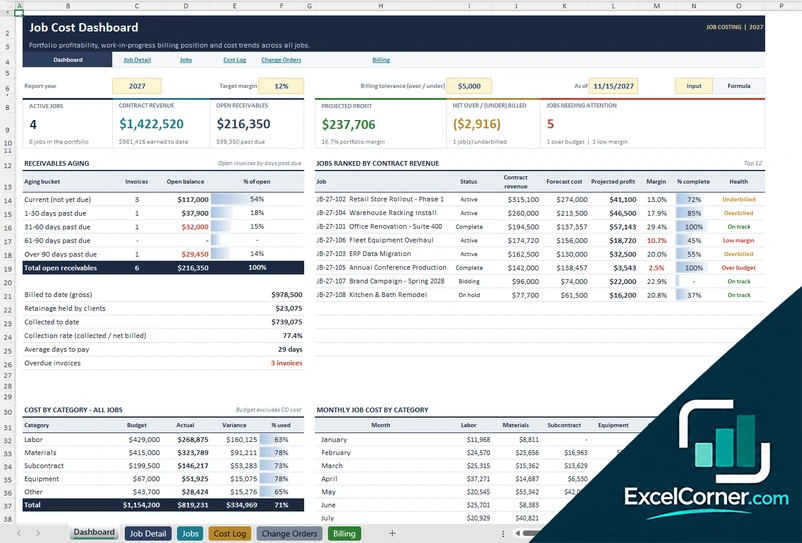
More free costing and margin templates
These templates are educational planning tools with sample data. They are not tax, legal or engineering advice, and they do not replace a cost segregation study. Depreciation and bonus rules change, so confirm them with a qualified tax professional. Excel is a trademark of Microsoft Corporation; Excel Corner is not affiliated with Microsoft.