
Home › HR & Workforce Management › Free Organizational Chart Template Excel
Previewing: Version 1 · Org Chart with Roster. Pick another version on the right.
Instant download · No sign-up · No email
Use this free organizational chart template for Excel to see who reports to whom. List your employees once, pick each person’s manager and the org chart draws itself. Choose a simple chart, a headcount and cost plan, or a colorful chart with an employee directory.
Choose your version
- File
- .xlsx · 52 KB · 3 sheets
- Works with
- Microsoft Excel (.xlsx)
- Macros
- None · formulas only
- Price
- Free
Build an organizational chart in Excel without drawing boxes
An organizational chart shows how a company is structured: who leads each team, who reports to whom and where the open positions are. Drawing boxes by hand with shapes breaks as soon as someone changes jobs. These Excel org chart templates work the other way around: you keep a list of people or positions, and the chart is built from it.
The three versions cover different needs. The first draws a clean chart from an employee roster and shows headcount, open roles and span of control. The second is a position-based structure with a cost plan, so you can see headcount and budget by department. The third is a colorful chart with a directory that stores email, phone and department for every employee.
Best for
- Small and mid-size companies that need a clear company org chart
- HR teams that keep the employee list and the chart in one workbook
- Managers planning open roles, headcount and budget by team
Maybe not for
Very large organizations with thousands of employees. These templates show a chosen leader and the levels directly below, which suits teams and departments of a few hundred people.
Which version is right for you?
All three are free, formula-driven Excel files with sample data you can replace. They are independent, so you can download more than one.
Version 1
Org Chart with Roster
Enter your people once and get a clean organizational chart with headcount, open roles, people managers and span of control.
Org ChartEmployee RosterSettings
.xlsx · 52 KB
Version 2
Org Structure and Headcount Plan
See your structure as an indented hierarchy with filled and open positions, plan-year cost and budget by department.
Org StructurePosition RegisterPlan Settings
.xlsx · 73 KB
Version 3
Interactive Org Chart with Directory
Show your organization as color-coded cards by department, backed by an employee directory with email and phone.
Org ChartEmployeesSetup & Summary
.xlsx · 92 KB
What is inside the organizational chart Excel templates
Version 1: Org Chart with Roster
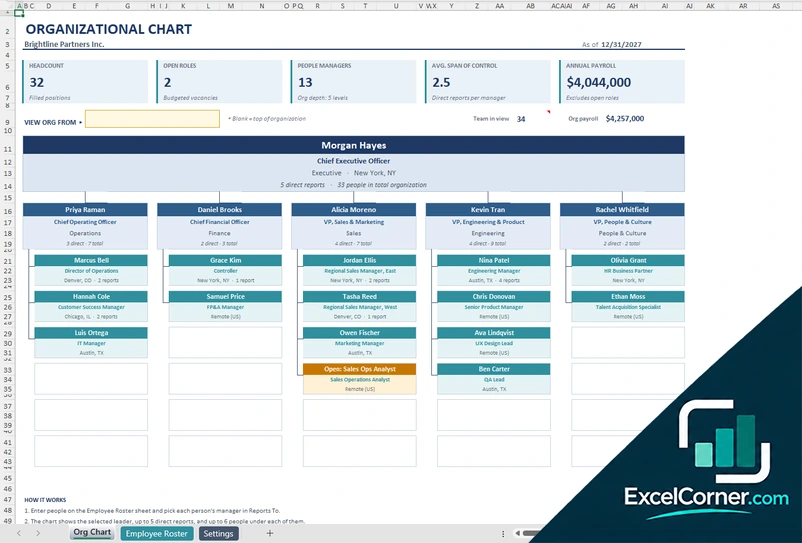
On the Employee Roster sheet you add one row per person or open role, with the job title, department, location, employment type, start date and salary, and pick the manager in the Reports To column. The Org Chart sheet draws the selected leader, up to five direct reports and up to six people under each of them, and open roles appear in amber. The top of the sheet shows the headcount, the open roles, the number of people managers, the average span of control and the annual payroll. To see a deeper level, choose any manager in the View org from cell. The roster calculates each person’s level, direct reports, total team, team payroll and tenure, with a data check, and the Settings sheet holds the lists of departments, locations and employment types.
Version 2: Org Structure and Headcount Plan
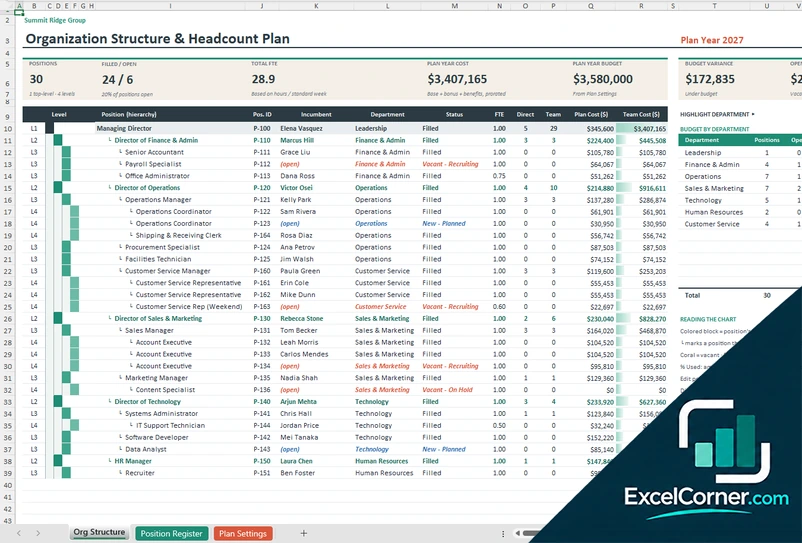
The Position Register holds one row per position, filled or open, with the position ID, title, department, the position it reports to, the incumbent, the status, the pay basis, the pay rate, the hours per week, the bonus target and the effective date. Pay can be annual, monthly, semi-monthly, biweekly, weekly or hourly. The Org Structure sheet shows the hierarchy by level, with direct reports, team size, plan cost and team cost, and highlights vacant and planned positions. The summary shows the number of positions, filled and open positions, total FTE, plan-year cost, the budget, the variance and the cost of open roles, with a budget by department table you can highlight. Plan Settings holds the plan year, the benefits and payroll tax load and the department budgets.
Version 3: Interactive Org Chart with Directory
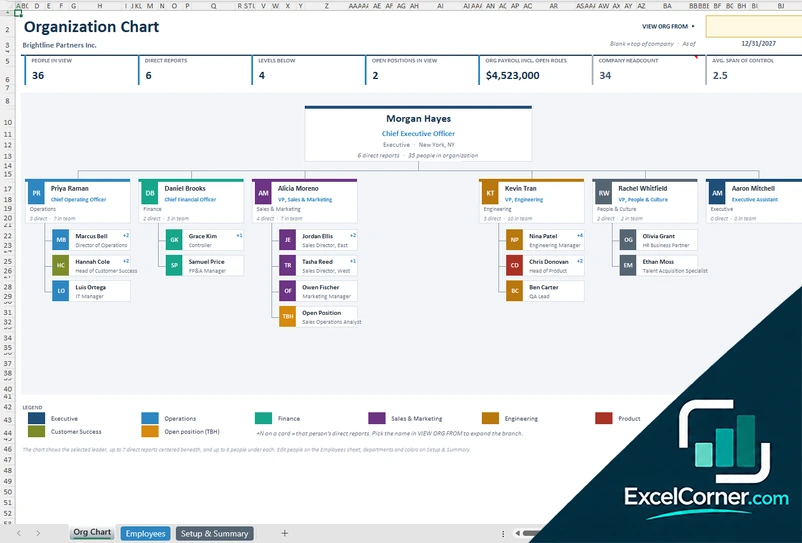
The Employees sheet is a directory with one row per person or vacancy: the name, job title, department, manager, location, employment type, email, phone, start date and salary. It calculates the level, direct reports, total team, team payroll, tenure and reporting line. The Org Chart sheet shows the selected leader with up to seven direct reports and up to six people under each, as cards with initials and a colored band for the department. A card marked with a plus sign shows how many people report to that person, and open positions appear as TBH. The summary at the top shows the people in view, the direct reports, the levels below, the open positions in view, the payroll, the company headcount and the average span of control. On the Setup and Summary sheet you list up to eight departments with a color, a department head, headcount, open positions, payroll and the average salary.
How to make an organizational chart in Excel with these templates
- Download
Pick the version you want and open it in Excel. - List your people
Add one row per employee or open position with the title, department and location. Fill in the input cells; formula cells calculate on their own. - Choose each manager
Pick the manager in the Reports To column. The chart uses that column to place every person under their leader. - Read the chart
Select a leader to see their branch, check the headcount and open roles, and expand deeper levels as needed.
Update the list whenever someone joins, leaves or moves, and the org chart redraws itself.
Which organizational chart template do you need?
| Org Chart with Roster | Org Structure and Headcount Plan | Interactive Org Chart with Directory | |
|---|---|---|---|
| Best for | A clean company chart with key numbers | Headcount, vacancies and budget by department | A colorful chart and an employee directory |
| You enter | People, titles, departments and managers | Positions, status, pay and hours | People, contacts and managers |
| You get | Headcount, open roles and span of control | Plan cost, budget variance and open-role cost | Department colors, team sizes and contact details |
They are separate files, so you can use more than one.
Tips for a clear organization chart
- Give every person a unique ID and spell department and manager names the same way each time.
- Add open positions to the list so vacancies show on the chart before you hire.
- Use Reports To to model dotted structures by choosing the main manager and noting the second one separately.
- Check the span of control: a manager with one report or a dozen may signal a structure problem.
- Keep the top of the organization blank in Reports To, and make sure there is only one top leader.
- Update the chart on a fixed schedule, for example monthly, so it stays trustworthy.
Frequently asked questions
Is this organizational chart template for Excel free?
Yes. All three versions are free to download as .xlsx files. You do not need an account or an email address.
Which version should I choose?
Choose the Org Chart with Roster (Version 1) for a simple chart with headcount, open roles and span of control. Choose the Org Structure and Headcount Plan (Version 2) if you plan positions, pay and budget by department. Choose the Interactive Org Chart with Directory (Version 3) for a colorful chart with department colors and an employee directory. They are separate files, so you can use more than one.
How does the chart know who reports to whom?
You pick the manager of each person in the Reports To column. The template uses it to calculate the level, the direct reports and the team size of every person, and to place each person on the chart.
Can I show a single department or a branch?
Yes. In Versions 1 and 3 you choose a leader in the View org from cell and the chart shows that person with their direct reports and the people below them. Leave it blank to see the top of the organization.
How do I show open positions?
Add them as rows and mark them as open. Version 1 uses the Open Role employment type, Version 2 uses vacant and planned statuses, and Version 3 uses Open Position, shown as TBH on the chart.
Does the template work in Google Sheets?
The files are made for Microsoft Excel and use standard formulas with no macros. You can upload them to Google Drive and open them with Google Sheets, but some formatting or the chart layout may look different.
Is my employee information stored online?
No. The templates are plain Excel files, so the names and salaries you type stay in your own file on your own computer.
More free HR and workforce templates
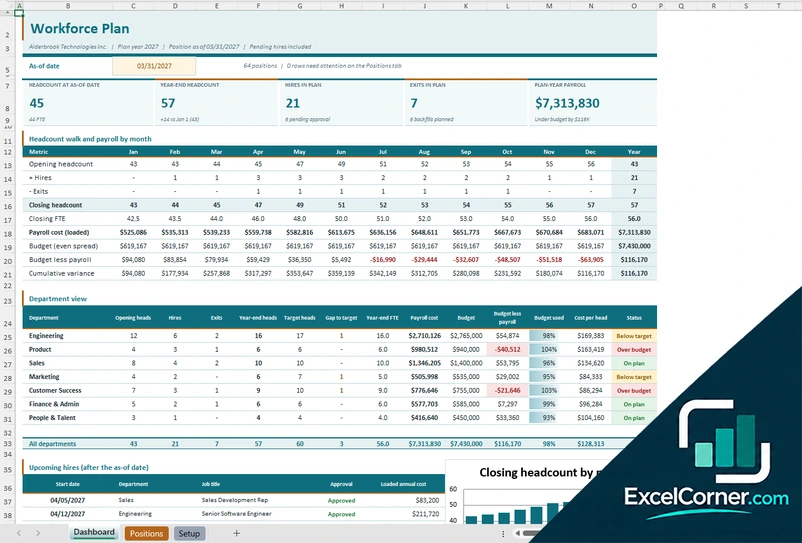
These templates are planning tools with sample data. Review pay, legal and HR decisions with a qualified professional. Excel is a trademark of Microsoft Corporation; Excel Corner is not affiliated with Microsoft.