
Home › Personal Finance › Investment Portfolio Excel Template
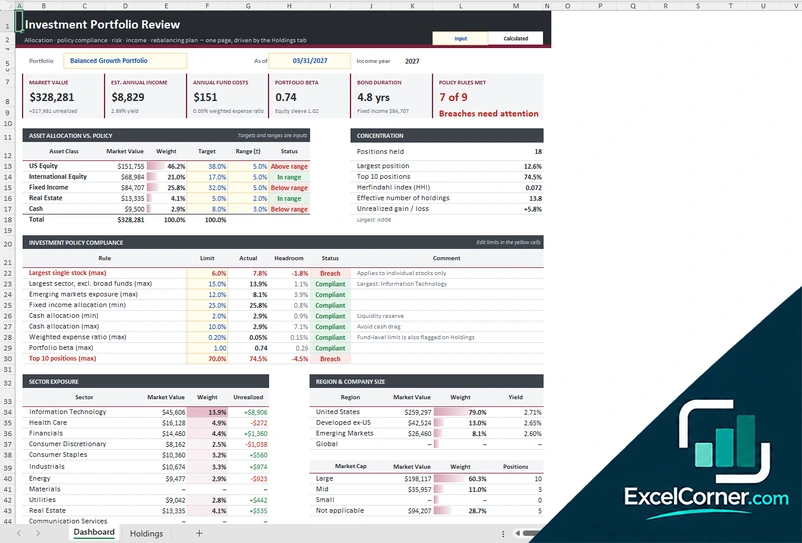
Previewing: Version 1 · Investment Portfolio Review. Pick another version on the right.
Instant download · No sign-up · No email
Use this free investment portfolio Excel template to see how your portfolio is allocated, how risky it is and whether it follows your own rules. Review what you hold today, or plan a portfolio toward a goal. Pick the version that fits your question.
Choose your version
- File
- .xlsx · 53 KB · 2 sheets
- Works with
- Microsoft Excel (.xlsx)
- Macros
- None · formulas only
- Price
- Free
Review and plan your investment portfolio in Excel
An investment portfolio spreadsheet puts all your holdings in one place and answers the questions that matter: how much is in each asset class, how concentrated you are in a few positions, what the portfolio costs you in fees and how much income it produces.
These Excel investment portfolio templates start from a list of holdings. The review and analysis versions turn it into an allocation, concentration and policy check with sector and region exposure, while the planner works the other way around: it starts from your risk profile and goal and models what a portfolio could grow to.
Best for
- Investors who want to check allocation against their own targets
- People with several accounts who want one view of their holdings
- Anyone planning how much to invest to reach a goal
Maybe not for
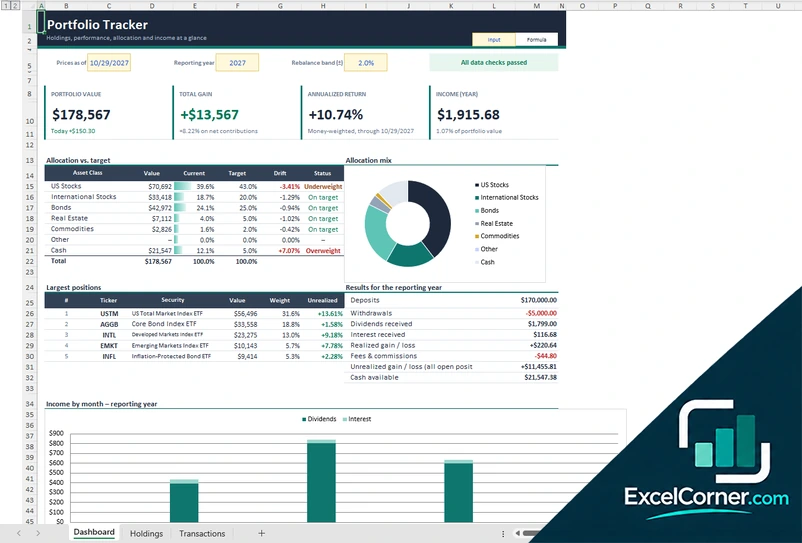
Anyone who only wants to log trades and track performance. A portfolio tracker is a better fit for that.
Which version is right for you?
All three are free, formula-driven Excel files. They are independent, so you can download more than one.
Version 1
Investment Portfolio Review
See allocation, policy compliance, risk, income and a rebalancing plan on one page, driven by your list of holdings.
DashboardHoldings
.xlsx · 53 KB
Version 2
Investment Portfolio Planner
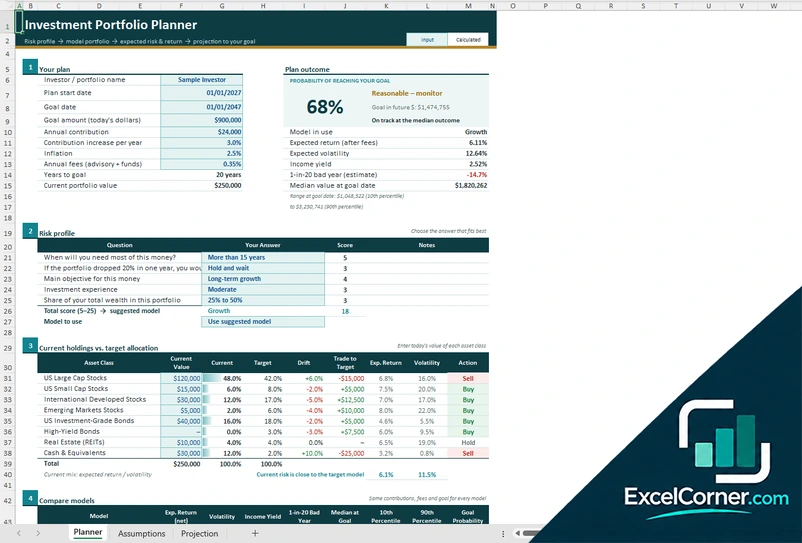
Start from your risk profile, choose a model portfolio and see the expected risk, return and the probability of reaching your goal.
PlannerAssumptionsProjection
.xlsx · 36 KB
Version 3
Risk and Exposure Analysis
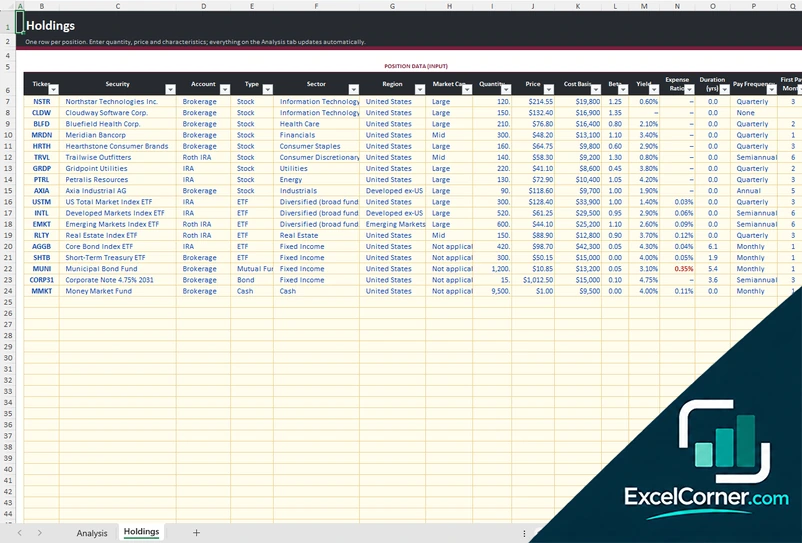
Analyze allocation, concentration, policy compliance, stress scenarios and income from your list of holdings.
AnalysisHoldings
.xlsx · 49 KB
What is inside the investment portfolio Excel templates
Version 1: Investment Portfolio Review
You enter each position on the Holdings sheet, and the Dashboard summarizes the market value, the estimated annual income, the annual fund costs, the portfolio beta, the bond duration and how many of your policy rules are met. It compares your asset allocation with your targets and ranges, shows concentration through the largest position, the top 10 positions and an effective number of holdings, and checks your own limits for single stocks, sectors, emerging markets, fixed income, cash, expense ratio, beta and top 10 weight. Sector, region and company size tables complete the view.
Version 2: Investment Portfolio Planner
On the Planner sheet you enter your goal amount and date, your annual contribution and how much it increases, inflation, fees and your current portfolio value. A short risk questionnaire gives a score and a suggested model portfolio, and the plan outcome shows the probability of reaching your goal, the expected return and volatility, a one-in-20 bad year and the median value at the goal date. You compare your current holdings with the target allocation to see the drift and the trade needed, and compare models side by side. The Assumptions sheet holds the capital market assumptions and model portfolios you can adjust, and the Projection sheet shows the range of projected values.
Version 3: Risk and Exposure Analysis
The Holdings sheet is a simple list with one row per position: ticker, security, account, type, sector, region, market cap, quantity, price, cost basis, beta, yield, expense ratio, duration and payment frequency. The Analysis sheet turns it into the market value, estimated annual income, annual fund costs, portfolio beta and bond duration, compares your asset allocation with policy, measures concentration with the Herfindahl index and shows exposure by sector, region and company size, together with an investment policy compliance table.
How to use the investment portfolio Excel template
- Download
Pick the version you want and open it in Excel. - Enter your holdings
List each position with its ticker, account, type, sector, region, quantity, price and cost basis. Fill in the input cells; formula cells calculate on their own. - Set your targets
Enter target allocations, ranges and your own policy limits, such as the largest single stock you accept. - Review the results
Check allocation against targets, concentration, risk and any rule you breach, and decide what to rebalance.
Update prices and quantities regularly, and review the policy checks after every large trade or contribution.
Which investment portfolio template do you need?
| Portfolio Review | Portfolio Planner | Risk and Exposure Analysis | |
|---|---|---|---|
| Start from | Your current holdings | Your risk profile and goal | Your current holdings |
| Best for | A one-page review with a rebalancing view | Modeling a portfolio toward a goal | Looking at concentration, stress scenarios and income |
| You get | Allocation, policy compliance, risk and income | A model portfolio and a probability of reaching your goal | Exposure by sector and region plus an analysis sheet |
They are separate files, so you can use more than one.
Tips to review your portfolio
- Set a target and a range for each asset class so you know when a drift matters.
- Write down your own limits for a single stock, a sector and fees, then let the template flag breaches.
- Check the weighted expense ratio, because small fund fees add up over many years.
- Look at the top 10 positions to see how concentrated the portfolio really is.
- Review the portfolio after a large market move or a new contribution, not every day.
- Rebalance with new contributions first, to limit trading and taxes.
Frequently asked questions
Is this investment portfolio Excel template free?
Yes. All three versions are free to download as .xlsx files. You do not need an account or an email address.
Which version should I choose?
Choose the Investment Portfolio Review (Version 1) for a one-page review of allocation, policy compliance, risk, income and rebalancing. Choose the Investment Portfolio Planner (Version 2) to start from a risk profile and see the probability of reaching a goal. Choose the Risk and Exposure Analysis (Version 3) for a deeper look at concentration, stress scenarios and income. They are separate files, so you can use more than one.
Does it download live prices?
No. You type the price of each holding, so the file stays a plain Excel workbook with no links or add-ins. Update the prices whenever you want a fresh review.
What does the policy compliance check do?
You set limits such as the largest single stock, the largest sector, emerging markets exposure, minimum fixed income, cash and the weighted expense ratio. The template compares each limit with your actual holdings and shows whether you are compliant, how much headroom you have or whether you breach it.
What does the planner estimate?
The planner asks a few questions to suggest a model portfolio, applies your contributions, fees, inflation and goal, and estimates the probability of reaching the goal and the range of possible values. These are illustrations based on assumptions you can change, not forecasts.
Does the template work in Google Sheets?
The files are made for Microsoft Excel and use standard formulas with no macros. You can upload them to Google Drive and open them with Google Sheets, but some formatting or charts may look different.
Is my financial information stored online?
No. The templates are plain Excel files, so the numbers you type stay in your own file on your own computer.
These templates are educational tools, not investment advice. Projections are illustrations based on the assumptions you enter, and past performance does not guarantee future results. Excel is a trademark of Microsoft Corporation; Excel Corner is not affiliated with Microsoft.