
Home › Personal Finance › Net Worth Excel Template
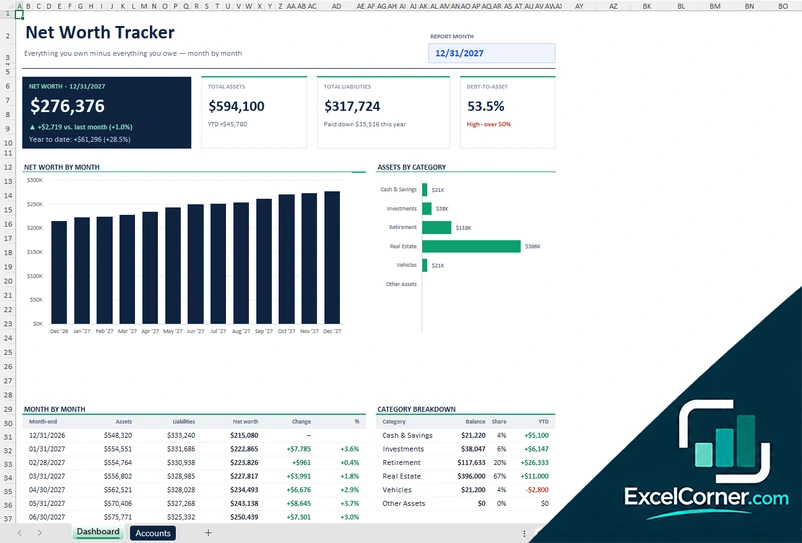
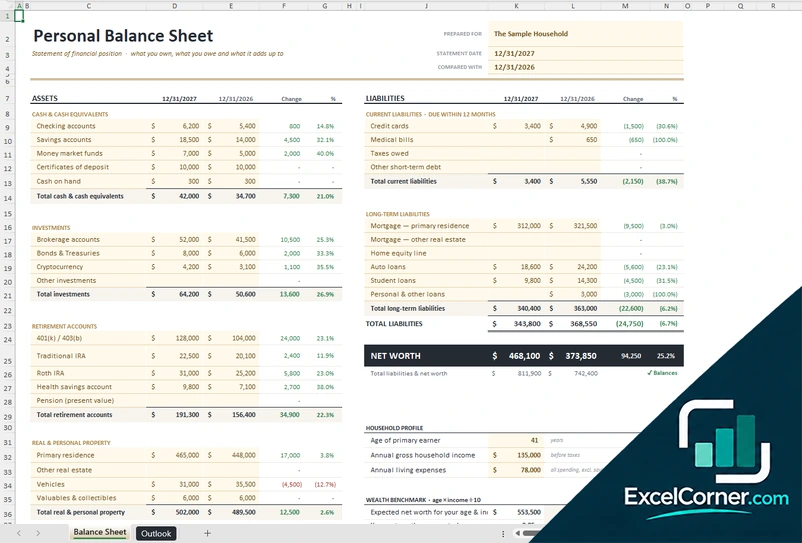
Previewing: Version 1 · Net Worth Tracker. Pick another version on the right.
Instant download · No sign-up · No email
Use this free net worth Excel template to see everything you own minus everything you owe. Track your net worth month by month, or build a personal balance sheet for a single date. Pick the version that fits how you track.
Choose your version
- File
- .xlsx · 44 KB · 2 sheets
- Works with
- Microsoft Excel (.xlsx)
- Macros
- None · formulas only
- Price
- Free
Know your net worth with a simple Excel spreadsheet
Your net worth is what you own minus what you owe. A net worth spreadsheet adds up your cash, investments, retirement accounts, home and other property, subtracts your mortgage, loans and credit cards, and shows where you stand and how it changes over time.
These net worth Excel templates work in two ways. The Net Worth Tracker follows your accounts month by month, with charts, a year-end goal and a safety-net check. The Personal Balance Sheet is a statement of your financial position at a date, compared with a year earlier, with a benchmark for your age and income.
Best for
- Anyone who wants one number for their overall financial health
- People tracking progress toward a net worth goal
- Households preparing a personal balance sheet for a loan or a financial review
Maybe not for
Anyone who only needs a monthly budget. A financial tracker is a better fit for day-to-day spending.
Which version is right for you?
Both are free, formula-driven Excel files. They are independent, so you can download both.
Version 1
Net Worth Tracker
Follow everything you own minus everything you owe, month by month, with charts, a year-end goal and a safety-net check.
DashboardAccounts
.xlsx · 44 KB
Version 2
Personal Balance Sheet
Build a personal balance sheet: what you own, what you owe and what it adds up to, compared with a year earlier.
Balance SheetOutlook
.xlsx · 30 KB
What is inside the net worth Excel templates
Version 1: Net Worth Tracker
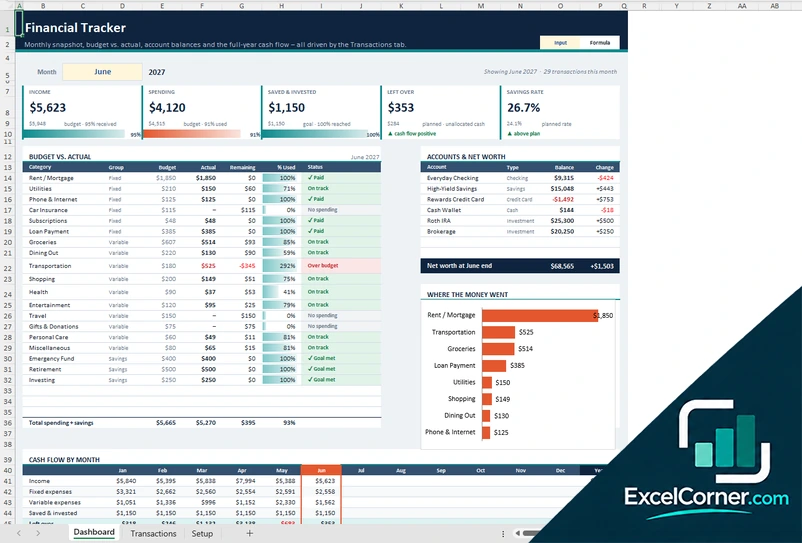
On the Accounts sheet you list every account once and type its balance at each month-end, with a type, an institution and a flag for liquid assets. The Dashboard shows your net worth for the report month and how it changed from the prior month and year to date, with total assets, total liabilities and your debt-to-asset ratio. Charts show net worth by month and assets by category, a month-by-month table and a category breakdown, and a list of top movers year to date shows your biggest boosts and drags. You can also set a year-end net worth goal, see the amount still to go and needed per remaining month, and check your safety net as liquid assets divided by monthly essential expenses.
Version 2: Personal Balance Sheet
The Balance Sheet lists your assets in groups, cash and cash equivalents, investments, retirement accounts, and real and personal property, and your liabilities in current and long-term groups, from credit cards and medical bills to mortgages, home equity lines, auto loans and student loans. It compares each line with the previous year, adds up total assets, total liabilities and net worth and checks that the sheet balances. A household profile with your age, gross income and living expenses feeds a wealth benchmark that compares your net worth with the expected amount for your age and income.
How to use the net worth Excel template
- Download
Pick the version you want and open it in Excel. - List your accounts
Enter each asset and each debt once, with its type, or fill in the balance sheet lines for your cash, investments, property and loans. - Enter your balances
Type each balance at the month-end, or on the statement date. Fill in the input cells; formula cells calculate on their own. - Read your net worth
Check total assets, total liabilities and net worth, and how they changed since last month or last year.
Update your balances once a month, on the same day, so the trend is easy to compare.
Net worth tracker or personal balance sheet?
| Net Worth Tracker | Personal Balance Sheet | |
|---|---|---|
| View | Month by month, with charts and a goal | One date compared with a year earlier |
| Best for | Following your progress over time | A formal snapshot and a benchmark for your age |
| You enter | Month-end balances for each account | Balances on a statement date |
You can use both: the tracker for the monthly trend and the balance sheet for a yearly review.
Tips to track your net worth
- Update your balances on the same day each month so the changes are comparable.
- Count debts as negatives: paying down a loan is a boost to your net worth.
- Revalue slow-moving assets, such as a home or a car, once a quarter instead of every month.
- Mark liquid accounts so you can see how many months of expenses you could cover.
- Set a year-end net worth goal and check the amount needed per remaining month.
- Look at the biggest boosts and drags each year to see what moved the number.
Frequently asked questions
Is this net worth Excel template free?
Yes. Both versions are free to download as .xlsx files. You do not need an account or an email address.
Which version should I choose?
Choose the Net Worth Tracker (Version 1) if you want to follow your net worth month by month with charts, a goal and a safety-net check. Choose the Personal Balance Sheet (Version 2) if you want a statement of your assets and liabilities on one date, compared with a year earlier, with a benchmark for your age and income. They are separate files, so you can use both.
How is net worth calculated?
Net worth is your total assets minus your total liabilities. Assets include cash, investments, retirement accounts, property and vehicles. Liabilities include credit cards, mortgages, auto loans, student loans and other debts.
What if I do not update a month?
In the Net Worth Tracker, leave a month blank and the last balance carries forward, which is handy for a home or a car you only revalue every quarter.
What is the wealth benchmark?
The Personal Balance Sheet compares your net worth with an expected amount based on your age and household income and labels the result Under, Average or Prodigious. Treat it as a rough reference, not a target.
Does the template work in Google Sheets?
The files are made for Microsoft Excel and use standard formulas with no macros. You can upload them to Google Drive and open them with Google Sheets, but some formatting or charts may look different.
Is my financial information stored online?
No. The templates are plain Excel files, so the numbers you type stay in your own file on your own computer.
These templates are educational tools, not financial advice. Results depend on the information you enter. Excel is a trademark of Microsoft Corporation; Excel Corner is not affiliated with Microsoft.