
Home › HR & Workforce Management › Pay Stub Template Excel
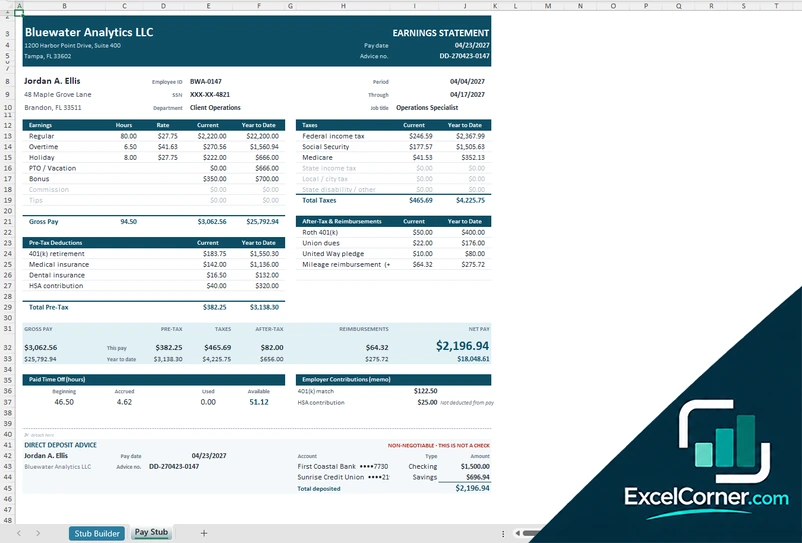
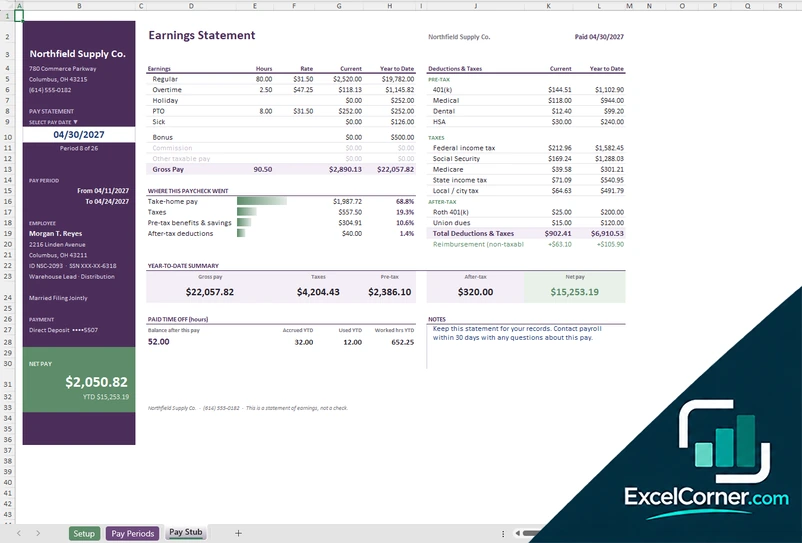
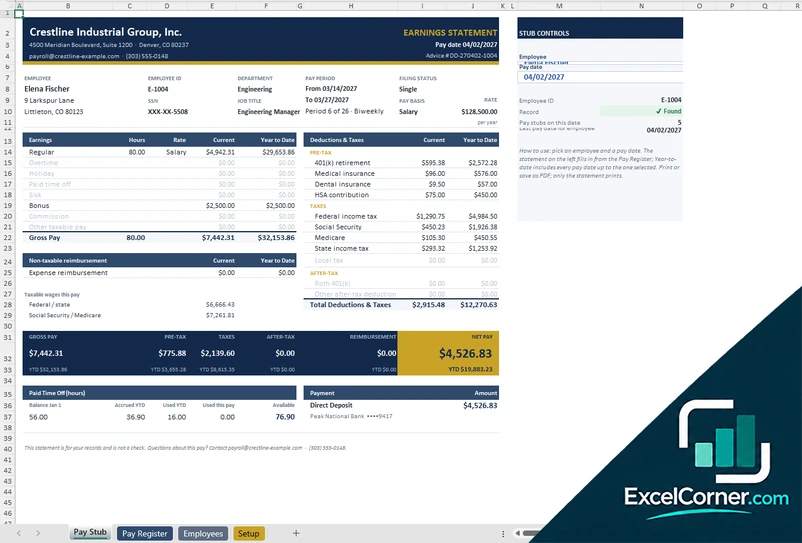
Previewing: Version 1 · Pay Stub Builder. Pick another version on the right.
Instant download · No sign-up · No email
Use this free pay stub template for Excel to create a clear earnings statement for an employee. Enter the hours and pay, and the formulas calculate taxes, deductions, year-to-date totals and net pay. Print the stub or save it as a PDF. Pick the version that fits how many stubs you produce.
Choose your version
- File
- .xlsx · 21 KB · 2 sheets
- Works with
- Microsoft Excel (.xlsx)
- Macros
- None · formulas only
- Price
- Free
Make a professional paystub in Excel
A pay stub, also called a paystub or check stub, shows an employee how their paycheck was calculated: the gross pay by type of earnings, the taxes and deductions taken out and the net pay, with year-to-date totals. A pay stub template in Excel does the calculation for you, so the numbers add up and the stub looks consistent.
These Excel pay stub templates cover three situations. The first is a stub builder where you fill in one stub and print it. The second tracks a whole year of pay periods for one employee and lets you pick any pay date. The third is built for a team: employees and a pay register feed a stub you select by employee and pay date.
Best for
- Small business owners who need to give employees a pay stub
- Contractors and self-employed people who want a record of their own pay
- Bookkeepers who prepare stubs for several employees
Maybe not for
Payroll that needs automatic tax filing or direct deposit. These files produce the stub and the calculations, but they do not pay or file for you.
Which version is right for you?
All three are free, formula-driven Excel files with sample data you can replace. They are independent, so you can download more than one.
Version 1
Pay Stub Builder
Fill in one form and get a printable earnings statement with taxes, deductions and year-to-date totals.
Stub BuilderPay Stub
.xlsx · 21 KB
Version 2
Annual Pay Stub
Track a year of pay periods for one employee and print the paystub for any pay date.
SetupPay PeriodsPay Stub
.xlsx · 44 KB
Version 3
Pay Stub with Register
Keep employees and a pay register, then pick an employee and a pay date to produce their pay stub.
Pay StubPay RegisterEmployeesSetup
.xlsx · 237 KB
What is inside the pay stub Excel templates
Version 1: Pay Stub Builder
On the Stub Builder sheet you enter the company name and address, the employee name, ID, address and the last four digits of the Social Security number, the department, the job title, the pay frequency, the pay period dates, the pay date, the check or advice number and the pay basis, hourly or salary, with the rate. You then add the earnings with hours, rates or fixed amounts, the pre-tax deductions such as a 401(k), medical, dental and HSA, the tax rates for federal, Social Security, Medicare, state and local tax, and the after-tax deductions and reimbursements. The sheet shows the current and year-to-date amounts and the net pay, and it also tracks the PTO balance and splits the net pay across up to two bank accounts. The Pay Stub sheet turns this into an earnings statement, ready to print or save as a PDF.
Version 2: Annual Pay Stub
The Setup sheet holds the company, the employee, the pay plan and the withholding settings, including the pay basis, the rate, the pay frequency, the first period start date, the overtime multiplier, the federal filing status, the state and local tax rates and the deductions taken every pay period. On the Pay Periods sheet there is one column for each pay period, where you mark the period as paid and log the regular, overtime, holiday, PTO and sick hours, the bonus, the commission and the reimbursements. Everything below it calculates. On the Pay Stub sheet you select a pay date and see the earnings, the taxes and deductions, the net pay, where the paycheck went, and the year-to-date summary.
Version 3: Pay Stub with Register
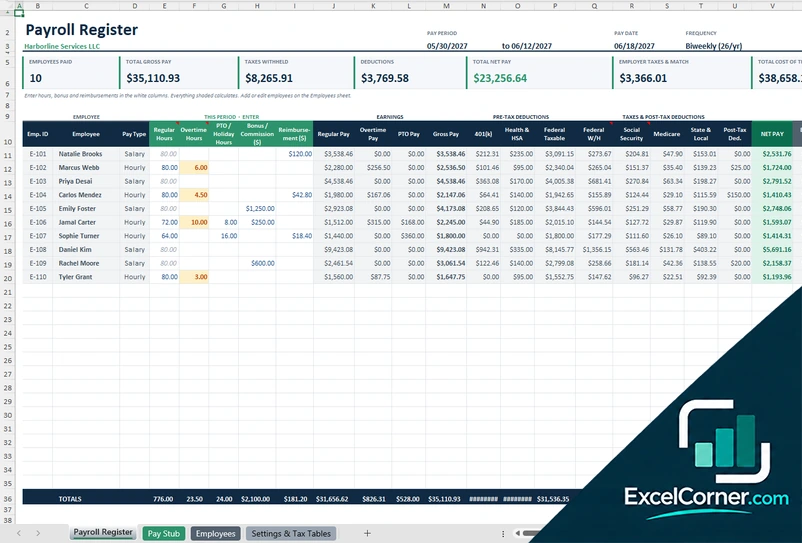
The Employees sheet holds each employee’s ID, address, job title, department, status, pay basis, rate, filing status, extra withholding, state and local tax rates, 401(k) percentage, medical, dental and HSA deductions and payment method. In the Pay Register you add one line per employee per pay date with the hours and any extra pay, and the taxes and net pay are calculated. The Pay Stub sheet then fills in for the employee and pay date you pick, showing the earnings, deductions and taxes for the period and the year to date, which includes every earlier pay date. The register also shows the latest pay date, the gross and net pay for the latest run and the lines to review. The Setup sheet holds the company, the pay schedule and the tax settings.
How to use the pay stub template in Excel
- Download
Pick the version you want and open it in Excel. - Enter the company and employee
Add the company name and address, the employee details, the pay frequency and the pay rate. Fill in the input cells; formula cells calculate on their own. - Enter hours and pay
Type the regular, overtime and other hours, the bonus or commission, and any deductions for the period. - Print the stub
Check the net pay and print the Pay Stub sheet, or save it as a PDF to send to the employee.
Keep a copy of every stub, and update the tax rates and wage limits at the start of each year.
Which pay stub template do you need?
| Pay Stub Builder | Annual Pay Stub | Pay Stub with Register | |
|---|---|---|---|
| Best for | One stub, filled in on one sheet | One employee across the year | A team with a pay register |
| You enter | Company, employee, hours and deductions | Hours for each pay period | Employees and a pay register line for each pay date |
| You get | A printable stub with year-to-date | A stub for any pay date and a pay periods sheet | A stub by employee and pay date, plus register totals |
They are separate files, so you can use more than one.
Tips for a clear and accurate pay stub
- Show the pay period, the pay date and the pay frequency at the top of the stub.
- List each type of earnings separately, such as regular, overtime, bonus and commission.
- Show taxes and deductions with both the current and the year-to-date amounts.
- Show only the last four digits of the Social Security number.
- Round the same way every pay period so the year-to-date totals match.
- Keep a copy of every stub, and ask employees to keep theirs too.
Frequently asked questions
Is this pay stub template for Excel free?
Yes. All three versions are free to download as .xlsx files. You do not need an account or an email address.
Which version should I choose?
Choose the Pay Stub Builder (Version 1) to fill in and print a single stub. Choose the Annual Pay Stub (Version 2) to track one employee’s pay periods for the year and print the stub for any pay date. Choose the Pay Stub with Register (Version 3) for a team, with an employees sheet and a pay register that feed the stub. They are separate files, so you can use more than one.
Can I print the pay stub or save it as a PDF?
Yes. The Pay Stub sheet is set up for printing. Use Print in Excel, or choose Save As and PDF, to give the employee a copy.
What does the pay stub show?
The stubs show the company and employee details, the pay period and pay date, the earnings by type with hours and rate, the pre-tax deductions, the taxes, the after-tax deductions, the net pay and the year-to-date totals.
Does it calculate taxes and deductions?
Yes. It calculates federal income tax, Social Security, Medicare and state and local tax from the rates you enter, plus the deductions you list. The rates in the files are illustrative, so replace them with the current rates.
Does the template work in Google Sheets?
The files are made for Microsoft Excel and use standard formulas with no macros. You can upload them to Google Drive and open them with Google Sheets, but some formatting or charts may look different.
Is my payroll data stored online?
No. The templates are plain Excel files, so the names, pay rates and tax data you type stay in your own file on your own computer.
These templates are calculation tools with sample data and illustrative tax rates. They are not tax, payroll or legal advice, and the rules for pay stubs vary by state. Excel is a trademark of Microsoft Corporation; Excel Corner is not affiliated with Microsoft.