
Home › Personal Finance › Income Sheet Template Excel
Previewing: Version 1 · Income Tracker. Pick another version on the right.
Instant download · No sign-up · No email
Use this free income sheet template for Excel to see how much money comes in, from where and when. Track what you have received and what is still expected, or compare actual income and profit with your budget. Pick the version that fits what you need.
Choose your version
- File
- .xlsx · 70 KB · 2 sheets
- Works with
- Microsoft Excel (.xlsx)
- Macros
- None · formulas only
- Price
- Free
Keep track of your income in Excel
An income sheet shows how much money comes in, from which source and when. Use it to follow your salary, freelance work, rental income, dividends or sales, to see what you have received and what you are still waiting for, and to plan how much to set aside for taxes.
These Excel income templates cover two needs. The Income Tracker is for people and freelancers who receive money from several sources. The two Income Statement templates are for a small business or side business that wants to compare actual results with the budget and the prior year, from revenue down to net income.
Best for
- Freelancers and side hustlers with several income sources
- Households tracking salary, rent and investment income
- Small businesses comparing actual results with budget
Maybe not for
Filing taxes. These templates are planning aids; ask a tax professional about returns and estimated tax payments.
Which version is right for you?
All three are free, formula-driven Excel files. They are independent, so you can download more than one.
Version 1
Income Tracker
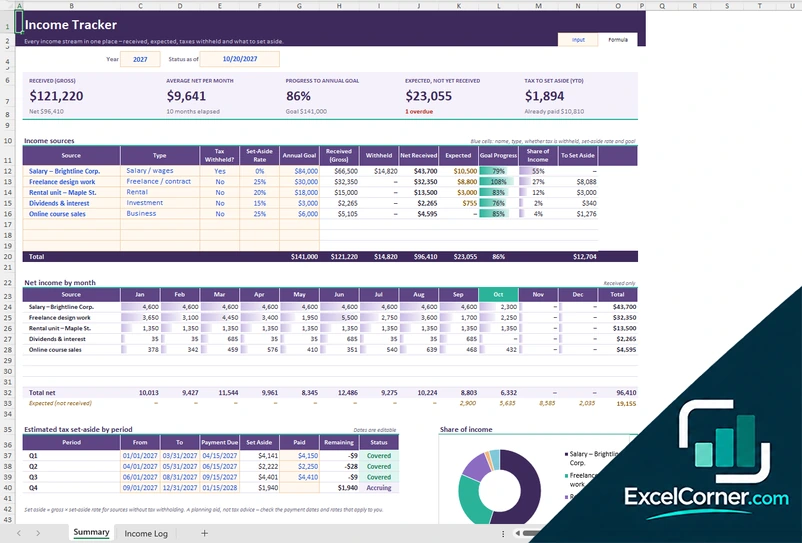
Follow every income stream in one place: what you have received, what is expected, the tax withheld and how much to set aside.
SummaryIncome Log
.xlsx · 70 KB
Version 2
Income Statement
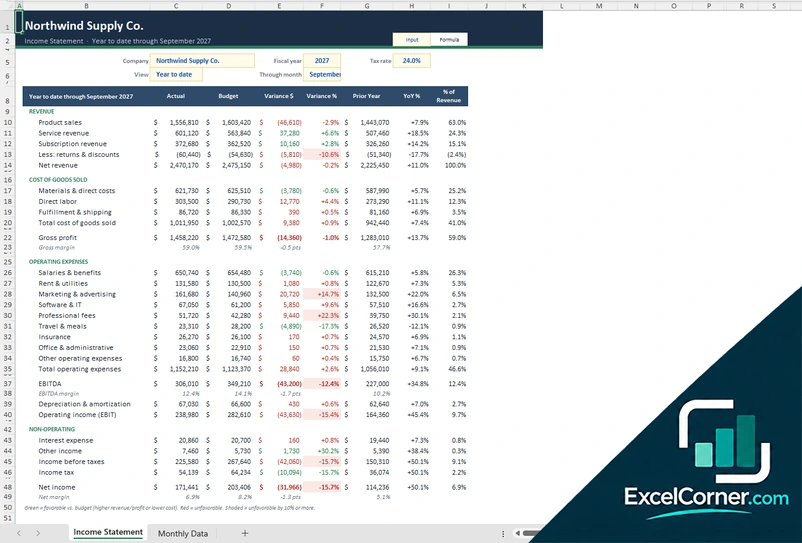
See revenue, costs and net income for any period, with actual results compared with budget and the prior year.
Income StatementMonthly Data
.xlsx · 29 KB
Version 3
Income Statement Report
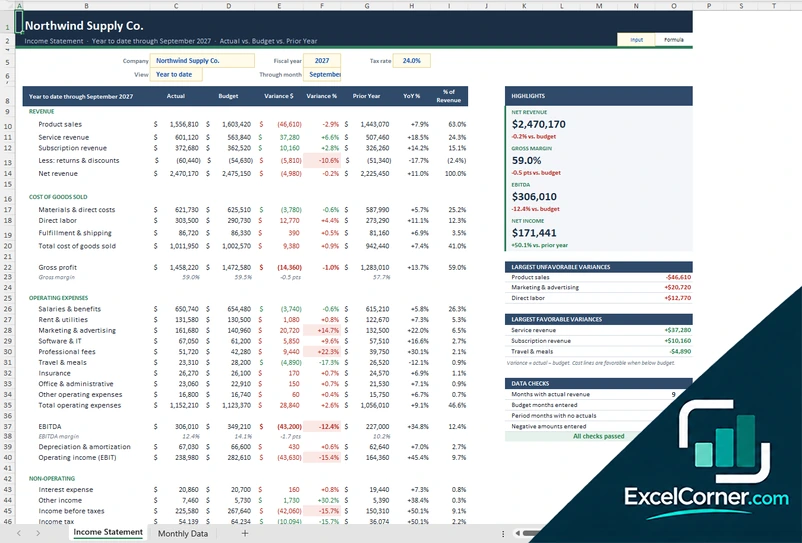
The same income statement with a report panel: key highlights, the largest favorable and unfavorable variances and data checks.
Income StatementMonthly Data
.xlsx · 31 KB
What is inside the income sheet Excel templates
Version 1: Income Tracker
The Summary sheet shows income received (gross), your average net income per month, your progress to an annual goal, expected income not yet received and the tax to set aside so far this year. A table of income sources lists each source with its type (salary, freelance, rental, investment or business), whether tax is withheld, a set-aside rate and an annual goal, with received, withheld, net and expected amounts, goal progress and share of income. Charts show net income by month and share of income, and an estimated tax set-aside by period shows what is due, set aside and paid. In the Income Log you enter one row per payment with the gross amount, tax withheld, other deductions, net amount and method, and you mark payments you are still waiting for as expected.
Version 2: Income Statement
On the Monthly Data sheet you enter the actual, budget and prior-year amounts by month for revenue, cost of goods sold, operating expenses and interest. The Income Statement sheet turns them into a statement for the period you choose, year to date or a single month, with columns for actual, budget, variance in dollars and percent, prior year, year-over-year change and percent of revenue. It calculates gross profit and margin, EBITDA, operating income, income before taxes, income tax from your tax rate and net income, colors favorable and unfavorable variances and adds a monthly trend and charts.
Version 3: Income Statement Report
The statement works like Version 2, built from monthly actual, budget and prior-year data, with the same variance, margin and tax calculations. A highlights panel next to it shows net revenue, gross margin, EBITDA and net income against budget and the prior year, and two lists show the largest unfavorable and largest favorable variances. A data check panel counts the months with actual revenue, the budget months entered, the period months with no actuals and any negative amounts entered, so you can see at a glance whether the data is complete.
How to use the income sheet template in Excel
- Download
Pick the version you want and open it in Excel. - Set up your sources or company
List your income sources with their type and tax settings, or enter your company name, fiscal year and tax rate. - Record your income
Log each payment in the Income Log, or enter the monthly actual, budget and prior-year amounts. Fill in the input cells; formula cells calculate on their own. - Review the results
Check what you have received against your goal, or the variance against your budget and last year.
Update the income sheet after every payment or at each month-end, and use the status date to see where you stand on any day.
Which income template do you need?
| Income Tracker | Income Statement | Income Statement Report | |
|---|---|---|---|
| View | Income by source and by month | Profit and loss, actual vs. budget | Profit and loss with highlights and data checks |
| Best for | Individuals, freelancers and landlords | Small businesses | Owners who want a one-page summary |
| You enter | Each payment and its tax withheld | Monthly actual, budget and prior-year amounts | Monthly actual, budget and prior-year amounts |
They are separate files, so you can use more than one.
Tips to keep your income records accurate
- Log each payment with its gross amount, tax withheld and net amount so your totals add up.
- Mark invoices you are waiting for as expected, and follow up on the ones that become overdue.
- Set a set-aside rate for income with no tax withheld, such as freelance work.
- Compare what you have received with your annual goal to see whether you are on track.
- Enter budget and prior-year amounts so the variance columns show where results differ.
- Look at the largest variances first when you review a month.
Frequently asked questions
Is this income sheet template for Excel free?
Yes. All three versions are free to download as .xlsx files. You do not need an account or an email address.
Which version should I choose?
Choose the Income Tracker (Version 1) to follow personal or freelance income from several sources, with expected payments and a tax set-aside. Choose the Income Statement (Version 2) for a company profit and loss compared with budget and last year. Choose the Income Statement Report (Version 3) for the same statement with a highlights panel, the largest variances and data checks. They are separate files, so you can use more than one.
What is an income sheet?
An income sheet is a record of the money you earn. For a person it is usually a list of income sources and payments. For a business it often means an income statement, which shows revenue, costs and net income for a period.
Can I track income from several sources?
Yes. The Income Tracker lists each source with its type, such as salary, freelance, rental, investment or business income, and shows what you have received, what is withheld, what is expected and your progress toward an annual goal.
Does it calculate how much to set aside for taxes?
For sources without tax withholding, the Income Tracker multiplies the gross income by the set-aside rate you choose and shows an estimate by period. It is a planning aid, not tax advice.
Does the template work in Google Sheets?
The files are made for Microsoft Excel and use standard formulas with no macros. You can upload them to Google Drive and open them with Google Sheets, but some formatting or charts may look different.
Is my financial information stored online?
No. The templates are plain Excel files, so the numbers you type stay in your own file on your own computer.
More free personal finance templates
These templates are educational tools, not financial, accounting or tax advice. Results depend on the information you enter. Excel is a trademark of Microsoft Corporation; Excel Corner is not affiliated with Microsoft.