
Home › Personal Finance › Excel Portfolio Tracker Template
Previewing: Version 1 · Portfolio Tracker. Pick another version on the right.
Instant download · No sign-up · No email
Use this free portfolio tracker Excel template to follow your holdings, performance, allocation and income in one workbook. Log your transactions once and let the dashboard do the math. Pick the version that fits how you invest.
Choose your version
- File
- .xlsx · 163 KB · 3 sheets
- Works with
- Microsoft Excel (.xlsx)
- Macros
- None · formulas only
- Price
- Free
Track your investments in a portfolio tracker for Excel
A portfolio tracker answers the basic questions about your investments: what is your portfolio worth, how much have you gained, what is your return and how much income did it pay. You enter your holdings and transactions, and the template calculates positions, gains, allocation and income.
These Excel portfolio tracking templates come in three styles. Two are built on a transaction ledger, so shares, cost basis and income are calculated for you. The third is a portfolio statement that you update on each statement date, with performance against a benchmark, risk figures and a view by account, tax treatment and region.
Best for
- Investors who want to track stocks, ETFs and funds in Excel
- People who like a transaction log as the source of truth
- Families who want a periodic portfolio statement across several accounts
Maybe not for
Anyone who wants live prices pulled in automatically. These workbooks use prices you type in.
Which version is right for you?
All three are free, formula-driven Excel files. They are independent, so you can download more than one.
Version 1
Portfolio Tracker
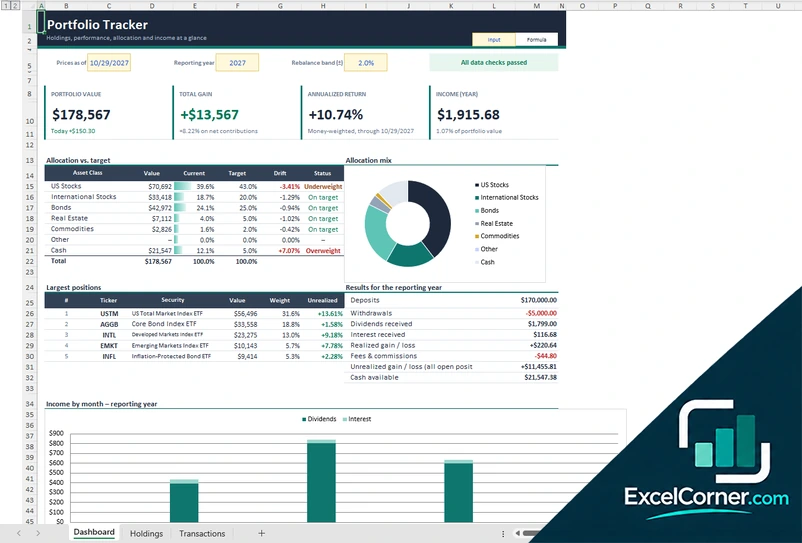
Follow your holdings, performance, allocation and income at a glance, built from a log of your transactions.
DashboardHoldingsTransactions
.xlsx · 163 KB
Version 2
Investment Portfolio Tracker
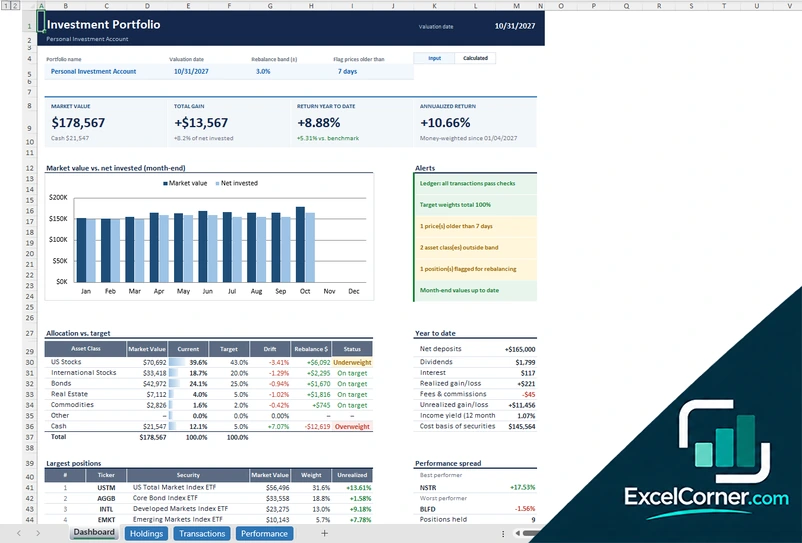
Track market value against net invested each month, with alerts, allocation targets and time-weighted and money-weighted returns.
DashboardHoldingsTransactionsPerformance
.xlsx · 122 KB
Version 3
Portfolio Statement
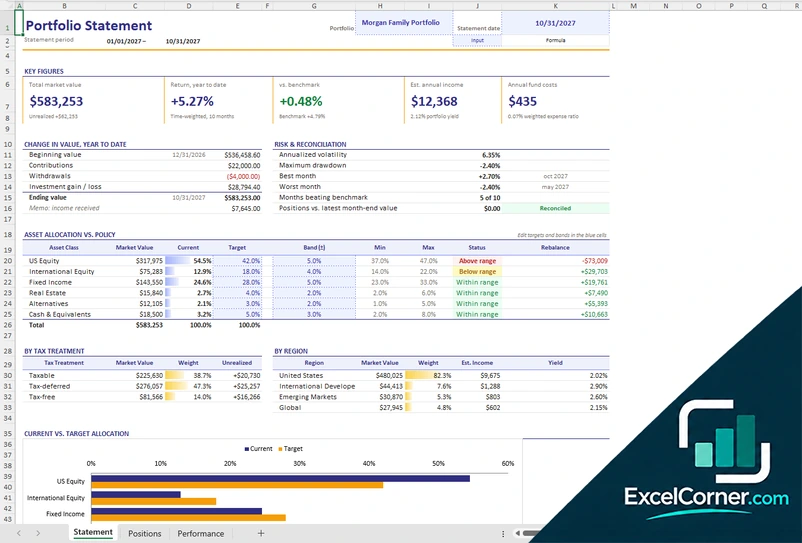
Produce a portfolio statement with key figures, change in value, risk, allocation against policy and a view by tax treatment and region.
StatementPositionsPerformance
.xlsx · 37 KB
What is inside the portfolio tracker Excel templates
Version 1: Portfolio Tracker
On the Holdings sheet you enter each security once with its latest price, prior close and target weight, and the shares, average cost and cost basis are built from the Transactions log. The Dashboard shows portfolio value, total gain, annualized return and income for the year, compares allocation with target for each asset class with a rebalance band, lists the largest positions and summarizes the results for the reporting year: deposits, withdrawals, dividends, interest, realized and unrealized gains and fees. A chart shows income by month, and the Holdings sheet calculates the rebalance amount and the shares to trade.
Version 2: Investment Portfolio Tracker
One row per security on the Holdings sheet holds the price, the price date and the target weight, while positions are built from the Transactions ledger. The Dashboard shows market value, total gain, return year to date and annualized return, a chart of market value against net invested at each month-end, and alerts for ledger checks, target weights, old prices, asset classes outside their band and positions flagged for rebalancing. It also lists the largest positions and the best and worst performers. The Performance sheet records month-end values so the year-to-date return can be time-weighted.
Version 3: Portfolio Statement
You enter one line per holding and account on the Positions sheet and update the units and prices on each statement date. The Statement shows the total market value, the return year to date against a benchmark, the estimated annual income and the annual fund costs, a change in value from the beginning value through contributions, withdrawals and investment gain to the ending value, and a risk and reconciliation panel with volatility, maximum drawdown and best and worst months. It compares asset allocation with policy, including the amount to rebalance, and breaks the portfolio down by tax treatment and region.
How to use the portfolio tracker Excel template
- Download
Pick the version you want and open it in Excel. - Add your securities
List each security once with its ticker, latest price and target weight, or each position and account for the statement. - Log your transactions
Record purchases, sales, dividends, interest, deposits and withdrawals. Fill in the input cells; formula cells calculate on their own. - Read the dashboard
Check portfolio value, total gain, return, income and how far each asset class is from its target.
Update prices on a regular schedule, for example once a month, and use the rebalance band to see when a drift needs action.
Which portfolio tracker do you need?
| Portfolio Tracker | Investment Portfolio Tracker | Portfolio Statement | |
|---|---|---|---|
| Method | A transaction log with holdings | A transaction ledger with a performance sheet | Positions updated on each statement date |
| Best for | A clear dashboard of value, gain and income | Month-end value against net invested and alerts | A periodic report by account, tax treatment and region |
| You get | Allocation vs. target, largest positions and income by month | Time-weighted and money-weighted returns | Return vs. benchmark, volatility and drawdown |
They are separate files, so you can use more than one.
Tips to keep your portfolio tracker accurate
- Record every transaction, including dividends, interest and fees, so returns are accurate.
- Update prices on a regular schedule and use the stale-price flag to spot old ones.
- Set a target weight and a rebalance band for each asset class.
- Compare your return with a benchmark to judge performance fairly.
- Check the data checks and alerts before you rely on a number.
- Keep separate lines for each account if you hold the same fund in several places.
Frequently asked questions
Is this portfolio tracker Excel template free?
Yes. All three versions are free to download as .xlsx files. You do not need an account or an email address.
Which version should I choose?
Choose the Portfolio Tracker (Version 1) for a dashboard of holdings, performance, allocation and income built from a transaction log. Choose the Investment Portfolio Tracker (Version 2) if you also want month-end value against net invested, alerts and a performance sheet. Choose the Portfolio Statement (Version 3) for a periodic report by account, tax treatment and region. They are separate files, so you can use more than one.
Does it pull live prices?
No. You enter the latest price of each security yourself, so the workbook has no links or add-ins. The Investment Portfolio Tracker can flag prices that are older than the number of days you choose.
How are returns calculated?
The Investment Portfolio Tracker shows a time-weighted return year to date from the Performance sheet and a money-weighted return from the ledger. The Portfolio Tracker shows an annualized money-weighted return. The Portfolio Statement shows the time-weighted return against a benchmark.
Can I track more than one account?
Yes. The Portfolio Statement lists each account with its custodian and shows holdings by account, tax treatment and region. In the transaction-based versions you can keep a separate workbook for each account or add the account to each line.
Does the template work in Google Sheets?
The files are made for Microsoft Excel and use standard formulas with no macros. You can upload them to Google Drive and open them with Google Sheets, but some formatting or charts may look different.
Is my financial information stored online?
No. The templates are plain Excel files, so the numbers you type stay in your own file on your own computer.
These templates are educational tools, not investment or tax advice. Results depend on the prices and transactions you enter. Excel is a trademark of Microsoft Corporation; Excel Corner is not affiliated with Microsoft.