
Home › Personal Finance › Excel Retirement Template
Previewing: Version 1 · Retirement Plan. Pick another version on the right.
Instant download · No sign-up · No email
Use this free retirement Excel template to see whether your savings will last. Project your nest egg, compare it with what you will need and plan your retirement income against your budget. Pick the version that fits your question.
Choose your version
- File
- .xlsx · 62 KB · 3 sheets
- Works with
- Microsoft Excel (.xlsx)
- Macros
- None · formulas only
- Price
- Free
Plan your retirement with an Excel spreadsheet
Retirement planning comes down to three questions: how much will you have when you stop working, how much will you need and how long will it last. A retirement spreadsheet connects your savings, your contributions, your expected returns and your spending in one projection.
These Excel retirement templates look at the question from three angles. The Retirement Plan is a household dashboard with three market scenarios. The Retirement Savings Planner follows your career from today’s paycheck to your last withdrawal. The Retirement Income Plan starts from your retirement budget and shows whether your income sources and savings cover it.
Best for
- Savers who want to know whether they are on track
- Couples planning retirement together
- People close to retirement who want to plan their income and spending
Maybe not for
A detailed tax or Social Security claiming analysis. These templates are planning tools and use simple, adjustable assumptions.
Which version is right for you?
All three are free, formula-driven Excel files. They are independent, so you can download more than one.
Version 1
Retirement Plan
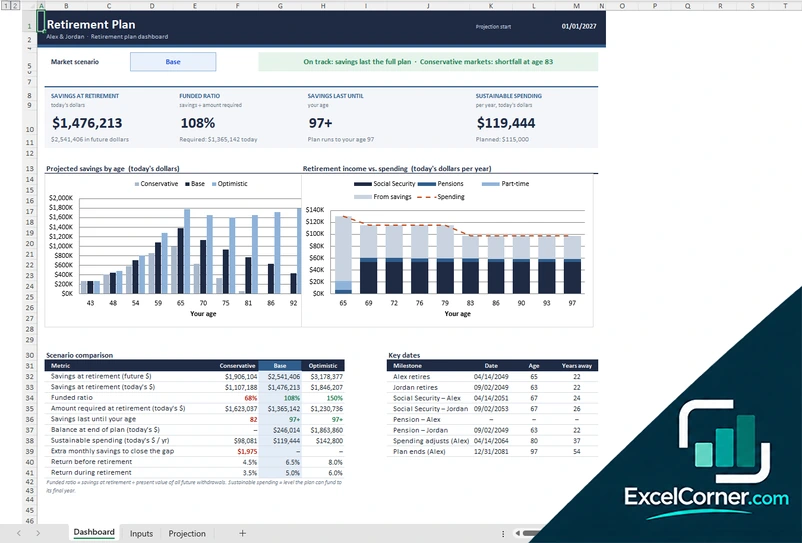
See your savings at retirement, your funded ratio, how long your savings last and how much you can sustainably spend, under three market scenarios.
DashboardInputsProjection
.xlsx · 62 KB
Version 2
Retirement Savings Planner
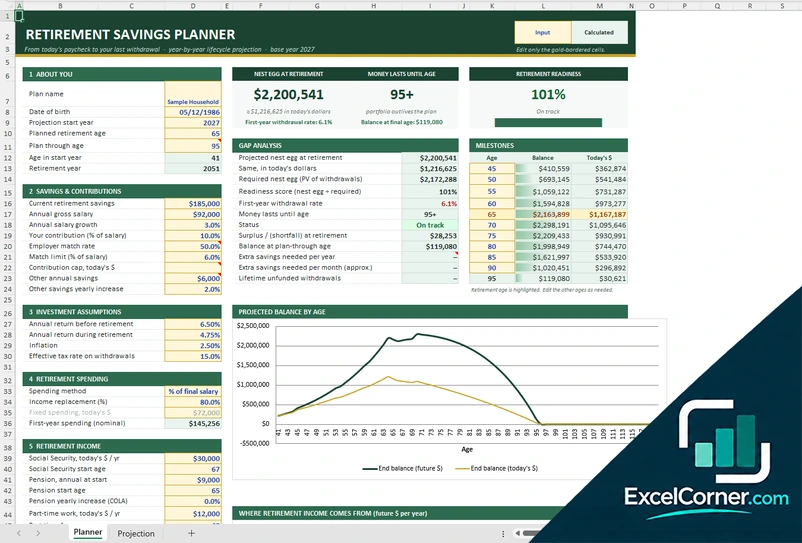
Project your retirement savings year by year, from today’s salary and contributions to your last withdrawal.
PlannerProjection
.xlsx · 51 KB
Version 3
Retirement Income Plan
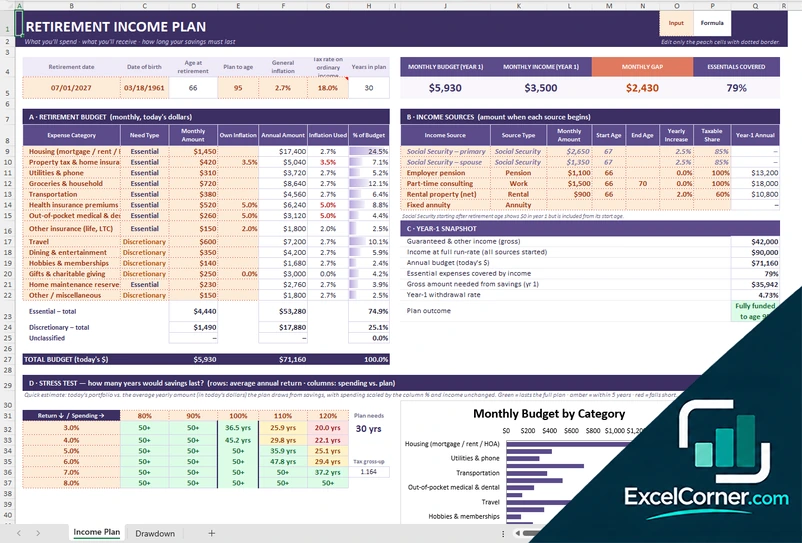
Start from what you will spend, add what you will receive and see how long your savings must last.
Income PlanDrawdown
.xlsx · 48 KB
What is inside the retirement Excel templates
Version 1: Retirement Plan
On the Inputs sheet you enter the details for each person in the household, such as the date of birth and the retirement date, along with savings, contributions and income sources. The Dashboard shows the savings at retirement, the funded ratio, the age your savings last until and the sustainable spending in today’s dollars, for a market scenario you choose. Charts show projected savings by age and retirement income against spending, and a scenario comparison shows the conservative, base and optimistic cases, the extra monthly savings needed to close a gap and the key dates for each person. The Projection sheet lists the year-by-year numbers.
Version 2: Retirement Savings Planner
The Planner sheet collects your date of birth, retirement age, the age the plan runs to, your current retirement savings, salary and salary growth, your contribution as a percentage of salary, the employer match and any other annual savings. You set the return before and during retirement, inflation and the tax rate on withdrawals, and choose how to model retirement spending, for example a percentage of your final salary. Results show the nest egg at retirement, the age your money lasts until and a readiness score, with a gap analysis that gives the required nest egg, the first-year withdrawal rate, the surplus or shortfall and the extra savings needed per year and per month. A milestones table and a chart show the balance by age.
Version 3: Retirement Income Plan
You list your retirement budget by category, marking each line as essential or discretionary with its monthly amount and its own inflation rate, and your income sources, such as Social Security, a pension, part-time work, rental income or an annuity, with the start and end age, yearly increase and taxable share. The Income Plan shows the monthly budget, the monthly income, the monthly gap and the share of essentials covered, with a year-one snapshot that includes the amount needed from savings and the withdrawal rate. A stress test shows how many years your savings would last for different returns and spending levels, and the Drawdown sheet shows the year-by-year withdrawals.
How to use the retirement Excel template
- Download
Pick the version you want and open it in Excel. - Enter your details
Add your date of birth, planned retirement age, current savings and salary, or your retirement budget. Fill in the input cells; formula cells calculate on their own. - Set your assumptions
Choose your return before and during retirement, inflation, contributions and income sources such as Social Security or a pension. - Read the results
Check your savings at retirement, the age your money lasts until and whether the plan is funded.
Review the plan once a year and after major changes, such as a new job, a market drop or a change in your retirement date.
Which retirement template do you need?
| Retirement Plan | Retirement Savings Planner | Retirement Income Plan | |
|---|---|---|---|
| Best for | A household dashboard with market scenarios | Planning from today’s salary to your last withdrawal | Matching your budget with your income sources |
| You enter | Household details, savings and income | Salary, contributions, assumptions and spending | Budget categories, income sources and savings |
| You get | Funded ratio, sustainable spending and scenario comparison | Nest egg, readiness score and gap analysis | Monthly gap, essentials covered and a stress test |
They are separate files, so you can use more than one.
Tips for your retirement plan
- Compare conservative, base and optimistic markets instead of relying on one return.
- Include inflation, because spending in the future costs more than spending today.
- Count employer matching contributions, which can be the fastest boost to your savings.
- Separate essential spending from discretionary spending and cover the essentials with guaranteed income.
- Start Social Security or a pension at the age you actually plan to use, and model the alternatives.
- Revisit the plan every year and adjust your savings if the funded ratio falls.
Frequently asked questions
Is this retirement Excel template free?
Yes. All three versions are free to download as .xlsx files. You do not need an account or an email address.
Which version should I choose?
Choose the Retirement Plan (Version 1) for a household dashboard with conservative, base and optimistic scenarios. Choose the Retirement Savings Planner (Version 2) to follow your savings from today to the end of the plan, with a readiness score and a gap analysis. Choose the Retirement Income Plan (Version 3) to start from your retirement budget and see whether your income sources and savings cover it. They are separate files, so you can use more than one.
What is the funded ratio?
The funded ratio compares your projected savings at retirement with the amount required to fund all your future withdrawals. A ratio above 100 percent means the plan is fully funded under the assumptions you entered.
Can I include Social Security and a pension?
Yes. You enter the amount and the start age of each income source, and the templates add them to your retirement income. The Retirement Income Plan also lets you set a yearly increase and the taxable share of each source.
How are the projections calculated?
The templates project your balance year by year using the returns, inflation, contributions and withdrawals you enter, and show the results in today’s dollars. They are illustrations of your assumptions, not predictions.
Does the template work in Google Sheets?
The files are made for Microsoft Excel and use standard formulas with no macros. You can upload them to Google Drive and open them with Google Sheets, but some formatting or charts may look different.
Is my financial information stored online?
No. The templates are plain Excel files, so the numbers you type stay in your own file on your own computer.
These templates are educational tools, not financial, tax or legal advice. Projections are illustrations based on the assumptions you enter. Excel is a trademark of Microsoft Corporation; Excel Corner is not affiliated with Microsoft.