
Home › HR & Workforce Management › Employee Database Excel Template
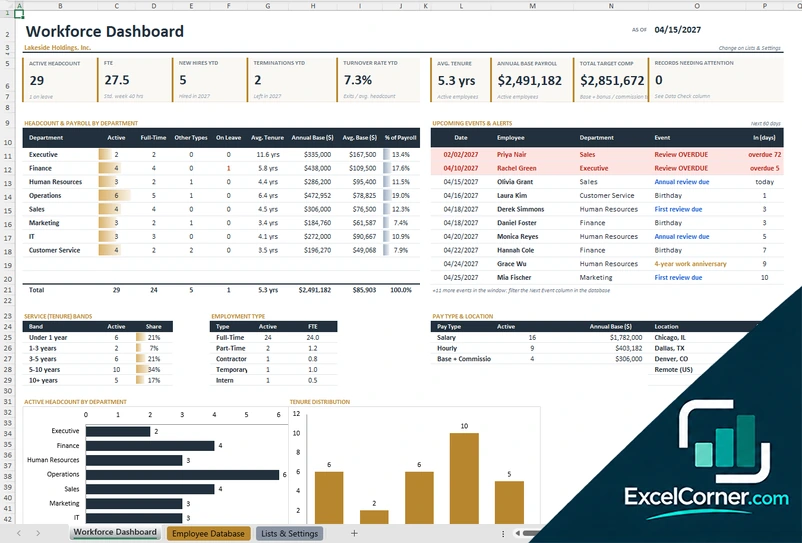
Previewing: Version 1 · Employee Database with Dashboard. Pick another version on the right.
Instant download · No sign-up · No email
Use this free employee database template for Excel to keep every employee record in one place: job, pay, contact details, emergency contacts and onboarding. See headcount, turnover and payroll on a dashboard, and find anyone in a staff directory. Pick the version that fits your team.
Choose your version
- File
- .xlsx · 253 KB · 3 sheets
- Works with
- Microsoft Excel (.xlsx)
- Macros
- None · formulas only
- Price
- Free
Keep your staff records in an Excel employee database
An employee database is the master list of the people who work for you, current and former. A spreadsheet is enough for many small and mid-size teams if it is organized: one row per employee, consistent lists for departments and statuses, and formulas that calculate tenure, headcount and payroll for you.
These Excel employee database templates cover three needs. The first adds a workforce dashboard with headcount, hires, terminations, turnover and upcoming events. The second is a staff directory and profile built on a detailed record with emergency contacts, skills and onboarding documents. The third combines the dashboard, an employee profile and the full database.
Best for
- Small and mid-size businesses that keep employee records in Excel
- HR coordinators who track hires, exits, reviews and onboarding
- Office managers who need a searchable staff directory
Maybe not for
Companies that need payroll processing or confidential records controlled by user permissions. Excel files are not access-controlled, so protect the file and limit who can open it.
Which version is right for you?
All three are free, formula-driven Excel files with sample data you can replace. They are independent, so you can download more than one.
Version 1
Employee Database with Dashboard
Keep one row per employee and see active headcount, hires, terminations, turnover, tenure and payroll by department.
Workforce DashboardEmployee DatabaseLists & Settings
.xlsx · 253 KB
Version 2
Staff Directory and Profiles
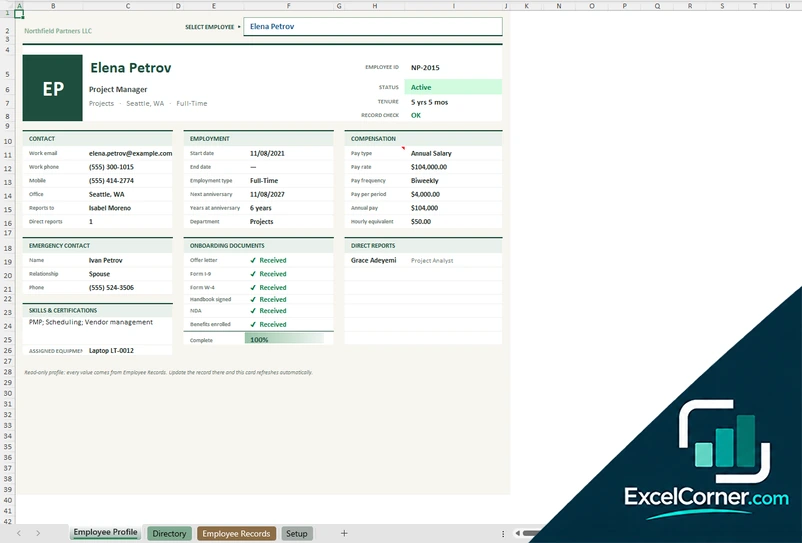
Store a detailed record for each person, search a staff directory and view an employee profile card.
Employee ProfileDirectoryEmployee RecordsSetup
.xlsx · 201 KB
Version 3
Complete Employee Database
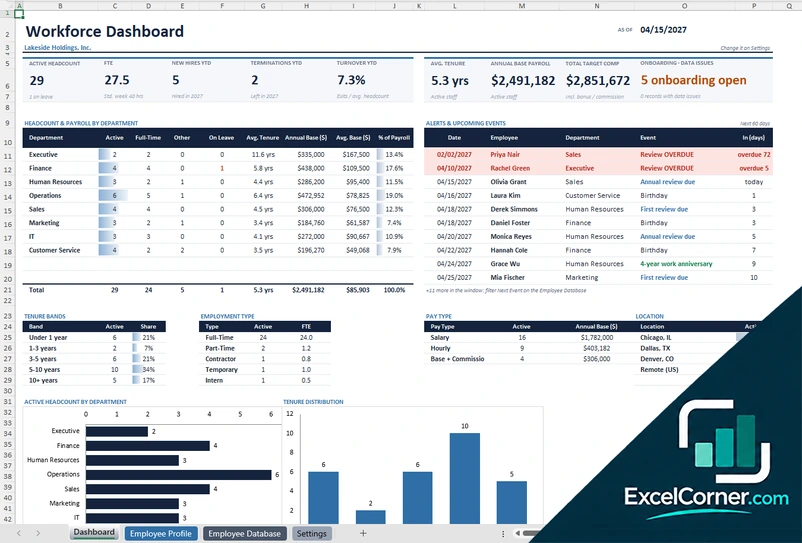
Combine a workforce dashboard, an employee profile and a full database with emergency contacts and onboarding.
DashboardEmployee ProfileEmployee DatabaseSettings
.xlsx · 332 KB
What is inside the employee database Excel templates
Version 1: Employee Database with Dashboard
On the Employee Database sheet you add one row per employee, current or former, with the ID, name, job title, department, manager, location, employment type, status, hire and termination dates, date of birth, work email and phone, pay type, pay rate, hours per week, bonus target and the last review date. Tenure, age, FTE, annual pay and a data check are calculated for you. The Workforce Dashboard shows the active headcount and FTE, the new hires and terminations for the year, the turnover rate, the average tenure, the base payroll and the total target compensation, with a department table and a list of upcoming events and alerts for the next 60 days, such as reviews, birthdays and expiring work authorization.
Version 2: Staff Directory and Profiles
The Employee Records sheet is the master table. It holds the identity and role, the contact details, the employment and pay details, the emergency contact, the skills and equipment and the onboarding documents, with a count of the people whose onboarding is incomplete. The Directory lists the current staff alphabetically and lets you search by name, title or skill and filter by department and office. The Employee Profile shows one person at a time: pick a name and you see the contact details, the start date, the employment type, the next anniversary, the pay type, the pay per period, the annual pay and the hourly equivalent.
Version 3: Complete Employee Database
The Employee Database holds one row per employee, with the identity and role, key dates, contact details, pay and review, emergency contact, skills and equipment, and onboarding documents, followed by automatic calculations and a data check. The Dashboard shows the active headcount and FTE, the new hires and terminations, turnover, tenure, base payroll, total target compensation and the number of onboarding and data issues, with headcount and payroll by department and alerts and upcoming events. The Employee Profile lets you pick any name from a dropdown and read every value from the database in a clean card.
How to use the employee database template in Excel
- Download
Pick the version you want and open it in Excel. - Set up your lists
Enter your company name and the lists of departments, locations and employment types. Fill in the input cells; formula cells calculate on their own. - Add your employees
Enter one row per person with the job, dates, pay and contact details. Keep former employees on file and mark them with a termination date. - Use the views
Check the dashboard for headcount and turnover, pick a name for the profile, or search the directory.
Update the database whenever someone joins, changes role or leaves, so the dashboard and the alerts stay accurate.
Which employee database template do you need?
| Employee Database with Dashboard | Staff Directory and Profiles | Complete Employee Database | |
|---|---|---|---|
| Best for | Records plus a workforce dashboard | Finding people and viewing a profile | Everything in one workbook |
| You enter | Job, pay, dates and contact details | Records, emergency contacts, skills and onboarding | Records, emergency contacts and onboarding |
| You get | Headcount, turnover and upcoming events | A searchable directory and a profile card | A dashboard, a profile card and data checks |
They are separate files, so you can use more than one.
Tips to keep an employee database accurate
- Give every employee a unique ID and never reuse it, even after someone leaves.
- Keep terminated employees in the database with an end date so turnover history stays complete.
- Use dropdown lists for departments, locations and statuses to avoid spelling variants.
- Track review dates and document expiry dates so the alerts can warn you in time.
- Limit access to the file, because it holds personal and pay information.
- Back up the file regularly and keep a dated copy before big changes.
Frequently asked questions
Is this employee database template for Excel free?
Yes. All three versions are free to download as .xlsx files. You do not need an account or an email address.
Which version should I choose?
Choose the Employee Database with Dashboard (Version 1) if you want records plus headcount, turnover and payroll by department. Choose the Staff Directory and Profiles (Version 2) if you need a searchable directory and an employee profile with emergency contacts and onboarding. Choose the Complete Employee Database (Version 3) for a dashboard, a profile card and the full record in one file. They are separate files, so you can use more than one.
What information does the database store?
The templates store the employee ID, name, job title, department, manager, location, employment type, status, hire and termination dates, contact details, pay type and rate, hours, review dates, emergency contacts, skills and equipment, and onboarding documents.
How does it calculate tenure and turnover?
Tenure is calculated from the hire date to the as-of date, or to the termination date for former employees. Turnover is the number of exits divided by the average headcount for the year.
Can I search for an employee?
Yes. The Staff Directory and Profiles version has a search box and filters by department and office, and the profile views let you pick any name from a dropdown to see that person’s details.
Does the template work in Google Sheets?
The files are made for Microsoft Excel and use standard formulas with no macros. You can upload them to Google Drive and open them with Google Sheets, but some formatting or charts may look different.
Is my employee information stored online?
No. The templates are plain Excel files, so the names and pay rates you type stay in your own file on your own computer. Protect the file with a password because it contains personal data.
More free HR and workforce templates
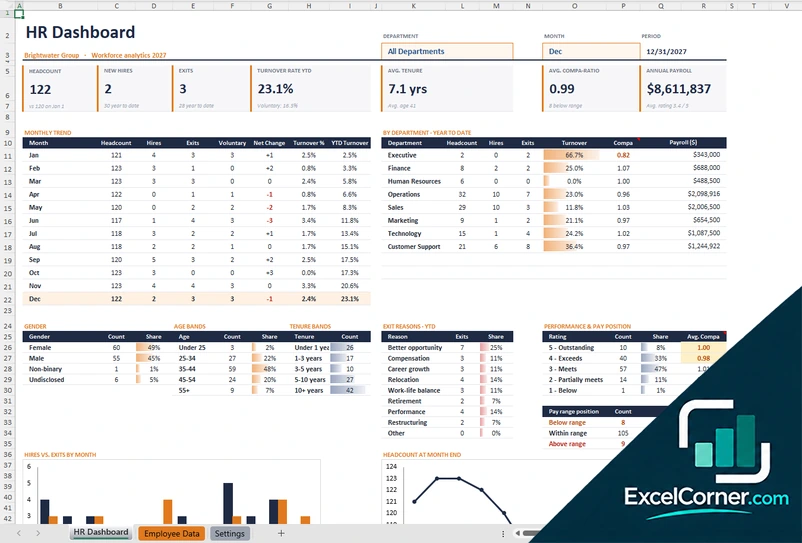
These templates contain sample data. Employee records are sensitive, so follow the privacy and employment laws that apply to you and protect the file. Excel is a trademark of Microsoft Corporation; Excel Corner is not affiliated with Microsoft.