
Home › HR & Workforce Management › Excel Payroll Template
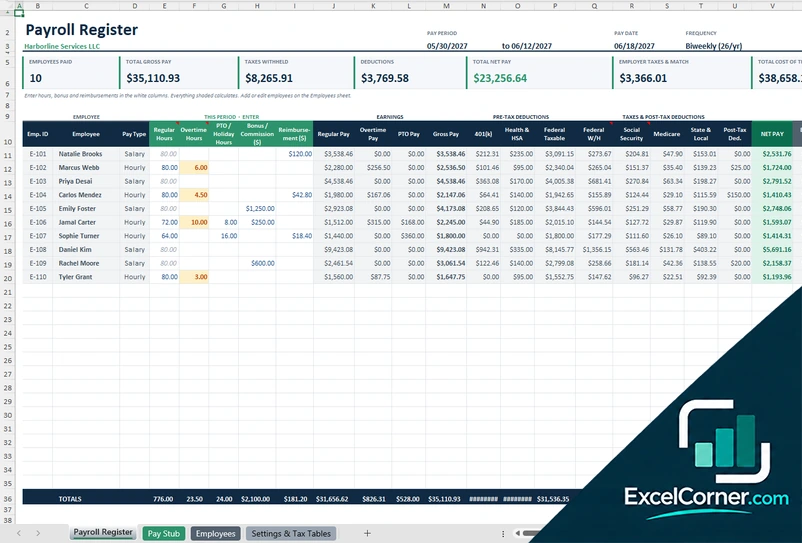
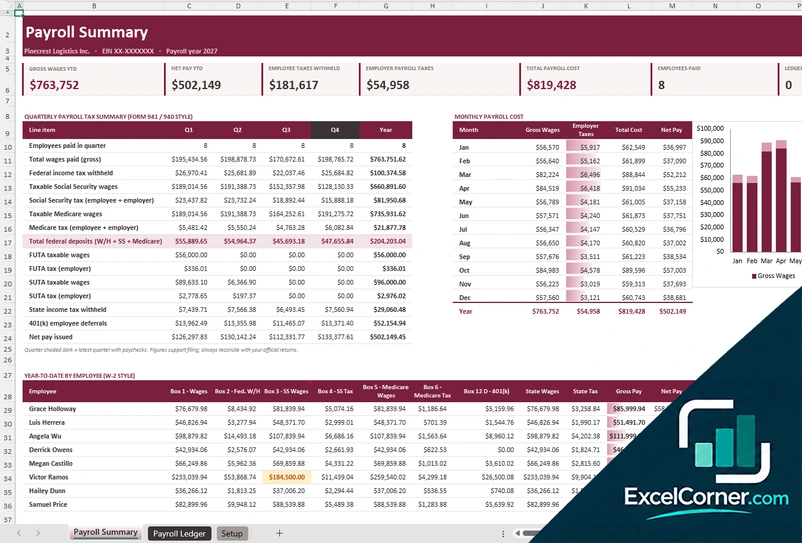
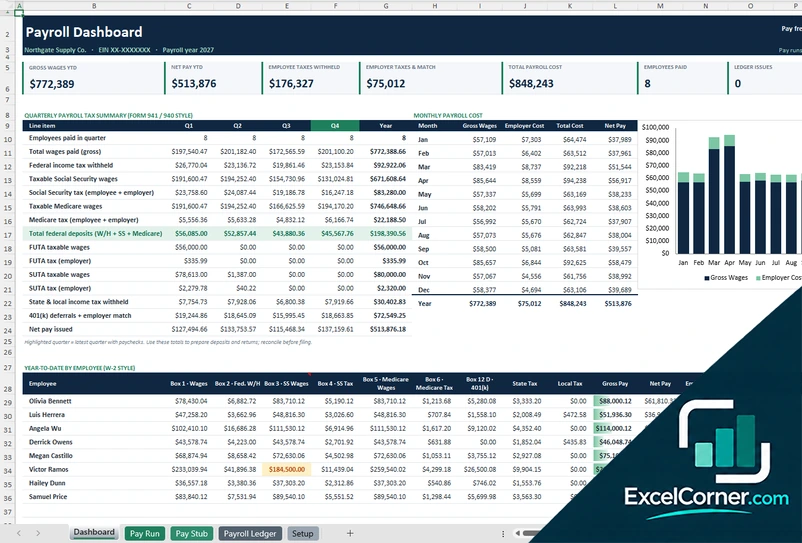
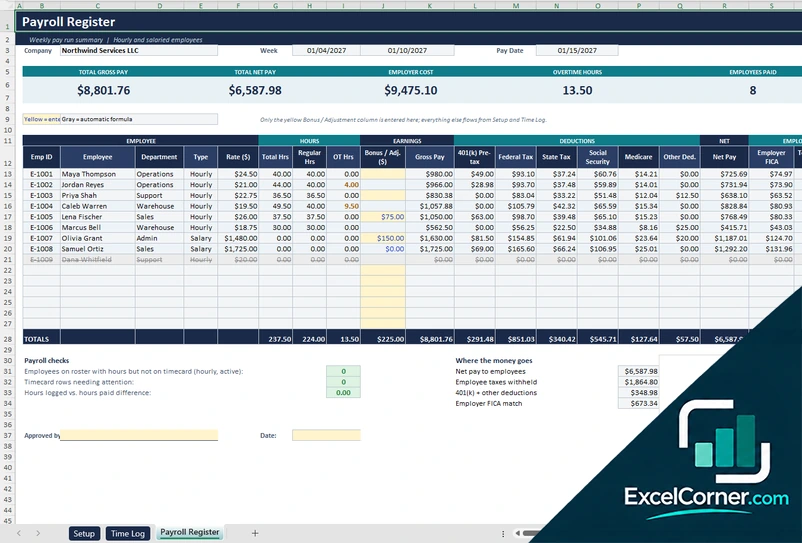
Previewing: Version 1 · Payroll Register. Pick another version on the right.
Instant download · No sign-up · No email
Use this free Excel payroll template to calculate gross pay, taxes, deductions and net pay for your employees. Run a single pay period, keep a full-year payroll ledger with quarterly tax summaries, or manage every pay run from a dashboard. Pick the version that fits your payroll.
Choose your version
- File
- .xlsx · 38 KB · 4 sheets
- Works with
- Microsoft Excel (.xlsx)
- Macros
- None · formulas only
- Price
- Free
Run payroll in Excel with formulas that do the math
A payroll spreadsheet turns hours, pay rates and deductions into paychecks. For each employee it works out regular and overtime pay, subtracts pre-tax deductions, withholds federal, state and payroll taxes and shows the net pay, along with what the payroll costs the employer.
These Excel payroll templates cover three ways of working. The first is a payroll register for one pay period with a printable pay stub. The second is a payroll ledger for the whole year with a quarterly tax summary and year-to-date totals by employee. The third adds a dashboard, a pay run view and a pay stub on top of the ledger.
Best for
- Small businesses that run payroll in-house with a spreadsheet
- Bookkeepers who prepare payroll and need quarterly tax totals
- Owners who want to see the full cost of each pay run
Maybe not for
Businesses that need automatic tax filing and direct deposit. These files calculate payroll but do not file taxes or pay your employees.
Which version is right for you?
All three are free, formula-driven Excel files with sample data you can replace. They are independent, so you can download more than one.
Version 1
Payroll Register
Run a pay period: enter hours, bonuses and reimbursements and get gross pay, taxes, deductions and net pay.
Payroll RegisterPay StubEmployeesSettings & Tax Tables
.xlsx · 38 KB
Version 2
Payroll Ledger
Record every paycheck in one ledger and get quarterly payroll tax totals and year-to-date totals for each employee.
Payroll SummaryPayroll LedgerSetup
.xlsx · 266 KB
Version 3
Payroll Dashboard
Keep the payroll record for the year and see it as a dashboard, a single pay run and a printable pay stub.
DashboardPay RunPay StubPayroll LedgerSetup
.xlsx · 430 KB
What is inside the Excel payroll templates
Version 1: Payroll Register
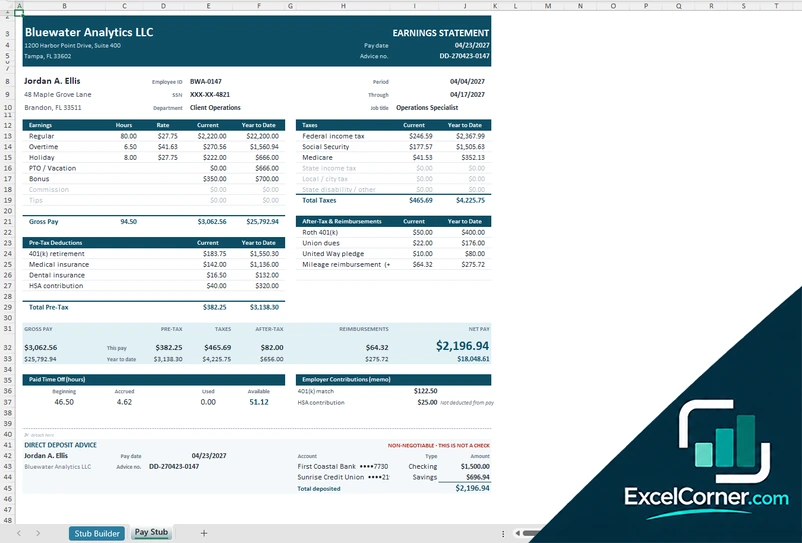
On the Employees sheet you enter each employee’s ID, department, pay type, salary or hourly rate, filing status, state and local tax percentages, 401(k) percentage, health insurance and other deductions, and the year-to-date amounts paid before the run. In the Payroll Register you type the regular, overtime and PTO hours, any bonus or commission and any reimbursement, and the register calculates the regular, overtime and PTO pay, the pre-tax deductions, federal withholding from the brackets, Social Security, Medicare, state and local tax, the post-tax deductions and the net pay. Totals show the employees paid, the gross pay, the taxes withheld, the net pay, the employer taxes and match and the total cost of the payroll. Pick an employee on the Pay Stub sheet to print an earnings statement, and edit the rates and brackets on the Settings and Tax Tables sheet.
Version 2: Payroll Ledger
The Setup sheet holds the company and pay frequency, the pay schedule, which is built automatically from the first pay date, the tax rates and wage bases and the pay setup for each employee. In the Payroll Ledger you add one row per employee and paycheck, choosing the pay date and the employee and typing the hours and any extra pay. Taxes, wage limits for Social Security, FUTA and SUTA from earlier paychecks and the totals are calculated for you. The Payroll Summary shows the gross wages, net pay, employee taxes withheld, employer payroll taxes and the total payroll cost for the year, a quarterly payroll tax summary in the style of Form 941 and Form 940, the monthly payroll cost and the year-to-date totals for each employee in a W-2 style layout.
Version 3: Payroll Dashboard
The Payroll Ledger is the record of the year, with one row per employee per paycheck, and the Setup sheet holds the company, the pay schedule, the tax rates and the employees. The Dashboard shows the gross wages, net pay, employee taxes withheld, employer taxes and match, the total payroll cost, the employees paid and the ledger issues, followed by a quarterly payroll tax summary, the monthly payroll cost and the year-to-date totals by employee. The Pay Run sheet lets you pick a pay date and see the payroll register for that date, with the hours, gross pay, deductions, taxes, net pay, employer cost and status for each employee, and the Pay Stub sheet prints an earnings statement for an employee and a pay date.
How to use the Excel payroll template
- Download
Pick the version you want and open it in Excel. - Set up your company and employees
Enter the pay frequency, tax rates and each employee’s pay type, rate and deductions. Fill in the input cells; formula cells calculate on their own. - Enter the pay run
Type the hours, bonus and reimbursements for the period, or add one ledger row per employee and paycheck. - Review and print
Check gross pay, taxes and net pay, read the totals and print the pay stubs.
Update the tax rates and wage limits at the start of every year, and reconcile the totals with your official tax forms before you file.
Which payroll template do you need?
| Payroll Register | Payroll Ledger | Payroll Dashboard | |
|---|---|---|---|
| Covers | One pay period | The full payroll year | The full payroll year |
| Best for | A quick biweekly pay run with a pay stub | Quarterly tax totals and year-to-date by employee | Seeing every pay run, trends and checks on one page |
| You get | Register, pay stub and tax tables | Quarterly tax summary and W-2 style totals | Dashboard, pay run view and pay stub |
They are separate files, so you can use more than one.
Tips for accurate payroll
- Keep the tax rates and wage limits current, and review them every year.
- Record hours and pay type for each employee, and separate overtime from regular hours.
- Enter pre-tax deductions such as a 401(k) or health premium so taxable wages are correct.
- Track year-to-date totals, because Social Security and unemployment taxes stop at a wage limit.
- Include employer taxes and matching contributions to see the real cost of payroll.
- Back up each pay run and protect the file, since it contains personal and pay data.
Frequently asked questions
Is this Excel payroll template free?
Yes. All three versions are free to download as .xlsx files. You do not need an account or an email address.
Which version should I choose?
Choose the Payroll Register (Version 1) for a single pay period with a printable pay stub. Choose the Payroll Ledger (Version 2) to keep the whole year, with quarterly tax totals and W-2 style totals for each employee. Choose the Payroll Dashboard (Version 3) for a dashboard, a pay run view and a pay stub on top of the ledger. They are separate files, so you can use more than one.
Does the template calculate payroll taxes?
Yes. It calculates federal income tax withholding from tax brackets, Social Security, Medicare, state and local tax, and the employer share, including wage limits. The rates in the files are illustrative, so replace them with the current rates before you run payroll.
Can I use it for hourly and salaried employees?
Yes. You choose hourly or salary for each employee. Hourly pay uses regular and overtime hours, and salary pay is divided by the number of pay periods in the year.
Does it support biweekly or other pay frequencies?
The sample files use a biweekly schedule with 26 pay periods. You change the pay frequency and the number of pay periods in the settings, and the Payroll Ledger builds the pay dates from your first pay date.
Does the template work in Google Sheets?
The files are made for Microsoft Excel and use standard formulas with no macros. You can upload them to Google Drive and open them with Google Sheets, but some formatting or charts may look different.
Is my payroll data stored online?
No. The templates are plain Excel files, so the names, pay rates and tax data you type stay in your own file on your own computer.
These templates are calculation tools with sample data and illustrative tax rates. They are not tax, payroll or legal advice. Confirm rates and rules with the IRS, your state and a qualified professional. Excel is a trademark of Microsoft Corporation; Excel Corner is not affiliated with Microsoft.