
Home › Accounting & Business Finance › Recipe Costing Template Excel
Previewing: Version 1 · Recipe Costing Workbook. Pick another version on the right.
Instant download · No sign-up · No email
Use this free recipe costing template for Excel to find the real cost of every dish. Enter your ingredient prices once, build each recipe and see the cost per portion, the food cost percentage and a suggested menu price. Pick the version that fits your kitchen.
Choose your version
- File
- .xlsx · 228 KB · 5 sheets
- Works with
- Microsoft Excel (.xlsx)
- Macros
- None · formulas only
- Price
- Free
Cost your recipes and protect your margin in Excel
Recipe costing means adding up what each ingredient in a dish costs, after trim and waste, and dividing it by the number of portions. The result is the cost per portion, which you compare with the menu price to get the food cost percentage and the margin. A spreadsheet keeps ingredient prices in one list, so when a supplier raises a price every recipe updates.
These Excel recipe costing templates cover three needs. The first is a full workbook with an ingredient list, recipes, a recipe card and a menu profitability dashboard. The second is a single recipe cost card built on an ingredient library with yield and unit conversions. The third focuses on the menu: it shows each item’s contribution margin, sales mix and menu engineering class.
Best for
- Restaurants, cafes and caterers that want to know their plate costs
- Bakers and food producers who price products from ingredients
- Chefs and managers who need to react quickly to supplier price changes
Maybe not for
Restaurants that need live prices from suppliers or point-of-sale links. These files use prices you type in.
Which version is right for you?
All three are free, formula-driven Excel files with sample data you can replace. They are independent, so you can download more than one.
Version 1
Recipe Costing Workbook
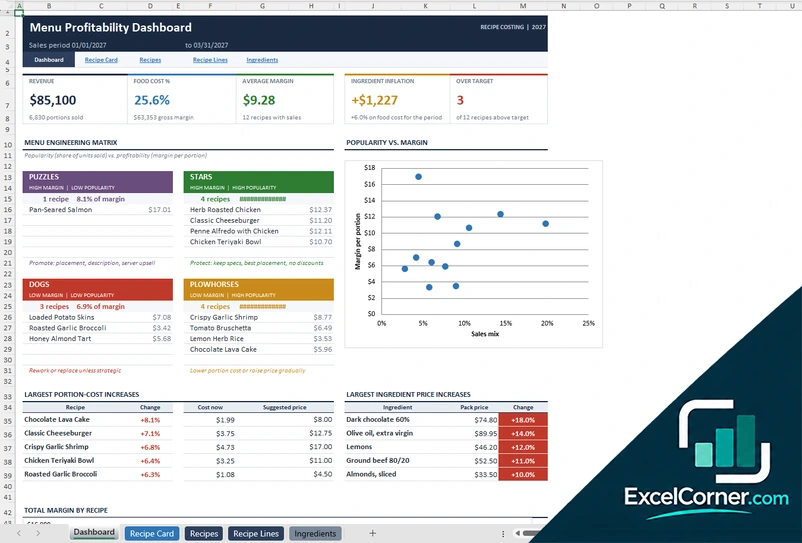
Cost every recipe from one ingredient list and see food cost, margin, price changes and a menu engineering matrix on a dashboard.
DashboardRecipe CardRecipesRecipe LinesIngredients
.xlsx · 228 KB
Version 2
Recipe Cost Card
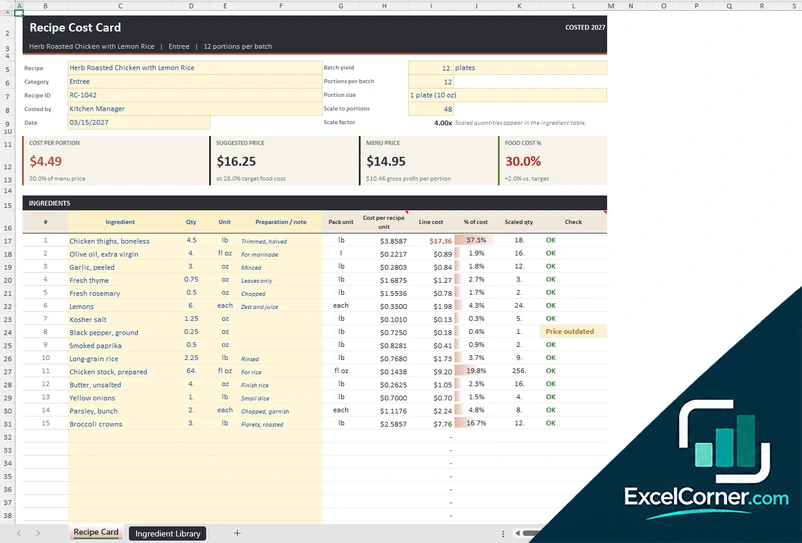
Price your ingredients once in a library, then cost a recipe card with scaled quantities and a suggested menu price.
Recipe CardIngredient Library
.xlsx · 49 KB
Version 3
Menu Profitability Workbook
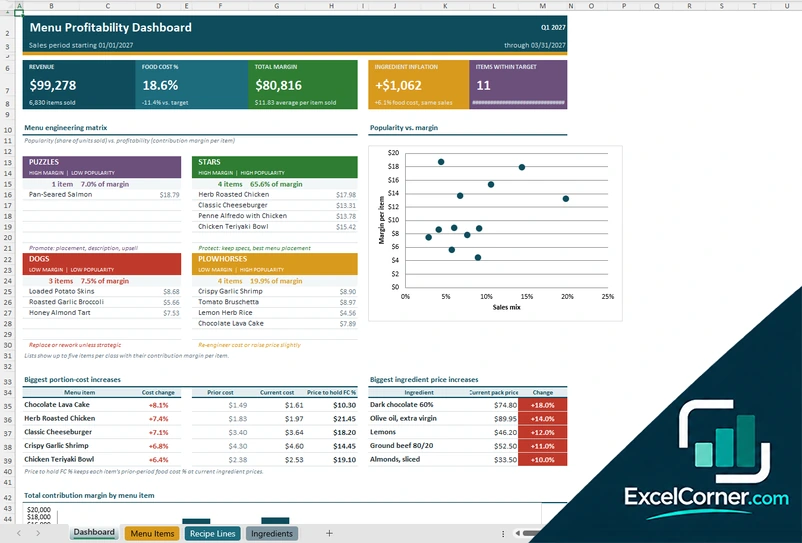
Cost each menu item and see contribution margin, sales mix, revenue and menu engineering class for a sales period.
DashboardMenu ItemsRecipe LinesIngredients
.xlsx · 131 KB
What is inside the recipe costing Excel templates
Version 1: Recipe Costing Workbook
On the Ingredients sheet you list each ingredient with its supplier, pack size, pack unit, yield percentage and both the prior and the current pack price, so the template shows the price change. The Recipe Lines sheet holds the ingredients of every recipe in batch quantities, with unit conversion and a check on each line. The Recipes sheet adds the portions per batch, the portion size, the menu price, the target food cost, the units sold and the sales period, and calculates the cost per portion, the cost change, the food cost percentage, a suggested price and the menu class. The Recipe Card shows one recipe scaled to the number of portions you choose, and the Dashboard summarizes revenue, food cost percentage, average margin, ingredient inflation and the items over target, with a popularity against margin matrix.
Version 2: Recipe Cost Card
The Ingredient Library holds the ingredients with the category, supplier, pack size, pack unit, pack price and yield percentage, and calculates the cost per pack unit before and after trim, which is the usable cost, and the cost per gram, milliliter or each. It flags prices older than the review window you set and lists the allergens. The Recipe Card takes the recipe name, category, ID, portions per batch and portion size, and lists the ingredients with the quantity, unit and preparation note. It calculates the line cost and the share of the total, the cost per portion, the suggested price, the menu price and the food cost percentage, and scales the quantities to a number of portions you choose.
Version 3: Menu Profitability Workbook
On the Ingredients sheet you enter the pack size, yield and the prior and current pack price for every ingredient, and on Recipe Lines you add the ingredients of each menu item in batch quantities. The Menu Items sheet takes the menu price and the units sold for a sales period, and calculates the portion cost at prior and current prices, the cost change, the food cost percentage, the contribution margin, the sales mix and the revenue. You set the target food cost and a popularity factor, and each item is classed for menu engineering. The Dashboard shows the revenue, the food cost percentage, the total margin, the ingredient inflation and the items within target, with a popularity against margin matrix.
How to use the recipe costing template in Excel
- Download
Pick the version you want and open it in Excel. - Enter your ingredients
List each ingredient with the supplier, pack size, pack price and yield percentage. Fill in the input cells; formula cells calculate on their own. - Build your recipes
Add the ingredients of each recipe in batch quantities, with the portions per batch and the menu price. - Read the results
Check the cost per portion, the food cost percentage, the margin and the suggested price, and review the items above your target.
Update the ingredient prices whenever an invoice changes, and compare the new cost with the prior cost to see how inflation affects each dish.
Which recipe costing template do you need?
| Recipe Costing Workbook | Recipe Cost Card | Menu Profitability Workbook | |
|---|---|---|---|
| Best for | A complete recipe book with a dashboard | Costing one recipe at a time | Seeing which menu items make money |
| You enter | Ingredients, recipes and sales | An ingredient library and one recipe | Menu items, ingredients and units sold |
| You get | Cost per portion, menu matrix and price changes | Cost per portion, scaled quantities and a price | Contribution margin, sales mix and menu class |
They are separate files, so you can use more than one.
Tips for accurate recipe costing
- Cost ingredients by the usable amount after trim and waste, not by the purchase weight.
- Use the same units in the library and the recipes, or let the template convert them for you.
- Include small items such as oil, salt and garnish, because they add up over many portions.
- Aim for a target food cost percentage and review the dishes above it each month.
- Check supplier prices regularly and keep the prior price to see the change.
- Scale recipes to your real batch size so the cost per portion matches what you cook.
Frequently asked questions
Is this recipe costing template for Excel free?
Yes. All three versions are free to download as .xlsx files. You do not need an account or an email address.
Which version should I choose?
Choose the Recipe Costing Workbook (Version 1) for a complete system with an ingredient list, recipes, a recipe card and a dashboard. Choose the Recipe Cost Card (Version 2) to cost a single recipe from an ingredient library. Choose the Menu Profitability Workbook (Version 3) to analyze the menu with contribution margin and menu engineering. They are separate files, so you can use more than one.
How is the cost per portion calculated?
Each ingredient line multiplies the quantity by the usable cost per unit, which is the pack price divided by the pack size and by the yield percentage. The lines are added up and divided by the number of portions in the batch.
What is food cost percentage?
Food cost percentage is the cost per portion divided by the menu price. A dish that costs $4.50 to make and sells for $15.00 has a food cost of 30 percent.
What is menu engineering?
Menu engineering classifies each item by popularity and profitability. The templates label items as stars, plowhorses, puzzles or dogs, so you can decide what to promote, reprice or remove.
Can I convert units such as ounces and pounds?
Yes. The templates include unit conversions for weight, volume and count, such as ounces, pounds, grams, fluid ounces, cups and each.
Does the template work in Google Sheets?
The files are made for Microsoft Excel and use standard formulas with no macros. You can upload them to Google Drive and open them with Google Sheets, but some formatting or charts may look different.
Is my data stored online?
No. The templates are plain Excel files, so the numbers you type stay in your own file on your own computer.
More free costing and margin templates
These templates are planning tools with sample data and example figures. Check prices, costs and tax or accounting treatment before you rely on them. Excel is a trademark of Microsoft Corporation; Excel Corner is not affiliated with Microsoft.