
Home › Accounting & Business Finance › Cost Sheet Excel Template
Previewing: Version 1 · Product Costing Workbook. Pick another version on the right.
Instant download · No sign-up · No email
Use this free cost sheet Excel template to break down what it costs to make a product. Add materials, labor, machine time and overhead, and see the full cost per unit, the margin and the annual profit. Pick the version that fits how you cost.
Choose your version
- File
- .xlsx · 207 KB · 5 sheets
- Works with
- Microsoft Excel (.xlsx)
- Macros
- None · formulas only
- Price
- Free
Break down your costs in an Excel cost sheet
A cost sheet lists every cost that goes into a product or a period, grouped so you can see where the money goes: direct materials, direct labor, direct expenses, factory overhead and administration overhead. Dividing the total by the units produced gives the cost per unit, which you compare with the selling price.
These Excel cost sheet templates work in three ways. The first is a product costing workbook with a bill of materials, labor, machines and rates for many products, plus a profitability dashboard. The second is a cost sheet for a single product. The third is a statement of cost for a period, comparing budget and actual by account, with the cost per unit and the profit.
Best for
- Manufacturers and workshops that price products from materials, labor and machine time
- Cost accountants who prepare a monthly statement of cost and profit
- Small businesses that want a simple cost breakdown for each product
Maybe not for
Companies that need full inventory accounting with automatic stock valuation. These templates use the quantities and costs you enter.
Which version is right for you?
All three are free, formula-driven Excel files with sample data you can replace. They are independent, so you can download more than one.
Version 1
Product Costing Workbook
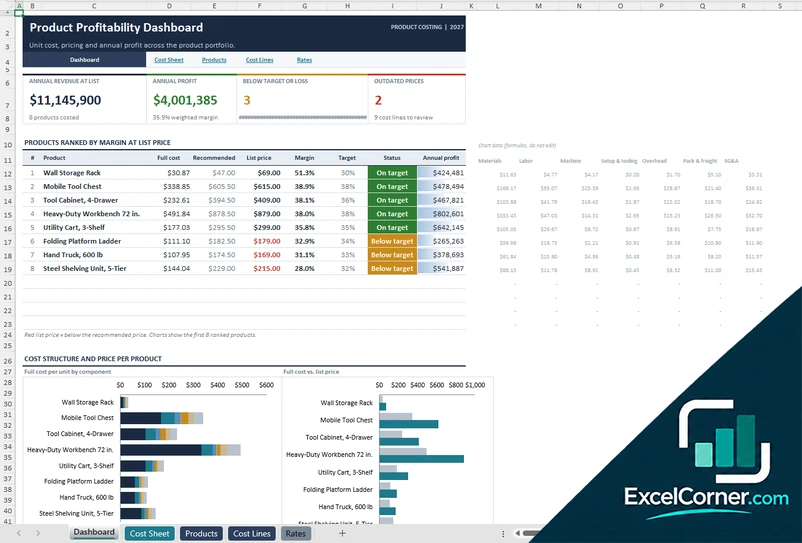
Cost several products from a bill of materials, labor operations and machine time, and rank them by margin.
DashboardCost SheetProductsCost LinesRates
.xlsx · 207 KB
Version 2
Single Product Cost Sheet
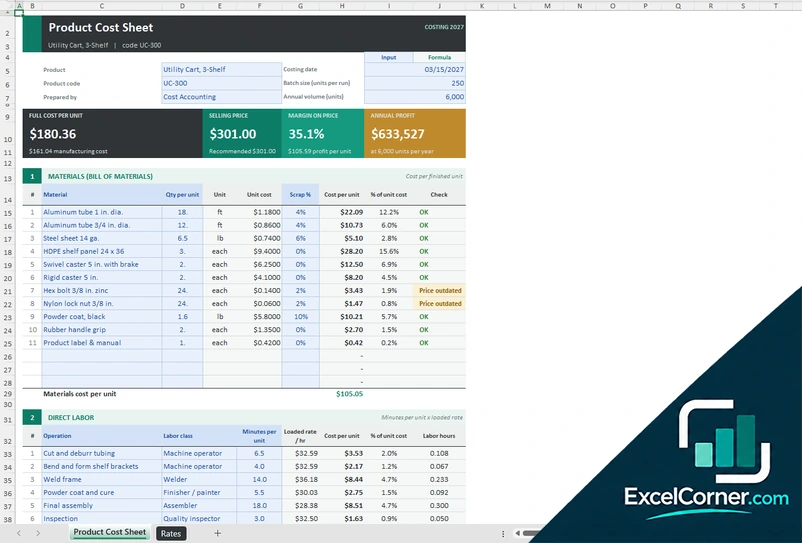
Cost one product with a bill of materials, labor operations and machine time, and see the full cost per unit and the margin.
Product Cost SheetRates
.xlsx · 29 KB
Version 3
Cost Breakdown Statement
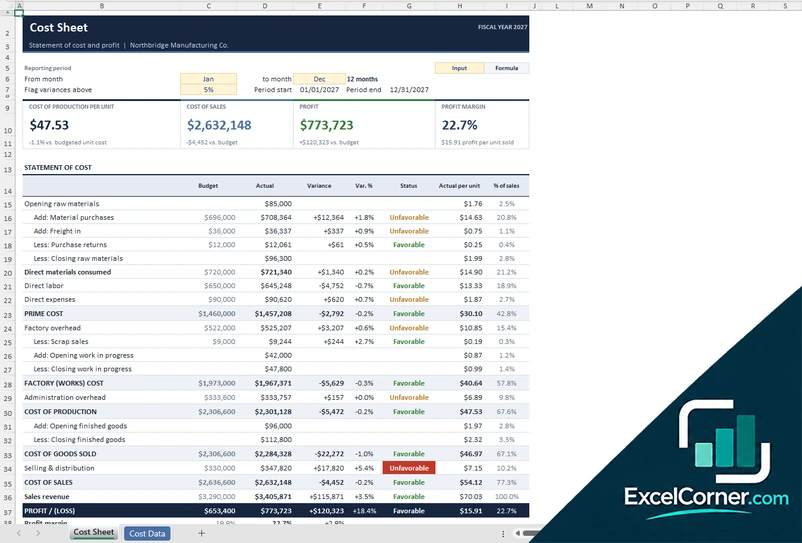
Post monthly costs by account and get a statement of cost and profit with budget variances, cost per unit and percent of sales.
Cost SheetCost Data
.xlsx · 31 KB
What is inside the cost sheet Excel templates
Version 1: Product Costing Workbook
The Cost Lines sheet lists the materials, the labor operations and the machine time for every product, per finished unit, with scrap percentage, rate and a price check that flags outdated prices. The Rates sheet holds the labor classes, the machine rates and the overhead assumptions, and the Products sheet holds the product list with its batch size, annual volume, list price and target margin. The Cost Sheet shows one product at a time with the full cost per unit, the selling price, the margin and the annual profit. The Dashboard ranks all products by margin and shows the annual revenue at list price, the annual profit, the products below target and the outdated prices, with charts of the cost structure and the price for each product.
Version 2: Single Product Cost Sheet
The Product Cost Sheet takes the product name and code, the costing date, the batch size and the annual volume. In section one you list the bill of materials with the quantity per unit, the unit, the unit cost and the scrap percentage, and the sheet calculates the cost per unit and each line’s share of the total. In section two you list the labor operations with the minutes per unit and a labor class, and the sheet applies the loaded rate. In section three you add the machine time. The sheet adds setup, tooling and overhead from the Rates sheet and shows the full cost per unit, the selling price, the margin on price and the annual profit.
Version 3: Cost Breakdown Statement
On the Cost Data sheet you enter each account once, choose its cost element, such as direct materials, direct labor, direct expenses, factory overhead or administration overhead, and post the monthly actual amounts against an annual budget, along with inventory balances and activity. The Cost Sheet then builds the statement from direct materials consumed through prime cost, factory cost and cost of production to the cost of goods sold, with the budget, the actual, the variance, the variance percentage, a favorable or unfavorable status, the actual cost per unit and the percentage of sales. You choose the reporting months and the variance threshold, and the top of the sheet shows the cost of production per unit, the cost of sales, the profit and the profit margin.
How to use the cost sheet template in Excel
- Download
Pick the version you want and open it in Excel. - Set up your rates
Enter labor classes, machine rates, overhead and the target margin. Fill in the input cells; formula cells calculate on their own. - Add your costs
List the materials, labor operations and machine time for a product, or post the monthly actual costs by account. - Read the cost sheet
Check the full cost per unit, the margin against your price and the variances against budget.
Review the rates and material prices at least once a quarter, and flag the prices that are out of date.
Which cost sheet template do you need?
| Product Costing Workbook | Single Product Cost Sheet | Cost Breakdown Statement | |
|---|---|---|---|
| Best for | A portfolio of products | One product in detail | A period statement of cost and profit |
| You enter | Materials, labor, machines and rates | A bill of materials, operations and machine time | Monthly actual costs and budgets by account |
| You get | Cost per unit, margin and annual profit by product | Full cost per unit and margin on price | Prime cost, factory cost, cost of goods sold and profit |
They are separate files, so you can use more than one.
Tips for a reliable cost sheet
- Separate direct costs, which you can trace to a product, from overhead, which you allocate.
- Include scrap and waste in material costs, so the cost per unit is realistic.
- Use loaded labor rates that include payroll taxes and benefits.
- Set overhead rates from real annual costs and real volumes.
- Compare actual with budget each month and look at the variances that exceed your threshold.
- Keep the selling price and the target margin next to the cost, so pricing decisions are quick.
Frequently asked questions
Is this cost sheet template for Excel free?
Yes. All three versions are free to download as .xlsx files. You do not need an account or an email address.
Which version should I choose?
Choose the Product Costing Workbook (Version 1) to cost several products and compare their margins. Choose the Single Product Cost Sheet (Version 2) to cost one product in detail with a bill of materials, labor and machine time. Choose the Cost Breakdown Statement (Version 3) for a monthly or annual statement of cost and profit with budget variances. They are separate files, so you can use more than one.
What is included in a cost sheet?
A cost sheet usually includes direct materials, direct labor, direct expenses, factory overhead and administration overhead. Adding them gives the cost of production, and the cost per unit is the total divided by the units made.
How is the margin calculated?
The margin on price is the selling price minus the full cost per unit, divided by the selling price. The templates compare it with the target margin and mark the products that are below target.
Can I use it for a construction cost breakdown?
You can adapt the cost lines for other kinds of work, for example by listing materials, labor and subcontract items as lines. For job-based costing with budgets, billing and change orders, see the job costing templates.
Does the template work in Google Sheets?
The files are made for Microsoft Excel and use standard formulas with no macros. You can upload them to Google Drive and open them with Google Sheets, but some formatting or charts may look different.
Is my data stored online?
No. The templates are plain Excel files, so the numbers you type stay in your own file on your own computer.
More free costing and margin templates
These templates are planning tools with sample data and example figures. Check prices, costs and tax or accounting treatment before you rely on them. Excel is a trademark of Microsoft Corporation; Excel Corner is not affiliated with Microsoft.