
Home › Accounting & Business Finance › Labor Cost Template Excel
Previewing: Version 1 · Labor Cost Manager. Pick another version on the right.
Instant download · No sign-up · No email
Use this free labor cost template for Excel to see what your workforce really costs. Calculate wages plus employer taxes and benefits, track the cost by department and by project, and compare it with your budget. Pick the version that fits how you plan labor.
Choose your version
- File
- .xlsx · 179 KB · 5 sheets
- Works with
- Microsoft Excel (.xlsx)
- Macros
- None · formulas only
- Price
- Free
Calculate and control labor cost in Excel
Labor cost is more than gross pay. It includes overtime and bonuses and the employer burden: payroll taxes, insurance and benefits. A labor cost spreadsheet adds these up for each employee, department or project, and compares the total with your budget, so you can see where you are over or under.
These Excel labor cost templates cover three views. The first is a labor cost manager with employees, a time log, projects and a dashboard. The second is an annual workforce planner with planned hires and a pay increase scenario. The third is a project labor tracker that turns logged hours into labor cost, revenue earned and margin for each project.
Best for
- Service firms that track labor cost and margin by project
- Finance and HR teams that plan the annual cost of the workforce
- Managers who compare labor cost with budget by department
Maybe not for
A restaurant labor cost percentage report based on daily sales. These templates calculate labor cost from pay and hours, so you would enter the sales yourself.
Which version is right for you?
All three are free, formula-driven Excel files with sample data you can replace. They are independent, so you can download more than one.
Version 1
Labor Cost Manager
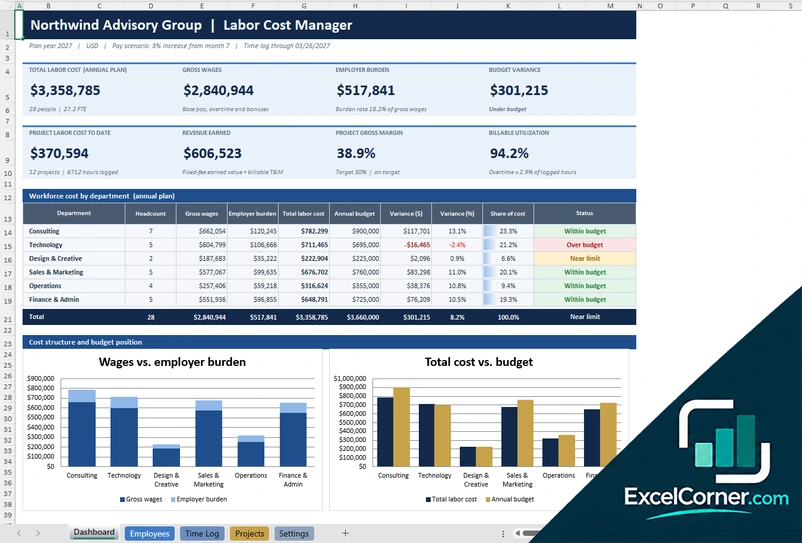
Plan the annual labor cost of your workforce and track project labor cost, revenue earned and billable utilization from a time log.
DashboardEmployeesTime LogProjectsSettings
.xlsx · 179 KB
Version 2
Workforce Labor Cost Planner
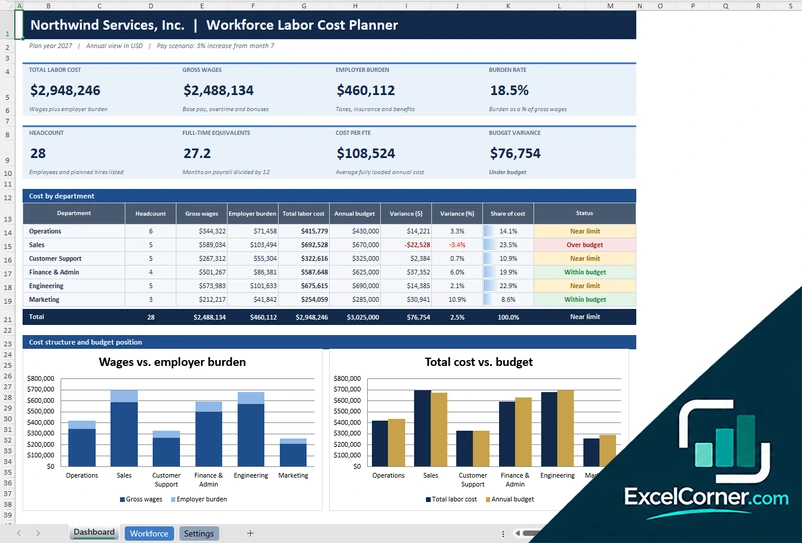
Plan the annual cost of your workforce, including planned hires and a pay increase, and compare it with the budget by department.
DashboardWorkforceSettings
.xlsx · 41 KB
Version 3
Project Labor Cost Tracker
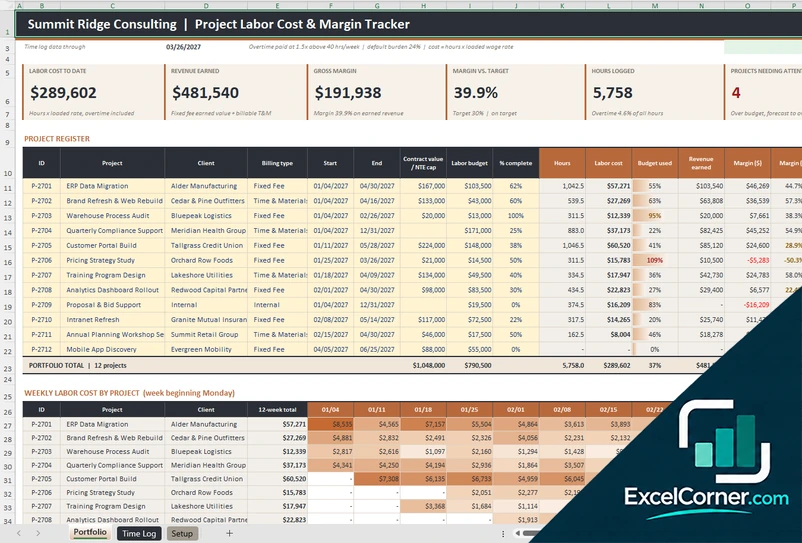
Log hours and see the labor cost, the revenue earned and the margin of each project against its budget.
PortfolioTime LogSetup
.xlsx · 138 KB
What is inside the labor cost Excel templates
Version 1: Labor Cost Manager
On the Employees sheet you list each person with the department, pay and hire details, and on the Settings sheet you set the burden rate, the overtime rule and the pay scenario, for example a 3 percent increase from month 7. The Projects sheet holds the project register with the contract terms, and the Time Log records the hours worked on each project. The Dashboard shows the total labor cost for the plan year, the gross wages, the employer burden and the budget variance, with a table of cost by department against budget. It also shows the project labor cost to date, the revenue earned, the project gross margin and the billable utilization.
Version 2: Workforce Labor Cost Planner
The Workforce sheet lists the employees and the planned hires with the department, pay, bonus and start and end dates, and calculates the months on payroll, the full-time equivalents, the gross wages and the burden for each person. The Settings sheet holds the burden rates, the department budgets and the pay scenario. The Dashboard shows the total labor cost, the gross wages, the employer burden, the burden rate, the headcount, the full-time equivalents, the cost per FTE and the budget variance, followed by a table of cost by department with the variance and a status such as within budget, near limit or over budget.
Version 3: Project Labor Cost Tracker
On the Setup sheet you enter the employees with their loaded wage rates, the overtime rule, which pays 1.5 times above 40 hours per week, and a default burden rate. The Time Log records the hours worked by employee, project and date. The Portfolio sheet is the project register with the client, the billing type, the contract value, the labor budget and the percent complete, and it calculates the hours, the labor cost, the budget used, the revenue earned and the gross margin for each project. The top shows the labor cost to date, the revenue earned, the gross margin, the margin against target, the hours logged and the projects needing attention.
How to use the labor cost template in Excel
- Download
Pick the version you want and open it in Excel. - Set up your rules
Enter the burden rate, the overtime rule, the pay scenario and the department budgets. Fill in the input cells; formula cells calculate on their own. - Add your people or hours
List the employees with their pay, or log the hours worked on each project. - Review the cost
Check the total labor cost, the variance against budget, and the margin by project.
Update the time log every week, so the labor cost to date is always current.
Which labor cost template do you need?
| Labor Cost Manager | Workforce Labor Cost Planner | Project Labor Cost Tracker | |
|---|---|---|---|
| Best for | Workforce cost and project margin together | The annual labor budget by department | Labor cost and margin by project |
| You enter | Employees, projects and a time log | Employees, planned hires and pay scenario | A project register and a time log |
| You get | Total labor cost, burden and utilization | Cost per FTE, burden rate and budget variance | Labor cost, revenue earned and margin by project |
They are separate files, so you can use more than one.
Tips for controlling labor cost
- Include the employer burden, such as payroll taxes and benefits, to see the fully loaded cost.
- Track overtime separately, because it costs more per hour and can signal understaffing.
- Compare labor cost with budget by department every month.
- Log hours to projects as they happen, so margins are not a surprise at the end.
- Model a pay increase and planned hires before you commit to the budget.
- Watch billable utilization if you charge clients for hours.
Frequently asked questions
Is this labor cost template for Excel free?
Yes. All three versions are free to download as .xlsx files. You do not need an account or an email address.
Which version should I choose?
Choose the Labor Cost Manager (Version 1) for workforce cost, projects and a time log in one file. Choose the Workforce Labor Cost Planner (Version 2) for the annual labor budget with planned hires and a pay scenario. Choose the Project Labor Cost Tracker (Version 3) to turn logged hours into project labor cost and margin. They are separate files, so you can use more than one.
What is employer burden?
Employer burden is the cost of employing someone on top of their gross pay, such as employer payroll taxes, insurance and benefits. The templates apply a burden rate to gross wages to get the total labor cost.
How is overtime handled?
The templates pay overtime at a multiplier, such as 1.5 times the regular rate, for hours above a weekly threshold, such as 40 hours, and you can change both in the settings.
Can I model a pay raise?
Yes. The planner and the manager include a pay scenario, for example a 3 percent increase from a chosen month, and recalculate the annual cost.
Does the template work in Google Sheets?
The files are made for Microsoft Excel and use standard formulas with no macros. You can upload them to Google Drive and open them with Google Sheets, but some formatting or charts may look different.
Is my data stored online?
No. The templates are plain Excel files, so the numbers you type stay in your own file on your own computer.
More free costing and margin templates
These templates are planning tools with sample data. They are not payroll, tax or legal advice, and labor cost depends on the rates you enter. Excel is a trademark of Microsoft Corporation; Excel Corner is not affiliated with Microsoft.