
Home › Personal Finance › Bill Paying Checklist Excel Template
Previewing: Version 1 · Bill Paying Checklist. Pick another version on the right.
Instant download · No sign-up · No email
Use this free bill paying checklist Excel template to see which bills are paid, which are due soon and which are overdue. Type an x when a bill is paid and the colors update on their own. Pick the version that fits how you manage your bills.
Choose your version
- File
- .xlsx · 46 KB · 2 sheets
- Works with
- Microsoft Excel (.xlsx)
- Macros
- None · formulas only
- Price
- Free
Pay every bill on time with a checklist in Excel
A bill paying checklist is the simplest way to stay on top of your bills. List each recurring bill once, with its due day and usual amount, and the template builds the checklist for you, so you can tick off each payment as you make it.
These free bill paying checklist Excel templates go further than a list. They show what is overdue and what is due in the next 7 days, how much is left to pay this month and how the year is tracking. The planner and the bill pay center also match each bill to your paydays and show your checking balance after each payment.
Best for
- Households with rent, utilities, loans and subscriptions to pay every month
- People who want to see overdue and upcoming bills at a glance
- Anyone who wants to match bills with paydays and a checking balance
Maybe not for
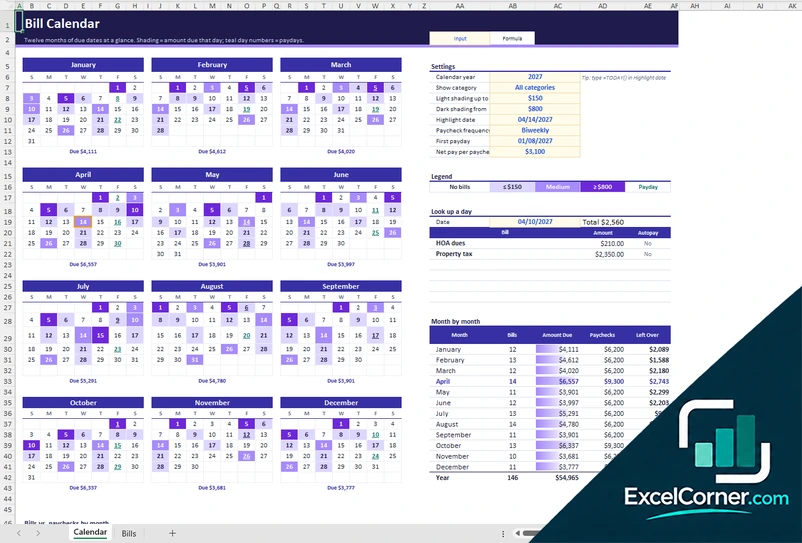
Anyone who only needs a calendar of due dates. A bill calendar is a better fit for that.
Which version is right for you?
All three are free, formula-driven Excel files. They are independent, so you can download more than one.
Version 1
Bill Paying Checklist
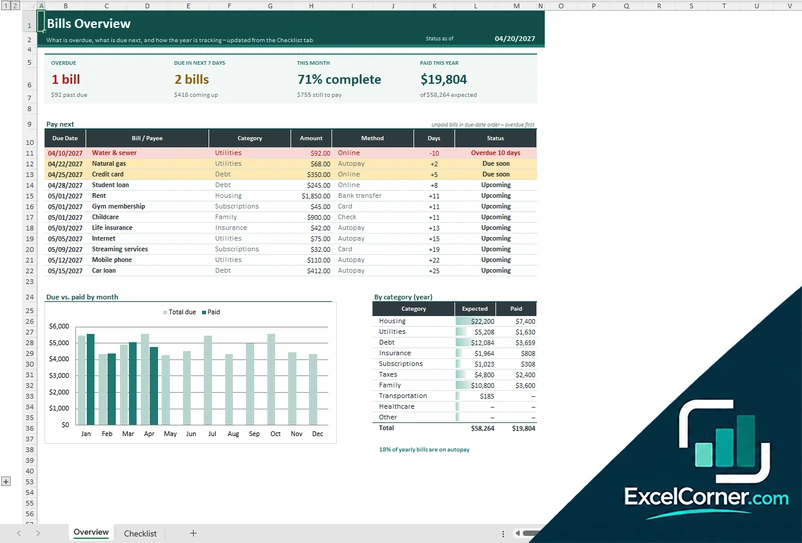
See what is overdue, what is due next and how the year is tracking. Type an x when a bill is paid and the colors update against the status date.
OverviewChecklist
.xlsx · 46 KB
Version 2
Bill Pay Planner
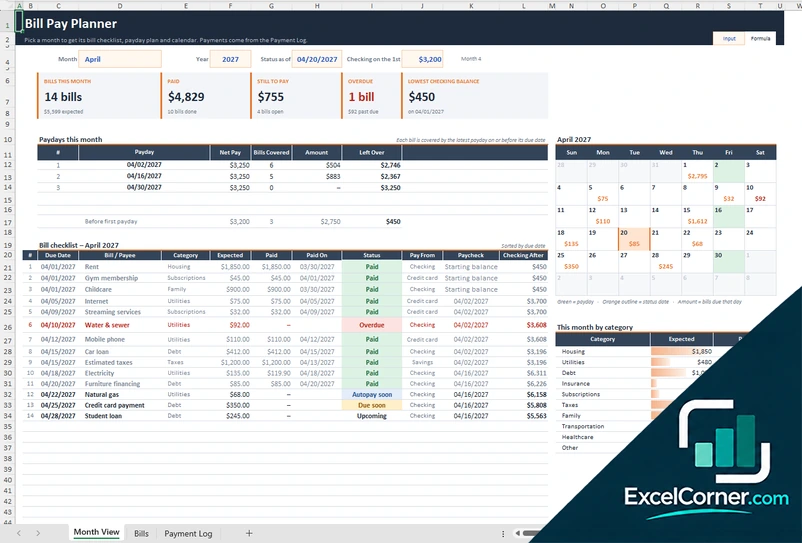
Pick a month and get its bill checklist, payday plan and calendar. Each bill is matched to a payday, and you see your checking balance after every payment.
Month ViewBillsPayment Log
.xlsx · 80 KB
Version 3
Bill Pay Center
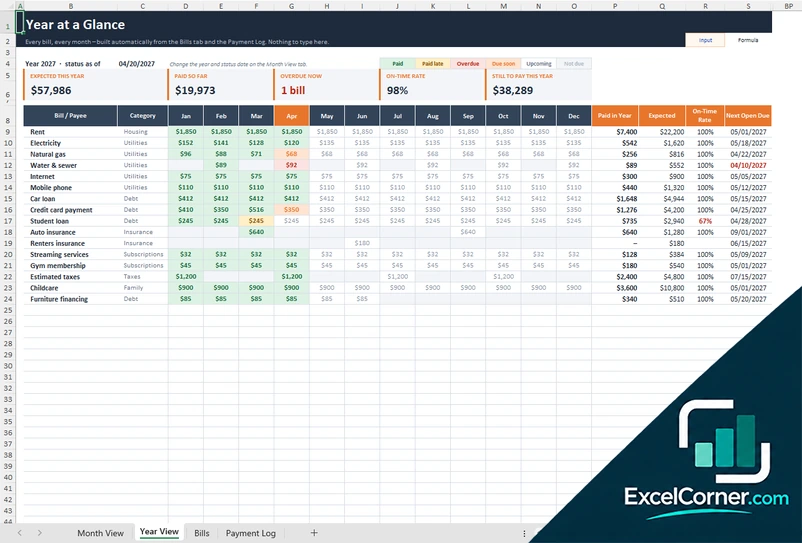
Everything in the planner plus a year-at-a-glance view: every bill for every month, what is paid, what is overdue and your on-time payment rate.
Month ViewYear ViewBillsPayment Log
.xlsx · 123 KB
What is inside the bill paying checklist Excel templates
Version 1: Bill Paying Checklist
On the Checklist sheet you list each bill once with its frequency, first month, due day, usual amount and payment method, such as autopay, online, bank transfer, card or check. You type an x when a bill is paid, or the exact amount paid, and colors show what is overdue, due soon, still to pay or not yet due. The Overview sheet shows what is overdue, what is due in the next 7 days, how much of this month is complete and how much you have paid this year. A pay-next list puts unpaid bills in due-date order with overdue bills first, and a chart and a category table compare what is due with what you have paid.
Version 2: Bill Pay Planner
The Month View sheet lets you pick a month and builds its bill checklist, sorted by due date, with the expected amount, the amount paid, the date paid and a status such as Paid, Overdue, Autopay soon, Due soon or Upcoming. It shows the paydays in the month with the bills each one covers and the money left over, a calendar of due amounts and paydays, a summary by category and your lowest checking balance. You set up each recurring bill once on the Bills sheet, with a fixed or variable amount, frequency, due dates, autopay and notes, plus your pay schedule, and you record payments in the Payment Log.
Version 3: Bill Pay Center
The Month View, Bills and Payment Log sheets work like the planner, with a monthly checklist, a payday plan, a calendar and your checking balance after each payment. The Year View sheet adds every bill for every month in one grid, built automatically from the Bills sheet and the Payment Log, with colors for paid, paid late, overdue, due soon, upcoming and not due. It shows the amount expected this year, what you have paid so far, what is overdue now, your on-time rate and what is still to pay, with the next open due date for each bill.
How to use the bill paying checklist Excel template
- Download
Pick the version you want and open it in Excel. - List your bills
Enter each bill once with its category, how often it repeats, its first due date, its usual amount and how you pay it. Fill in the input cells; formula cells calculate on their own. - Add your pay schedule
In the planner and the bill pay center, enter your pay frequency, your first payday and your net pay. - Check off your bills
Type an x or the exact amount when you pay a bill, or record it in the Payment Log. Colors show what is overdue or due soon.
Change the status date to see what is overdue or due soon on any day, and update your recurring bills at the start of each year.
Which bill paying checklist do you need?
| Bill Paying Checklist | Bill Pay Planner | Bill Pay Center | |
|---|---|---|---|
| View | An overview and a yearly checklist | A month at a time: checklist, paydays and calendar | The month view plus a year at a glance |
| Best for | A quick check-off list | Matching bills to paydays and your checking balance | Tracking on-time payments across the year |
| You enter | Bill details and an x when paid | Bills, a pay schedule and a payment log | Bills, a pay schedule and a payment log |
They are separate files, so you can use more than one.
Tips to pay your bills on time
- Set a due-soon window so bills change color a few days before they are due.
- Type the exact amount paid for variable bills such as electricity, not just an x.
- Mark autopay bills so you know which ones need no action but still deserve a check.
- Match each bill to a payday so you know which paycheck covers it.
- Look at overdue bills first; the overview lists them at the top.
- Check your on-time rate every few months to spot bills that are often late.
Frequently asked questions
Is this bill paying checklist Excel template free?
Yes. All three versions are free to download as .xlsx files. You do not need an account or an email address.
Which version should I choose?
Choose the Bill Paying Checklist (Version 1) if you want a quick overview and a simple check-off list. Choose the Bill Pay Planner (Version 2) if you want to pick a month and see its checklist, paydays and calendar with your checking balance. Choose the Bill Pay Center (Version 3) if you also want a year-at-a-glance view and your on-time payment rate. They are separate files, so you can use more than one.
How do I mark a bill as paid?
In the Bill Paying Checklist, type an x when a bill is paid, or enter the exact amount paid. In the planner and the bill pay center, record each payment in the Payment Log and the checklist updates automatically.
How are the due dates calculated?
Each bill has a frequency, a first month and a due day, such as monthly, every 2 months, quarterly, semiannual or annual. A due day that does not exist in a month, such as the 31st, moves to the last day of that month.
Can I see what is overdue or due soon?
Yes. The overview shows what is overdue, what is due in the next 7 days and which bill to pay next. Change the status date to see the picture on any other day.
Can I match my bills to my paydays?
Yes. In the planner and the bill pay center you enter your pay frequency, first payday and net pay. Each bill is matched to the latest payday on or before its due date, and you see the money left over and your checking balance after each payment.
Does the template work in Google Sheets?
The files are made for Microsoft Excel and use standard formulas with no macros. You can upload them to Google Drive and open them with Google Sheets, but some formatting or charts may look different.
Is my financial information stored online?
No. The templates are plain Excel files, so the numbers you type stay in your own file on your own computer.
More free personal finance templates
These templates are educational tools, not financial advice. Results depend on the information you enter. Excel is a trademark of Microsoft Corporation; Excel Corner is not affiliated with Microsoft.