
Home › Personal Finance › Conscious Spending Plan Template Excel
Previewing: Version 1 · Conscious Spending Plan. Pick another version on the right.
Instant download · No sign-up · No email
Use this free conscious spending plan template for Excel to give every dollar of your take-home pay a job: fixed costs, investments, savings and guilt-free spending with what is left. Pick the version that fits how you get paid.
Choose your version
- File
- .xlsx · 25 KB · 2 sheets
- Works with
- Microsoft Excel (.xlsx)
- Macros
- None · formulas only
- Price
- Free
Spend without guilt by giving every dollar a job
A conscious spending plan divides your take-home pay into four buckets: fixed costs, investments, savings and guilt-free spending. You pay for the things that matter first, then spend the rest on whatever you like without guilt, because the plan already covered the essentials.
These Excel templates do the math. Enter your take-home pay and your fixed costs, and the template shows what share of your pay goes to each bucket, compares it with target ranges and tells you how much you can spend guilt-free each week or day. One version also splits every paycheck so you can follow the plan on payday.
Best for
- People who want a simple plan instead of a detailed budget
- Couples combining two paychecks and shared goals
- Anyone paid weekly, biweekly or twice a month who wants to plan paycheck by paycheck
Maybe not for
Anyone who needs to track every purchase by category. A financial tracker is a better fit for that.
Which version is right for you?
All three are free, formula-driven Excel files. They are independent, so you can download more than one.
Version 1
Conscious Spending Plan
Give every dollar of take-home pay a job. See fixed costs, investments, savings and guilt-free spending against target ranges.
My PlanSavings Goals
.xlsx · 25 KB
Version 2
Conscious Spending Plan Pro
Build the plan from your real pay schedule and fixed costs, then carry it out paycheck by paycheck.
Plan OverviewPaycheck PlanYear SummarySetup
.xlsx · 70 KB
Version 3
Paycheck Spending Plan
Split every paycheck of the year into fixed costs, investments, savings and guilt-free money, sized to your real pay schedule.
Paycheck PlanYear SummarySetup
.xlsx · 57 KB
What is inside the conscious spending plan Excel templates
Version 1: Conscious Spending Plan
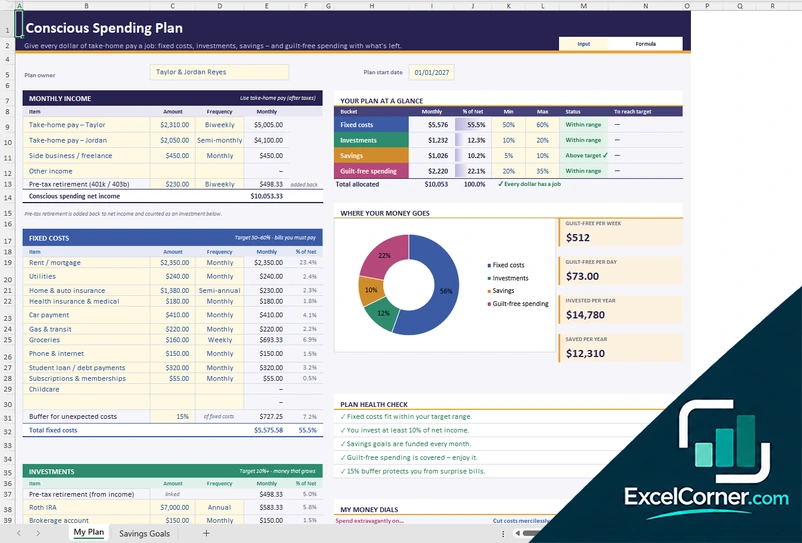
The My Plan sheet starts with your take-home pay for each person, with its frequency, plus side income and pre-tax retirement contributions, which are added back to net income and counted as an investment. You then list your fixed costs, with a buffer for unexpected costs, your investments and your savings, and the plan shows a status for each of the four buckets against its target range. It calculates your guilt-free spending per week and per day, what you invest and save per year, a plan health check and a donut chart of where your money goes. You can also write your money dials, the things you spend extravagantly on and the things you cut mercilessly on, and track your savings goals on the Savings Goals sheet.
Version 2: Conscious Spending Plan Pro
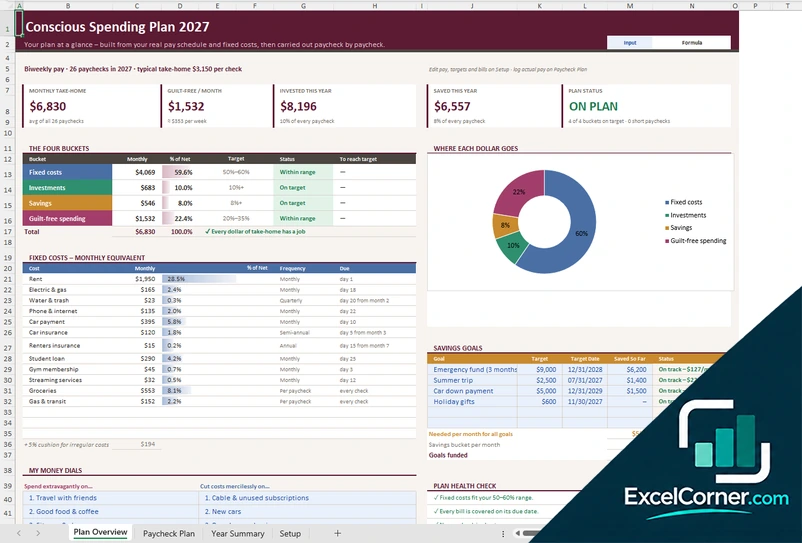
On the Setup sheet you enter your pay, targets and bills. The Plan Overview shows your monthly take-home pay, guilt-free spending per month, the amount invested and saved this year and a plan status, with the four buckets, a donut chart and a table of fixed costs converted to monthly equivalents with their frequency and due day. It tracks savings goals with target dates and the amount needed per month, lists your money dials and runs a plan health check. The Paycheck Plan sheet splits each paycheck and the Year Summary shows how each month was split.
Version 3: Paycheck Spending Plan
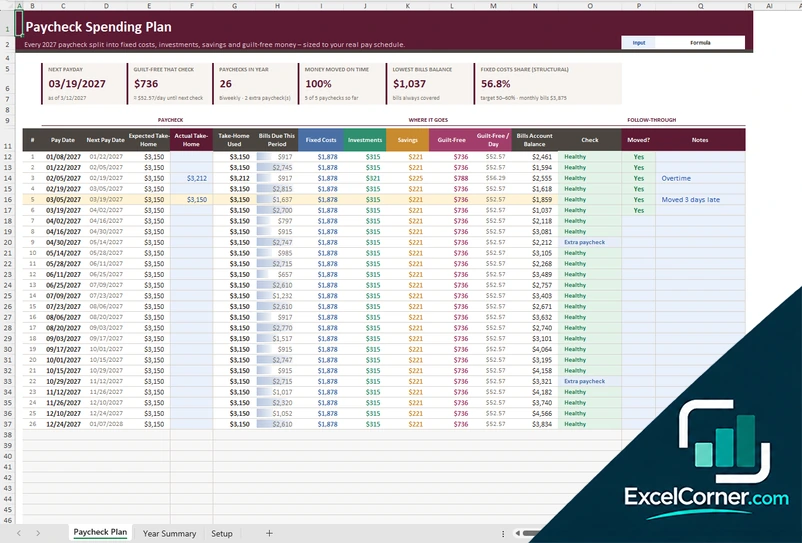
The Paycheck Plan lists every paycheck of the year with its pay date, expected and actual take-home pay, the bills due in that period and the amounts for fixed costs, investments, savings and guilt-free spending, with the guilt-free amount per day and a bills account balance that must stay above zero. You mark each paycheck as moved and add notes, and months with an extra paycheck are flagged. The Year Summary shows each month’s paychecks, take-home pay and the share going to each bucket against your targets, and the Setup sheet holds your pay schedule, targets and fixed costs.
How to use the conscious spending plan template in Excel
- Download
Pick the version you want and open it in Excel. - Enter your take-home pay
Add your pay after taxes with its frequency, plus any side income. Fill in the input cells; formula cells calculate on their own. - List your fixed costs
Add rent, utilities, insurance, debt payments and other bills, and the template converts each to a monthly amount. - Set your targets
Choose how much to invest and save, then read how much is left for guilt-free spending.
Check the plan health check and the status of each bucket, and adjust your fixed costs, investing or savings until every dollar has a job.
Which conscious spending plan do you need?
| Conscious Spending Plan | Conscious Spending Plan Pro | Paycheck Spending Plan | |
|---|---|---|---|
| View | One plan for your monthly income | The plan plus paycheck, year and setup sheets | Each paycheck split into the four buckets |
| Best for | A first plan, alone or as a couple | A plan based on your real pay schedule | Following the plan on every payday |
| You get | Buckets, targets, guilt-free spending and savings goals | Buckets, savings goals, paycheck plan and a year summary | A paycheck table and a monthly split by bucket |
They are separate files, so you can use more than one.
Tips to follow your conscious spending plan
- Use your take-home pay, after taxes, not your gross salary.
- Pay your fixed costs, invest and save first, then spend what is left without guilt.
- Aim to keep fixed costs between 50% and 60% of your take-home pay and to invest at least 10%.
- Choose a few things to spend extravagantly on and a few to cut ruthlessly, and write them in your money dials.
- Add a buffer for unexpected costs so a surprise bill does not break the plan.
- Move each paycheck on payday and check whether the money was moved on time.
Frequently asked questions
Is this conscious spending plan template for Excel free?
Yes. All three versions are free to download as .xlsx files. You do not need an account or an email address.
Which version should I choose?
Choose the Conscious Spending Plan (Version 1) for a simple monthly plan with savings goals. Choose the Conscious Spending Plan Pro (Version 2) if you want the plan built from your real pay schedule, with a paycheck plan and a year summary. Choose the Paycheck Spending Plan (Version 3) if you only want to split each paycheck into the four buckets. They are separate files, so you can use more than one.
What are the four buckets?
Fixed costs are the bills you must pay. Investments are money that grows, such as retirement accounts. Savings are for goals like an emergency fund or a trip. Guilt-free spending is what is left for anything you enjoy.
What are good target percentages?
The templates compare your plan with target ranges, for example 50% to 60% of take-home pay for fixed costs and at least 10% for investments. Treat them as guidelines and adjust them to your situation.
Can I use it if I am paid weekly or biweekly?
Yes. You enter each pay with its frequency, such as weekly, biweekly, semi-monthly or monthly, and the template converts it to a monthly amount. The Pro and Paycheck versions also plan each paycheck, including months with an extra paycheck.
Can two people use the same plan?
Yes. You can list a take-home pay for each person and any shared side income, and the plan combines them.
Does the template work in Google Sheets?
The files are made for Microsoft Excel and use standard formulas with no macros. You can upload them to Google Drive and open them with Google Sheets, but some formatting or charts may look different.
Is my financial information stored online?
No. The templates are plain Excel files, so the numbers you type stay in your own file on your own computer.
More free personal finance templates
These templates are educational tools, not financial advice. Results depend on the information you enter. Excel is a trademark of Microsoft Corporation; Excel Corner is not affiliated with Microsoft.