
Home › Calendars, Schedules & Productivity › One on One Meeting Template Excel
Previewing: Version 1 · One-on-One Meeting Form. Pick another version on the right.
Instant download · No sign-up · No email
Use these free one on one meeting templates for Excel to run better 1-on-1s between a manager and an employee. One version is a printable meeting form with a pulse check-in, one is a prep sheet with a topic backlog, goals and actions, and one tracks the 1-on-1 cadence for a whole team.
Choose your version
- File
- .xlsx · 18 KB · 1 sheets
- Works with
- Microsoft Excel (.xlsx)
- Macros
- None · formulas only
- Price
- Free
Run one on one meetings with an Excel spreadsheet
A one on one meeting is a regular conversation between a manager and a direct report. It works best when both sides add topics beforehand, the conversation follows an agenda, and the actions that come out of it are written down and reviewed at the next meeting. A spreadsheet is a simple way to keep all of that in one place, and to see patterns over time, such as mood, workload and open actions.
These 1-on-1 meeting templates for Excel cover three ways to work. The first is a single-sheet form for one meeting, with a pulse check-in, a shared agenda, wins and blockers and actions. The second is a prep sheet and playbook for one employee, with a ranked topic backlog, goals, an action tracker and a history of meetings. The third is a manager dashboard that tracks the cadence of 1-on-1s for every direct report, with the overdue meetings, the mood of the team and the cost of the time.
Best for
- Managers who hold regular 1-on-1s with their direct reports
- Employees who want to prepare topics and track goals and actions between meetings
- Team leads and HR partners who want to see whether 1-on-1s are happening on schedule
Maybe not for
Performance reviews or HR case files. These templates help you hold and follow up regular conversations, they do not replace a formal review process.
Which version is right for you?
All three are free, formula-driven Excel files with sample data you can replace. They are independent, so you can download more than one.
Version 1
One-on-One Meeting Form
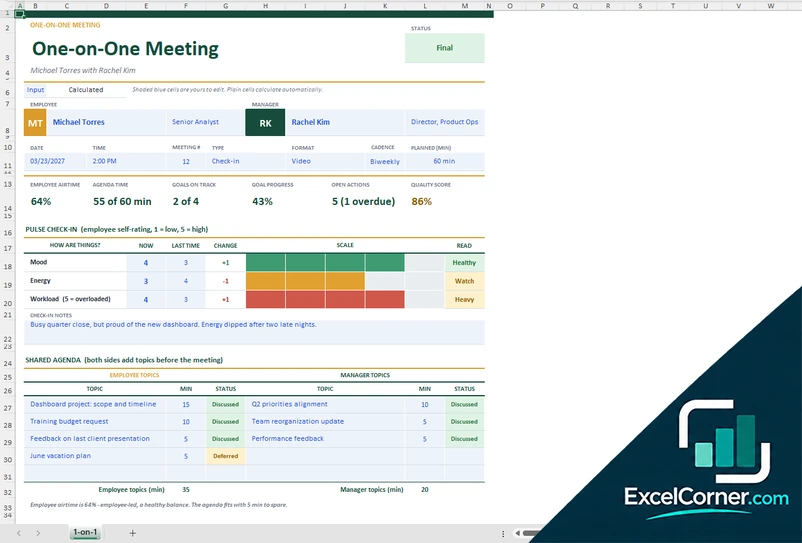
Fill in one printable sheet for each 1-on-1: pulse check-in, a shared agenda for both sides, wins and blockers, and actions.
1-on-1
.xlsx · 18 KB
Version 2
1:1 Prep Sheet and Playbook
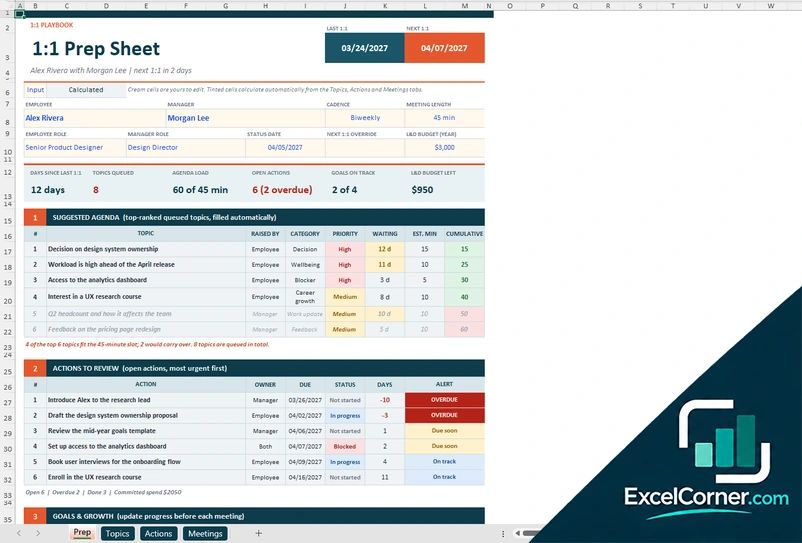
Prepare every 1-on-1 with a suggested agenda from the topic backlog, the actions that need review, goals and a pulse trend.
PrepTopicsActionsMeetings
.xlsx · 72 KB
Version 3
1:1 Cadence Tracker for Managers
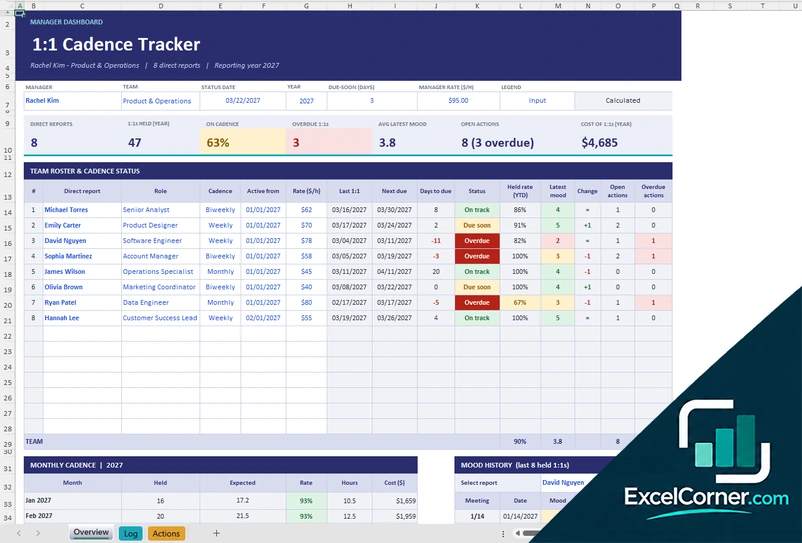
Log the 1-on-1s with each direct report and see who is on cadence, who is overdue, the team’s mood and the open actions.
OverviewLogActions
.xlsx · 63 KB
What is inside the one on one meeting Excel templates
Version 1: One-on-One Meeting Form
The sheet has the employee and the manager, the date, the time, the meeting number, the type, the format, the cadence and the planned minutes. It calculates the employee airtime, the agenda time, the goals on track, the goal progress, the open actions and a quality score. The pulse check-in records the mood, energy and workload on a scale of 1 to 5 and compares them with last time. A shared agenda has a list of topics for the employee and for the manager with the minutes and a status, followed by wins and recognition, blockers with a severity and the support needed, goals and growth, a feedback exchange, action items and a closing section with the next meeting and usefulness ratings.
Version 2: 1:1 Prep Sheet and Playbook
The Prep sheet is the page to open before the meeting. It shows the days since the last 1:1, the topics queued, the agenda load against the meeting length, the open actions, the goals on track and the learning budget left, then a suggested agenda made of the top-ranked topics, the actions to review with an alert, the goals with progress against what is expected, a pulse trend of the last six meetings and a box for your prep notes. The Topics sheet is a backlog that either side can add to, ranked by priority and days waiting. The Actions sheet tracks owners, due dates and status, and the Meetings sheet keeps the history with mood, energy, workload and usefulness ratings.
Version 3: 1:1 Cadence Tracker for Managers
The Log has one row for each scheduled 1-on-1 with the date, the direct report, the outcome (held, rescheduled or cancelled), the duration, the type, the mood, energy and workload ratings, the cost and the key topics. The Actions sheet lists the follow-ups with the owner, the due date and the status, and calculates the days to due, the health and the age. The Overview shows the number of direct reports, the 1:1s held in the year, the share on cadence, the overdue 1:1s, the latest mood, the open actions and the cost of the 1:1s, with a roster that gives the cadence status of each person, the monthly cadence and the mood history of a report you select, with two charts.
How to use a one on one meeting template in Excel
- Download
Pick the version you want and open it in Excel. The files come with sample meetings so you can see how they work. - Enter the people and the rhythm
Fill in the names of the employee and the manager, the cadence, such as weekly or biweekly, and the length of the meeting. - Add topics before the meeting
Both sides add their topics to the agenda or the topic backlog. In the prep sheet, the topics are ranked and fitted into the time available. - Hold the meeting and record it
Note the pulse check-in, what was discussed, the wins and the blockers, and write each action with an owner and a due date. - Follow up
Review the open actions at the start of the next meeting, and update the goals and the status date so the overdue flags stay current.
Type the TODAY function in the status date to keep the due and overdue flags live.
Which one on one meeting template do you need?
| One-on-One Meeting Form | 1:1 Prep Sheet and Playbook | 1:1 Cadence Tracker for Managers | |
|---|---|---|---|
| For | One meeting on one printable sheet | One employee over time | A whole team of direct reports |
| Best for | Managers and employees who want a simple form | Preparing each meeting with topics, goals and actions | Managers with several direct reports |
| Main outputs | Pulse check-in, agenda time, goals on track and quality score | Suggested agenda, action alerts, goals and pulse trend | On-cadence rate, overdue 1:1s, mood and action workload |
| Sheets | 1 | 4 | 3 |
| Charts | No | Yes | Yes |
They are separate files, so you can use more than one.
Tips for better one on one meetings
- Keep the meeting on the calendar at a fixed time and move it rather than cancel it. A canceled 1-on-1 tells people it is not important.
- Let the employee lead. Aim for the employee to speak for more than half of the time.
- Ask for topics before the meeting, and use a shared agenda so that both sides can prepare.
- Write down actions with an owner and a due date, and review them first at the next meeting.
- Check in on mood, energy and workload with the same questions each time, so you can see changes.
- Use the meeting to talk about growth and feedback, not only status updates.
Frequently asked questions
Is this one on one meeting template for Excel free?
Yes. All three versions are free to download as .xlsx files. You do not need an account or an email address.
Which version should I choose?
Choose the One-on-One Meeting Form (Version 1) for a single printable sheet. Choose the 1:1 Prep Sheet and Playbook (Version 2) to prepare each meeting for one employee with a topic backlog, goals and actions. Choose the 1:1 Cadence Tracker (Version 3) if you manage several people and want to see who is due for a 1-on-1.
What is the pulse check-in?
It is a quick self-rating by the employee of mood, energy and workload on a scale from 1 to 5. The template compares it with the last meeting and shows the change, so you can spot trends early.
How does the prep sheet rank the topics?
Each topic gets points for its priority and for the days it has been waiting, with a bonus for topics raised by the employee. The sheet suggests an agenda from the top-ranked topics that fit in the meeting time.
How often should I hold one on one meetings?
Weekly or every two weeks is common. The templates let you set the cadence for each person, and the cadence tracker shows who is overdue.
Can I track goals and actions between meetings?
Yes. The prep sheet and the cadence tracker keep a list of actions with owners, due dates and an alert, and the prep sheet also tracks goals with their progress.
Does the template work in Google Sheets?
The files are made for Microsoft Excel and use standard formulas with no macros. You can upload them to Google Drive and open them with Google Sheets, but some formatting or charts may look different.
Is my meeting information stored online?
No. The templates are plain Excel files, so the names, notes and ratings you type stay in your own file on your own computer.
More free meeting and productivity templates
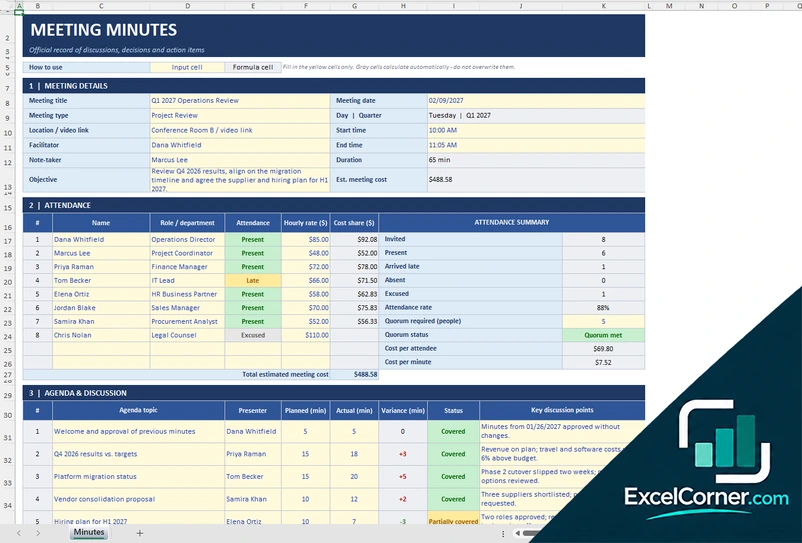
These templates are record-keeping and planning tools with sample data. They do not replace HR policies or legal advice. Handle personal notes about employees according to your organization’s rules. Excel is a trademark of Microsoft Corporation; Excel Corner is not affiliated with Microsoft.