
Home › Marketing, Sales & Customers › SEO Competitor Analysis Template Excel
Previewing: Version 1 · Full Competitive Review. Pick another version on the right.
Instant download · No sign-up · No email
Use these free SEO competitor analysis templates for Excel to see how your site compares with the sites that rank above you. One version is a full competitive review with a scorecard, a keyword gap and a backlink gap, one is a benchmark of your site against up to five competitors, and one is a keyword gap analysis with a matrix of up to 300 keywords.
Choose your version
- File
- .xlsx · 75 KB · 5 sheets
- Works with
- Microsoft Excel (.xlsx)
- Macros
- None · formulas only
- Price
- Free
Run an SEO competitor analysis in an Excel spreadsheet
An SEO competitor analysis answers a simple question: why do other sites rank above mine, and what can I do about it? To answer it you compare domains on authority, traffic, content and technical health, find the keywords where competitors rank and you do not, and find the sites that link to your competitors but not to you. A spreadsheet is a good tool for this because it can score the sites, rank the opportunities and keep track of the work that follows.
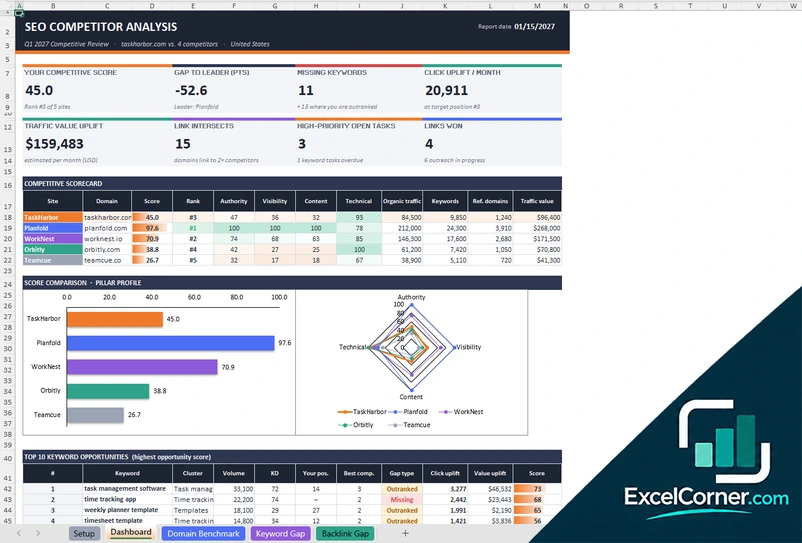
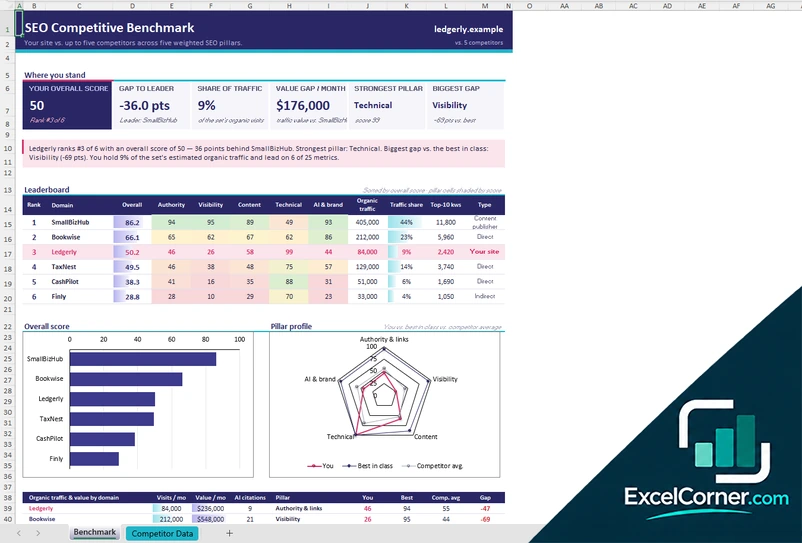
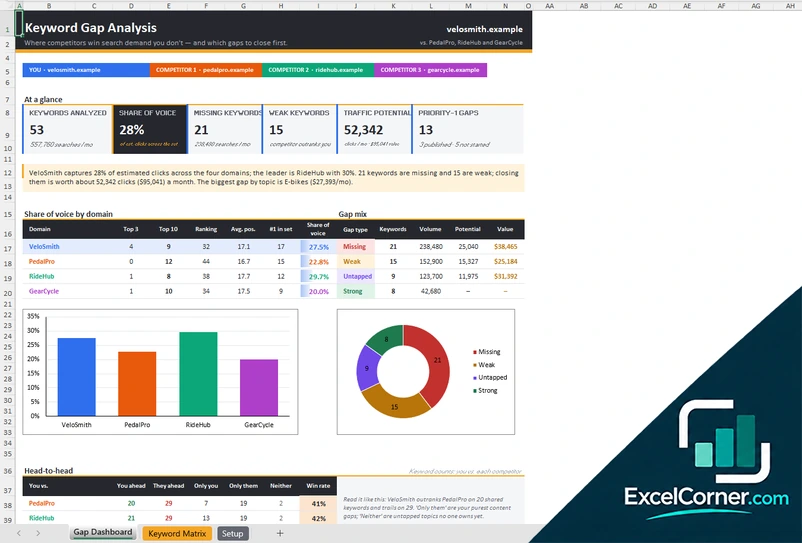
These Excel templates cover three ways to do it. The first is a full competitive review: it scores your site against four competitors, lists the keyword gaps with the clicks and the traffic value you could gain, and tracks the backlink targets and the outreach. The second is a competitive benchmark, which scores up to five competitors across five pillars and shows where you lead and where you trail. The third is a keyword gap analysis, with a matrix of up to 300 keywords and your position and your competitors’ positions for each, which gives a share of voice, a gap type and a priority.
Best for
- SEO specialists and agencies that review a client’s competitors and present the gaps
- In-house marketers who plan content and link building from the keywords that competitors win
- Website owners who want to see how their site compares with the top sites in their niche
Maybe not for
A paid SEO platform that collects competitor data for you. These templates do not collect data: you enter the figures from your own SEO tool, which can be a free or a paid plan.
Which version is right for you?
All three are free, formula-driven Excel files with sample data you can replace. They are independent, so you can download more than one.
Version 1
Full Competitive Review
Compare your site with four competitors, find the keyword and backlink gaps and track the actions with owners and due dates.
SetupDashboardDomain BenchmarkKeyword GapBacklink Gap
.xlsx · 75 KB
Version 2
Competitive Benchmark
Benchmark your site against up to five competitors on authority, visibility, content, technical health and AI and brand, and see where you lead.
BenchmarkCompetitor Data
.xlsx · 31 KB
Version 3
Keyword Gap Analysis
Compare keyword positions across your site and three competitors, label each gap and rank the content opportunities by potential.
Gap DashboardKeyword MatrixSetup
.xlsx · 139 KB
What is inside the SEO competitor analysis Excel templates
Version 1: Full Competitive Review
The Setup sheet holds the project details, the market and the data source, the sites that you compare, the click-through rate curve and the dropdown lists. On the Domain Benchmark sheet you enter raw metrics for each site, such as domain authority, monthly organic traffic, ranking keywords, keywords in the top 3 and the top 10, referring domains, backlinks, the estimated traffic value, indexed pages, new content per month, mobile load time, Core Web Vitals and the site health score. They are normalized to scores from 0 to 100, weighted, and grouped into pillars for authority, visibility, content and technical health. The Keyword Gap sheet lists keywords with your position and the best competitor position, labels the gap, and estimates the click uplift and the value uplift, with an opportunity score, a priority, a suggested action, an owner, a status and a due date. The Backlink Gap sheet lists referring domains that link to competitors and not to you, with a link score, a priority and an outreach status. The Dashboard shows the competitive score, the gap to the leader, the missing keywords, the click and value uplift, the link intersects and the open tasks, with charts.
Version 2: Competitive Benchmark
On the Competitor Data sheet you enter your domain and up to five competitors, the type of each one, the weight of the five pillars and a value for each domain and metric from your SEO tool. The Benchmark sheet turns this into a weighted score. It shows your overall score, the gap to the leader, your share of the traffic, the monthly value gap, your strongest pillar and your biggest pillar gap, with a written summary. A leaderboard ranks every domain with a score for each pillar, the organic traffic, the traffic share, the keywords in the top 10 and the type of competitor. Charts show the overall score, the pillar profile of your site against the best in class and the competitor average, and the organic traffic and value by domain. Two tables list the biggest gaps to close and the metrics where you lead, with your rank and the leader for each.
Version 3: Keyword Gap Analysis
The Keyword Matrix has one row for each keyword, up to 300, with the topic, the intent, the monthly volume, the relevance and your ranking URL, and the Google position for your site and three competitors. It calculates the best competitor position and the leader, how many competitors rank, the gap type of missing, weak, untapped or strong, your clicks, the leader’s clicks, the traffic potential, the value per month, an opportunity score, a priority and a recommended action, and has columns for the owner and the status. The Gap Dashboard shows the keywords analyzed, your share of voice, the missing and weak keywords, the traffic potential and the priority-1 gaps. It also shows the share of voice by domain, the mix of gap types, a head-to-head table with each competitor, and a topic gap map with the share of voice for each topic. The Setup sheet holds the domains, the weights for volume, relevance, ease and intent, the value of each intent, the click-through rate curve and the topics.
How to use an SEO competitor analysis template in Excel
- Download
Pick the version you want and open it in Excel. The files have sample data so you can see how each analysis works. - Add your site and the competitors
On the Setup sheet, enter your domain and your competitors’ domains. Choose the competitors that rank for your main keywords, not only the ones you know. - Enter the data
Type or paste the metrics from your SEO tool, such as domain authority, organic traffic, keywords and referring domains, and the positions for each keyword. - Set the weights
Adjust the weights of the pillars, the click-through rate curve and the value of each search intent to match your goals. - Review the gaps and act
Read the scorecard and the gaps, pick the priorities, assign an owner and a due date, and update the status as the work is done.
Replace the sample domains and keywords with your own. The scores, the gaps, the priorities and the charts update on their own.
Which SEO competitor analysis template do you need?
| Full Competitive Review | Competitive Benchmark | Keyword Gap Analysis | |
|---|---|---|---|
| For | Scorecard, keyword gap and backlink gap | Your site against up to five competitors | Keywords where competitors outrank you |
| Best for | A complete review with an action plan | A quick view of where you lead and trail | Planning content from keyword gaps |
| Main outputs | Competitive score, gap to leader, click uplift, traffic value, link targets | Overall score, rank, pillar profile, share of traffic, biggest gaps | Share of voice, gap types, traffic potential, priorities |
| Sheets | 5 | 2 | 3 |
| Charts | Yes | Yes | Yes |
They are separate files, so you can use more than one.
Tips for competitor analysis in SEO
- Choose competitors by the search results for your main keywords, since they may not be the companies you compete with in the market.
- Compare each site on the same metrics from the same tool and the same date.
- Look at the keywords where two or more competitors rank and you do not, because they point to topics you are missing.
- Rank the gaps by the clicks you could gain at a realistic target position, not at position one.
- Check the search intent of each keyword before you plan a page for it.
- Look for the sites that link to several competitors and not to you, because they are your best link targets.
- Repeat the analysis every quarter and keep the old versions to see the progress.
Frequently asked questions
Are these SEO competitor analysis templates for Excel free?
Yes. All three versions are free to download as .xlsx files. You do not need an account or an email address.
Which version should I choose?
Choose the Full Competitive Review (Version 1) for a complete analysis with keyword and backlink gaps and an action plan. Choose the Competitive Benchmark (Version 2) for a quick score of your site against up to five competitors. Choose the Keyword Gap Analysis (Version 3) if your main goal is to find the keywords that competitors win and you do not.
What data do I need for an SEO competitor analysis?
You need metrics for each domain, such as domain authority, monthly organic traffic, ranking keywords, referring domains and backlinks, and the Google positions of your keywords for each site. You can get them from a free or paid SEO tool and type or paste them in.
What is a keyword gap?
A keyword gap is a keyword for which your competitors rank and you do not, or rank much lower. The templates label each keyword as missing, weak, untapped or strong, and estimate the clicks and the traffic value you could gain at a target position.
What is a backlink gap?
A backlink gap is the list of sites that link to your competitors but not to you. Version 1 lists these referring domains with their authority, the source type and how many competitors they link to, and has a tracker for the outreach, with the status, the first contact and the follow-up date.
How is the competitive score calculated?
Each metric is turned into a score from 0 to 100, where the best site gets 100. Each metric has a weight that you can change, and the weighted scores give an overall score and a rank. Metrics where a lower value is better, such as load time, are scored the other way around.
Can I use it for local SEO?
Yes. Enter local competitors and the keywords for your area, and set the market or location on the Setup sheet. The scoring and the gap analysis work in the same way.
Does the template work in Google Sheets?
The files are made for Microsoft Excel and use standard formulas with no macros. You can upload them to Google Drive and open them with Google Sheets, but some formatting or charts may look different.
Is my information stored online?
No. The templates are plain Excel files, so the names, numbers and dates you type stay in your own file on your own computer.
These templates are analysis tools with made-up sample data. The scores, the traffic value and the click estimates depend on the data you enter from your own SEO tools, and they are not a guarantee of results in search. Excel is a trademark of Microsoft Corporation; Excel Corner is not affiliated with Microsoft.