
Home › Marketing, Sales & Customers › Website Audit Template Excel
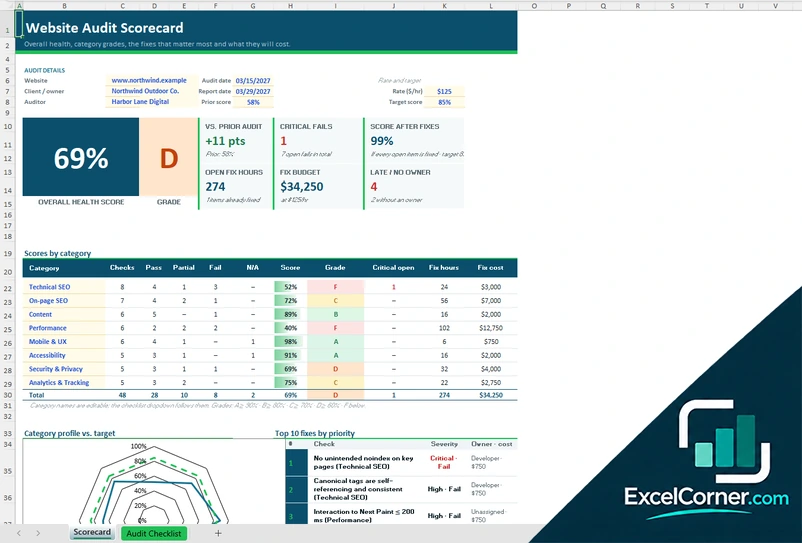
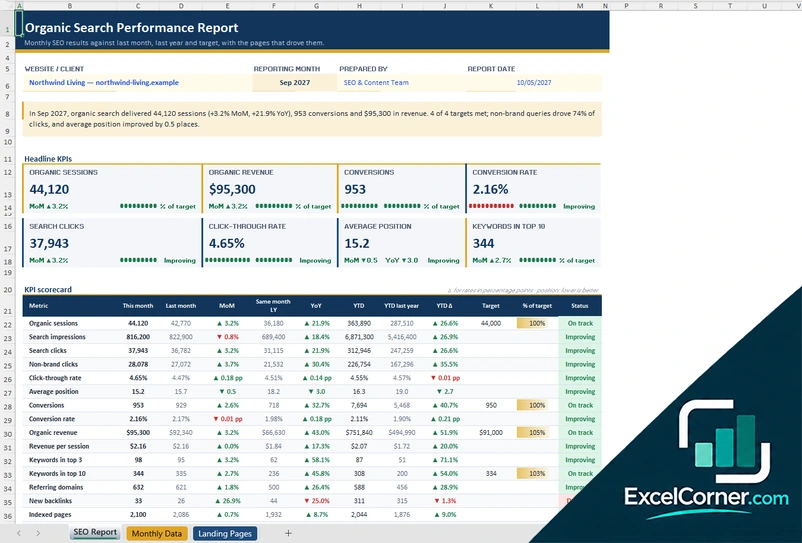
Previewing: Version 1 · Scorecard and Checklist. Pick another version on the right.
Instant download · No sign-up · No email
Use these free website audit templates for Excel to check a site, score its health and plan the fixes. One version is a scorecard with an audit checklist, one is a page-by-page audit of content and technical issues, and one is an executive summary with a findings list and a 16-week remediation roadmap.
Choose your version
- File
- .xlsx · 42 KB · 2 sheets
- Works with
- Microsoft Excel (.xlsx)
- Macros
- None · formulas only
- Price
- Free
Audit a website in an Excel spreadsheet
A website audit looks at a site from several sides: technical SEO, on-page SEO, content, speed, mobile use, accessibility and tracking. The hard part is not finding problems. It is deciding which ones to fix first, who will fix them and what the work is worth. A spreadsheet is a good place for that, because it can score each check, add up the hours and the cost, and sort the findings by priority.
These Excel templates cover three stages of an audit. The first is a scorecard with a checklist: you rate each check as pass, partial or fail, and the workbook gives an overall health score, a grade and a score for each category, with the fix hours and the cost. The second is a page-by-page audit, where you paste one row for each URL from a crawler and the thresholds flag issues such as a missing title, a thin page or a slow page. The third is an executive summary, where each finding has a business case, an owner and a place on a 16-week roadmap, and the summary shows the value at stake, the cost to fix and the return.
Best for
- SEO specialists and agencies that audit client websites and present the results
- Marketing and content teams that check pages for thin content, missing titles and metadata
- Website owners who want a scored checklist and a plan to fix the problems in order
Maybe not for
A crawler or an SEO platform that scans a site for you. These templates do not crawl a website: you enter the results from your own tools.
Which version is right for you?
All three are free, formula-driven Excel files with sample data you can replace. They are independent, so you can download more than one.
Version 1
Scorecard and Checklist
Score a website with a checklist of checks by category, and see the health score, the grade, the top fixes and the cost.
ScorecardAudit Checklist
.xlsx · 42 KB
Version 2
Page-by-Page Audit
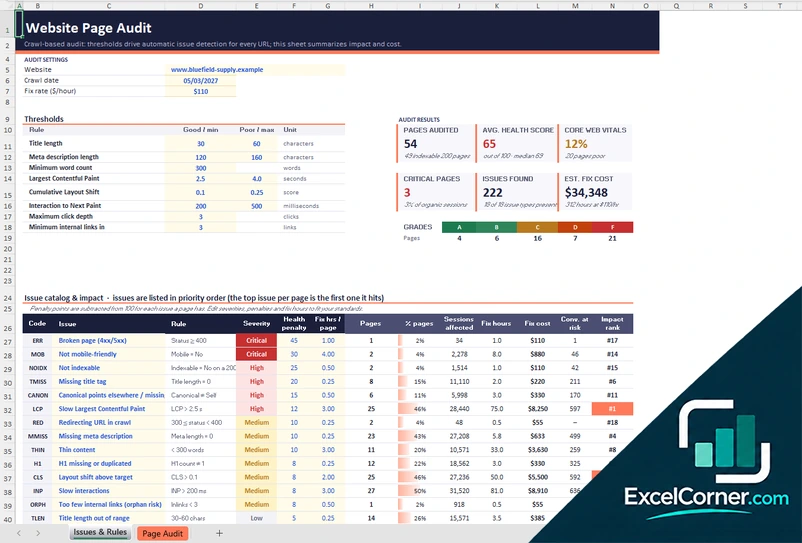
Audit every URL from a crawl, with thresholds for titles, metadata, word count and speed, and a health score and grade for each page.
Issues & RulesPage Audit
.xlsx · 99 KB
Version 3
Executive Summary and Roadmap
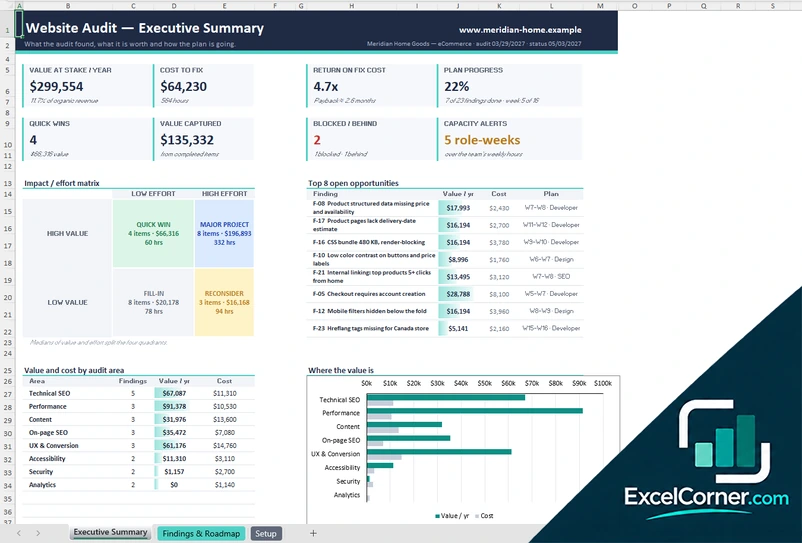
Turn audit findings into a plan with value, cost, owners and a 16-week roadmap, and report the value at stake and the progress.
Executive SummaryFindings & RoadmapSetup
.xlsx · 40 KB
What is inside the website audit Excel templates
Version 1: Scorecard and Checklist
The Audit Checklist lists the checks by category, such as technical SEO, on-page SEO, content, performance, mobile and UX, accessibility, security and privacy, and analytics and tracking. For each check it shows what good looks like and a severity of critical, high, medium or low. You enter the result as pass, partial, fail or not applicable, the evidence, the effort, the owner, the fix status and a target date. The workbook calculates the points, the priority, the rank, the fix hours, the cost and an alert. The Scorecard shows the overall health score and grade, the change from the prior audit, the critical fails, the score after the fixes, the open fix hours, the fix budget and the items that are overdue or have no owner. It also shows the scores by category with the passes, partials and fails, a radar chart of the category profile against the target and the ten fixes with the highest priority.
Version 2: Page-by-Page Audit
The Page Audit sheet has one row for each URL, with the page type, the status code, whether it is indexable, the canonical, the title and meta description length, the word count, the click depth, the internal links, the images without alt text, the Largest Contentful Paint, the Interaction to Next Paint, mobile friendliness, schema, and the sessions and conversions per month. Issue flags light up when a rule is triggered, such as noindex, a missing title, a canonical that points elsewhere, a thin page, an orphan page or a title that is too long. Each page gets an issue count, a health score, a grade, a Core Web Vitals result, its top issue and a priority. The Issues & Rules sheet holds the audit settings, the thresholds that you can edit, an issue catalog with the severity, the penalty points, the pages affected, the sessions affected, the fix hours and the cost, and a summary with the pages audited, the average health score, the Core Web Vitals pass rate, the critical pages, the issues found and the estimated cost, with a distribution of grades.
Version 3: Executive Summary and Roadmap
The Findings & Roadmap sheet lists each finding with its area, the finding, the recommendation, the traffic affected, the expected uplift, the confidence, the effort in hours, the owner, the start week, the length, the dependency and the status. The workbook calculates the value per year, the cost, a score, a quadrant in the impact and effort matrix, a rank and the end week, and draws a 16-week roadmap with a color for each owner. The Executive Summary shows the value at stake per year, the cost to fix, the return on the fix cost, the plan progress, the quick wins, the value captured, the findings that are blocked or behind and the capacity alerts. It also shows the impact and effort matrix with four quadrants, the eight top open opportunities, the value and cost by audit area, and a table of KPIs with the baseline, the target and the latest value. The Setup sheet holds the audit details, the roadmap start date, the revenue assumptions for the organic channel, the team rates and weekly capacity and the audit areas.
How to use a website audit template in Excel
- Download
Pick the version you want and open it in Excel. The files have sample audits so you can see how the scores and the charts work. - Enter the audit details
Write the website, the audit date, the client or owner and the hourly rate for fixes. In the executive summary, also add the monthly organic sessions, the conversion rate and the value of a conversion. - Rate the checks or paste the crawl
Rate each check in the checklist as pass, partial or fail with the evidence, or paste one row for each URL from your crawler or analytics export. - Assign the fixes
Add an owner, an effort, a status and a date to each finding, or place the finding on the 16-week roadmap. - Review and report
Read the health score, the priorities and the cost. Update the status as work is finished and keep the summary for your client or your team.
Replace the sample site and findings with your own. The scores, the priorities and the charts update on their own.
Which website audit template do you need?
| Scorecard and Checklist | Page-by-Page Audit | Executive Summary and Roadmap | |
|---|---|---|---|
| For | A scored checklist of the whole site | Every URL checked against thresholds | Findings with a business case and a plan |
| Best for | Quick audits and client reports | Content and technical SEO reviews | Presenting priorities and the return on fixes |
| Main outputs | Health score, grade, scores by category, fix hours and cost | Health score by page, issue counts, Core Web Vitals pass rate, fix cost | Value at stake, cost to fix, return, plan progress, roadmap |
| Sheets | 2 | 2 | 3 |
| Charts | Yes | Yes | Yes |
They are separate files, so you can use more than one.
Tips for a website audit
- Start with checks that block search engines, such as noindex tags, robots.txt rules and broken canonical tags.
- Rate each check with evidence, so that the person who fixes it can find it.
- Give every finding one owner and an effort in hours, so the cost of the plan is visible.
- Fix critical issues on pages that bring traffic first, before small issues on pages that nobody visits.
- Check Core Web Vitals on mobile, because that is where most visits come from.
- Run the audit again after the fixes and compare the score with the previous audit.
- Keep the thresholds for title length, meta description length and word count in one place, and change them to match your standards.
Frequently asked questions
Are these website audit templates for Excel free?
Yes. All three versions are free to download as .xlsx files. You do not need an account or an email address.
Which version should I choose?
Choose the Scorecard and Checklist (Version 1) for a scored audit with grades by category. Choose the Page-by-Page Audit (Version 2) if you have a crawl export and want to find issues on each URL. Choose the Executive Summary and Roadmap (Version 3) to present the findings with their value, their cost and a 16-week plan.
Can I use it as a website content audit template?
Yes. Version 2 checks each page for title and meta description length, word count, click depth, internal links, images without alt text and indexing, so it works for a content audit as well as a technical one. Version 1 also has a Content category in its checklist.
How is the website health score calculated?
In Version 1, each check has a severity weight and a result of pass, partial or fail, and the score is the share of the points earned. In Version 2, each page starts at 100 and loses penalty points for each issue it has, and the penalties depend on how serious the issue is.
Does the template crawl my website?
No. It does not connect to your site. You enter the results of your own checks, or paste an export from a crawler, Google Search Console or an analytics tool, and the workbook scores them.
How does it estimate the cost and the value of the fixes?
Each finding has an effort in hours, and the workbook multiplies it by your hourly rate. In the executive summary, the value is estimated from your organic revenue, the traffic affected, the expected uplift and your confidence. These are estimates, so treat them as a way to rank the work.
What is in the 16-week roadmap?
Each finding has an owner, a start week, a length in weeks and, if needed, a dependency. The roadmap draws the plan as a timeline, marks the findings that are done or blocked and warns when the hours of a team exceed its weekly capacity.
Does the template work in Google Sheets?
The files are made for Microsoft Excel and use standard formulas with no macros. You can upload them to Google Drive and open them with Google Sheets, but some formatting or charts may look different.
Is my information stored online?
No. The templates are plain Excel files, so the names, numbers and dates you type stay in your own file on your own computer.
These templates are audit tools with made-up sample data. The scores, costs and values are estimates that depend on the numbers you enter, and they are not a guarantee of results in search or sales. Excel is a trademark of Microsoft Corporation; Excel Corner is not affiliated with Microsoft.