
Home › Marketing, Sales & Customers › SEO Report Excel Template
Previewing: Version 1 · Monthly SEO Report. Pick another version on the right.
Instant download · No sign-up · No email
Use these free SEO report templates for Excel to show what organic search delivered and what to do next. One version is a monthly SEO report with a KPI scorecard, one is a weekly keyword ranking report with visibility and share of voice, and one is a performance review built from Search Console data with segments and an action plan.
Choose your version
- File
- .xlsx · 34 KB · 3 sheets
- Works with
- Microsoft Excel (.xlsx)
- Macros
- None · formulas only
- Price
- Free
Build an SEO report in an Excel spreadsheet
An SEO report has to do two things. It has to show what happened in organic search, such as clicks, impressions, rankings and conversions, and it has to say why it happened and what to do next. Most reports fail on the second part, because the numbers are pasted in a table and nobody explains them. A spreadsheet can write the summary for you, compare each metric with last month, last year and the target, and rank the opportunities.
These Excel templates cover three ways to report on SEO. The first is a monthly SEO report: you type the figures from your SEO tools once a month, and the report compares the month with the last month, the same month last year and your targets. The second is a keyword ranking report, where you enter weekly positions for each keyword and the workbook estimates the visibility, the clicks and the traffic value, and compares your share of voice with two competitors. The third is a performance review for two periods, built from Search Console data by URL, which explains the change in clicks by impressions and click-through rate, groups pages into segments and lists the pages that can grow.
Best for
- SEO specialists and agencies that send a monthly or weekly report to clients or managers
- In-house marketers who track keyword rankings and the traffic that they bring
- Website owners who want to understand why organic traffic went up or down
Maybe not for
A tool that pulls the data from Google Search Console, Google Analytics or a rank tracker by itself. These templates are Excel files in which you paste or type the data.
Which version is right for you?
All three are free, formula-driven Excel files with sample data you can replace. They are independent, so you can download more than one.
Version 1
Monthly SEO Report
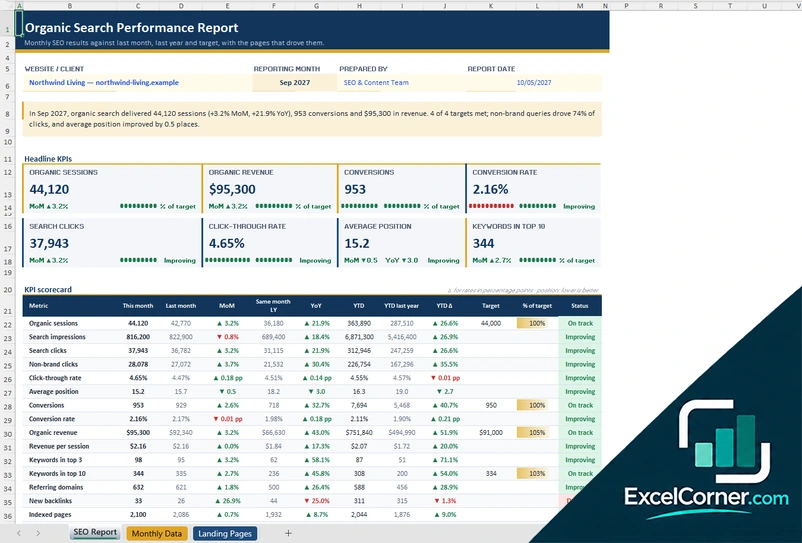
Report organic search results each month, with headline KPIs, comparisons with last month and last year, targets and the pages that drove traffic.
SEO ReportMonthly DataLanding Pages
.xlsx · 34 KB
Version 2
Keyword Ranking Report
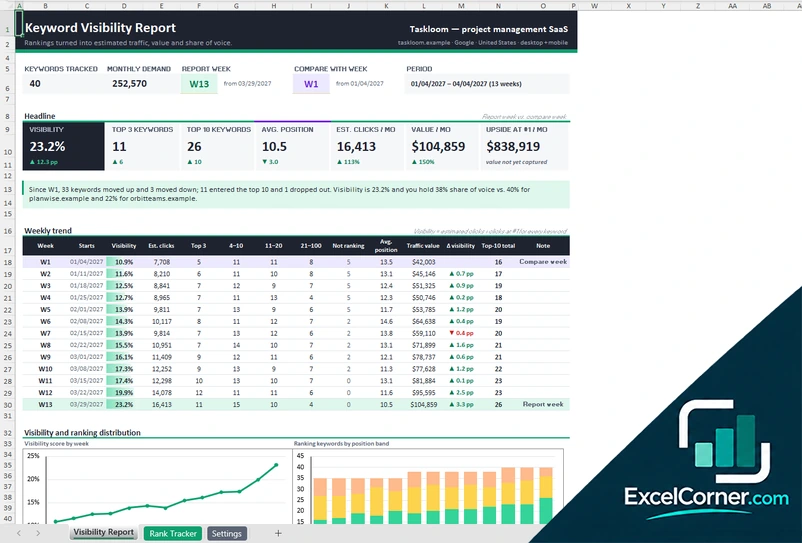
Track up to 50 keywords week by week and see the visibility score, the estimated clicks and value, and your share of voice against competitors.
Visibility ReportRank TrackerSettings
.xlsx · 59 KB
Version 3
Search Console Performance Review
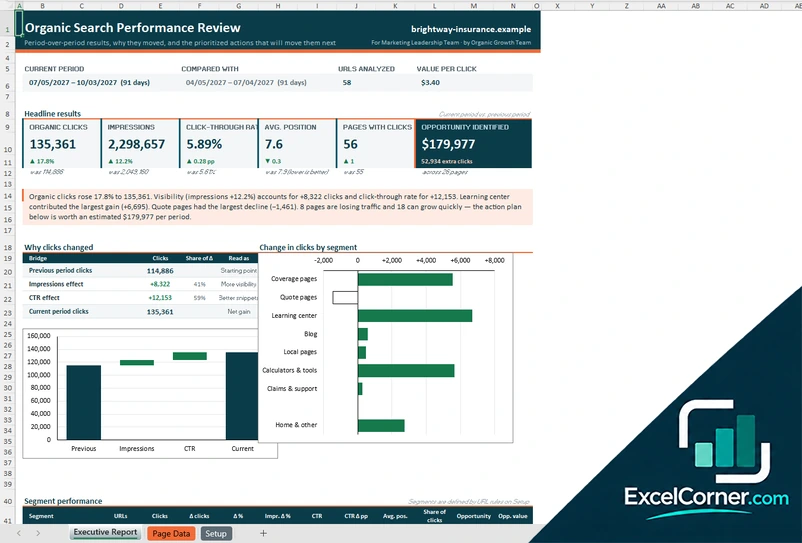
Paste clicks and impressions by URL for two periods and see why clicks changed, which segments moved and which pages offer the biggest opportunity.
Executive ReportPage DataSetup
.xlsx · 102 KB
What is inside the SEO report Excel templates
Version 1: Monthly SEO Report
The Monthly Data sheet takes one row for each month, for the prior year and the current year, with the impressions, the clicks, the brand clicks, the average position, the organic sessions, the conversions, the revenue, the backlinks, the referring domains, the Core Web Vitals pass rate, the referrals from AI assistants and the keywords in the top 10, plus monthly targets. The SEO Report sheet turns this into a one-page report for the month you pick. It shows a summary sentence, the headline KPIs for organic sessions, revenue, conversions, conversion rate, search clicks, click-through rate, average position and keywords in the top 10, each against the last month, the same month last year and the target, and a KPI scorecard with the change from the previous month, the year-over-year change, the year to date and a status. The Landing Pages sheet lists the organic sessions by landing page and month, with the page type, and shows the share of organic traffic and the sessions for the year to date. Two charts show the trend.
Version 2: Keyword Ranking Report
The Rank Tracker lists each keyword with its cluster, intent, monthly search volume, cost per click, target URL and priority, and takes the Google position for each of 13 weeks, shown as a heat map. It calculates the current position, the change against the week you compare, the position band, the estimated clicks, the traffic value, the upside at position 1 and a label for each move. The Visibility Report lets you pick the report week and the week to compare with and shows the keywords tracked, the search demand, the visibility score, the keywords in the top 3 and the top 10, the average position, the estimated clicks per month, the traffic value and the upside, with a summary of what moved. It also shows a weekly trend table, charts of the visibility score and of the keywords by position band, the share of voice against two competitors and the biggest gainers and losers. The Settings sheet holds the project, the domains, the weekly calendar, the click-through rate curve and the topic clusters.
Version 3: Search Console Performance Review
The Page Data sheet takes one row for each URL, up to 200, with the clicks, the impressions and the average position for the current period and the previous period, and notes. It calculates the change in clicks, the impressions effect and the click-through rate effect, the segment of each URL from rules you define, a flag for pages in striking distance or with a low click-through rate, the clicks that you could gain, their value and a suggested action. The Executive Report summarizes the current period against the previous one with the organic clicks, the impressions, the click-through rate, the average position, the pages with clicks and the opportunity identified, a written summary, a bridge chart that shows how impressions and click-through rate explain the change in clicks, a chart of the change by segment, a table of segment performance and the top pages to work on with an action for each. The Setup sheet holds the website, the two periods, the value per click, the thresholds, the segment rules and the click-through rate benchmark by position.
How to use an SEO report template in Excel
- Download
Pick the version you want and open it in Excel. The files have sample data so you can see how each report looks. - Set up the project
Enter the website or the client, the reporting period or the report week, and the settings, such as the click-through rate curve and the value of a click. - Add your data
Type or paste the monthly figures, the weekly keyword positions, or the clicks and impressions for each URL from Google Search Console or your SEO tool. - Compare and set targets
Add your targets, the previous period and the competitors where the template asks for them. - Read the report
Read the summary, the scorecard and the charts. Print the report or save it as a PDF to send it.
Replace the sample site and data with your own. The summary text, the comparisons and the charts update on their own.
Which SEO report template do you need?
| Monthly SEO Report | Keyword Ranking Report | Search Console Performance Review | |
|---|---|---|---|
| For | A monthly report with KPIs and targets | Weekly keyword positions and visibility | Two periods compared by URL and segment |
| Best for | Clients and managers who want a monthly update | Tracking keywords and competitors | Finding the pages that gained, lost or can grow |
| Main outputs | Sessions, revenue, conversions, CTR, position, status vs. target | Visibility, estimated clicks, traffic value, share of voice, upside | Clicks change, bridge by impressions and CTR, segments, opportunity value |
| Sheets | 3 | 3 | 3 |
| Charts | Yes | Yes | Yes |
They are separate files, so you can use more than one.
Tips for SEO reports
- Report the same metrics in the same order every month, so that trends are easy to see.
- Compare each metric with the previous month and with the same month last year, because many sites have seasons.
- Separate brand clicks from non-brand clicks, since non-brand clicks show how well your pages win new visitors.
- Write one sentence about what changed and why, before you show any table.
- Track a fixed list of keywords and group them by topic or intent.
- Look at pages with many impressions and a low click-through rate, because a better title and description can bring clicks quickly.
- End the report with the actions for next month and an owner for each.
Frequently asked questions
Are these SEO report templates for Excel free?
Yes. All three versions are free to download as .xlsx files. You do not need an account or an email address.
Which version should I choose?
Choose the Monthly SEO Report (Version 1) for a client or management report with KPIs against targets. Choose the Keyword Ranking Report (Version 2) to follow weekly rankings, visibility and share of voice. Choose the Search Console Performance Review (Version 3) to compare two periods by URL and find the pages to improve.
Can I use it as a monthly SEO report template?
Yes. Version 1 is built for a monthly report. You enter the figures for each month, and the report compares the month with the previous month, with the same month last year, with the year to date and with your targets, and it writes a summary sentence.
What is an SEO keyword ranking report?
It shows where a list of keywords ranks in Google over time. Version 2 takes a weekly position for each keyword, counts the keywords in the top 3 and the top 10, estimates the clicks with a click-through rate curve, converts them into a traffic value with the cost per click and shows your share of voice against two competitors.
What data do I need for the performance review?
You need the clicks, the impressions and the average position for each URL, for the current period and the previous one. You can export it from Google Search Console and paste it into the Page Data sheet, which has room for 200 URLs.
How does it explain why clicks changed?
The performance review splits the change in clicks into an effect from impressions and an effect from the click-through rate, and shows the result as a bridge chart. It also shows the change by segment, which you define with rules on the URL, such as /blog/ or /product/.
Does it pull the data from Google automatically?
No. The templates do not connect to Google or to any SEO tool. You paste or type the data, and the workbook does the calculations, the comparisons and the charts.
Does the template work in Google Sheets?
The files are made for Microsoft Excel and use standard formulas with no macros. You can upload them to Google Drive and open them with Google Sheets, but some formatting or charts may look different.
Is my information stored online?
No. The templates are plain Excel files, so the names, numbers and dates you type stay in your own file on your own computer.
These templates are reporting tools with made-up sample data. The traffic value, the click estimates and the opportunities depend on the numbers and the CTR curve you enter, and they are not a guarantee of results in search. Excel is a trademark of Microsoft Corporation; Excel Corner is not affiliated with Microsoft.