
Home › Personal Finance › Roommate Expenses Spreadsheet Template Excel
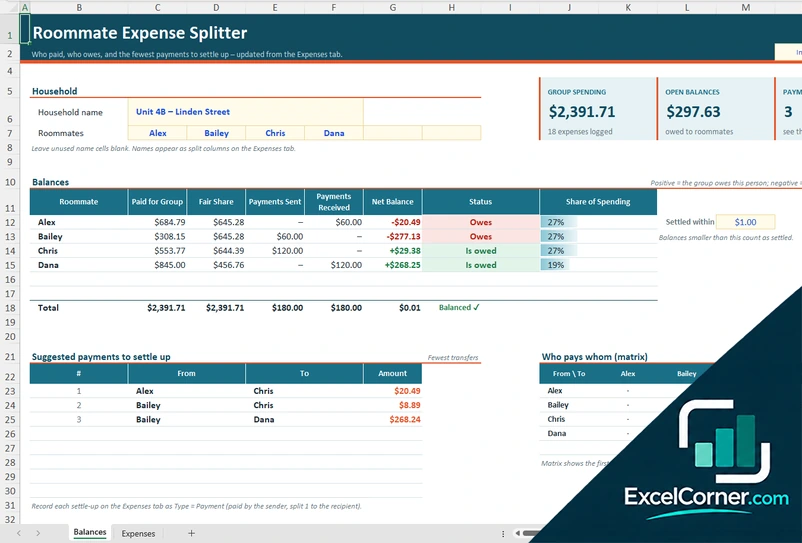
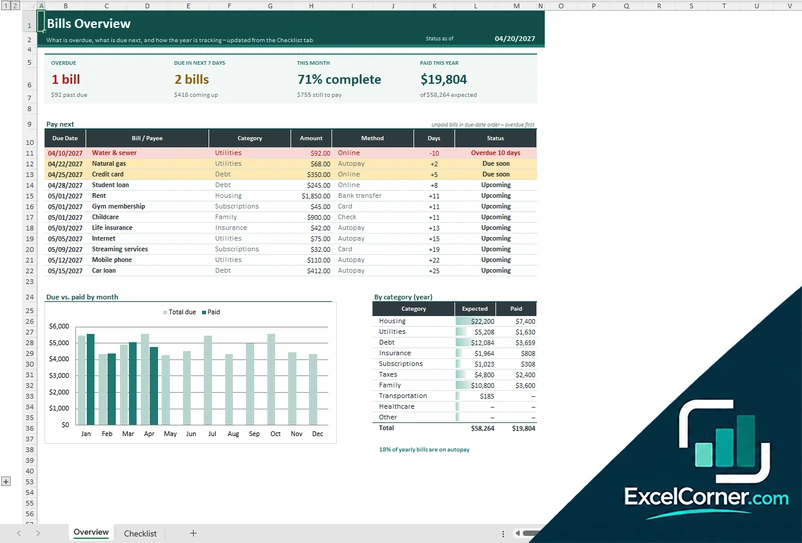
Previewing: Version 1 · Roommate Expense Splitter. Pick another version on the right.
Instant download · No sign-up · No email
Use this free roommate expenses spreadsheet template for Excel to split rent, utilities and shared purchases fairly. Log who paid, see who owes whom and settle up with the fewest payments. Pick the version that fits your household.
Choose your version
- File
- .xlsx · 91 KB · 2 sheets
- Works with
- Microsoft Excel (.xlsx)
- Macros
- None · formulas only
- Price
- Free
Split roommate expenses fairly with an Excel spreadsheet
Living with roommates means shared rent, utilities, groceries and the occasional new couch. A roommate expenses spreadsheet keeps track of who paid for what and what each person owes, so nobody has to remember who covered the last internet bill or the last Costco run.
These Excel templates calculate each person’s fair share, show who is owed money and who owes it, and suggest the fewest payments to settle up. You can split everything equally, give someone a double share, leave a roommate out of a purchase or split rent by room. Two versions also prorate bills by the days each person lives in the home.
Best for
- Roommates who share rent, utilities and everyday purchases
- Households where people move in or out during the year
- Anyone who wants a clear record of who paid and who owes
Maybe not for
A couple or family with one shared account. A regular household budget is simpler for that.
Which version is right for you?
All three are free, formula-driven Excel files. They are independent, so you can download more than one.
Version 1
Roommate Expense Splitter
Log every shared purchase and settle-up payment. See who paid, who owes, and the fewest payments to settle up.
BalancesExpenses
.xlsx · 91 KB
Version 2
Roommate Household Ledger
Combine recurring bills and one-off purchases in one workbook, with prorated monthly shares and household balances.
BalancesMonthly SplitBills 2027SetupShared Expenses
.xlsx · 107 KB
Version 3
Roommate Bill Split
Pick a month and see each roommate’s share of every bill, prorated for move-ins and move-outs, and who pays whom.
Monthly SplitBills 2027Setup
.xlsx · 31 KB
What is inside the roommate expenses spreadsheet templates
Version 1: Roommate Expense Splitter
On the Expenses sheet you log every shared purchase and every settle-up payment with the date, type, description, who paid, category and amount, and a split weight for each roommate: 1 for an equal share, 0 for not included and 2 for a double share. The Balances sheet shows group spending, open balances and the number of payments needed, then lists what each roommate paid for the group, their fair share, payments sent and received, their net balance and a status of Owes, Is owed or Balanced. It suggests the fewest transfers to settle up, shows who pays whom in a matrix and breaks down fair share by category and group spending by month.
Version 2: Roommate Household Ledger
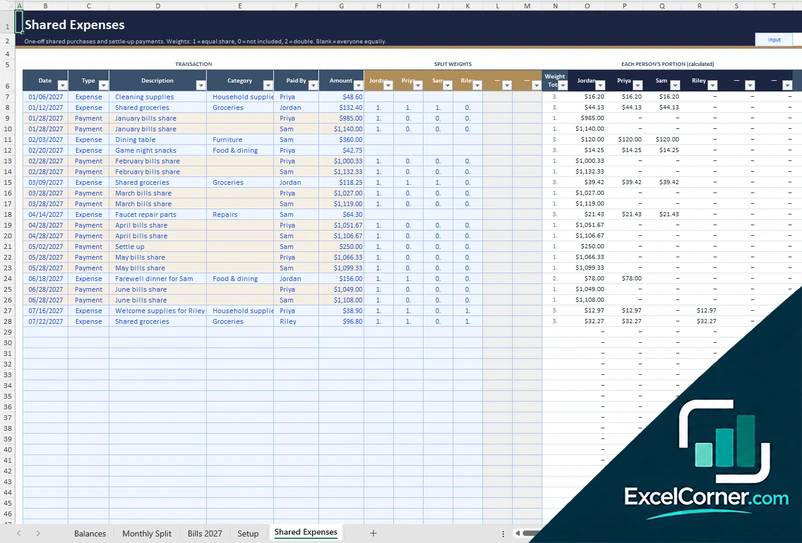
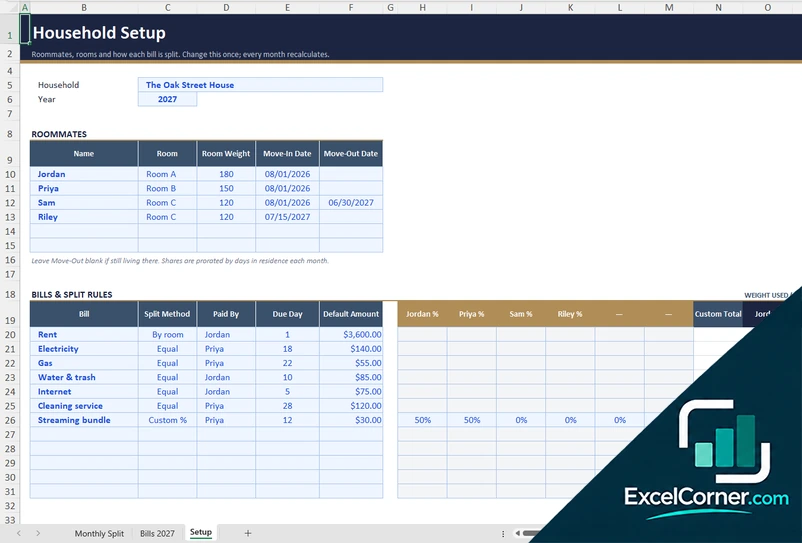
The Setup sheet holds the household, the roommates with their rooms, room weights and move-in and move-out dates, and the recurring bills with a split method of equal, by room or custom percentage. On Bills 2027 you enter the actual amount of each bill for each month, and Monthly Split shows each roommate’s prorated share of every bill for any month you pick, plus who pays whom. One-off purchases and settle-up payments go on Shared Expenses with split weights. The Balances sheet puts bills and expenses together for each roommate, with shares, amounts paid, payments sent and received, net balance, status and the fewest payments to settle up.
Version 3: Roommate Bill Split
On the Setup sheet you list up to six roommates with their rooms, room weights and move-in and move-out dates, and your recurring bills with a split method (by room, equal or custom percentage), who pays the bill, the due day and a default amount. On Bills 2027 you overwrite the default with the real amount each month. The Monthly Split sheet shows, for the month you choose, each bill with its method and payer, every roommate’s share, the days in residence, what each person paid to the bill companies, their net amount and who pays whom.
How to use the roommate expenses spreadsheet template
- Download
Pick the version you want and open it in Excel. - Add your roommates
Enter the household name and each roommate’s name. In the bill versions, add rooms, move-in and move-out dates and your recurring bills. - Log what is paid
Record every shared purchase or each month’s bills with who paid and how it is split. Fill in the input cells; formula cells calculate on their own. - Settle up
Check the balances and pay the suggested transfers, then log each payment so the balances go back to zero.
After you pay, record the payment as a settle-up entry so the template knows the debt is cleared.
Which roommate spreadsheet do you need?
| Roommate Expense Splitter | Roommate Household Ledger | Roommate Bill Split | |
|---|---|---|---|
| Best for | Shared purchases and settle-up payments | Recurring bills and shared purchases in one workbook | Splitting monthly bills by room and days lived |
| Splitting | Equal, double or excluded per purchase | Bills by room, equal or custom percent, plus weighted purchases | Bills by room, equal or custom percent |
| You get | Balances, fewest payments and spending by category | Combined balances, monthly bill shares and a year of bills | A monthly share per roommate and who pays whom |
They are separate files, so you can use more than one.
Tips for sharing expenses with roommates
- Log every purchase and bill as soon as it happens, while everyone remembers who paid.
- Agree on how each bill is split before the first payment, for example equal, by room size or a custom percentage.
- Use a double share for the roommate who uses something twice as much, and zero for someone who is not included.
- Enter move-in and move-out dates so a new roommate only pays for the days they live there.
- Settle up on a fixed day each month and record each payment so balances stay accurate.
- Set a small threshold so differences of a few cents count as settled.
Frequently asked questions
Is this roommate expenses spreadsheet template for Excel free?
Yes. All three versions are free to download as .xlsx files. You do not need an account or an email address.
Which version should I choose?
Choose the Roommate Expense Splitter (Version 1) for shared purchases and settle-up payments. Choose the Roommate Household Ledger (Version 2) if you want recurring bills and shared purchases combined in one workbook. Choose the Roommate Bill Split (Version 3) if you only need to split monthly bills by room and days lived. They are separate files, so you can use more than one.
How many roommates can I add?
All three versions have room for up to six roommates. Leave unused name cells blank and the extra columns stay empty.
How are expenses split?
In the Expense Splitter you give each person a weight for every purchase: 1 is an equal share, 0 means the person is not included and 2 is a double share. A blank row splits equally among everyone. The bill versions split each bill equally, by room or by a custom percentage.
What happens when someone moves in or out?
In the bill versions you enter move-in and move-out dates, and each monthly share is prorated by the days a roommate lives in the home.
How do I record a payment between roommates?
Add an entry with the type Payment, paid by the sender and split to the recipient. The balances update and the suggested transfers shrink.
Does the template work in Google Sheets?
The files are made for Microsoft Excel and use standard formulas with no macros. You can upload them to Google Drive and open them with Google Sheets, but some formatting or charts may look different.
Is my financial information stored online?
No. The templates are plain Excel files, so the numbers you type stay in your own file on your own computer.
More free personal finance templates
These templates are educational tools, not financial or legal advice. Results depend on the information you enter. Excel is a trademark of Microsoft Corporation; Excel Corner is not affiliated with Microsoft.