
Home › Calendars, Schedules & Productivity › Meeting Tracker Template Excel
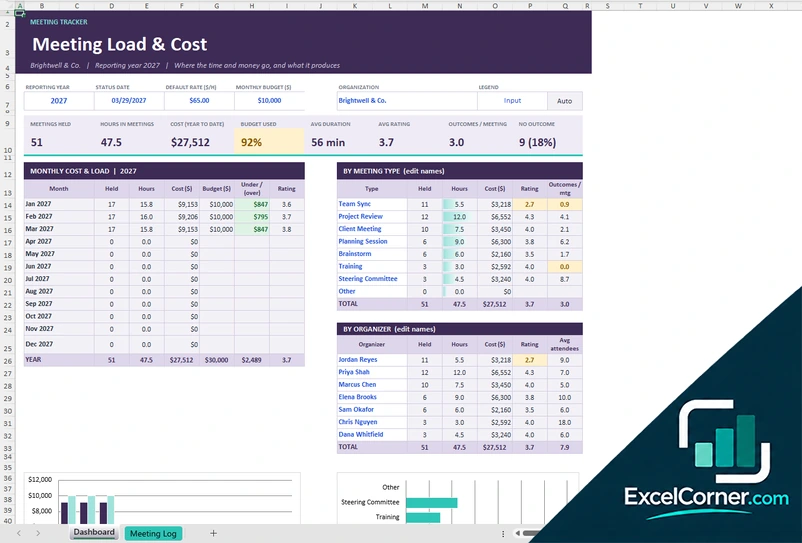
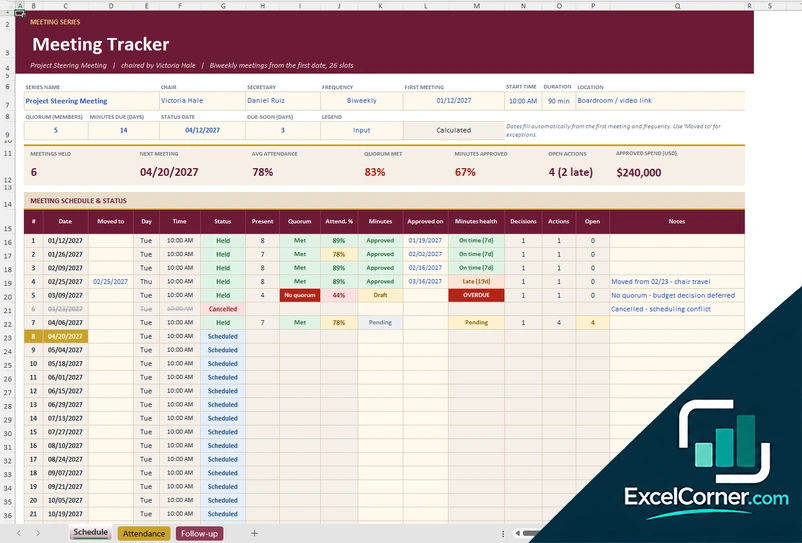
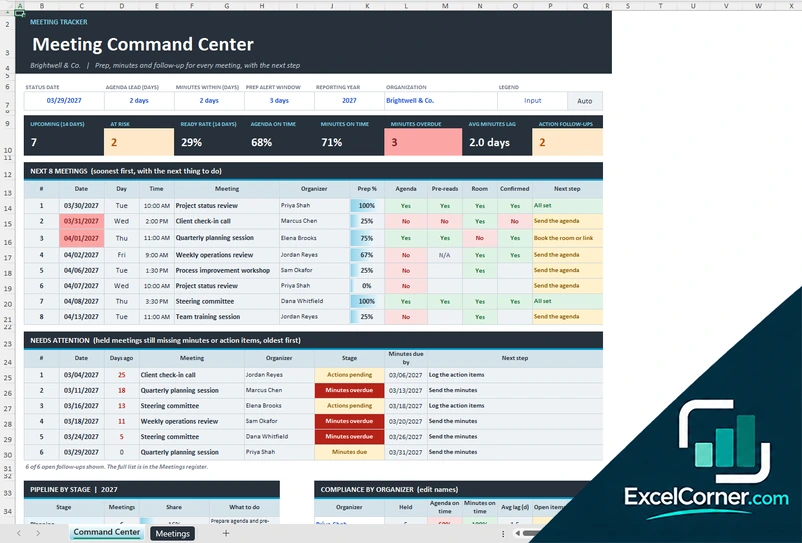
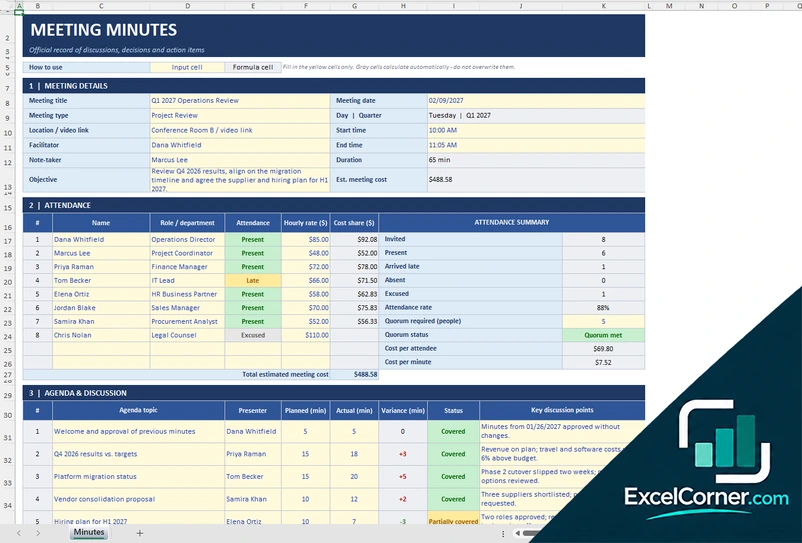
Previewing: Version 1 · Meeting Load and Cost Tracker. Pick another version on the right.
Instant download · No sign-up · No email
Use these free meeting tracker templates for Excel to see how much time and money your meetings take, and to follow up on what comes out of them. One version logs every meeting with its cost and rating, one tracks a recurring meeting with attendance, decisions and actions, and one checks that each meeting has its agenda, pre-reads and minutes on time.
Choose your version
- File
- .xlsx · 66 KB · 2 sheets
- Works with
- Microsoft Excel (.xlsx)
- Macros
- None · formulas only
- Price
- Free
Track your meetings in an Excel spreadsheet
A meeting tracker answers questions that are hard to see from the calendar. How many hours do we spend in meetings? What does it cost? Which meetings produce decisions and actions, and which produce nothing? Are agendas sent before the meeting and are the minutes sent after it? A spreadsheet can answer all of these when every meeting is logged in one place.
These meeting tracker templates for Excel cover three needs. The first is a meeting log with a dashboard of load and cost by month, by type, by organizer and by weekday, with a monthly budget. The second tracks one recurring meeting, such as a steering committee, with the schedule, attendance and quorum, minutes approval and a list of decisions and action items. The third is a command center for meeting hygiene: the upcoming meetings, their preparation, and the meetings whose minutes or actions are late.
Best for
- Managers and PMOs who want to understand the time and cost of meetings
- Chairs and secretaries of recurring meetings, committees and steering groups
- Teams that want agendas, pre-reads and minutes to go out on time
Maybe not for
A calendar or a video meeting tool. These templates track and report on meetings, they do not schedule them or send invitations.
Which version is right for you?
All three are free, formula-driven Excel files with sample data you can replace. They are independent, so you can download more than one.
Version 1
Meeting Load and Cost Tracker
Log every meeting and see the hours, the cost, the budget used, the rating and the outcomes by month, by type and by organizer.
DashboardMeeting Log
.xlsx · 66 KB
Version 2
Meeting Series and Action Tracker
Track a recurring meeting from the first date, with attendance and quorum, minutes approval and a list of decisions and action items.
ScheduleAttendanceFollow-up
.xlsx · 52 KB
Version 3
Meeting Command Center
Check that every meeting has its agenda, pre-reads and room, and that the minutes and actions go out on time.
Command CenterMeetings
.xlsx · 93 KB
What is inside the meeting tracker Excel templates
Version 1: Meeting Load and Cost Tracker
The Meeting Log has one row for each meeting with the date, the start time, the title, the type, the organizer, the status, the attendees and the average rate, and it calculates the duration, the cost and a flag. You also enter the decisions, the actions raised and closed and a rating from 1 to 5. The Dashboard sets the reporting year, the status date, the default rate and the monthly budget, and shows the meetings held, the hours, the cost to date, the budget used, the average duration and rating, the outcomes per meeting and the meetings with no outcome, with the monthly load and cost, the breakdown by meeting type and by organizer, a heat map of when meetings start and two charts.
Version 2: Meeting Series and Action Tracker
The Schedule sheet takes the series name, the chair, the secretary, the frequency, the first meeting, the start time, the quorum and the days allowed to issue the minutes, and it fills in the dates of up to 26 meetings, with a status, who was present, the quorum, the attendance rate, the state of the minutes, the decisions and the actions. The Attendance sheet is a matrix of members and meetings with present, remote, late, absent and excused, and an attendance rate for each member. The Follow-up sheet lists every decision and action with the meeting, the owner, the due or effective date, the status, any amount approved and a health flag, and the schedule shows the next meeting, the open actions and the approved spend.
Version 3: Meeting Command Center
The Meetings register has one row for each meeting with the date, the time, the title, the type, the organizer, the format, the status and the number of invitees, plus the date the agenda was sent, whether the pre-reads were shared, the room booked and the attendees confirmed, and the date the minutes were sent and whether the actions were logged. It calculates the preparation percentage, whether the agenda and the minutes were on time, the stage and the next step. The Command Center shows the upcoming meetings, those at risk, the ready rate, the agenda and minutes on time, the minutes overdue and the average lag, with the next eight meetings, the held meetings that still miss minutes or actions, the pipeline by stage, the compliance by organizer and a chart.
How to use a meeting tracker template in Excel
- Download
Pick the version you want and open it in Excel. The files have sample meetings so you can see how they work. - Set up the basics
Enter the organization or the series name, the reporting year, the default hourly rate, the status date and the lists of meeting types and organizers. - Log each meeting
Add one row per meeting with the date, the title, the type, the organizer, the attendees and the status, and update the status as the meeting moves from scheduled to held. - Record the outcomes
Note the decisions, the actions raised and closed, the rating, and, in the other versions, the attendance, the minutes and the follow-up items. - Review the dashboard
Check the hours, the cost, the budget used, the overdue minutes or actions and the meetings that need attention.
Type the TODAY function in the status date so that the upcoming and the overdue items stay current.
Which meeting tracker template do you need?
| Meeting Load and Cost Tracker | Meeting Series and Action Tracker | Meeting Command Center | |
|---|---|---|---|
| For | All your meetings in one log | One recurring meeting | Prep and follow-up of every meeting |
| Best for | Seeing the time and cost of meetings | Committees and steering meetings | Teams that want meetings run to a standard |
| Main outputs | Hours, cost, budget used, rating and outcomes per meeting | Attendance, quorum, minutes health, decisions and actions | Prep %, agenda and minutes on time, items at risk |
| Sheets | 2 | 3 | 2 |
| Charts | Yes | Yes | Yes |
They are separate files, so you can use more than one.
Tips for tracking meetings
- Log every meeting, including the short ones. Small meetings add up to a lot of hours.
- Use a single average hourly rate to estimate the cost. The aim is to see the order of magnitude, not an exact figure.
- Record the outcomes of each meeting, such as a decision or an action. A meeting with no outcome is worth a second look.
- Set a rule for the agenda and the minutes, for example the agenda two days before and the minutes within two days after, and track how often it is met.
- Review the dashboard every month and cancel or shorten the meetings with the lowest rating.
- Close the action items from past meetings before you add new ones.
Frequently asked questions
Is this meeting tracker template for Excel free?
Yes. All three versions are free to download as .xlsx files. You do not need an account or an email address.
Which version should I choose?
Choose the Meeting Load and Cost Tracker (Version 1) to log all your meetings and see their cost. Choose the Meeting Series and Action Tracker (Version 2) to follow one recurring meeting with attendance, decisions and actions. Choose the Meeting Command Center (Version 3) to check that the agenda, the pre-reads and the minutes are done on time.
How does the template calculate the cost of a meeting?
It multiplies the duration of the meeting by the number of attendees and an average hourly rate. You can change the default rate, and the log has a rate for each meeting.
Can I track action items from meetings?
Yes. The meeting log counts the actions raised and closed for each meeting. The Meeting Series and Action Tracker has a sheet of decisions and actions with an owner, a due date, a status and a health flag.
What does the meeting command center track?
For each meeting it checks the agenda sent, the pre-reads shared, the room booked, the attendees confirmed, the minutes sent and the actions logged. It calculates a preparation percentage, whether the agenda and the minutes were on time and the next step to take.
Does it track attendance and quorum?
Yes. The Meeting Series and Action Tracker has an attendance matrix with present, remote, late, absent and excused, an attendance rate and a quorum check for each meeting.
Does the template work in Google Sheets?
The files are made for Microsoft Excel and use standard formulas with no macros. You can upload them to Google Drive and open them with Google Sheets, but some formatting or charts may look different.
Is my meeting information stored online?
No. The templates are plain Excel files, so the names, notes and ratings you type stay in your own file on your own computer.
These templates are record-keeping and planning tools with sample data. They do not replace HR policies or legal advice. Handle personal notes about employees according to your organization’s rules. Excel is a trademark of Microsoft Corporation; Excel Corner is not affiliated with Microsoft.