
Home › Project Management › Decision Log Template Excel
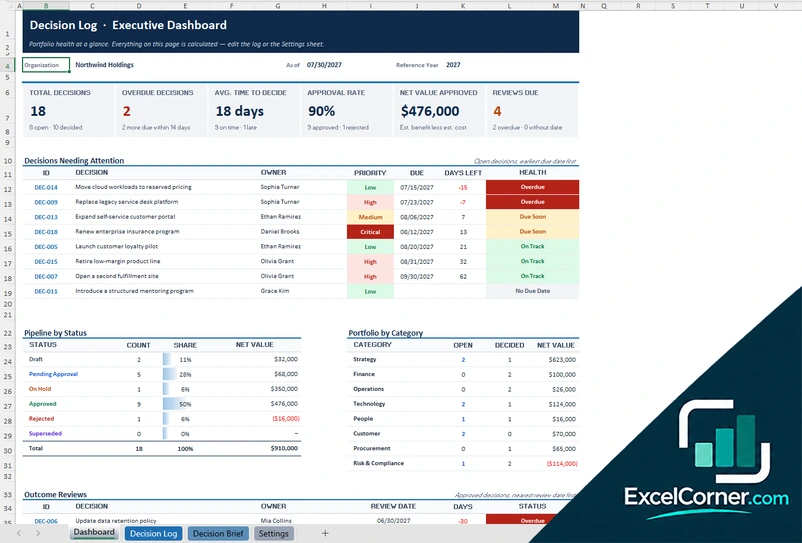
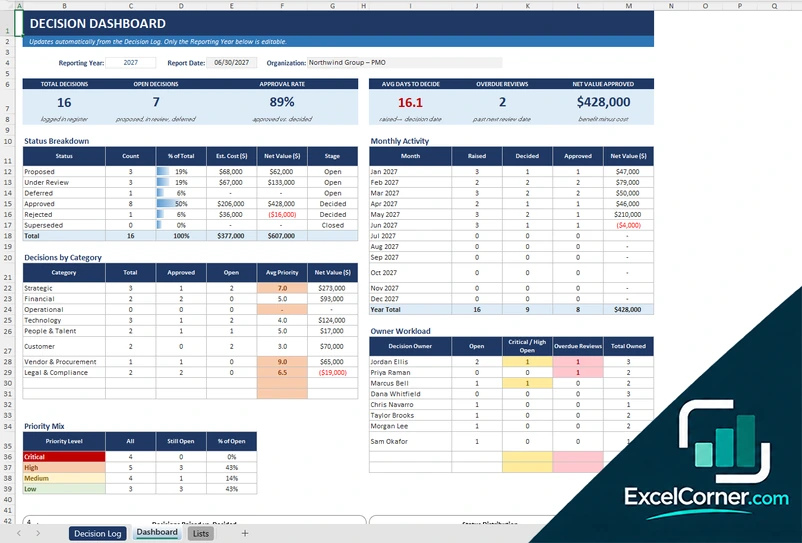
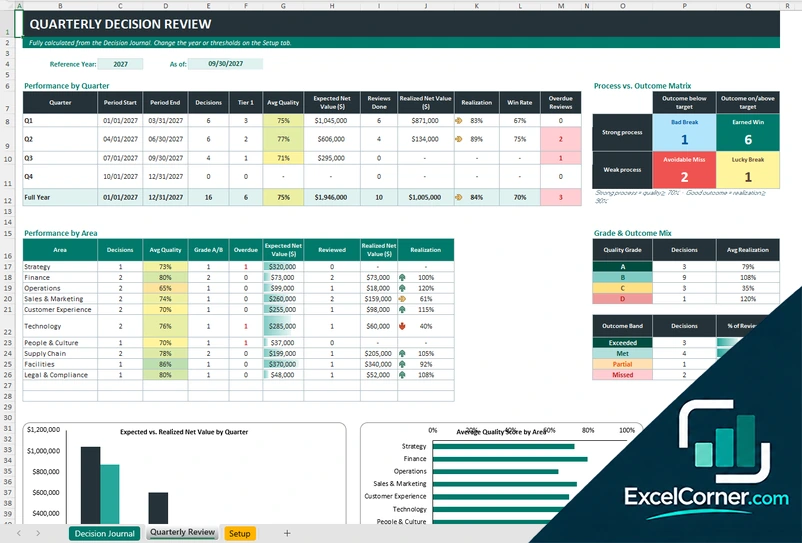
Previewing: Version 1 · Decision Log with Decision Brief. Pick another version on the right.
Instant download · No sign-up · No email
Use these free decision log templates for Excel to record the decisions your team makes, who made them and why. Track each decision from request to approval, follow up on reviews and see the portfolio on a dashboard. One version adds a one-page decision brief, one is a register with a dashboard, and one reviews the quality of each decision and its outcome.
Choose your version
- File
- .xlsx · 73 KB · 4 sheets
- Works with
- Microsoft Excel (.xlsx)
- Macros
- None · formulas only
- Price
- Free
Keep a decision log in an Excel spreadsheet
A decision log is a record of the choices that shape a project or a team: what was decided, who decided it, which options were considered and what was expected to happen. It saves people from reopening settled questions and gives new team members the reason behind a choice. A spreadsheet is enough for most teams, as long as every decision is one row and the summaries are calculated.
These decision log Excel templates cover three needs. The first is a decision log with a priority matrix, a status workflow, estimated cost and benefit and a printable one-page decision brief. The second is a decision log and register with a dashboard of status, monthly activity and owner workload. The third is a decision journal that scores the quality of the process behind each decision and compares the expected value with the realized value.
Best for
- Project managers and PMO teams that record and approve project decisions
- Leaders who want to follow decisions, owners and review dates in one place
- Teams that review past decisions to improve how they decide
Maybe not for
A formal governance system with workflows and electronic signatures. These templates keep a decision log and reports in Excel.
Which version is right for you?
All three are free, formula-driven Excel files with sample data you can replace. They are independent, so you can download more than one.
Version 1
Decision Log with Decision Brief
Record each decision with its priority, due date, cost and benefit, and see an executive dashboard and a printable decision brief.
DashboardDecision LogDecision BriefSettings
.xlsx · 73 KB
Version 2
Decision Log and Register
Capture every decision once, with the options and the rationale, and see the status, the monthly activity and the workload by owner.
Decision LogDashboardLists
.xlsx · 36 KB
Version 3
Decision Journal and Outcome Review
Score the quality of each decision, compare the expected value with the realized value and review the results by quarter and by area.
Decision JournalQuarterly ReviewSetup
.xlsx · 49 KB
What is inside the decision log Excel templates
Version 1: Decision Log with Decision Brief
The Settings sheet holds the organization, the as-of date, the alert window, the ratings, the categories, the decision owners, the priority matrix (impact by urgency), the status workflow and the reversibility options. The Decision Log has one row for each decision with the category, the owner, the approver, the impact and urgency, the due date, the status, the decision date, the estimated cost and benefit and the next review, plus expandable columns for the context, the options considered, the rationale and the action items. It calculates the priority, the stage, the cycle days, the health and the net value. The Dashboard shows the total, overdue and reviews due, the approval rate, the net value approved, the decisions needing attention, the pipeline by status and a chart. The Decision Brief builds a one-page record for the decision you pick.
Version 2: Decision Log and Register
The Decision Log records who raised each decision, who owns it, the context, the options considered, the final decision and rationale, the status, the decision date, the estimated cost and benefit and the next review date. It calculates the priority score and level, the days open or to decide, the net value and the review status. The Lists sheet holds the categories, the owners, the statuses with their stage and the points for each rating, which drive the priority score. The Dashboard shows the total, open and overdue decisions, the approval rate, the average days to decide and the net value approved, with the status breakdown, the monthly activity, the decisions by category, the priority mix, the owner workload and two charts.
Version 3: Decision Journal and Outcome Review
The Decision Journal frames each decision with its statement, area, decision maker, stake tier and reversibility, scores the process on criteria such as the quality of the information and the alternatives explored (each from 1 to 5), and calculates a quality score and a grade. It records the one-time cost, the annual benefit and the horizon to calculate the expected net value and the payback, then the review date, the realized net value, the realization rate and the outcome. The Setup sheet holds the criteria weights, the good-decision and good-outcome thresholds and the lists. The Quarterly Review shows the performance by quarter and by area, a process versus outcome matrix with four result types, the grade and outcome mix and two charts.
How to use a decision log template in Excel
- Download
Pick the version you want and open it in Excel. The files have sample decisions so you can see how the sheets work. - Set up the lists
On the Settings or Lists sheet, enter the organization, the report date and the lists of categories, owners, statuses and priority levels. - Log each decision
Add one row for each decision with the date raised, a title, the category, the owner, the options considered and the impact and urgency. The priority and the dates are calculated. - Record the outcome
Update the status, the decision date, the rationale, the estimated cost and benefit and the next review date as the decision moves on. - Review the dashboard
Check the open and overdue decisions, the approval rate, the net value approved and the reviews that are due.
Enter the TODAY function as the report date to keep the overdue flags current.
Which decision log template do you need?
| Decision Log with Decision Brief | Decision Log and Register | Decision Journal and Outcome Review | |
|---|---|---|---|
| For | Logging and approving decisions | A register with a dashboard | Judging decision quality and outcomes |
| Best for | Project and PMO teams | Teams that report on decisions by owner | Leaders who review past decisions |
| Main outputs | Priority, due dates, net value and a one-page brief | Status, monthly activity and owner workload | Quality score, realization and a process vs. outcome matrix |
| Sheets | 4 | 3 | 3 |
| Charts | Yes | Yes | Yes |
They are separate files, so you can use more than one.
Tips for keeping a decision log
- Record a decision when it is made, while the reasons are fresh, and write the options that you rejected as well as the one you chose.
- Give each decision one owner and the forum or person who approves it.
- Write the expected outcome and how you will measure it, so you can check it at the review.
- Set a next review date for the decisions that matter, and look at the overdue reviews each month.
- Separate the quality of the decision from the result. A good decision can still have a bad outcome, and the reverse.
- Keep the log short enough that people use it. One row per decision is better than long documents that nobody reads.
Frequently asked questions
Is this decision log template for Excel free?
Yes. All three versions are free to download as .xlsx files. You do not need an account or an email address.
Which version should I choose?
Choose the Decision Log with Decision Brief (Version 1) to record and approve decisions and print a one-page record. Choose the Decision Log and Register (Version 2) for a register with a dashboard. Choose the Decision Journal and Outcome Review (Version 3) to judge the quality of decisions and compare expected and realized value.
What should a decision log contain?
At least the decision, the date, the owner, the options considered, the rationale and the status. These templates also record the impact and urgency, the estimated cost and benefit, the next review date and the follow-up actions.
How is the priority calculated?
You rate the impact and the urgency of each decision, and the Settings sheet combines them into a priority level with a priority matrix that you can change.
What is the Decision Journal?
The decision journal scores each decision on the quality of the process, for example the information used and the alternatives explored, then compares the expected net value with the value realized at the review. The quarterly review groups the results into a process versus outcome matrix.
Can I print a decision as a one-page record?
Yes. The Decision Brief sheet in Version 1 builds a one-page record for any decision ID that you pick, with the key facts, the financial impact, the rationale and a sign-off block.
Does the template work in Google Sheets?
The files are made for Microsoft Excel and use standard formulas with no macros. You can upload them to Google Drive and open them with Google Sheets, but some formatting or charts may look different.
Is my project information stored online?
No. The templates are plain Excel files, so the costs, names and dates you type stay in your own file on your own computer.
These templates are planning and record-keeping tools with sample data. Check the figures against your contracts, invoices and accounting records before you rely on them. Excel is a trademark of Microsoft Corporation; Excel Corner is not affiliated with Microsoft.