
Home › HR & Workforce Management › Employee Task List Template Excel
Previewing: Version 1 · Employee Task Tracker. Pick another version on the right.
Instant download · No sign-up · No email
Use these free employee task list templates for Excel to assign work, follow due dates and progress, and see who is overloaded. One version is a task register with a team overview, one adds hours, labor cost and a team scoreboard, and one is a daily and weekly duties checklist for routine tasks.
Choose your version
- File
- .xlsx · 96 KB · 4 sheets
- Works with
- Microsoft Excel (.xlsx)
- Macros
- None · formulas only
- Price
- Free
Track employee tasks and workload in Excel
An employee task list shows what each person has to do, by when and how far along it is. In a spreadsheet, the best setup is one register with every task, so you can filter it, and views that summarize it for the team and for each employee. Routine duties that repeat every day or every week need a different setup, a checklist that shows which duties were done on each due day.
These Excel templates cover three ways to manage employee tasks. The first keeps one task register with a team overview and a printable sheet for each employee. The second is a task list that tracks estimated and actual hours and the labor cost, with a scoreboard that compares the queued work of each person with their weekly capacity. The third is a recurring duties checklist: you set the frequency of each routine task, and the workbook shows which duties were done, missed or excused on each day of the month.
Best for
- Managers who assign work to a small team and need to see who has capacity
- Office managers and team leads who track one-off tasks and recurring duties
- HR and operations teams that need a simple task register or duty checklist by employee
Maybe not for
Large projects with task dependencies and timelines. A project plan or a Gantt chart is a better fit for that.
Which version is right for you?
All three are free, formula-driven Excel files with sample data you can replace. They are independent, so you can download more than one.
Version 1
Employee Task Tracker
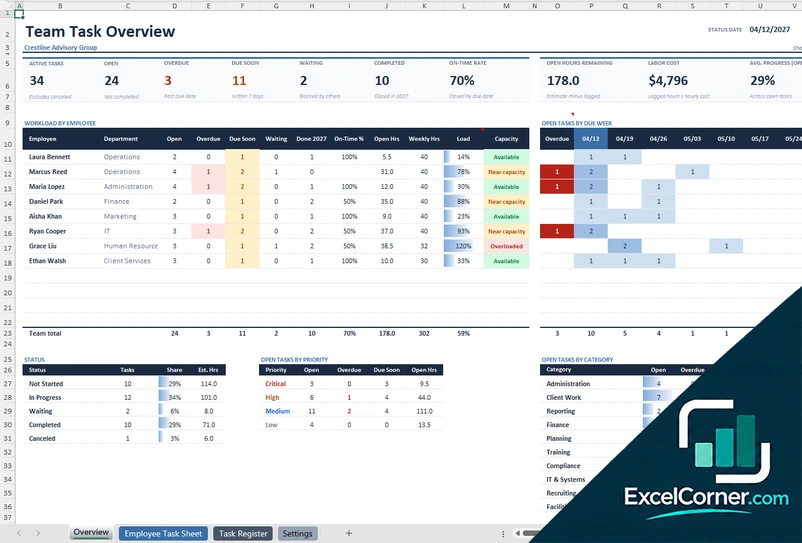
Keep one task register and see open, overdue and due-soon tasks, the on-time rate and the workload of every employee.
OverviewEmployee Task SheetTask RegisterSettings
.xlsx · 96 KB
Version 2
Task List with Hours and Cost
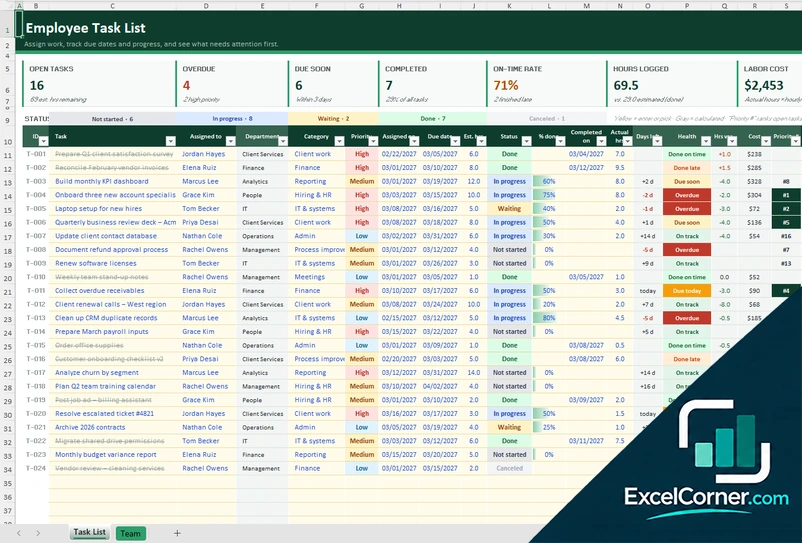
Assign tasks with estimated hours, log the actual hours and see the labor cost, the on-time rate and the load of each person.
Task ListTeam
.xlsx · 33 KB
Version 3
Daily Duties Checklist
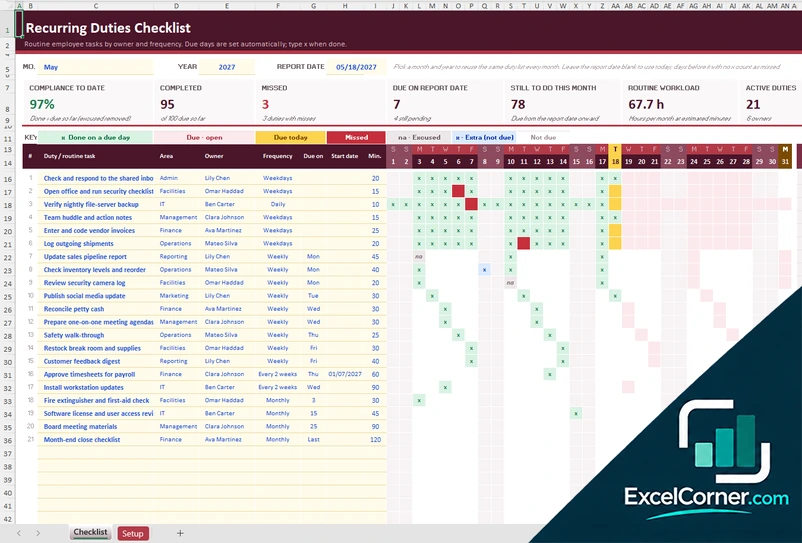
Set the frequency of each routine duty and track on a monthly grid which duties were done, missed or excused, with a compliance rate by owner.
ChecklistSetup
.xlsx · 72 KB
What is inside the employee task list Excel templates
Version 1: Employee Task Tracker
The Task Register holds every task, with the task ID, the task, the employee, the category, the priority, the assigned and due dates, the status, the percent complete, the estimated and actual hours and notes, and calculates the days left, the due status and the labor cost. The Overview shows the active, open, overdue, due-soon, waiting and completed tasks, the on-time rate, the open hours remaining and the labor cost, with the workload for each employee, open tasks by due week, and breakdowns by status, priority and category. On the Employee Task Sheet you pick an employee to see their tasks and workload. The Settings sheet holds the status date, the due-soon window, the employee roster with job title, department, manager, weekly hours and pay rate, and the dropdown lists.
Version 2: Task List with Hours and Cost
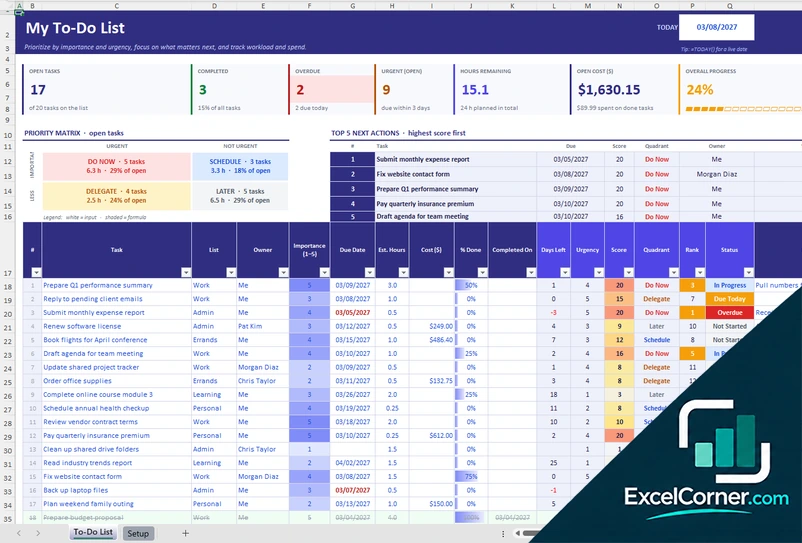
The Task List has one row for each task with the person it is assigned to, the department, the category, the priority, the assigned and due dates, the estimated hours, the status, the percent done, the completion date, the actual hours and notes. It calculates the days left, a health flag, the hours variance, the cost and a priority rank, and shows the open, overdue and due-soon tasks, the completed tasks, the on-time rate, the hours logged and the labor cost. The Team & Settings sheet holds the team name, the due-soon window, the report date, the categories and the team members with their job title, department, hourly rate and weekly capacity, and a scoreboard with the open and overdue tasks, the remaining hours, the load in weeks, the on-time rate and the labor cost, with a chart of queued work against weekly capacity.
Version 3: Daily Duties Checklist
The Checklist sheet takes the year, the month and the report date and lists each duty with its area, owner, frequency, due day, start date and minutes. The frequencies are daily, weekdays, weekly, every two weeks and monthly, and the due days are worked out for you, skipping holidays for the weekday duties if you choose. A grid shows each day of the month, where you type an x on the day a duty is done, and it shows the duties done, open, due today, missed and excused, with the compliance to date, the completed and missed duties, the duties due on the report date, those still to do this month and the routine workload in hours. The Setup sheet holds the team, the areas, the holidays and a scoreboard by team member.
How to use an employee task list template in Excel
- Download
Pick the version you want and open it in Excel. The files come with sample employees and tasks so you can see how each sheet works. - Set up your team
On the Settings, Team or Setup sheet, enter your team name, the report date, your employees with their role, weekly hours and pay if you track cost, and your categories or areas. - Add the tasks or duties
Add one row for each task with the employee, category, priority, due date, status and estimated hours. In the duties checklist, enter each routine task with its owner, frequency and start date. - Update the status
Change the status and the percent done as work moves on, or mark an x on the day a duty is done. - Review the workload
Check the overview or the scoreboard for overdue and due-soon tasks, the load of each person and the compliance with the duties.
Update the report date, or replace it with the TODAY function, so the due-soon and overdue flags stay current.
Which employee task list template do you need?
| Employee Task Tracker | Task List with Hours and Cost | Daily Duties Checklist | |
|---|---|---|---|
| For | A task register with a team overview | Tasks with hours, cost and capacity | Routine duties that repeat |
| Best for | Managers who assign and follow tasks | Managers who plan the load of each person | Teams with daily and weekly routines |
| Main outputs | Open, overdue and due-soon tasks, on-time rate and workload | Hours logged, labor cost and load in weeks per employee | Compliance, completed and missed duties and workload |
| Sheets | 4 | 2 | 2 |
| Charts | No | Yes | No |
They are separate files, so you can use more than one.
Tips for managing employee tasks
- Give every task one owner, a due date and an estimate in hours.
- Use priorities sparingly, so critical tasks stand out.
- Compare open hours with each person’s weekly hours before you assign more work.
- Review overdue tasks first, and ask whether they are blocked or no longer needed.
- Mark tasks that are waiting on someone else, so they are not counted as late work by the employee.
- Keep routine duties in a checklist instead of the task list, so they do not clutter it.
- Archive or cancel tasks you no longer plan to do, to keep the register clean.
Frequently asked questions
Are these employee task list templates for Excel free?
Yes. All three versions are free to download as .xlsx files. You do not need an account or an email address.
Which version should I choose?
Choose the Employee Task Tracker (Version 1) for a task register with a team overview and a sheet for each employee. Choose the Task List with Hours and Cost (Version 2) if you also want hours, labor cost and a comparison of the queued work with each person’s capacity. Choose the Daily Duties Checklist (Version 3) for routine tasks that repeat every day, week or month.
How does it show who is overloaded?
The overview and the team scoreboard compare each employee’s open estimated hours with their weekly hours. Version 1 labels the load as available, near capacity or overloaded, and Version 2 shows the load in weeks.
Can I see the tasks of one employee?
Yes. Version 1 has a task sheet where you pick an employee and see their open and completed tasks, due status, progress and workload, ready to share or print. In the other versions you can filter the list by employee or owner.
How are overdue and due soon calculated?
The templates compare each due date with the report date or status date. Tasks past due are flagged overdue, and tasks due within the window you set, 7 days by default, are flagged due soon.
What is the daily duties checklist for?
It is for routine tasks that repeat, such as opening the office or checking a backup. You set the frequency of each duty, such as daily, weekdays, weekly, every two weeks or monthly, and the checklist shows the due days of the month, the duties done and the ones missed, with a compliance rate.
How many tasks can I enter?
The Employee Task Tracker has room for 300 tasks. The other versions are laid out for dozens of tasks or duties and can be extended by copying a row.
Does the template work in Google Sheets?
The files are made for Microsoft Excel and use standard formulas with no macros. You can upload them to Google Drive and open them with Google Sheets, but some formatting or charts may look different.
Is my employee information stored online?
No. The templates are plain Excel files, so the names and dates you type stay in your own file on your own computer.
More free HR and workforce templates
These templates contain sample data and are planning tools, not HR or legal advice. Excel is a trademark of Microsoft Corporation; Excel Corner is not affiliated with Microsoft.