
Home › Marketing, Sales & Customers › Keyword Research Template Excel
Previewing: Version 1 · Keyword Research Master Sheet. Pick another version on the right.
Instant download · No sign-up · No email
Use these free keyword research templates for Excel to turn a list of keywords into a plan. One version is a keyword research master sheet that scores, tiers and values every keyword, one is a topic cluster map that groups your keywords, ranks the clusters and tells you which one to start with, and one is a SERP and competitor analysis that shows which keywords you can realistically win.
Choose your version
- File
- .xlsx · 44 KB · 3 sheets
- Works with
- Microsoft Excel (.xlsx)
- Macros
- None · formulas only
- Price
- Free
Do keyword research in an Excel spreadsheet
Keyword research is easy to start and hard to finish. A tool gives you thousands of keywords with a search volume and a difficulty score, but it does not tell you which ones fit your business, which ones you can win, or what to write first. A spreadsheet is the place where that decision is made. In Excel you can score each keyword, group keywords by topic and intent, and see how much traffic each one could bring.
These Excel templates cover three parts of the job. The first is a master sheet for the keywords you have chosen: you add the search volume, the keyword difficulty, the CPC and your current position, and the sheet calculates a priority score, a tier, the clicks you could gain and what that traffic is worth. The second is a topic cluster map: you type or paste keywords with their volume and difficulty (the same columns as an Ahrefs or Semrush export) into one block for each topic, and the sheet adds up each cluster, calculates an opportunity score and ranks the clusters in the order you should publish them. The third is a competitor keyword research sheet: for each keyword you list the top 5 results, and the sheet measures how hard they are, finds the weak spots and sets a target for your page.
Best for
- SEO specialists and agencies that research keywords for clients and need a clear priority list
- Content marketers and bloggers who plan articles around search intent and topic clusters
- Small business owners and e-commerce teams that want to know which keywords are worth targeting first
Maybe not for
A keyword research tool with its own database of search volumes. These templates do not collect data: you bring the numbers from your SEO tool, and the workbook does the sorting, scoring and planning.
Which version is right for you?
All three are free, formula-driven Excel files with sample data you can replace. They are independent, so you can download more than one.
Version 1
Keyword Research Master Sheet
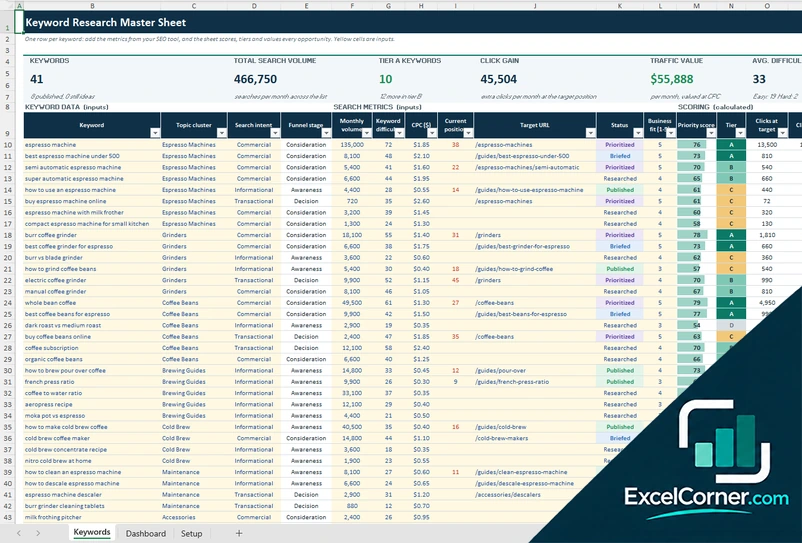
Score and rank your keywords by volume, difficulty, business fit and intent, and see the clicks and the traffic value you could gain.
KeywordsDashboardSetup
.xlsx · 44 KB
Version 2
Keyword Topic Cluster Map
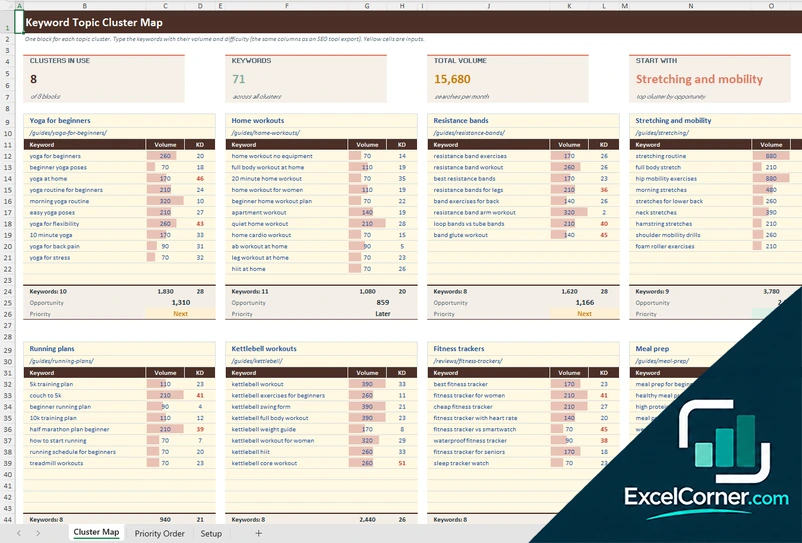
Type or paste Ahrefs-style columns (keyword, volume, KD) into one block for each topic, and the workbook ranks the clusters and labels them Start here, Next or Later.
Cluster MapPriority OrderSetup
.xlsx · 22 KB
Version 3
SERP and Competitor Analysis
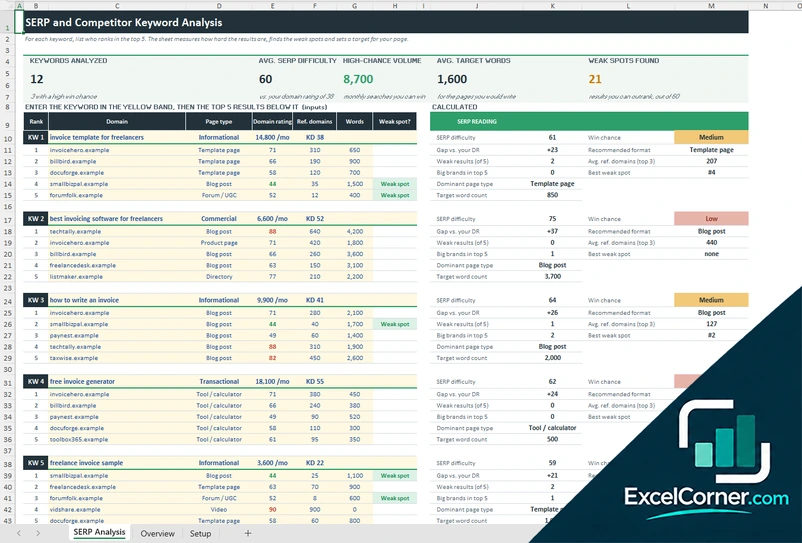
Analyze who ranks for each keyword, weigh their domain ratings against yours and see which keywords you can realistically win.
SERP AnalysisOverviewSetup
.xlsx · 30 KB
What is inside the keyword research Excel templates
Version 1: Keyword Research Master Sheet
The Keywords sheet holds up to 200 keywords. For each one you enter the topic cluster, the search intent, the monthly volume, the keyword difficulty, the CPC, your current position, the target URL, a status from idea to published and a business fit from 1 to 5. The sheet adds the funnel stage and calculates a priority score from 0 to 100, a tier from A to D, the clicks at your target position, the click gain compared with today, the traffic value and a difficulty band. The score uses weights that you set on the Setup sheet, where you can also edit the click-through rate by position, the tier thresholds and the intent values. The Dashboard summarizes the keywords by intent, topic cluster, tier and status, lists the top 10 opportunities and draws the volume by cluster and a chart of difficulty against volume.
Version 2: Keyword Topic Cluster Map
The Cluster Map is a board of eight blocks, one for each topic cluster. In each block you type the name of the topic, the pillar page that will rank for it and up to 12 keywords with their monthly volume and keyword difficulty, the same three columns that Ahrefs, Semrush and similar tools export. Under each block the sheet counts the keywords, adds the volume, averages the difficulty and works out an opportunity score, which is the total volume multiplied by 100 minus the average difficulty, divided by 100. Keywords harder than the limit you set turn red. The Priority Order sheet ranks the clusters by opportunity, shows the pillar page, the keywords, the volume, the difficulty and the share of the total opportunity, and labels each cluster Start here, Next or Later with the thresholds you choose. Two charts show the opportunity and the volume of every cluster. The Setup sheet holds the thresholds and the highest difficulty you can compete for.
Version 3: SERP and Competitor Analysis
The SERP Analysis sheet has a block for each of 12 keywords. You enter the keyword, its intent, its volume and its difficulty, and then the top 5 results with the domain, the page type, the domain rating, the referring domains and the word count. For every keyword the sheet calculates a SERP difficulty weighted by position, the gap to your own domain rating, the number of weak results and big brands, the dominant page type, a recommended format, the average referring domains of the top 3, the position of the first weak spot and a target word count. It rates the win chance as high, medium or low. The Overview compares all keywords, and a table shows how often each competitor domain appears, how many #1 spots it holds and its average rank and domain rating. The Setup sheet holds your domain rating, the weak spot margin, the rank weights and the page types.
How to use a keyword research template in Excel
- Download
Pick the version you want and open it in Excel. The files have sample data, so you can see how each sheet works before you add your own. - Set up the project
On the Setup or Rules sheet, enter your site, your market and the settings: the weights of the score, the click-through rate by position, the intent words or your own domain rating. - Add your keywords
Type the keywords or paste them from your SEO tool, with the search volume and the keyword difficulty, plus the CPC and your current position in the master sheet. In the cluster map, put them under the topic they belong to. For the SERP analysis, enter the top 5 results of each keyword. - Read the scores
Check the priority tier, the quick wins and the traffic value, or the win chance of each SERP. Sort and filter the table to find the best opportunities. - Plan the content
Assign the target URL, the status and the target word count, then work through the tier A keywords first. Update the list as you publish.
Replace the sample keywords with your own. The scores, the tiers, the charts and the summaries update on their own.
Which keyword research template do you need?
| Keyword Research Master Sheet | Keyword Topic Cluster Map | SERP and Competitor Analysis | |
|---|---|---|---|
| For | A curated list of keywords with a priority plan | Groups of keywords by topic, ranked by opportunity | The top 5 results of each keyword |
| Best for | Content plans and keyword mapping | Planning pillar pages and topic clusters | Deciding which keywords you can win |
| Main outputs | Priority score, tier, click gain, traffic value, status | Cluster volume, average difficulty, opportunity, priority order | SERP difficulty, weak spots, win chance, target words |
| Sheets | 3 | 3 | 3 |
| Charts | Yes | Yes | Yes |
They are separate files, so you can use more than one in the same project.
Tips for keyword research
- Start with the topics of your business and your customers, then use a tool to find the words people use for them.
- Look at the search intent before the volume. A keyword with a modest volume and a buying intent can be worth more than a big informational term.
- Choose keywords that you can realistically win. Check the domain rating of the top results against your own.
- Group keywords into topic clusters and give each cluster one main page, so your pages do not compete with each other.
- Look for long-tail keywords with low difficulty and a clear need. They are often the quickest wins for a new site.
- Check the search results yourself. The page types that rank tell you which format to write.
- Update the list every few months, because volumes, difficulty and your own rankings change.
Frequently asked questions
Are these keyword research templates for Excel free?
Yes. All three versions are free to download as .xlsx files. You do not need an account or an email address.
Which version should I choose?
Choose the Keyword Research Master Sheet (Version 1) to keep a prioritized list of the keywords you plan to target. Choose the Keyword Topic Cluster Map (Version 2) if you want to group keywords into topics and see which cluster to publish first. Choose the SERP and Competitor Analysis (Version 3) to check who ranks for a keyword and whether you can beat them.
What should a keyword research template include?
At a minimum it needs the keyword, the monthly search volume, the keyword difficulty, the search intent and a priority. Better templates add the CPC, your current position, the target URL, a status and a way to group keywords by topic. These templates add scores, a traffic estimate and a dashboard.
How do I prioritize keywords in Excel?
In the master sheet, each keyword gets a score from 0 to 100. It combines the search volume, the ease of ranking, the value of the search intent and, in the master sheet, how well the keyword fits your business. You set the weights, and the sheet turns the score into tiers A to D.
Can I use an export from Ahrefs or Semrush?
Yes. Version 2 uses the three columns that most SEO tools export, which are the keyword, the volume and the keyword difficulty. Copy them from your file and paste them under the right topic in the yellow cells. The template does not connect to any tool.
How does the cluster opportunity score work?
In Version 2 the score of a cluster is its total monthly volume multiplied by 100 minus its average keyword difficulty, divided by 100. A big cluster of easy keywords scores high and a small cluster of hard ones scores low. The clusters are ranked by that score, and the top ones are labeled Start here, Next or Later with thresholds that you can change.
How do I do competitor keyword research in Excel?
Version 3 follows the results page. For each keyword you list the top 5 results with their page type, domain rating, referring domains and word count. The sheet weights the domain ratings by position to get a SERP difficulty, marks the results that you could outrank, and shows how often each competitor domain appears across your keywords.
Does the template work in Google Sheets?
The files are made for Microsoft Excel and use standard formulas with no macros. You can upload them to Google Drive and open them with Google Sheets, but some formatting or charts may look different.
Is my information stored online?
No. The templates are plain Excel files, so the keywords, numbers and notes you type stay in your own file on your own computer.
More free SEO templates
These templates are research and planning tools with made-up sample data. The scores, click estimates and values depend on the numbers you enter and are not a guarantee of rankings or traffic. Excel Corner is not affiliated with Ahrefs, Semrush or Google. Excel is a trademark of Microsoft Corporation; Excel Corner is not affiliated with Microsoft.