
Home › Accounting & Business Finance › State Apportionment Excel Template
Previewing: Version 1 · State Apportionment Dashboard. Pick another version on the right.
Instant download · No sign-up · No email
Use this free state apportionment Excel template to split a company’s income among the states where it files. Enter your property, payroll and sales by state, choose each state’s formula, and see the apportionment percentage, the state tax and the balance due. Pick the version that fits your workpaper.
Choose your version
- File
- .xlsx · 58 KB · 4 sheets
- Works with
- Microsoft Excel (.xlsx)
- Macros
- None · formulas only
- Price
- Free
Apportion multistate income to each state in Excel
A business that operates in several states has to decide how much of its income each state can tax. Most states use an apportionment formula based on the share of property, payroll and sales in the state, and many weigh sales more heavily or use sales only. A spreadsheet keeps the factors, the formulas and the state rules in one workpaper.
These Excel state apportionment templates give you three tools. The first is a dashboard for a company with many filing states, ranking the states by net tax and comparing with the prior year. The second is a multistate workpaper that reconciles the factors to your books and applies a formula to each state. The third monitors economic nexus from a receipts ledger and estimates state tax.
Best for
- Tax departments and accountants who prepare multistate returns
- Small and mid-size companies that sell or operate in several states
- Finance teams that need to watch nexus thresholds as sales grow
Maybe not for
A tax return. These are workpapers with sample data and simplified state rules, so check each state’s current rules and forms.
Which version is right for you?
All three are free, formula-driven Excel files with sample data you can replace. They are independent, so you can download more than one.
Version 1
State Apportionment Dashboard
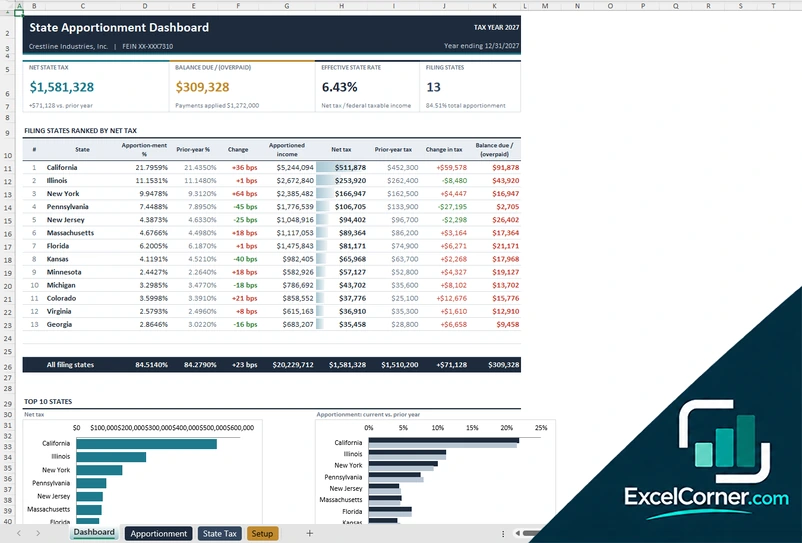
Apportion income to your filing states and see net tax, balance due and the change from the prior year for each one.
DashboardApportionmentState TaxSetup
.xlsx · 58 KB
Version 2
Multistate Apportionment Workpaper
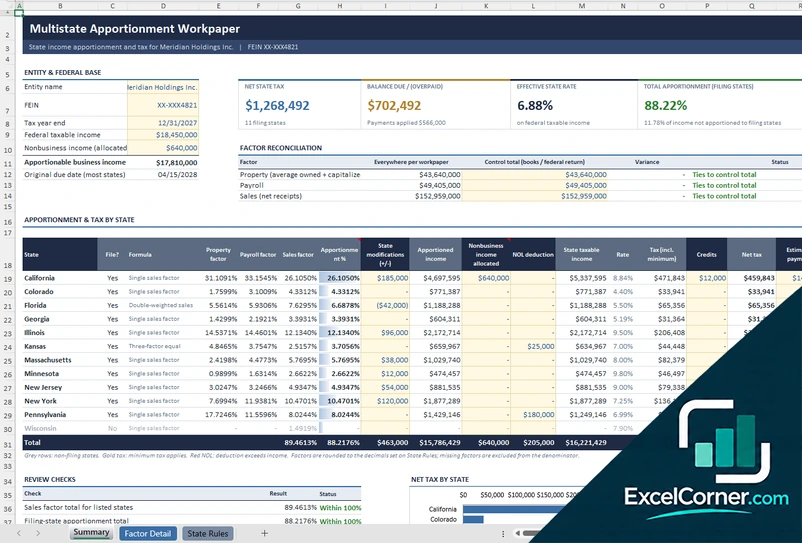
Reconcile the property, payroll and sales factors and apply a formula to each state to calculate the apportioned income and tax.
SummaryFactor DetailState Rules
.xlsx · 32 KB
Version 3
State Nexus and Apportionment Tracker
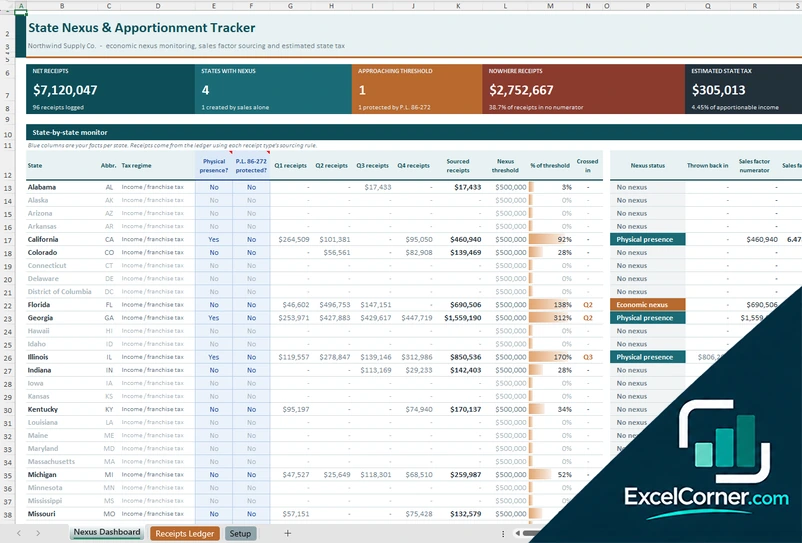
Log receipts by state, compare them with nexus thresholds and estimate the state tax of the states where you have nexus.
Nexus DashboardReceipts LedgerSetup
.xlsx · 320 KB
What is inside the state apportionment Excel templates
Version 1: State Apportionment Dashboard
On the Setup sheet you enter the entity, the tax year and the federal taxable income, and on the Apportionment sheet you enter the property, payroll and sales factors for each state. The State Tax sheet applies each state’s rate and your payments and credits. The Dashboard shows the net state tax, the balance due or overpaid, the effective state rate and the number of filing states, with a table of the filing states ranked by net tax, with the apportionment percentage, the prior-year percentage, the change, the apportioned income, the net tax, the change in tax and the balance due, and charts of the top states by net tax and of the apportionment compared with the prior year.
Version 2: Multistate Apportionment Workpaper
The Summary sheet holds the entity, the federal taxable income, the nonbusiness income that is allocated and the apportionable business income, and shows the net state tax, the balance due, the effective state rate and the total apportionment. A factor reconciliation compares the property, payroll and sales everywhere with the control totals from the books and federal return. A table of apportionment and tax by state shows whether the company files in each state, the formula, the property, payroll and sales factors, the apportionment percentage, state modifications, apportioned income, net operating loss deduction, taxable income, rate, credits and tax, with review checks and a chart of net tax by state. The Factor Detail and State Rules sheets hold the data and the formulas.
Version 3: State Nexus and Apportionment Tracker
The Receipts Ledger holds the receipts with the state and the type of receipt, and each receipt type has a sourcing rule that decides where the sale counts. On the Setup sheet you set the tax regime, the nexus threshold and the tax rate of each state, and on the dashboard you enter your facts for each state, such as physical presence and whether P.L. 86-272 protection applies. The Nexus Dashboard shows the net receipts, the states with nexus, the states approaching the threshold, the receipts sourced nowhere and the estimated state tax, with a state-by-state monitor of quarterly receipts, the percentage of the threshold, the date the threshold was crossed and the nexus status, such as physical presence or economic nexus.
How to use the state apportionment template in Excel
- Download
Pick the version you want and open it in Excel. - Set up the entity
Enter the company, the tax year, the federal taxable income and any nonbusiness income. Fill in the input cells; formula cells calculate on their own. - Enter the factors
Add property, payroll and sales for each state, or log receipts with their sourcing rule. - Review the results
Check the apportionment percentages, the state tax, the balance due and the nexus status of each state.
Tie the factors to your books before you finish, and update the state rules and rates every year.
Which state apportionment template do you need?
| State Apportionment Dashboard | Multistate Apportionment Workpaper | State Nexus and Apportionment Tracker | |
|---|---|---|---|
| Best for | Ranking many filing states | A complete workpaper with factor checks | Monitoring economic nexus |
| You enter | Factors and rates for each state | Entity data, factors, state rules and adjustments | Receipts by state and thresholds |
| You get | Apportionment, net tax and change from last year | Factor reconciliation, apportioned income and state tax | Nexus status, sourced receipts and estimated tax |
They are separate files, so you can use more than one.
Tips for state apportionment
- Confirm which apportionment formula each state uses, such as single sales factor, double-weighted sales or three equal factors.
- Reconcile the factors everywhere to your books and your federal return.
- Apply each state’s own modifications to federal income before you apportion.
- Source sales according to the state’s rules, which can differ by type of receipt.
- Monitor economic nexus thresholds during the year and not only at year end.
- Keep the prior-year workpaper to explain changes in the percentages.
Frequently asked questions
Is this state apportionment Excel template free?
Yes. All three versions are free to download as .xlsx files. You do not need an account or an email address.
Which version should I choose?
Choose the State Apportionment Dashboard (Version 1) to see many filing states ranked by net tax with a comparison to the prior year. Choose the Multistate Apportionment Workpaper (Version 2) for a full workpaper with a factor reconciliation and a formula for each state. Choose the State Nexus and Apportionment Tracker (Version 3) to monitor economic nexus from a receipts ledger. They are separate files, so you can use more than one.
What is apportionment?
Apportionment is the way a multistate business divides its business income among the states. Each state applies a formula, usually based on the share of the company’s property, payroll and sales in that state.
What is economic nexus?
Economic nexus means a business has enough sales or activity in a state to have a tax obligation there, even without a physical presence. The tracker compares your receipts in each state with a threshold you set and marks the status.
Are the state rules and rates included?
The files include sample state rules and rates to show how the calculation works. State rules change, so update them with the current official rules before you rely on the results.
Does the template work in Google Sheets?
The files are made for Microsoft Excel and use standard formulas with no macros. You can upload them to Google Drive and open them with Google Sheets, but some formatting or charts may look different.
Is my data stored online?
No. The templates are plain Excel files, so the numbers you type stay in your own file on your own computer.
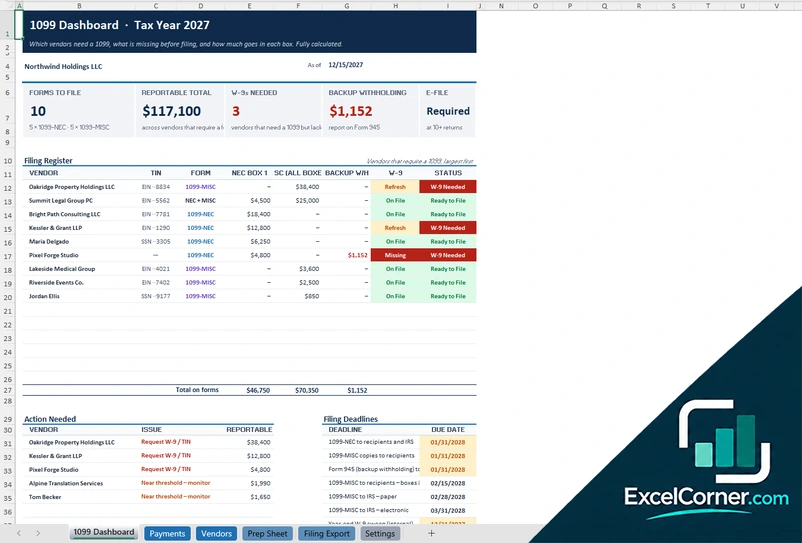
More free tax templates
These templates are planning and bookkeeping tools with sample data and illustrative tax figures. They are not tax, legal or accounting advice. Tax rules, rates and thresholds change, so confirm them with the IRS, your state and a qualified tax professional before you file. Excel is a trademark of Microsoft Corporation; Excel Corner is not affiliated with Microsoft.