
Home › Accounting & Business Finance › Tax Deduction Spreadsheet Template Excel
Previewing: Version 1 · Tax Deduction Tracker. Pick another version on the right.
Instant download · No sign-up · No email
Use this free tax deduction spreadsheet template for Excel to keep track of everything you can deduct. Log expenses and payments all year, add mileage and home office, and see whether the standard or the itemized deduction saves you more. Pick the version that fits your tax situation.
Choose your version
- File
- .xlsx · 210 KB · 4 sheets
- Works with
- Microsoft Excel (.xlsx)
- Macros
- None · formulas only
- Price
- Free
Track your tax deductions in Excel all year
Deductions only help if you can document them. A tax deduction spreadsheet gives you one place to record every deductible expense as it happens, with the date, amount, category and a note about the receipt, so you are not searching for papers in April.
These Excel tax deduction templates cover three situations. The first is a tracker with a deduction log, mileage and home office, and a summary of the tax you save. The second is a planner focused on itemized against standard deductions, with the limits of Schedule A applied automatically. The third is a workbook for the self-employed with a Schedule C profit and loss and a plan for estimated payments.
Best for
- Households that want to know if itemizing beats the standard deduction
- Self-employed people who track business deductions and mileage
- Anyone who wants an organized record of deductible expenses
Maybe not for
Claiming deductions without records. The templates help you organize and estimate, but you still need receipts and a qualified review of what is deductible.
Which version is right for you?
All three are free, formula-driven Excel files with sample data you can replace. They are independent, so you can download more than one.
Version 1
Tax Deduction Tracker
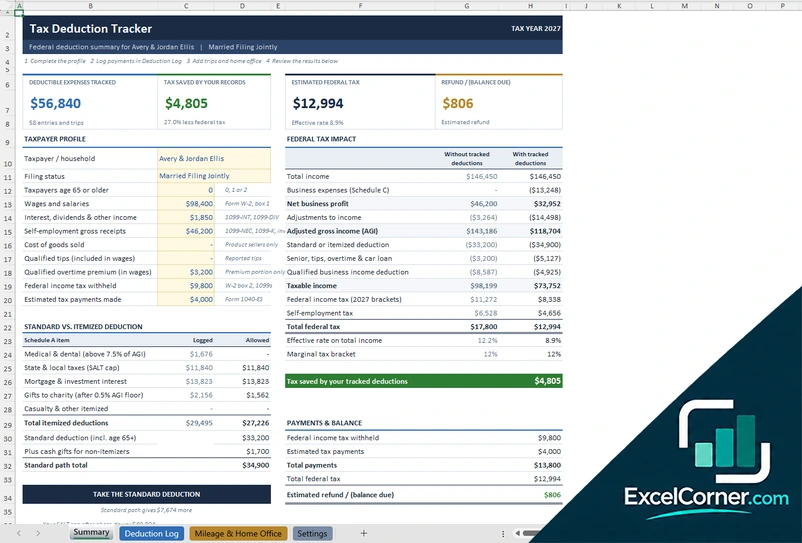
Log deductions all year and see the tax your records save you, with a standard versus itemized comparison.
SummaryDeduction LogMileage & Home OfficeSettings
.xlsx · 210 KB
Version 2
Tax Deduction Planner
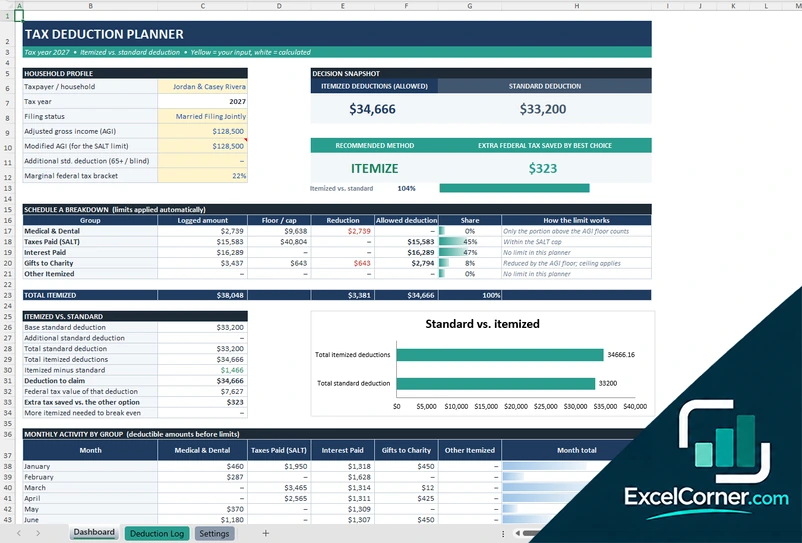
Log deductible payments and see whether itemizing or the standard deduction saves more tax.
DashboardDeduction LogSettings
.xlsx · 66 KB
Version 3
Self-Employed Deduction Workbook
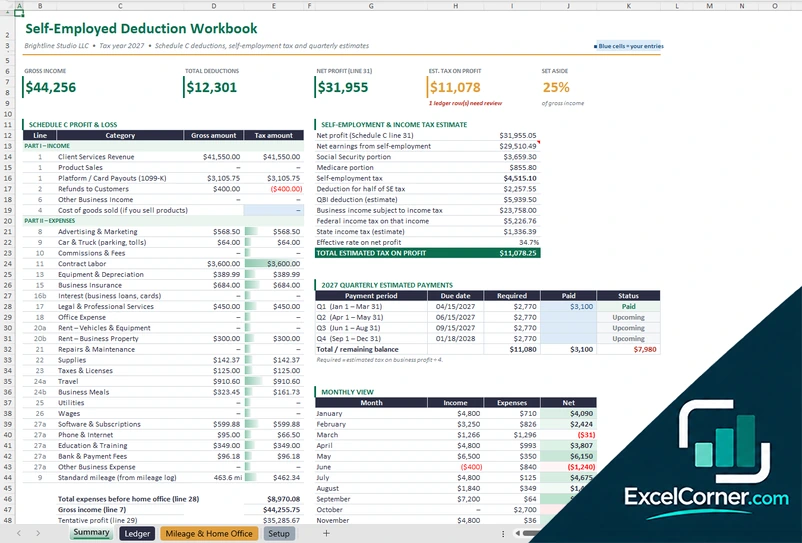
Log business income and expenses, and see your Schedule C profit, your tax estimate and your quarterly payments.
SummaryLedgerMileage & Home OfficeSetup
.xlsx · 110 KB
What is inside the tax deduction Excel templates
Version 1: Tax Deduction Tracker
On the Summary sheet you complete the taxpayer profile, with the filing status, the wages, the interest and dividends and the self-employment receipts, and the sheet compares the federal tax with and without your tracked deductions. The Deduction Log records each expense or payment with its date, category and amount, and the Mileage and Home Office sheet records trips and the business use of the home. The summary shows the deductible expenses tracked, the tax saved by your records, the estimated federal tax and the refund or balance due, and compares the standard deduction with the itemized deductions by Schedule A item. The Settings sheet holds the tax parameters and the lists.
Version 2: Tax Deduction Planner
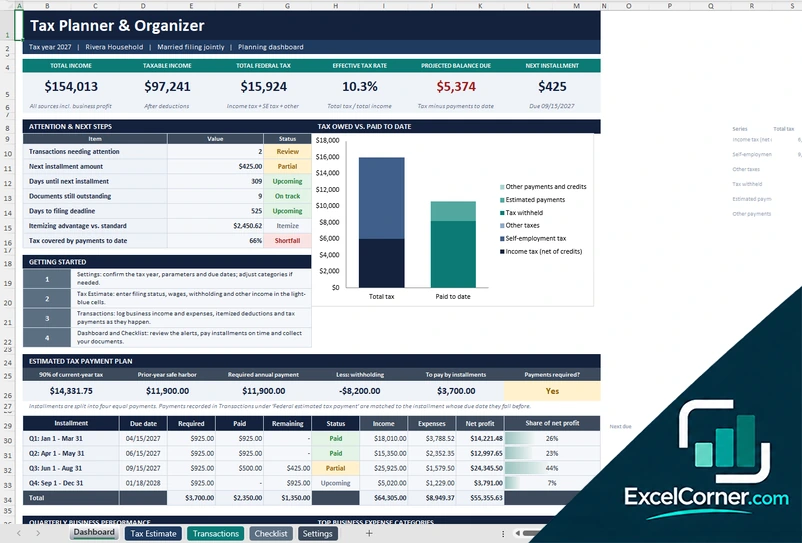
On the Dashboard you enter the household profile, with the tax year, the filing status, the adjusted gross income and the marginal tax bracket. You log deductible payments on the Deduction Log, and the planner groups them as medical and dental, state and local taxes, interest paid, gifts to charity and other itemized deductions, and applies the floor or the cap of each group automatically. The Dashboard shows the allowed itemized deductions against the standard deduction, the recommended method and the extra federal tax saved by the best choice, with a Schedule A breakdown, a chart of standard against itemized and the monthly activity by group.
Version 3: Self-Employed Deduction Workbook
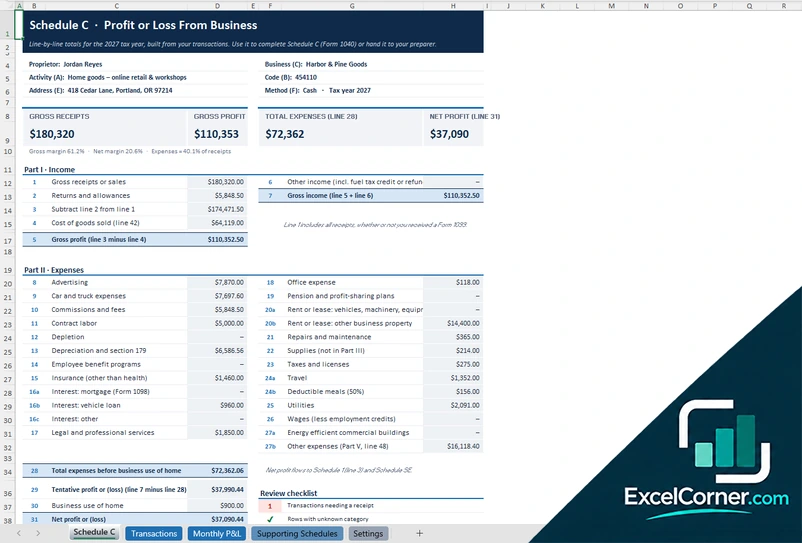
The Ledger sheet records business income and expenses by category, and the Mileage and Home Office sheet records business miles and home office details. The Summary shows the gross income, the total deductions, the net profit on line 31, the estimated tax on the profit and the share of income to set aside, with a Schedule C profit and loss by line, a self-employment and income tax estimate that includes the deduction for half of the self-employment tax and the qualified business income deduction, a schedule of quarterly estimated payments and a monthly view. The Setup sheet holds the business details and the tax parameters.
How to use the tax deduction spreadsheet in Excel
- Download
Pick the version you want and open it in Excel. - Complete your profile
Enter the tax year, your filing status, your income and the standard deduction. Fill in the input cells; formula cells calculate on their own. - Log your deductions
Record each expense or payment with its date, category and amount, and add business miles and home office details if they apply. - Review the results
Check the total tracked, the tax saved by your records and whether to itemize or take the standard deduction.
Add expenses as they happen and keep the receipts, so the log matches your documents.
Which tax deduction template do you need?
| Tax Deduction Tracker | Tax Deduction Planner | Self-Employed Deduction Workbook | |
|---|---|---|---|
| Best for | A year-round log with tax impact | Itemized versus standard | Business deductions on Schedule C |
| You enter | Deductions, mileage and home office | Deductions by Schedule A group | A ledger, mileage and home office |
| You get | Tax saved by your records and refund estimate | The better method and the extra tax saved | Net profit, tax estimate and quarterly payments |
They are separate files, so you can use more than one.
Tips for tracking tax deductions
- Record each deduction when you pay it and keep the receipt or a photo.
- Use categories that match the tax form, such as medical, taxes, interest and charity.
- Remember the limits: some deductions only count above a floor or up to a cap.
- Keep a mileage log with the date, the purpose and the miles.
- Measure the home office and keep records of the related expenses.
- Compare itemized and standard deductions before you file.
Frequently asked questions
Is this tax deduction spreadsheet template for Excel free?
Yes. All three versions are free to download as .xlsx files. You do not need an account or an email address.
Which version should I choose?
Choose the Tax Deduction Tracker (Version 1) for a year-round log with mileage and a summary of the tax you save. Choose the Tax Deduction Planner (Version 2) to compare itemized and standard deductions with the Schedule A limits. Choose the Self-Employed Deduction Workbook (Version 3) for a Schedule C profit and loss with a self-employment tax estimate. They are separate files, so you can use more than one.
How does it decide between itemized and standard deductions?
It adds up your itemized deductions after applying the limits, compares the total with the standard deduction for your filing status and shows the better choice and the extra tax you would save.
Which deductions are limited?
Some groups have limits. Medical expenses count only above a percentage of your adjusted gross income, state and local taxes have a cap, and gifts to charity are limited by income. The planner applies the limits that you set.
Can I track mileage and a home office?
Yes. The Tax Deduction Tracker and the Self-Employed Deduction Workbook have a sheet for business, medical and charity miles and for the home office.
Does the template work in Google Sheets?
The files are made for Microsoft Excel and use standard formulas with no macros. You can upload them to Google Drive and open them with Google Sheets, but some formatting or charts may look different.
Is my data stored online?
No. The templates are plain Excel files, so the numbers you type stay in your own file on your own computer.
More free tax templates
These templates are planning and bookkeeping tools with sample data and illustrative tax figures. They are not tax, legal or accounting advice. Tax rules, rates and thresholds change, so confirm them with the IRS, your state and a qualified tax professional before you file. Excel is a trademark of Microsoft Corporation; Excel Corner is not affiliated with Microsoft.