
Home › Calendars, Schedules & Productivity › Call Sheet Template Excel
Previewing: Version 1 · Daily Production Call Sheet. Pick another version on the right.
Instant download · No sign-up · No email
Use these free call sheet templates for Excel to tell your cast and crew where to be and when, or to log and follow up sales calls. One version is a daily production call sheet with a crew roster, one builds the call sheet from a shooting schedule, and one is a sales call sheet with a call log and a performance dashboard.
Choose your version
- File
- .xlsx · 30 KB · 2 sheets
- Works with
- Microsoft Excel (.xlsx)
- Macros
- None · formulas only
- Price
- Free
Make a call sheet in an Excel spreadsheet
A call sheet is a one-page document with the details of the day. On a film, video or photo shoot, it tells every person on the team the call time, the location, the weather and the schedule. In sales, a call sheet is the list or log of calls that a rep makes, with the outcome and the next step for each. Excel is a good fit for both because the times, the totals and the follow-ups can be calculated from the data you enter.
These Excel templates cover three ways to work. The first is a daily production call sheet: you enter the production details, the general crew call, the locations, the people and the schedule, and the sheet shows who is called, the confirmed people, the length of the day and the estimated labor cost. The second is a call sheet generated from a shooting schedule, where you assign each scene to a shoot day, pick the day and get the scenes, the cast calls, the crew calls and the day cost. The third is a sales call sheet, where you log every dial with the outcome and see the connect rate, the meetings booked, the weighted pipeline and the follow-ups that are overdue.
Best for
- Producers, assistant directors and production coordinators who send a call sheet for every shoot day
- Small video, film and photo teams that need a clear schedule and a crew list for each day
- Sales teams and reps that make outbound calls and want a call log with follow-ups
Maybe not for
A full production management or CRM system with online distribution, shared access and automatic messages. These templates are Excel files that you update yourself.
Which version is right for you?
All three are free, formula-driven Excel files with sample data you can replace. They are independent, so you can download more than one.
Version 1
Daily Production Call Sheet
Make a daily call sheet with the general call, weather, locations, key contacts, a schedule and a roster with call times and pay.
Call SheetRoster
.xlsx · 30 KB
Version 2
Production Call Sheet from a Shooting Schedule
Build the shooting schedule, the cast and crew and the shoot days, then pick a day to get its call sheet with scenes, cast calls and costs.
Call SheetShooting ScheduleCast & CrewShoot Days
.xlsx · 55 KB
Version 3
Sales Call Sheet
Log sales calls with the disposition, the deal value and the next step, and follow the connect rate, meetings and pipeline by rep and week.
Call LogDashboardSetup
.xlsx · 178 KB
What is inside the call sheet Excel templates
Version 1: Daily Production Call Sheet
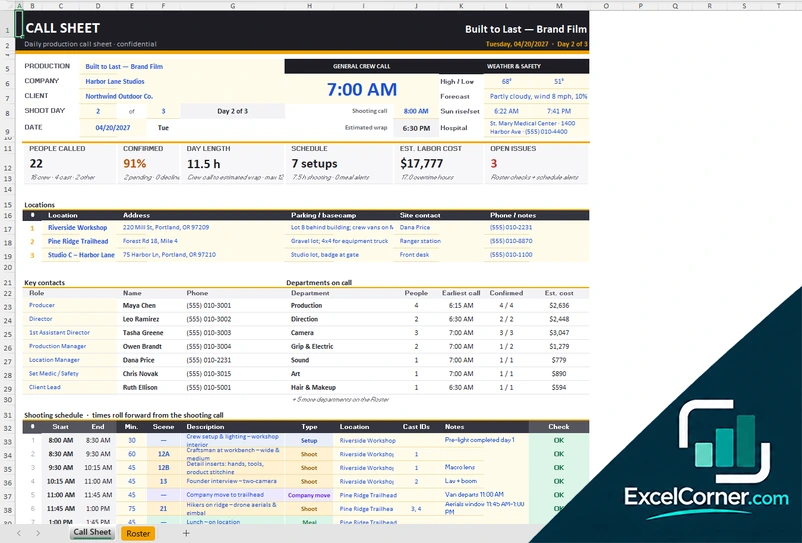
The Call Sheet sheet is a one-page document that you can print or save as a PDF. You enter the production, the company, the client, the shoot day and date, the general crew call, the shooting call and the estimated wrap, the weather and the nearest hospital. It shows the people called, the confirmed share, the length of the day, the schedule setups, the estimated labor cost and the open issues, with the locations, the key contacts, the departments on call with their first call and the shooting schedule, where the times roll forward from the shooting call. The Roster sheet lists the cast and crew with their department, position, phone, email, call time, preparation minutes, rate type, rate and confirmation. It calculates each person’s call, the time on set, the paid hours, the overtime hours and the estimated pay, using day rules for the overtime hours, the wrap buffer, the meal break and the maximum workday.
Version 2: Production Call Sheet from a Shooting Schedule
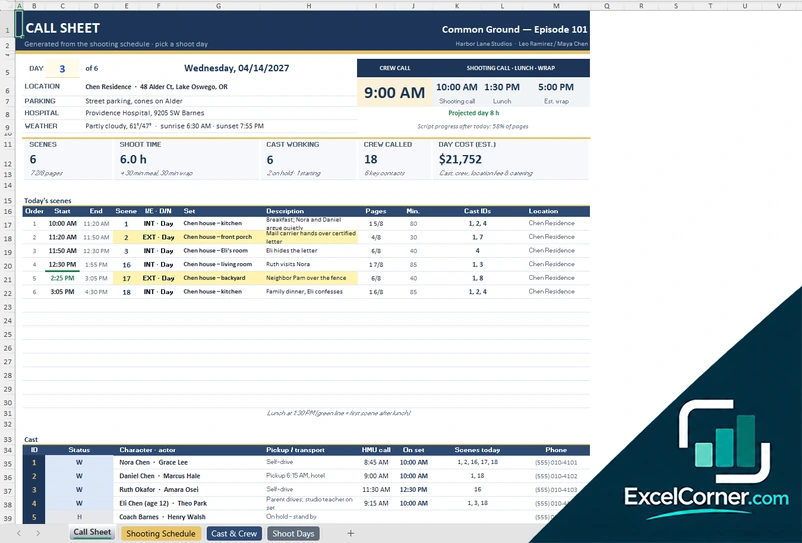
The Shoot Days sheet has one row for each shoot day with the date, the location, the address, the parking, the nearest hospital, the crew call, the shooting call, lunch, sunrise and sunset, the weather, the location fee and the catering cost per head. The Shooting Schedule is a stripboard where you list each scene with its location, a description, its pages in eighths, the estimated minutes and the cast IDs, and assign it to a shoot day, with colors for interior and exterior, day and night. The Cast & Crew sheet holds the cast with a day-out-of-days grid that marks start work, work and hold, the day rates and the pickup, and the crew with a call offset from the general call. When you pick a shoot day, the Call Sheet shows the crew call, the shooting call, lunch and the estimated wrap, the location, the parking and the weather, the scenes of the day in order, the shoot time, the cast working with their pickup and makeup calls, the crew called by department, the key contacts and the estimated cost of the day.
Version 3: Sales Call Sheet
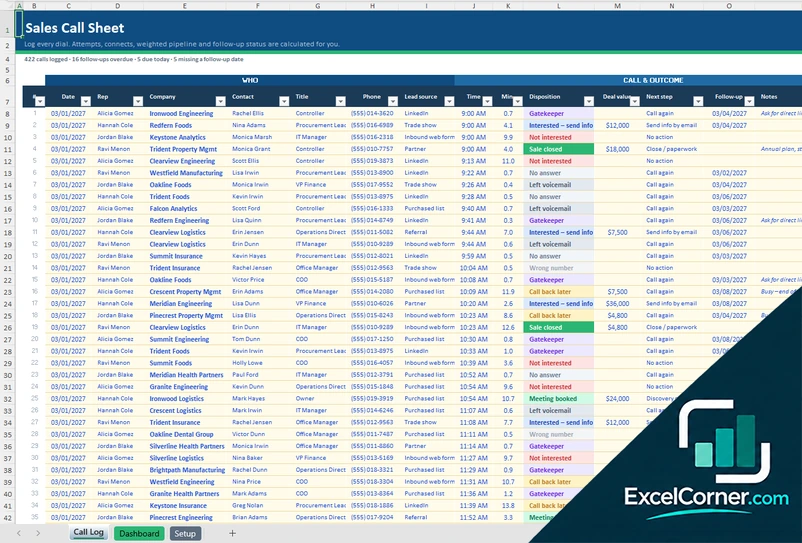
The Call Log is a table with one row for each call. You enter the date, the rep, the company, the contact, the title, the phone, the lead source, the time, the minutes, the disposition, the deal value, the next step, the follow-up date and notes. The sheet marks each call as an attempt or a connect, weights the deal value by the probability of the outcome and shows the status of the follow-up. The Dashboard lets you pick a week and shows the dials, the connect rate, the meetings booked, the sales closed, the weighted pipeline and the follow-ups overdue, a scorecard by rep with their daily targets, a day-by-day view, the mix of outcomes, the follow-ups to work next with the overdue ones first and the quality of each lead source. The Setup sheet holds the team or campaign, the report date, the reps with their daily targets for dials, connects and meetings, the call outcomes with the pipeline probability, the lead sources and the next steps.
How to use a call sheet template in Excel
- Download
Pick the version you want and open it in Excel. The files have sample data, such as a production, a crew and a call log, so you can see how they work. - Enter the basics
Fill in the production or the team, the report date and the rules, such as the overtime hours and the meal break, or the reps, the daily targets and the call outcomes. - Add people, scenes or calls
Add the cast and crew with their department and call time, the scenes in the shooting schedule, or each sales call with its outcome. - Pick the day
In the production versions, choose the shoot day or enter the date. The call sheet fills in the locations, the times and the people working. In the sales version, pick the week on the dashboard. - Print or share
Print the sheet or save it as a PDF to send it to the team. Update it again when the schedule or the plan changes.
Replace the sample production, people and calls with your own. The times, the totals and the follow-up flags update on their own.
Which call sheet template do you need?
| Daily Production Call Sheet | Production Call Sheet from a Shooting Schedule | Sales Call Sheet | |
|---|---|---|---|
| For | One shoot day with a crew roster | A whole shoot, one call sheet for each day | Outbound sales calls and follow-ups |
| Best for | Small crews and one-day shoots | Productions with scenes and a cast | Sales reps and call campaigns |
| Main outputs | People called, confirmed, day length, labor cost, open issues | Scenes, shoot time, cast working, crew called, day cost | Dials, connect rate, meetings, weighted pipeline, overdue follow-ups |
| Sheets | 2 | 4 | 3 |
| Charts | No | No | Yes |
They are separate files, so you can use more than one.
Tips for call sheets
- Send the call sheet the day before, with the call time, the location, the parking and the nearest hospital.
- Give each department its own call time, so people do not wait on set.
- Check the weather and the sunrise and sunset times for each shoot day.
- Plan a wrap buffer after the last scene, and compare the estimated wrap time with the maximum workday.
- Ask people to confirm their call, and follow up with those who have not.
- In sales, set a next step and a follow-up date for every call that does not end in a no.
- Review the connect rate and the outcomes by week to see which lead sources work.
Frequently asked questions
Are these call sheet templates for Excel free?
Yes. All three versions are free to download as .xlsx files. You do not need an account or an email address.
Which version should I choose?
Choose the Daily Production Call Sheet (Version 1) for a single shoot day with a crew roster and labor cost. Choose the Production Call Sheet from a Shooting Schedule (Version 2) if you plan a whole shoot with scenes and a cast and want a call sheet for each day. Choose the Sales Call Sheet (Version 3) to log outbound calls and follow-ups.
What is a call sheet?
On a film, video or photo shoot, a call sheet is the daily schedule that tells the cast and crew where to be and when. It lists the call times, the locations, the weather, the scenes and the contacts. In sales, a call sheet is a list or log of the calls made to prospects, with the outcome of each call.
How do I make a daily call sheet in Excel?
Open the daily production call sheet, enter the production, the date, the general crew call and the locations, add the people on the Roster with their department and call time, and fill in the schedule. The call sheet shows the people called, the day length, the estimated wrap and the labor cost.
Can the call sheet use the shooting schedule?
Yes. In Version 2 you assign each scene to a shoot day on the Shooting Schedule sheet, and the call sheet for the day you pick shows the scenes in order, with the start times, the cast working, the pickup and makeup calls and the crew calls by department.
How does the sales call sheet track follow-ups?
Each call has a disposition, a next step and a follow-up date. The sheet shows whether the follow-up is overdue, due today or upcoming, and the dashboard lists the follow-ups to work next, overdue first. It also weights the deal value by the probability of each outcome to give a pipeline.
Does it calculate overtime and labor cost?
The daily production call sheet does. You set the overtime hours, the meal break and the maximum workday, and each person has a rate type and a rate. The Roster calculates the paid hours, the overtime hours and the estimated pay. The version built from a shooting schedule shows an estimated day cost with the day rates, the location fee and catering.
Does the template work in Google Sheets?
The files are made for Microsoft Excel and use standard formulas with no macros. You can upload them to Google Drive and open them with Google Sheets, but some formatting or charts may look different.
Is my information stored online?
No. The templates are plain Excel files, so the names, numbers and dates you type stay in your own file on your own computer.
These templates are planning tools with made-up sample data. They are not legal, safety or contract advice. Check call times, rates and overtime rules against your own agreements before you use them. Excel is a trademark of Microsoft Corporation; Excel Corner is not affiliated with Microsoft.