
Home › Marketing, Sales & Customers › Website Development Project Plan Template Excel
Previewing: Version 1 · Project Plan with Gantt Chart. Pick another version on the right.
Instant download · No sign-up · No email
Use these free website development project plan templates for Excel to plan a new site or a redesign from kickoff to launch. One version is a project plan with tasks, dependencies and a Gantt chart, one is a budget and resource plan with hours, costs and payments, and one is a launch checklist with seven phases and a go or no-go answer.
Choose your version
- File
- .xlsx · 36 KB · 3 sheets
- Works with
- Microsoft Excel (.xlsx)
- Macros
- None · formulas only
- Price
- Free
Plan a website project in an Excel spreadsheet
A website project has three things to keep under control: the schedule, the money and the content. Most delays come from the same few places. A client approval takes a week longer than planned, the copy is not ready when the developer needs it, or nobody remembers the redirects and the analytics until launch day. A spreadsheet is a good place to see all of this at once, because it can work out the dates from the dependencies, add up the hours and the costs, and show what is overdue.
These Excel templates look at a website development project from three sides. The first is a project plan with phases, tasks, owners, predecessors and a Gantt chart, where the start and end dates of every task are calculated and the status is shown against the date you choose. The second is a budget and resource plan, where each work package has a role, hours and other costs, and the workbook shows the cost, the forecast, the hours per role and week against capacity, and a payment schedule. The third is a website launch checklist: seven phases from planning to after launch, a status, an owner and a due date for every task, and a readiness sheet that gives a go or no-go answer.
Best for
- Freelance web developers and small agencies that plan and quote website projects
- Marketing and IT teams that run a redesign, a migration or a new site with several people involved
- Small business owners who hire a web developer and want to follow the schedule, the cost and the content
Maybe not for
A project management tool with task comments, notifications and shared boards. These templates are Excel files that you update yourself, and they work well next to such a tool as a plan and a report.
Which version is right for you?
All three are free, formula-driven Excel files with sample data you can replace. They are independent, so you can download more than one.
Version 1
Project Plan with Gantt Chart
List the tasks of a website project with owners, durations and predecessors, and get calculated dates, a Gantt chart and a status for every task.
Project PlanDashboardSetup
.xlsx · 36 KB
Version 2
Budget and Resource Plan
Price a website project by work package, role and hour, compare the forecast with the budget and plan the hours of each role by week.
Budget PlanResource PlanSummarySetup
.xlsx · 41 KB
Version 3
Website Launch Checklist
A checklist of 44 tasks in seven phases. Each phase shows its own progress, and the readiness sheet says go only when every critical task is done.
Launch ChecklistGo-Live ReadinessSetup
.xlsx · 22 KB
What is inside the website development project plan Excel templates
Version 1: Project Plan with Gantt Chart
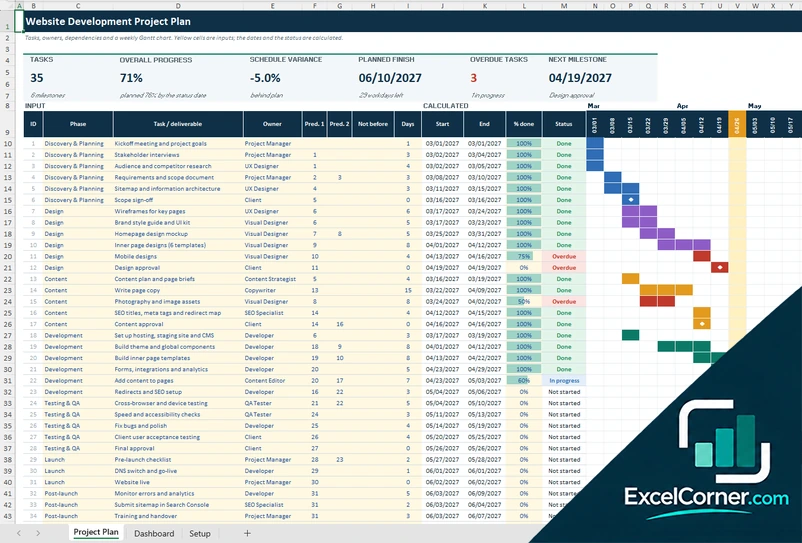
On the Project Plan sheet you list up to 60 tasks, each with a phase, an owner, up to two predecessor tasks, an optional not-before date and a duration in workdays. A duration of 0 makes the task a milestone. The sheet calculates the start and end date of every task, skipping weekends and the holidays that you list, and a status that compares the percent done with the status date: done, in progress, overdue, late start or not started. At the top it shows the number of tasks, the overall progress against the plan, the schedule variance, the planned finish date, the overdue tasks and the next milestone. A weekly Gantt chart colors the bars by phase, marks milestones, turns overdue tasks red and highlights the current week. The Dashboard shows the progress against plan by phase, the tasks by status, the milestones and a list of the tasks that need attention. The Setup sheet holds the project details, the phases, the holidays and the owners.
Version 2: Budget and Resource Plan
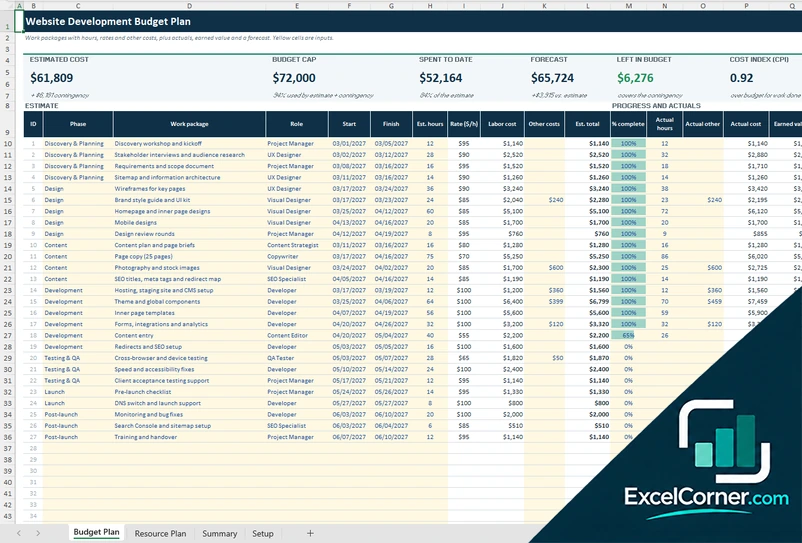
The Budget Plan sheet lists up to 60 work packages with a phase, a role, a start and finish date, the estimated hours and any other costs, such as licenses, stock photos or hosting. The hourly rate comes from the role on the Setup sheet, so the labor cost and the estimated total are worked out for you. You then enter the percent complete, the actual hours and the actual other costs, and the sheet calculates the actual cost, the earned value, the cost variance and a forecast at completion. The top of the sheet shows the estimate with the contingency, the budget cap, the amount spent, the forecast, the amount left in the budget and the cost index. The Resource Plan spreads the hours of each package over its dates and shows the planned hours per role and week against the capacity of the team, with a heat map of utilization, the overloaded weeks and a stacked chart. The Summary sheet gives the cost by phase and by role, a budget check and a payment schedule with the amounts paid, invoiced and pending.
Version 3: Website Launch Checklist
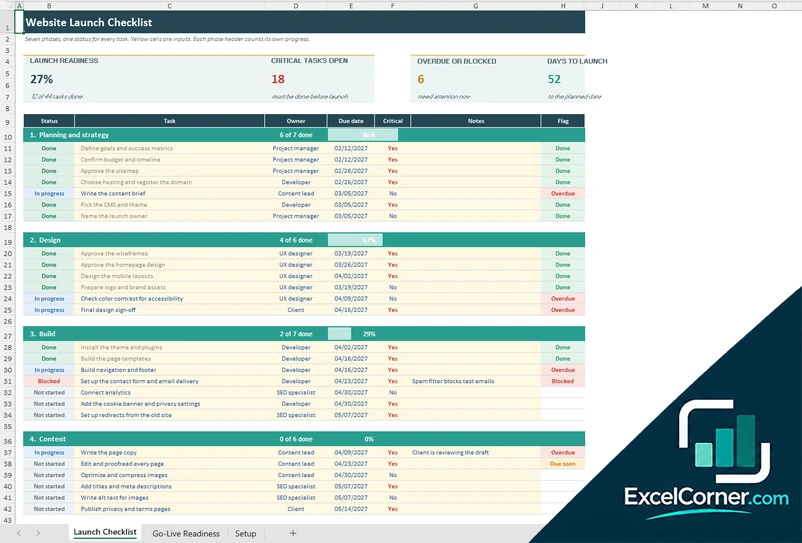
The Launch Checklist has seven phases: planning and strategy, design, build, content, quality check, launch day and after launch. Each phase has a header that shows how many of its tasks are done and a progress bar, and below it the tasks. For each task you choose a status (done, in progress, blocked, not started or N/A), an owner and a due date, mark it as critical or not, and add a note. The sheet flags each task as done, blocked, overdue or due soon, and four tiles show the launch readiness, the critical tasks still open, the tasks that are overdue or blocked and the days to launch. The Go-Live Readiness sheet gives the answer: GO only when every critical task is done, and NOT YET otherwise. It also shows the progress of every phase, a chart of the tasks by phase and a list of the blocked and overdue tasks, critical first. The Setup sheet holds the launch date, the status date, the due-soon window and the lists of owners and statuses.
How to use a website development project plan in Excel
- Download
Pick the version you want and open it in Excel. The files come with a sample website project, so you can see how each sheet works. - Set up the project
On the Setup sheet, enter the project name, the start date, the status date and your team or roles. In the budget plan, also enter the hourly rates and the contract value. - List the work
Add the tasks, the work packages or the pages, one on each row. Give each one an owner, a duration or a date and, in the plan, the tasks that must finish first. - Update the progress
Enter the percent done, the actual hours or the content stage as work moves on. Leave the status date empty to use today. - Read the results
Check the status, the forecast and the dashboard for overdue items, cost overruns, overloaded roles and open launch checks, and share the sheet with the client.
Replace the sample project with your own. The dates, the costs, the status and the charts update on their own.
Which website project template do you need?
| Project Plan with Gantt | Budget and Resource Plan | Website Launch Checklist | |
|---|---|---|---|
| For | The schedule: tasks, dependencies and dates | The money and the people: costs, hours and payments | The checks to pass before and after go-live |
| Best for | Project managers and developers | Agencies, freelancers and clients with a fixed budget | Launch coordination and sign-off |
| Main outputs | Start and end dates, progress vs. plan, overdue tasks, milestones | Estimate, spent, forecast, hours per role and week, paid and pending | Progress by phase, critical tasks open, blocked and overdue tasks, go or no-go |
| Sheets | 3 | 4 | 3 |
| Charts | Yes | Yes | Yes |
They are separate files, so you can use more than one on the same project.
Tips for planning a website development project
- Split the project into phases, such as discovery, design, content, development, testing, launch and after launch, and give each phase a clear deliverable.
- Add the client’s approvals as milestones with a date, since waiting for feedback is the most common reason a website project slips.
- Start the content early. Copy and images are often the last thing to arrive, and they hold up the build.
- Estimate the work in hours for each role, not only as one total price, so you can see who is overloaded.
- Keep a contingency of 10% to 20% in the budget for changes and extra rounds of review.
- Plan the redirects, the analytics and the search engine setup before launch, not after it.
- Use the launch checklist the week before go-live and do not launch until the critical checks are done.
Frequently asked questions
Are these website development project plan templates free?
Yes. All three versions are free to download as .xlsx files. You do not need an account or an email address.
Which version should I choose?
Choose the Project Plan with Gantt (Version 1) if you need a schedule with tasks, dependencies and milestones. Choose the Budget and Resource Plan (Version 2) if you need to estimate the cost, follow the spending and plan the hours of each role. Choose the Website Launch Checklist (Version 3) to work through the tasks before go-live and get a go or no-go answer. Many projects use all three.
What should a website development project plan include?
It should include the scope and the sitemap, the phases and tasks with owners and dates, the milestones and approvals, the budget and the team, the content plan and a launch checklist. The three templates cover the schedule, the budget and resources, and the pages and launch checks.
How do I make a Gantt chart for a website project in Excel?
Open the project plan, enter the start date, and list the tasks with their duration in workdays and the tasks that come before them. The sheet works out the start and end dates, skipping weekends and the holidays you list, and draws the bars for each week. The week of the status date is highlighted.
How long does it take to build a website?
A small business website often takes 8 to 16 weeks, depending on the number of pages, how ready the content is and how fast the approvals come. The sample plan runs about 15 weeks. Change the durations to match your project and the end date updates.
Can I use it for a redesign, a WordPress site or an online store?
Yes. The phases and checks are not tied to one platform. You can rename the phases, the tasks and the roles, and add the steps that your platform needs, such as theme setup, product import or payment testing.
Does the template include a website budget?
Yes. Version 2 estimates the cost of each work package from the hours and the hourly rate of the role, adds other costs and a contingency, and compares the estimate and the forecast with your budget. It also has a payment schedule with the amounts paid, invoiced and pending.
Does the template work in Google Sheets?
The files are made for Microsoft Excel and use standard formulas with no macros. You can upload them to Google Drive and open them with Google Sheets, but some formatting or charts may look different.
Is my information stored online?
No. The templates are plain Excel files, so the tasks, costs, names and dates you type stay in your own file on your own computer.
More free website and project templates
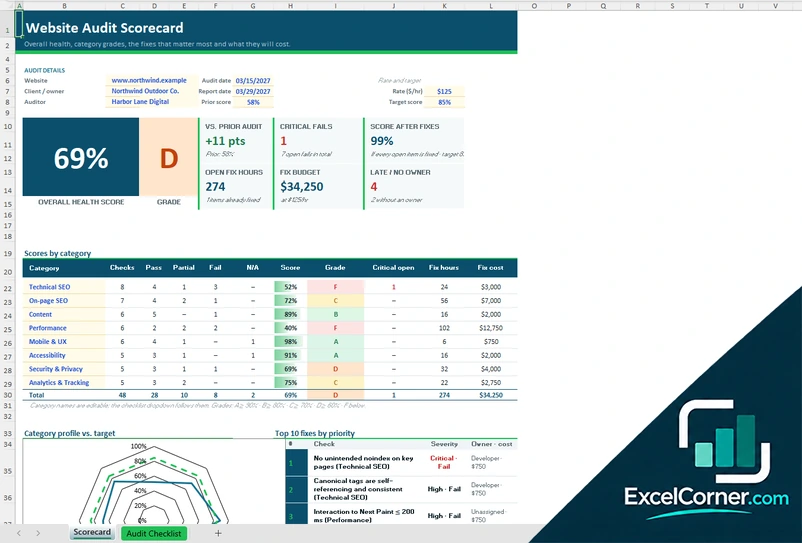
These templates are planning tools with made-up sample data. The dates, costs and scores depend on what you enter, and they are not a guarantee that a project will finish on time or on budget. Excel is a trademark of Microsoft Corporation; Excel Corner is not affiliated with Microsoft.