
Home › Project Management › Project Budget Template Excel
Previewing: Version 1 · Project Budget Template. Pick another version on the right.
Instant download · No sign-up · No email
Use these free project budget templates for Excel to set a budget, track what you spend and see whether the project will finish within it. One version tracks budget by line item with a dashboard, one controls the budget by cost code with an expense ledger and a change log, and one plans payments and cash flow month by month.
Choose your version
- File
- .xlsx · 34 KB · 3 sheets
- Works with
- Microsoft Excel (.xlsx)
- Macros
- None · formulas only
- Price
- Free
Plan and track a project budget in an Excel spreadsheet
A project budget has two jobs. Before the work starts, it sets how much money each part of the project can use. During the work, it shows how much has been spent, how much is already committed and where the total is heading. A spreadsheet handles both well when the budget lines, the spending and the forecast are linked.
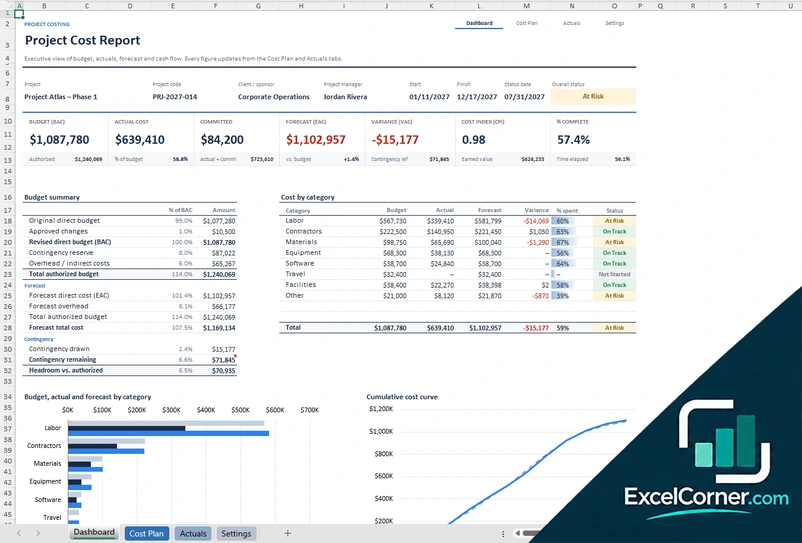
These project budget templates for Excel cover three setups. The first is a line-item budget with quantities and unit rates, a contingency reserve and a dashboard of budget, actual spend and forecast. The second is a budget control workbook organized by cost code, with an expense ledger, a log of budget changes and a monthly plan against actual spend. The third is a budget and cash flow plan that schedules payments by month and compares planned spend with actual spend and funding.
Best for
- Project managers who need a simple budget with a forecast and a variance
- Sponsors and PMO teams that approve budget changes and track contingency
- Finance and project teams that plan monthly spend and cash position
Maybe not for
Corporate budgeting for a whole organization or an accounting system with ledgers. These templates budget and track individual projects.
Which version is right for you?
All three are free, formula-driven Excel files with sample data you can replace. They are independent, so you can download more than one.
Version 1
Project Budget Template
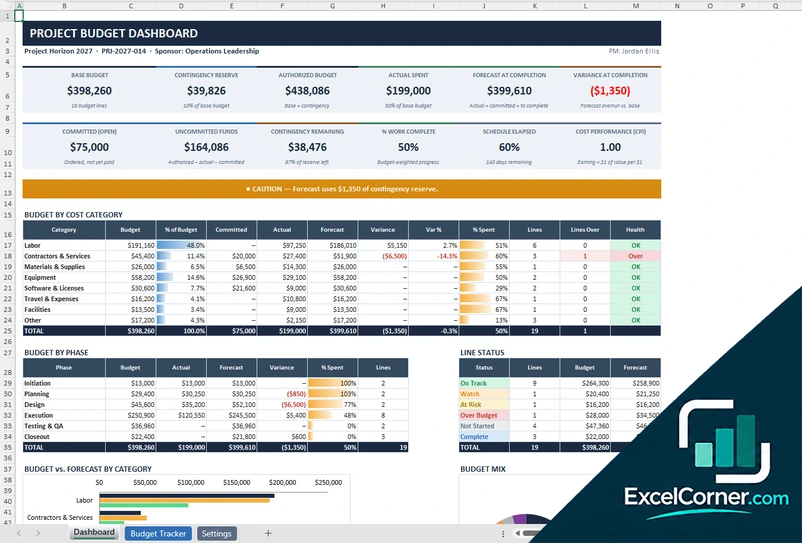
Build a line-item budget with quantities and unit rates, track committed and actual spend, and see the forecast and variance on a dashboard.
DashboardBudget TrackerSettings
.xlsx · 34 KB
Version 2
Project Budgeting Template
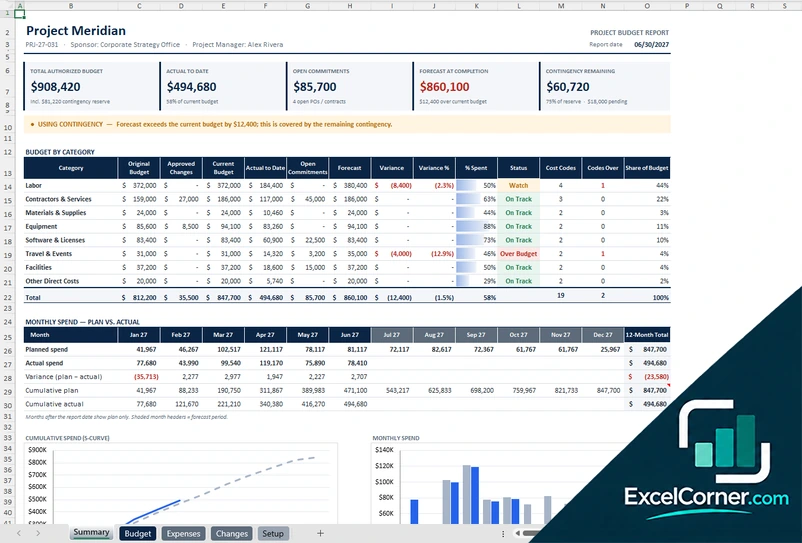
Control the budget by cost code, log expenses and budget changes, and compare the monthly plan with actual spend on a summary report.
SummaryBudgetExpensesChangesSetup
.xlsx · 75 KB
Version 3
Project Budget Cash Flow Plan
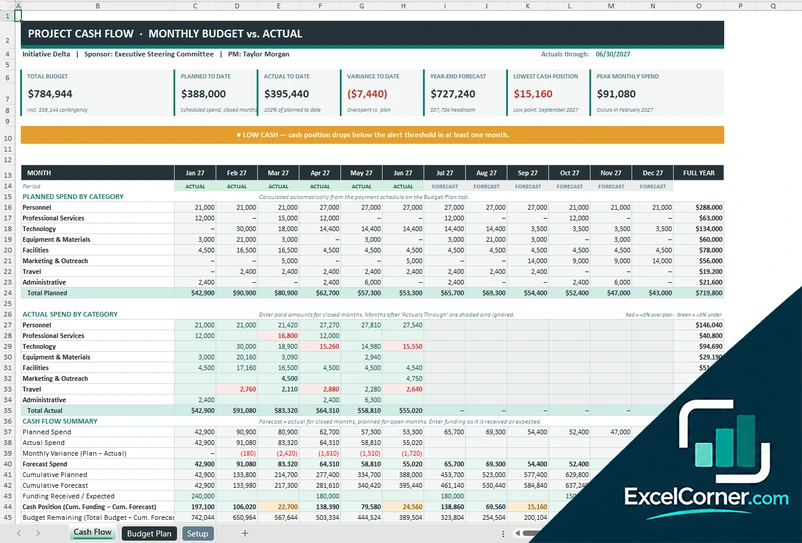
Schedule payments for each budget line, enter monthly actuals and see the cash position, the forecast and the funding gap.
Cash FlowBudget PlanSetup
.xlsx · 45 KB
What is inside the project budget Excel templates
Version 1: Project Budget Template
The Settings sheet holds the project information, the contingency reserve, the status date and the lists of phases, cost categories and units. The Budget Tracker lists one cost line per row with the phase, category, owner or vendor, unit, unit rate and budget, then the committed amount, the actual spend, the estimate to complete, the forecast at completion, the variance, the percent spent and complete and a status. The Dashboard shows the base budget, the contingency reserve, the authorized budget, the actual spend, the commitments, the forecast, the variance and the cost performance index, with the budget by category and by phase, the line status and two charts.
Version 2: Project Budgeting Template
The Budget sheet sets the original budget by cost code with the category, owner and planned start and end months, and calculates the current budget, the actual to date, the open commitments, the estimate to complete, the forecast, the variance and the monthly plan. The Expenses sheet is a ledger of paid, invoiced and committed entries, and the Changes sheet logs budget changes by funding source, such as contingency, sponsor funding or reallocation, with their status. The Summary shows the authorized budget, the actual, the commitments, the forecast and the contingency remaining, with the budget by category, the monthly plan against actual, the largest forecast variances and two charts.
Version 3: Project Budget Cash Flow Plan
The Setup sheet holds the project parameters, the contingency reserve, the actuals-through date, the low cash alert threshold, the cost categories and the payment plans: one-time, monthly, bi-monthly, quarterly, semi-annual and annual. The Budget Plan lists each line item with its total cost, payment plan, first payment and deposit, and calculates the installments and the schedule by month. The Cash Flow sheet shows the planned spend by category, the actual spend for closed months, the forecast, the funding received and the cash position, with a low cash alert and two charts.
How to use a project budget template in Excel
- Download
Pick the version you want and open it in Excel. The files include sample data so you can see how each sheet works. - Enter the project details
Fill in the project name, sponsor, dates, contingency reserve and status date on the Setup or Settings sheet, and edit the lists of categories and phases. - Build the budget
Add one line for each cost item with its category, owner and amount. In the line-item version, the budget is the quantity times the unit rate. - Record spending and changes
Enter invoices, purchase orders and approved changes as they happen, or, in the cash flow version, the amounts paid in each closed month. - Review the dashboard
Check the budget, actual spend, commitments, forecast and variance, and update the status date each reporting period.
Update the actuals and the status date each period, and the forecast, the variances and the charts recalculate.
Which project budget template do you need?
| Project Budget Template | Project Budgeting Template | Project Budget Cash Flow Plan | |
|---|---|---|---|
| For | A line-item budget and a forecast | Budget control by cost code | Monthly spend and cash position |
| Best for | Small and mid-size projects | Projects with budget changes and an approval process | Projects that pay vendors on a schedule |
| Main outputs | Budget, committed, actual, forecast and variance | Current budget, forecast, S-curve and largest variances | Planned vs. actual spend, cash position and funding |
| Sheets | 3 | 5 | 3 |
| Charts | Yes | Yes | Yes |
They are separate files, so you can use more than one.
Tips for managing a project budget
- Break the budget into lines you can track, such as labor, contractors, materials, software and travel, and assign each line an owner.
- Keep a contingency reserve and record every draw on it, so you can see how much risk money is left.
- Track commitments, such as purchase orders and signed contracts, as well as invoices. They reduce the funds you can still use.
- Record budget changes in a log with the amount, the reason, the funding source and the approval.
- Compare the forecast at completion with the authorized budget every period, not only the spend to date.
- Keep one file per project so that the totals and the charts always refer to the same work.
Frequently asked questions
Are these project budget templates for Excel free?
Yes. All three versions are free to download as .xlsx files. You do not need an account or an email address.
Which version should I choose?
Choose the Project Budget Template (Version 1) for a line-item budget with a dashboard and a forecast. Choose the Project Budgeting Template (Version 2) to control the budget by cost code with an expense ledger and a change log. Choose the Project Budget Cash Flow Plan (Version 3) to schedule payments and track monthly spend and cash position.
How is the forecast at completion calculated?
In the line-item version the forecast adds the actual spend, the open commitments and the estimate to complete for each line. The other versions combine the spend to date, the open commitments and the estimate to complete for each cost code.
How do I record a budget change?
In the Project Budgeting Template, the Changes sheet logs each change with its amount, funding source, status and approver. Approved changes update the current budget, and changes drawn from contingency reduce the contingency remaining.
What is the contingency reserve?
It is an amount held back for unexpected costs, entered as a percentage of the base budget. The dashboards show how much of it has been drawn and how much is left.
Can I plan payments over several months?
Yes. The Project Budget Cash Flow Plan schedules each line item with a payment plan, such as one-time, monthly, quarterly or with a deposit, and shows the planned spend by month and category.
Does the template work in Google Sheets?
The files are made for Microsoft Excel and use standard formulas with no macros. You can upload them to Google Drive and open them with Google Sheets, but some formatting or charts may look different.
Is my project information stored online?
No. The templates are plain Excel files, so the costs, names and dates you type stay in your own file on your own computer.
More free project management templates
These templates are planning and record-keeping tools with sample data. Check the figures against your contracts, invoices and accounting records before you rely on them. Excel is a trademark of Microsoft Corporation; Excel Corner is not affiliated with Microsoft.