
Home › Project Management › Project Cost Estimation Template Excel
Previewing: Version 1 · Project Cost Estimation Template. Pick another version on the right.
Instant download · No sign-up · No email
Use these free project cost estimation templates for Excel to estimate what a project will cost before you commit to it. One version builds a bottom-up estimate with three-point ranges and a confidence analysis, one adds a work breakdown, a cash flow and billing, and one produces a client-ready cost estimate with a payment schedule.
Choose your version
- File
- .xlsx · 39 KB · 3 sheets
- Works with
- Microsoft Excel (.xlsx)
- Macros
- None · formulas only
- Price
- Free
Estimate project costs in an Excel spreadsheet
A project cost estimate turns a scope of work into a number. A good one lists the work in small pieces, estimates the quantity and the rate for each piece, adds an allowance for risk and shows the assumptions behind the total. A spreadsheet makes that easy to repeat and to change when the scope changes.
These project cost estimation templates for Excel cover three situations. The first is a bottom-up estimate with optimistic, most likely and pessimistic quantities, a labor rate card with burden, escalation, overhead and fee, and a risk analysis with confidence levels. The second is a detailed estimate organized by work breakdown structure, with a cash flow, a billing plan and the team size by month. The third is a client-facing cost estimate with sections for labor, materials and equipment, optional items and a payment schedule.
Best for
- Project managers and estimators who build a cost estimate before a project is approved
- Consultants, contractors and agencies that send a cost estimate to a client
- PMO teams that want a repeatable estimating method with ranges and assumptions
Maybe not for
Detailed construction takeoffs or software that prices quantities from a supplier catalog. These templates estimate costs from the lines and the rates you enter.
Which version is right for you?
All three are free, formula-driven Excel files with sample data you can replace. They are independent, so you can download more than one.
Version 1
Project Cost Estimation Template
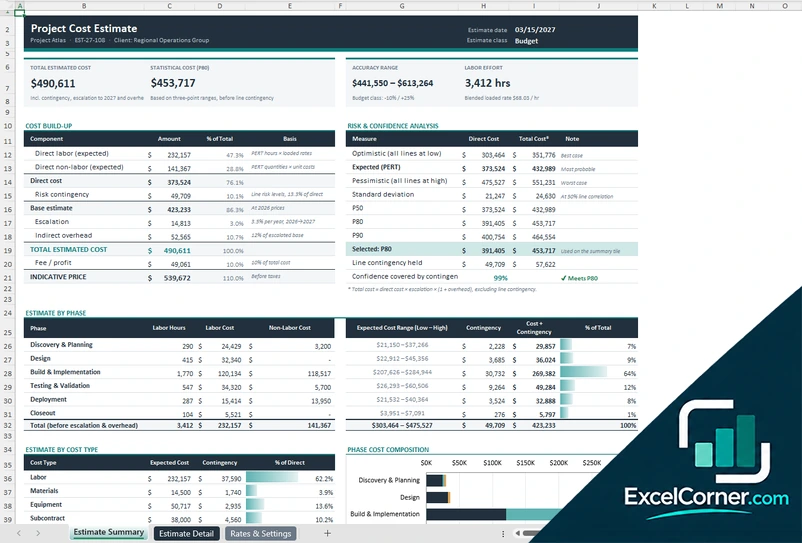
Estimate each task with low, likely and high quantities, apply a loaded rate card and see the total cost, the accuracy range and the confidence levels.
Estimate SummaryEstimate DetailRates & Settings
.xlsx · 39 KB
Version 2
Project Cost Estimate Template
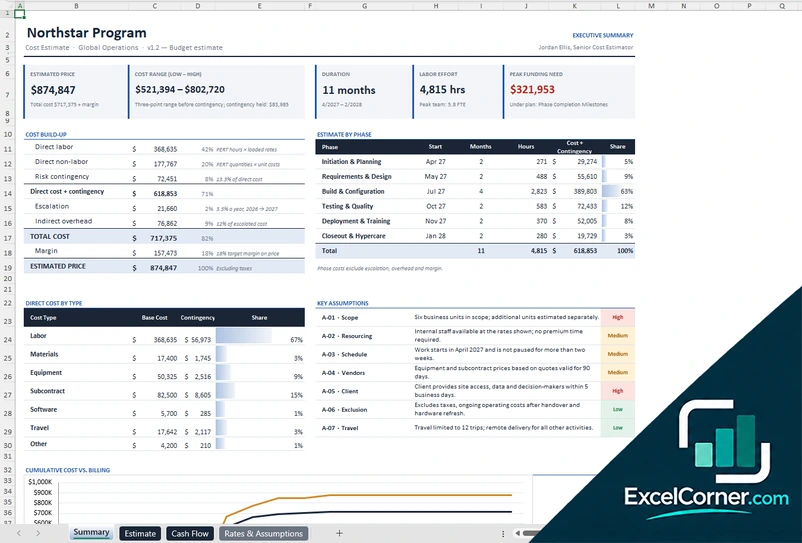
Estimate costs by work breakdown structure, then see the price, the duration, the monthly cost, the billing and the cash position.
SummaryEstimateCash FlowRates & Assumptions
.xlsx · 58 KB
Version 3
Client Cost Estimate and Payment Schedule
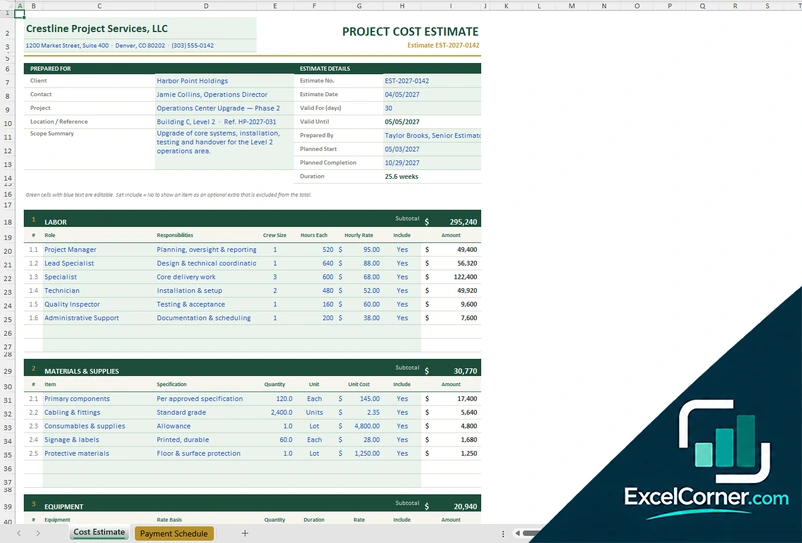
Prepare a cost estimate for a client with labor, materials and equipment sections, then choose a payment plan with deposit or retainage.
Cost EstimatePayment ScheduleLists
.xlsx · 30 KB
What is inside the project cost estimation Excel templates
Version 1: Project Cost Estimation Template
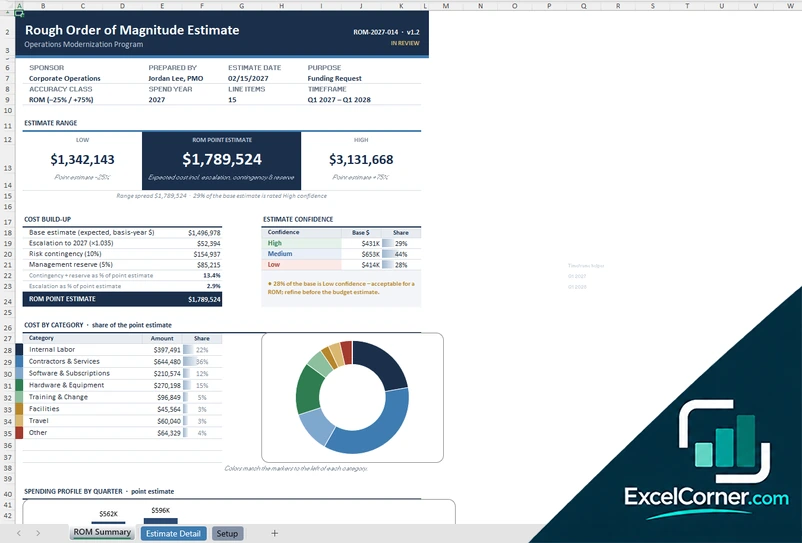
The Rates & Settings sheet holds the project details, the estimate class, the labor rate card with base rate, burden and loaded rate, the phases, and the escalation, overhead and fee. The Estimate Detail sheet lists one row per task or cost item with the phase, cost type, labor role and optimistic, most likely and pessimistic quantities, and calculates the expected quantity, the expected, low and high cost, the contingency and the standard deviation. The Estimate Summary shows the total estimated cost, the accuracy range and the labor effort, the cost build-up, the P50, P80 and P90 values, the cost by phase and by type, and a chart of phase cost.
Version 2: Project Cost Estimate Template
The Rates & Assumptions sheet holds the project parameters, the labor rate card with burden and the cost types. The Estimate sheet organizes the work by phase with expandable rows and lists the description, cost type, role, unit, quantities, rate, base cost, risk, contingency, total cost, timing and the assumption behind each line. The Cash Flow sheet spreads the cost by month, adds the labor hours and the team size, and compares billing with cost to show the cash position and the peak funding need. The Summary shows the estimated price, the cost range, the duration, the labor effort, the key assumptions and three charts.
Version 3: Client Cost Estimate and Payment Schedule
The Cost Estimate sheet is laid out like a quote, with the company name, the client, the estimate number and date, the validity period and a scope summary. It has sections for labor, materials and supplies, equipment and other costs, each with a subtotal, and an include column that lets you show an optional item without adding it to the total. The Payment Schedule sheet turns the contract value into a billing schedule with a payment plan such as 30/40/30 milestones, a 50 percent deposit with the balance on completion, or equal monthly installments, and it can withhold and release retainage. A Lists sheet holds the payment plans, the units and the pricing methods, and a chart shows the billing profile.
How to use a project cost estimation template in Excel
- Download
Pick the version you want and open it in Excel. The files have sample data so you can see how the estimate is built. - Set up the project and the rates
Enter the project details, the labor rate card with burden, the cost types, the phases and the pricing rules such as overhead, escalation, contingency and fee. - List the work
Add one row for each task or cost item with its phase, cost type and role, and enter the quantities or hours. The three-point versions ask for a low, most likely and high value. - Review the totals
Check the summary for the total cost, the range, the contingency, the price and the cost by phase and by type. - Share the estimate
Send the client version or print the summary, and update the lines as the scope and the assumptions change.
Change a quantity, a rate or an assumption and the totals, the range and the charts update.
Which project cost estimation template do you need?
| Project Cost Estimation Template | Project Cost Estimate Template | Client Cost Estimate and Payment Schedule | |
|---|---|---|---|
| For | A bottom-up estimate with ranges | A WBS estimate with cash flow and billing | A client-ready estimate and payments |
| Best for | Estimators checking risk and confidence | Project managers planning cost and funding over time | Contractors and consultants quoting a client |
| Main outputs | Total cost, accuracy range, P50 to P90 and price | Price, range, duration, peak funding and cash position | Estimate by section, total and payment plan |
| Sheets | 3 | 4 | 3 |
| Charts | Yes | Yes | Yes |
They are separate files, so you can use more than one.
Tips for estimating project costs
- Break the work into small tasks before you estimate. Small pieces are easier to size and to check.
- Estimate a low, a most likely and a high value for uncertain items, and let the template turn them into an expected cost and a range.
- Write down the assumptions behind the estimate, so you can see what changes when one of them is wrong.
- Use a loaded labor rate that includes burden, not only the base pay.
- Keep contingency visible as its own line, so decision makers can see it and challenge it.
- Save a copy of each estimate version, so you can compare the estimate with the actual cost later.
Frequently asked questions
Are these project cost estimation templates for Excel free?
Yes. All three versions are free to download as .xlsx files. You do not need an account or an email address.
Which version should I choose?
Choose the Project Cost Estimation Template (Version 1) for a bottom-up estimate with ranges and a confidence analysis. Choose the Project Cost Estimate Template (Version 2) for a work breakdown with a cash flow and billing. Choose the Client Cost Estimate and Payment Schedule (Version 3) to send an estimate to a client.
What is a three-point estimate?
A three-point estimate uses an optimistic, a most likely and a pessimistic value for each line. The template combines them into an expected value with the PERT formula and uses the spread to size the risk contingency.
What do P50, P80 and P90 mean in the estimate?
They are confidence levels. A P80 estimate is the total cost that has an 80 percent chance of not being exceeded, given the ranges you entered. The Project Cost Estimation Template lets you pick the level that you use on the summary.
Can I add overhead, escalation and profit?
Yes. The first two versions apply escalation, indirect overhead and fee or margin on top of the direct cost, and the client version supports pricing by markup on cost or by target margin.
Does it include a payment schedule?
The Client Cost Estimate (Version 3) includes a payment schedule with plans such as 30/40/30 milestones, a 50 percent deposit and equal monthly installments, with optional retainage. Version 2 has a billing and cash position sheet.
Does the template work in Google Sheets?
The files are made for Microsoft Excel and use standard formulas with no macros. You can upload them to Google Drive and open them with Google Sheets, but some formatting or charts may look different.
Is my project information stored online?
No. The templates are plain Excel files, so the costs, names and dates you type stay in your own file on your own computer.
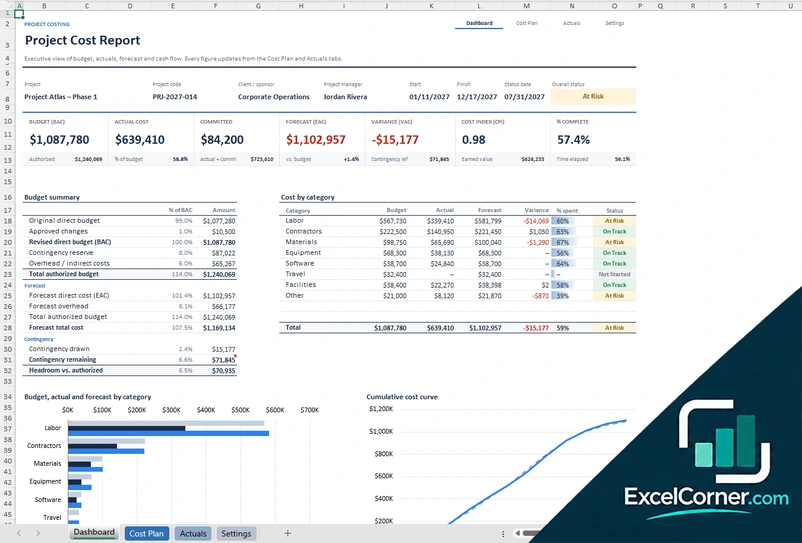
More free project management templates
These templates are planning and record-keeping tools with sample data. Check the figures against your contracts, invoices and accounting records before you rely on them. Excel is a trademark of Microsoft Corporation; Excel Corner is not affiliated with Microsoft.