
Home › Personal Life & Leisure › Excel Recipe Template
Previewing: Version 1 · Scalable Recipe Card. Pick another version on the right.
Instant download · No sign-up · No email
Download these free Excel recipe templates to write your recipes once and use them for everything: scaling, cost and shopping. One version is a recipe card that scales the servings, converts the units and shows the cost and the calories. One is a recipe book with a costing dashboard and a price list of your ingredients. One is a professional standardized recipe card with allergens, a method and pricing for a kitchen.
Choose your version
- File
- .xlsx · 20 KB · 2 sheets
- Works with
- Microsoft Excel (.xlsx)
- Macros
- None · formulas only
- Price
- Free
Keep your recipes in an Excel spreadsheet
Does Excel have a recipe template? Excel does not include one that does the work for you, but a spreadsheet is a very good place for recipes. Ingredients and quantities are numbers, and a spreadsheet can scale them to any number of servings, convert them from cups to grams, add up the cost and the calories and tell you what to buy. A recipe in a document cannot do any of that. With a template you only enter the recipe once.
These Excel recipe templates cover three needs. The first is a recipe card for home cooking: you enter the base quantities and the number of servings that you want to make, and the sheet scales the quantities, converts them to another unit, adds up the cost and the calories per serving and marks the ingredients that you already have. The second is a recipe book with costing: it keeps all your recipes with their ingredients and the price of each ingredient in a pantry price list, calculates the cost per serving and the food cost percentage and shows a dashboard with a spotlight on one recipe. The third is a professional recipe card for a restaurant or a catering business, with portions, a method with times and temperatures, the major allergens and the price that you need for a target food cost.
Best for
- Home cooks, bakers and meal preppers who want their recipes in one place and scaled to the number of servings
- Food bloggers, small food businesses and caterers who need a cost for each recipe
- Restaurant and kitchen teams that standardize recipes, portions and allergens
Maybe not for
A recipe app or a recipe website. These templates are Excel files that you fill in: they do not import recipes from a web page. They are useful when you want to control the quantities, the units and the cost.
Which version is right for you?
All three are free, formula-driven Excel files with sample data you can replace. They are independent, so you can download more than one.
Version 1
Scalable Recipe Card
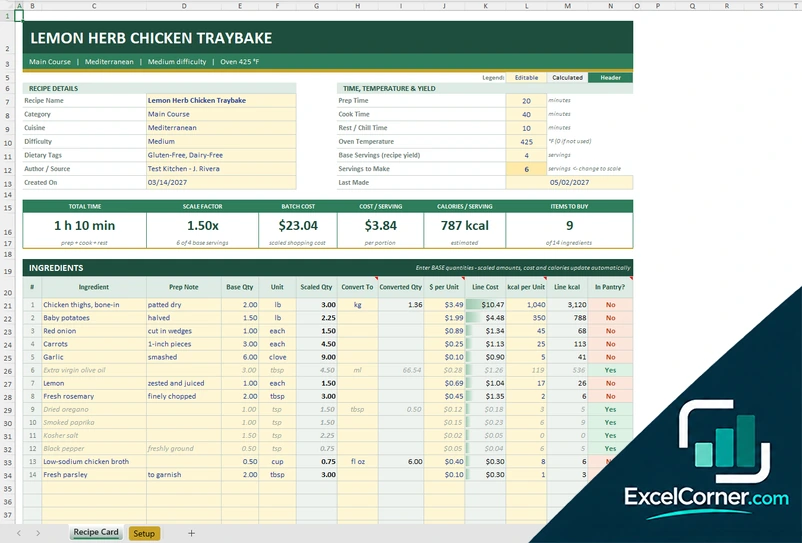
A recipe card with details, time and yield, cards for the scale factor, the batch cost, the cost and the calories per serving, and an ingredient table that scales and converts quantities and marks what is in the pantry.
Recipe CardSetup
.xlsx · 20 KB
Version 2
Recipe Book with Costing
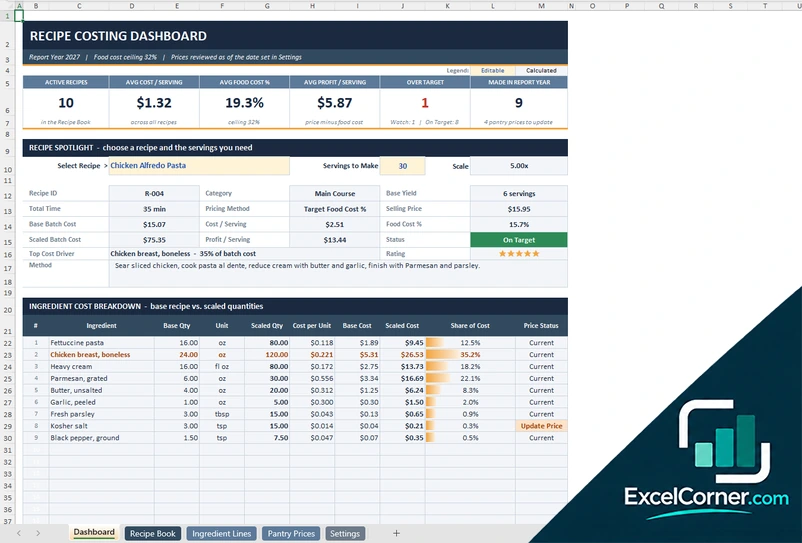
A recipe book with a costing dashboard, a spotlight on one recipe that scales to any servings, ingredient lines, a pantry price list with price status and settings for the target food cost.
DashboardRecipe BookIngredient LinesPantry PricesSettings
.xlsx · 71 KB
Version 3
Professional Recipe Card
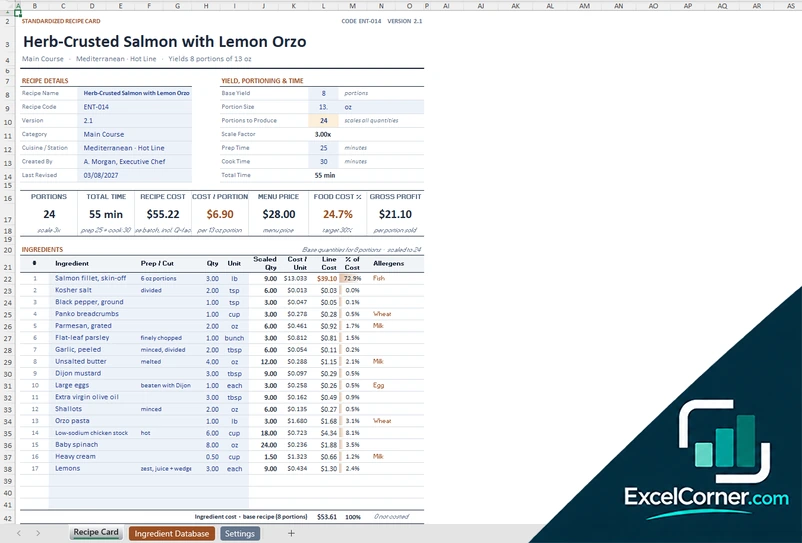
A standardized recipe card with yield and portioning, cost per portion, menu price and food cost, an ingredient table with allergens, a method with times and temperatures and an ingredient database with purchase prices and yields.
Recipe CardIngredient DatabaseSettings
.xlsx · 56 KB
What is inside the recipe Excel templates
Version 1: Scalable Recipe Card
The Recipe Card sheet has the recipe details (name, category, cuisine, difficulty, dietary tags, author or source, creation date and the last time it was made), the time, the temperature and the yield (prep time, cook time, rest time, oven temperature, base servings and the servings that you want to make) and cards for the total time, the scale factor, the batch cost, the cost per serving, the calories per serving and the items to buy. The ingredient table lists each ingredient with a prep note, the base quantity, its unit, the scaled quantity, a unit to convert to and the converted quantity, the price and the calories per unit, the line cost, the line calories and an in-pantry flag, with totals for the scaled batch. The Setup sheet holds the units with their conversions, the recipe categories, the levels of difficulty and the lists.
Version 2: Recipe Book with Costing
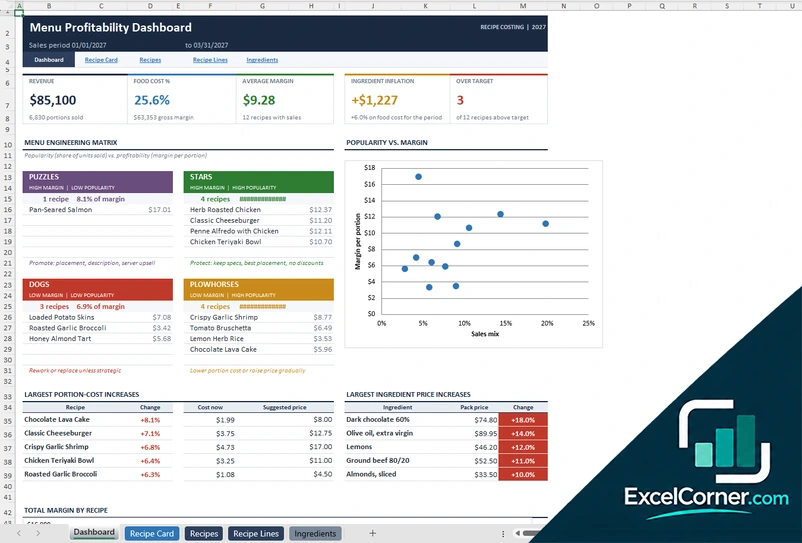
The Dashboard shows the active recipes, the average cost per serving, the average food cost percentage, the average profit per serving, the recipes over the target and how many were made in the year. A recipe spotlight lets you choose a recipe and the servings that you need and shows the scale, the category, the base yield, the cost, the food cost percentage, the selling price, the profit per serving, a status, the top cost driver, a rating and the method, with an ingredient cost breakdown (base quantity, scaled quantity, cost and share of cost) and a chart of performance by category. The Recipe Book lists the recipes with the yield, the times, the number of ingredients, the batch cost, the cost per serving, the pricing method, the suggested price, the menu price, the food cost percentage and the profit, and the Ingredient Lines sheet holds about 300 lines. The Pantry Prices sheet holds your ingredients with the supplier, the pack price, the usable units, the yield percentage, the cost per usable unit and a price status, and the Settings sheet holds the report year, the maximum food cost and the lists.
Version 3: Professional Recipe Card
The Recipe Card sheet holds the recipe details (name, code, version, category, cuisine or station, who created it and the last revision), the yield, the portioning and the time (base yield, portion size, portions to produce, scale factor, prep time and cook time) and cards for the portions, the total time, the recipe cost, the cost per portion, the menu price, the food cost percentage and the gross profit. The ingredient table has the prep or cut, the scaled quantity, the cost per unit, the line cost, the share of the cost and the allergens, and an allergen declaration flags shellfish, tree nuts, peanuts, wheat and sesame. A method lists the instructions with the minutes and the temperature or critical control point, and sections cover costing and pricing, storage, holding and service, and the price points by target food cost. The Ingredient Database holds about 300 ingredients with the supplier, the pack, the usable yield, the cost per unit as purchased and edible portion, the grams per cup, the allergens and the price date, and the Settings sheet holds the units, the lists and a quick guide.
How to use a recipe template in Excel
- Download
Pick the version you want and open it in Excel. The files have a sample recipe, so you can see how each sheet works. - Set up your units and lists
On the setup or settings sheet, check the units and the conversions, the recipe categories and the other lists, and add your own. - Enter the recipe
Write the name, the category, the time and the base number of servings, and add each ingredient with its base quantity, its unit and its cost or its price. - Scale it
Enter the number of servings that you want to make. The scaled quantities, the cost and the calories update on their own. - Use the results
Look at the cost per serving, the food cost percentage or the shopping needs, and print the recipe card or save it as a PDF.
Replace the sample recipe with your own. The scaled quantities, the costs and the totals update on their own.
Which recipe template do you need?
| Scalable Recipe Card | Recipe Book with Costing | Professional Recipe Card | |
|---|---|---|---|
| For | One recipe at home, scaled to any number of servings | A whole recipe collection with costs | A standardized recipe for a kitchen |
| Best for | Home cooks and bakers | Food bloggers, bakers and small food businesses | Restaurants, caterers and chefs |
| Data you enter | One recipe with its ingredients | About 60 recipes, 300 ingredient lines and a price list | One recipe card and an ingredient database |
| Main outputs | Scaled quantities, unit conversion, batch cost, cost and calories per serving | Cost per serving, food cost %, suggested price, spotlight dashboard, price status | Cost per portion, food cost %, gross profit, allergen declaration, price points |
| Sheets | 2 | 5 | 3 |
| Charts | No | Yes | No |
They are separate files, so you can use more than one.
Tips for writing recipes in Excel
- Write each ingredient in its own row with a quantity and a unit. Do not put the quantity in the name.
- Enter the quantities for the base recipe and let the sheet scale them. Do not change the base when you cook a bigger batch.
- Use one unit for each ingredient, for example grams for flour, and let the template convert it when you need to.
- Add the price of each ingredient once, in the price list, and keep it up to date.
- Write the method in short numbered steps, with the time and the temperature.
- Mark the allergens in the recipe, not only in your head, especially if you sell or share the food.
- Add the date that you last made the recipe and a rating, so that you know which ones to keep.
Frequently asked questions
Are these recipe templates for Excel free?
Yes. All three versions are free to download as .xlsx files. You do not need an account or an email address.
Which version should I choose?
Choose the Scalable Recipe Card (Version 1) to write a recipe and scale it to any number of servings, with unit conversion, cost and calories. Choose the Recipe Book with Costing (Version 2) to keep many recipes and see their cost and food cost percentage. Choose the Professional Recipe Card (Version 3) for a kitchen that needs portions, allergens and pricing.
Does Excel have a recipe template?
Excel does not come with a recipe template that scales quantities and calculates costs. The templates on this page do that, and you can download them for free.
How do I scale a recipe in Excel?
Keep the base quantities of the recipe, divide the number of servings that you want by the base servings to get a scale factor, and multiply each quantity by that factor. The scalable recipe card does this for you.
Can I convert units, for example cups to grams?
Yes. The recipe card has a table of units and conversions on the setup sheet, and a convert-to column for each ingredient. The professional recipe card also holds the grams per cup of each ingredient.
Can I calculate the cost and the calories of a recipe?
Yes. You enter the price and, in Version 1, the calories of each ingredient, and the template adds them up for the whole batch and for each serving. The values are the ones that you enter, so check them against a reliable source.
Is there a difference between this and the recipe costing template?
The recipe costing template focuses on the cost of a recipe. These templates start from the recipe itself, with its ingredients and its method, and add the cost as one of the results. If you only need costing, see the recipe costing page.
Does the template work in Google Sheets?
The files are made for Microsoft Excel and use standard formulas with no macros. You can upload them to Google Drive and open them with Google Sheets, but some formatting or charts may look different.
Is my information stored online?
No. The templates are plain Excel files, so the names, addresses, dates and amounts you type stay in your own file on your own computer.
These templates are planning tools with made-up sample data. The calories, nutrients, prices and costs are examples that you replace with your own, and they are not nutrition, medical or dietary advice. Check the allergens and the food safety rules that apply to you. Excel is a trademark of Microsoft Corporation; Excel Corner is not affiliated with Microsoft.