
Home › Personal Life & Leisure › Grocery List Template Excel
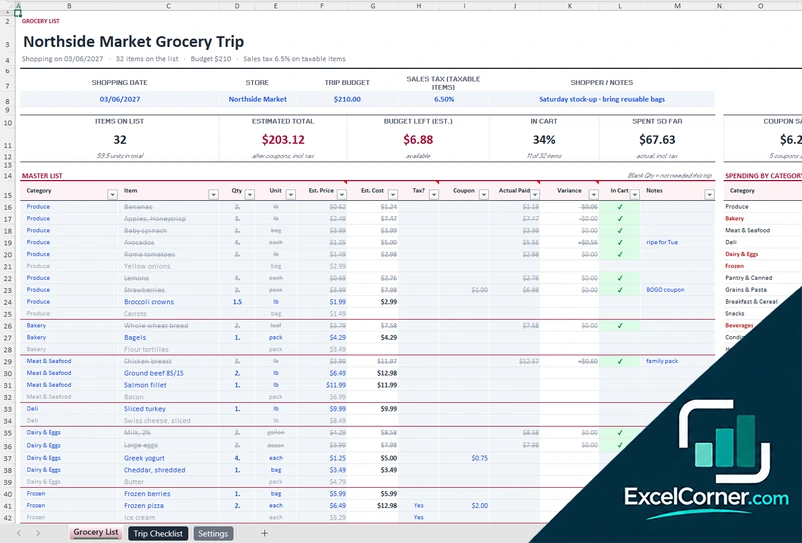
Previewing: Version 1 · Grocery List with Budget. Pick another version on the right.
Instant download · No sign-up · No email
Download these free grocery list templates for Excel to shop faster and spend less. One version is a grocery list with a trip budget, categories, a checklist for the cart and a receipt check. One is a smart grocery list with a price book that compares stores and tells you where to buy each item. One is a pantry restock list: you keep a pantry inventory and the list of what to buy writes itself.
Choose your version
- File
- .xlsx · 32 KB · 3 sheets
- Works with
- Microsoft Excel (.xlsx)
- Macros
- None · formulas only
- Price
- Free
Make a grocery list in an Excel spreadsheet
A grocery list helps you buy what you need and nothing else. On paper it is quick, but it does not know the prices, it cannot add them up and it is not the same from one week to the next. A grocery list in Excel can keep the items that you buy often, sort them by the aisles of your store, add up the estimated total as you go and compare it with your budget. You can print it, or open it on your phone while you shop.
These Excel templates give you three ways to shop. The first is a grocery list for a trip: you keep a master list of items with a category, a quantity, a unit and an estimated price, mark the ones that you need this time, and see the number of items, the estimated total, the budget that is left, what is already in the cart and your spending by category. When you are back, a receipt check compares the estimate with what you paid. The second is a smart grocery list for several stores: a price book keeps the prices of each item at each store, and the plan tells you the cheapest store for each item, the cost of the trip to every store, the best single store and how much you save by splitting the shop. The third is a grocery list maker that starts from your pantry: you list the items that you keep at home with how much you use in a week and how much you have now, and the sheet shows only what is below the minimum that you want to keep, in the order of your store aisles, with the packs to buy, the cost and the items that you should use soon.
Best for
- Families and individuals who want to control the grocery budget
- Shoppers who compare prices between stores or buy in bulk
- Anyone who wants a reusable grocery list that is sorted by aisle
- Households that stock up and want to restock before they run out of the staples
Maybe not for
A shopping list app that syncs with your phone. These templates are Excel files that you can open on a phone or print. They do not read store prices by themselves: you enter the prices that you see.
Which version is right for you?
All three are free, formula-driven Excel files with sample data you can replace. They are independent, so you can download more than one.
Version 1
Grocery List with Budget
A grocery list with a trip budget and sales tax, a master list by category, items marked for the cart, spending by category, coupon savings, a receipt check and a trip checklist sorted by aisle.
Grocery ListTrip ChecklistSettings
.xlsx · 32 KB
Version 2
Smart Grocery List by Store
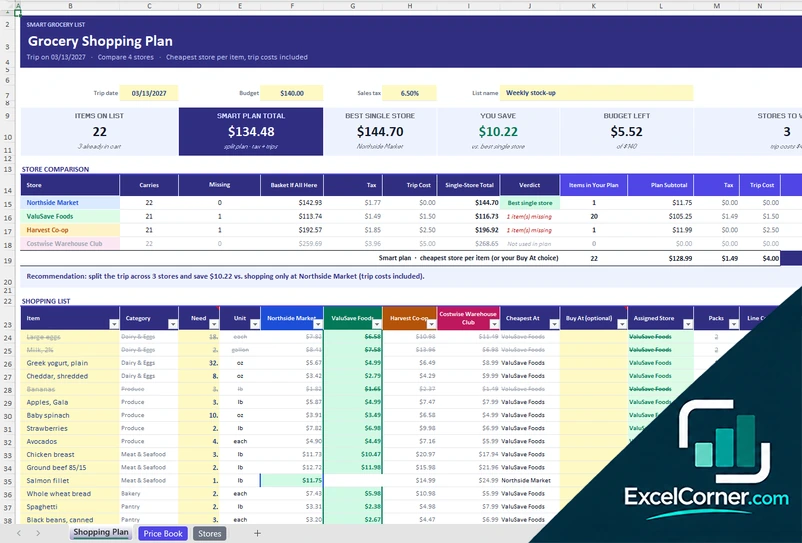
A smart grocery list that uses a price book of up to four stores to find the cheapest store for each item, compare the trip cost of every store and show how much you save by splitting the shop.
Shopping PlanPrice BookStores
.xlsx · 50 KB
Version 3
Pantry Restock List
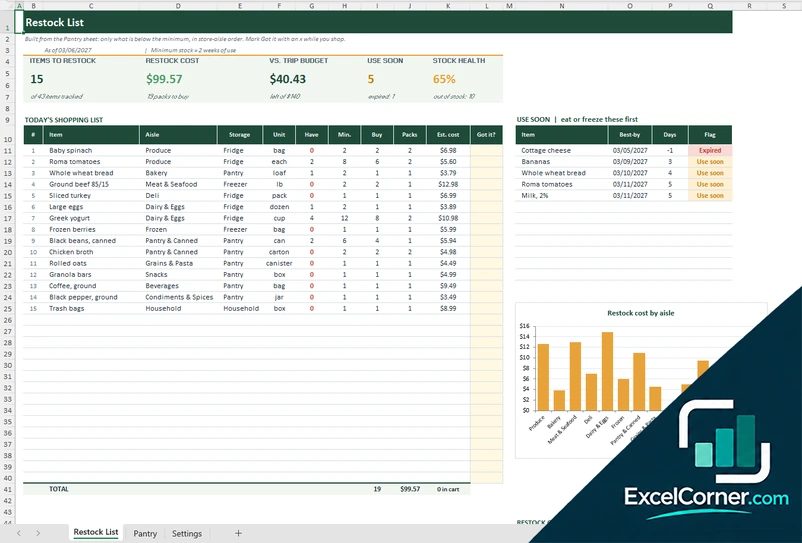
A grocery list maker that starts from your pantry: it compares what you have with the minimum that you want to keep and writes the shopping list for you, in store-aisle order, with packs, cost, a budget check, use-soon alerts and a cost-by-aisle chart.
Restock ListPantrySettings
.xlsx · 44 KB
What is inside the grocery list Excel templates
Version 1: Grocery List with Budget
The Grocery List sheet has the trip details (shopping date, store, trip budget, sales tax rate for the taxable items and notes) and cards for the items on the list, the estimated total, the budget left, the share of the list that is in the cart, the spent so far, the coupon savings and the price variance. The master list has a row for each item with its category, the quantity, the unit, the estimated price and cost, a taxable flag, the coupon, the actual price paid, the variance, an in-cart tick and notes, and items that you do not need on this trip stay greyed out when the quantity is blank. A table shows the spending by category against a budget for each one, and a receipt check compares the estimated total with the actual total. The Trip Checklist sheet shows only the items that you need, with the aisle and the estimated price, and the Settings sheet holds the categories, the units, the aisle order and the budget for each category.
Version 2: Smart Grocery List by Store
The Shopping Plan sheet has the trip date, the budget, the sales tax and the list name, and cards for the items on the list, the smart plan total, the best single store, the savings, the budget left and the stores to visit. A store comparison shows, for each store, how many items it carries, how many are missing, the basket if you buy everything there, the tax, the trip cost, the single-store total and a verdict, and a recommendation tells you whether to split the trip and how much you save. The shopping list has a row for each item with its category, the cheapest store, an optional store of your choice, the assigned store, the packs, the line cost, what you save against the most expensive store and an in-cart tick. The Price Book holds the pack size, the price and the unit price of each item at each store, with the best unit price, the best store, the price spread and the date of the last check, and the Stores sheet holds the stores to compare with an extra trip cost and a member discount, the categories and the compare units.
Version 3: Pantry Restock List
The Pantry sheet holds everything that you keep at home, up to about 120 items. For each one you enter the aisle, where it is stored (pantry, fridge, freezer or household), the unit, how much you use in a week, an optional minimum of your own, how much you have, the number of units in a pack, the pack price and an optional best-by date. The sheet works out the minimum (weekly use times the weeks of stock that you want to keep), a status (OK, Low or Out), the quantity needed, the packs to buy rounded up, the restock cost, the days to the best-by date and a use-soon flag. The Restock List sheet shows cards for the items to restock, the restock cost, the money left or over against your trip budget, the items to use soon and the stock health. It writes the shopping list of up to 30 items by itself in the order of your store aisles, with the quantity that you have, the minimum, the quantity to buy, the packs and the estimated cost, and a Got it column where you type an x to cross the item out. A use-soon list shows the items that are close to their date or expired, and a table and a chart show the restock cost by aisle. The Settings sheet holds the as-of date, the weeks of stock, the expiry alert, the trip budget, the aisles in walking order, the storage places and the units.
How to use a grocery list template in Excel
- Download
Pick the version you want and open it in Excel. The files have a sample trip, so you can see how each sheet works. - Set up your lists
On the settings, stores or pantry sheet, enter your categories or aisles, your units and your stores, with a budget for each trip or category. - Build the list
Add the items that you buy with their category, quantity, unit and price. Mark the items that you need for this trip. - Shop
Use the list in store, in aisle order. Tick each item when it goes into the cart and watch the total against your budget. - Check and save
After the trip, enter what you paid to compare it with the estimate, or look at what the smart plan saved you. Keep the master list for the next trip.
Replace the sample items and prices with your own. The totals, the budget and the checks update on their own.
Which grocery list template do you need?
| Grocery List with Budget | Smart Grocery List by Store | Pantry Restock List | |
|---|---|---|---|
| For | A trip to one store with a budget | Comparing prices between several stores | Restocking a pantry before it runs out |
| Best for | Weekly shoppers and families | Bargain hunters and bulk buyers | Households that stock up on staples |
| Data you enter | A master list of items with prices | A price book of items and prices by store | A pantry inventory with usage, minimum and pack size |
| Main outputs | Items on list, estimated total, budget left, in cart, coupon savings, spending by category, receipt check | Store comparison, cheapest store per item, trip cost, best single store, savings | Auto-written restock list, packs to buy, cost vs. budget, use-soon alerts, cost by aisle |
| Sheets | 3 | 3 | 3 |
| Charts | No | No | Yes |
They are separate files, so you can use more than one.
Tips for a better grocery list
- Sort the list by the aisles of your store. You walk the store once and do not go back.
- Keep a master list of what you buy often, and mark only what you need this week.
- Write a quantity and a unit for each item, for example 2 lb or 1 pack, so that you buy the right amount.
- Check the pantry and the fridge before you add an item, so that you do not buy it twice.
- Set a budget for the trip and keep an eye on the total as the cart fills.
- Use the receipt to update your prices. After a few trips the estimate becomes accurate.
- Compare the price per unit, not the price of the pack. A larger pack is not always cheaper.
- Set a minimum for your staples, such as rice, eggs and paper towels, and restock when you reach it, not when you run out.
Frequently asked questions
Are these grocery list templates for Excel free?
Yes. All three versions are free to download as .xlsx files. You do not need an account or an email address.
Which version should I choose?
Choose the Grocery List with Budget (Version 1) if you shop at one store and want to follow the budget and your spending by category. Choose the Smart Grocery List by Store (Version 2) if you compare prices at several stores and want to know where to buy each item. Choose the Pantry Restock List (Version 3) if you stock up and want the list to be written for you from what you have at home.
How do I make a grocery list in Excel?
Make a table with a column for the item, the category, the quantity, the unit and the price, add a column to tick the items that you bought, and add a formula that sums the estimated cost. The templates have all of this, with a budget and categories.
Can I print the grocery list or use it on my phone?
Yes. The list is set up to print, and you can open the .xlsx file in the Excel app on a phone. The file also opens in Google Sheets, but some formatting may look different.
Can the list be sorted by aisle?
Yes. In Version 1 you set the order of the aisles on the settings sheet, and the list follows it. Version 2 groups the plan by the store where you will buy each item. Version 3 puts the restock list in the order of your aisles.
What is a pantry restock grocery list?
It is a grocery list that is built from your inventory. For every item you enter how much you use in a week, how much you have and how many units come in a pack. The template works out a minimum, compares it with what you have and lists only the items that are below it, with the packs to buy and the cost.
How does the template know what to buy?
The minimum for each item is the weekly use times the number of weeks of stock that you want to keep, or a value that you type. If you have less than the minimum, the missing quantity is rounded up to whole packs and goes on the restock list.
Can I make a meal plan and a grocery list together?
Yes. The meal plan templates on this site build a grocery list from the meals that you plan. These grocery list templates are for the shopping itself, and you can use them with a meal plan.
Does the template include sales tax and coupons?
Yes. Versions 1 and 2 let you set a sales tax rate for the items that are taxable. Version 1 also tracks coupon savings and compares the estimate with the receipt. Version 3 estimates the cost of the packs that you need to buy from the pack price.
Does the template work in Google Sheets?
The files are made for Microsoft Excel and use standard formulas with no macros. You can upload them to Google Drive and open them with Google Sheets, but some formatting or charts may look different.
Is my information stored online?
No. The templates are plain Excel files, so the names, addresses, dates and amounts you type stay in your own file on your own computer.
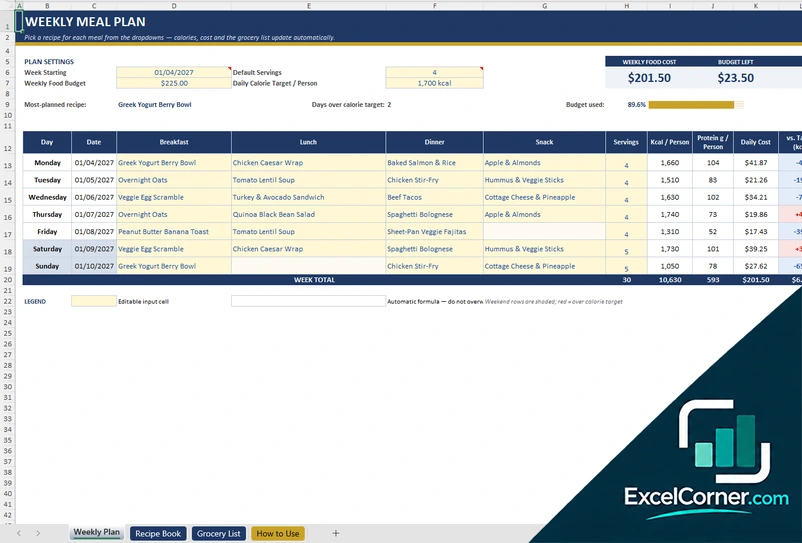
These templates are planning tools with made-up sample data. The calories, nutrients, prices and costs are examples that you replace with your own, and they are not nutrition, medical or dietary advice. Check the allergens and the food safety rules that apply to you. Excel is a trademark of Microsoft Corporation; Excel Corner is not affiliated with Microsoft.