
Home › Personal Life & Leisure › Meal Train Excel Template
Previewing: Version 1 · Sign-Up Sheet with Calendar. Pick another version on the right.
Instant download · No sign-up · No email
Download these free meal train Excel templates to organize meals for a family after a birth, surgery or loss. One is a sign-up sheet with a calendar. One is a planner with a page for volunteers. One is a coordinator dashboard with a meal fund.
Choose your version
- File
- .xlsx · 35 KB · 2 sheets
- Works with
- Microsoft Excel (.xlsx)
- Macros
- None · formulas only
- Price
- Free
Organize a meal train in an Excel spreadsheet
A meal train organizes friends, family and neighbors to bring meals to a household that needs help. One sheet shows who brings what and when, which dates still need a volunteer, what to avoid and where to drop off. Excel keeps it all in one place and can print a calendar to share.
These templates cover three ways to run a meal train. Version 1 is a sign-up sheet with a calendar view. Version 2 is a planner with an overview and a sign-up page for volunteers. Version 3 is a coordinator dashboard with a meal log, a volunteer roster and a meal fund.
Best for
- Coordinators who organize meals for a family in need
- Friends, neighbors, workplaces and congregations that want one shared schedule
- Families who want to share allergies, preferences and drop-off instructions
Maybe not for
An online sign-up service that sends reminders to volunteers. These are Excel files: you share or print them yourself.
Which version is right for you?
All three are free, formula-driven Excel files with sample data you can replace. They are independent, so you can download more than one.
Version 1
Sign-Up Sheet with Calendar
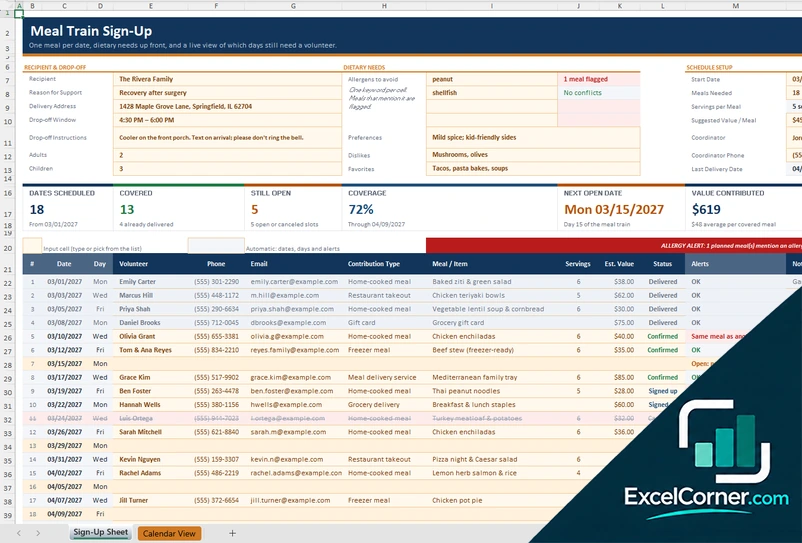
A meal train sign-up sheet with one row per date, dietary needs and an allergy alert, cards for covered and open dates, and a monthly calendar view.
Sign-Up SheetCalendar View
.xlsx · 35 KB
Version 2
Meal Train Planner
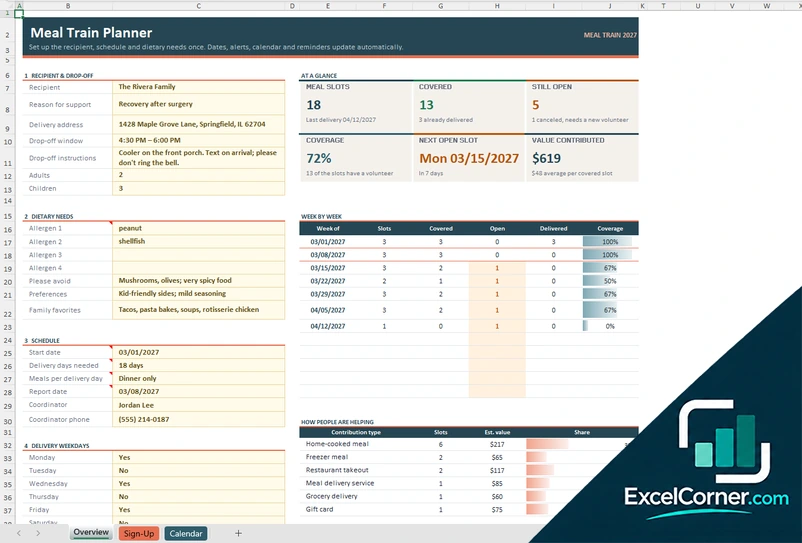
A meal train planner with an overview, a week-by-week coverage table, a sign-up page for volunteers and a monthly calendar.
OverviewSign-UpCalendar
.xlsx · 53 KB
Version 3
Coordinator Dashboard with Meal Fund
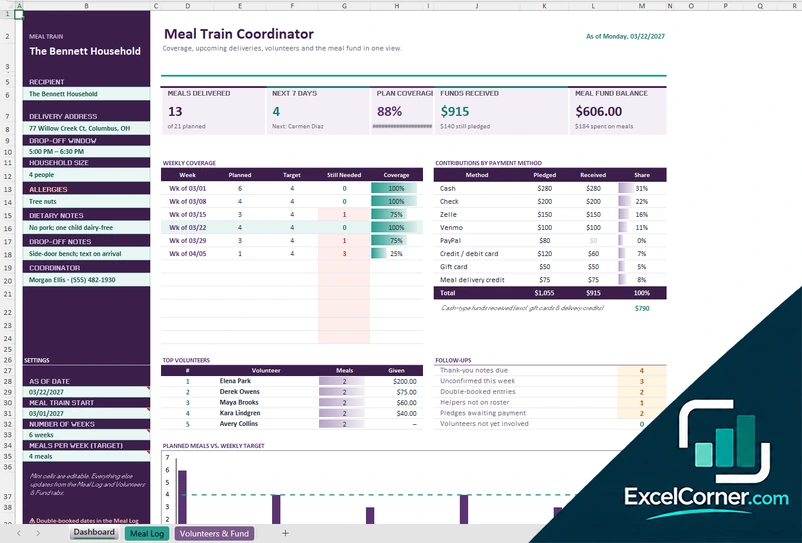
A coordinator dashboard with a meal log, a volunteer roster and a meal fund, with weekly coverage, contributions by payment method and follow-ups.
DashboardMeal LogVolunteers & Fund
.xlsx · 60 KB
What is inside the meal train Excel templates
Version 1: Sign-Up Sheet with Calendar
On the Sign-Up Sheet you enter the recipient, the reason, the address, the drop-off window and instructions, the allergens, preferences and dislikes, then the start date, meals needed, servings and suggested value. Each date gets a volunteer, a contribution type, a meal and a status.
Cards show dates scheduled, covered, still open, coverage, the next open date and value contributed. An allergy alert flags meals that mention an allergen, and the Calendar View shows any month with who is bringing what.
Version 2: Meal Train Planner
The Overview sheet holds the recipient and drop-off details, the dietary needs and the schedule: start date, delivery days, meals per delivery day and the coordinator. It shows meal slots, covered, still open, coverage, the next open slot and value contributed, with a week-by-week table.
The Sign-Up sheet is for volunteers: pick an open slot and add your name, phone, email and contribution type. The Calendar sheet shows the month with who is bringing what.
Version 3: Coordinator Dashboard with Meal Fund
The Dashboard shows meals delivered, the next 7 days, plan coverage, funds received and the meal fund balance, with weekly coverage, contributions by payment method, top volunteers, follow-ups and a chart of planned meals against the weekly target. The Meal Log records every meal, takeout order or grocery delivery.
The Volunteers & Fund sheet holds the roster with group, contact details, what each person can help with, preferred days, meals given and last meal, plus contributions and pledges.
How to use a meal train template in Excel
- Download
Pick the version you want and open it in Excel. The files include a sample meal train. - Set up the family
Enter the recipient, the address, the drop-off window and instructions, and the allergies and dislikes. - Set the schedule
Choose the start date, the delivery days and the number of meals needed. - Fill the dates
Add each volunteer, the meal and its status. Open dates stay highlighted. - Share it
Print the calendar or save it as a PDF and send it to the group.
Replace the sample family and volunteers with your own. Coverage, open dates and alerts update on their own.
Which meal train template do you need?
| Sign-Up Sheet with Calendar | Meal Train Planner | Coordinator Dashboard | |
|---|---|---|---|
| For | A simple sign-up and a monthly calendar | A plan to share with volunteers | Running a longer meal train with funds |
| Best for | Small meal trains | Group-organized meal trains | Coordinators who track meals and money |
| You get | Covered and open dates, allergy alert, calendar | Coverage by week, next open slot, sign-up page | Meals delivered, fund balance, volunteer roster |
| Sheets | 2 | 3 | 3 |
| Charts | No | No | Yes |
They are separate files, so you can use more than one.
Tips for a smooth meal train
- Ask about allergies, dislikes and favorite foods before you start.
- Give a clear drop-off window and instructions, such as a cooler on the porch.
- Spread the meals out, since one or two meals a week are easier to cover than daily ones.
- Welcome freezer meals, takeout and gift cards as well as home cooking.
- Keep a list of volunteers for the follow-ups and the thank-you notes.
Frequently asked questions
Are these meal train Excel templates free?
Yes. All three versions are free to download as .xlsx files. You do not need an account or an email address.
Which version should I choose?
Choose the Sign-Up Sheet with Calendar (Version 1) for a simple meal train. Choose the Meal Train Planner (Version 2) to share a planner and a sign-up page with volunteers. Choose the Coordinator Dashboard (Version 3) to track meals, volunteers and a meal fund.
How do I make a meal train in Excel?
Make a table with a row for each date, a column for the volunteer, the meal and the status, and a calendar that shows the open dates. Add the recipient, the allergies and the drop-off details. The templates already have this.
How do I share a meal train spreadsheet?
Save the file as a PDF or print the calendar and send it by email or message. If volunteers need to edit it, share the Excel file in a cloud folder.
Can the meal train handle allergies?
Yes. You list the allergens to avoid, and the sign-up sheet flags any meal that mentions one.
These templates use made-up sample data. They help you organize meals for a household and are not medical or dietary advice. Always check allergies and food safety with the recipient. Excel is a trademark of Microsoft Corporation; Excel Corner is not affiliated with Microsoft.