
Home › Personal Life & Leisure › Daily Medication Chart Template Excel
Previewing: Version 1 · Daily Medication Chart with Overview. Pick another version on the right.
Instant download · No sign-up · No email
Download these free daily medication chart and medication tracker templates in Excel to mark every dose and see how well you follow your schedule. They include monthly and weekly charts, a dose log with a dashboard, a yearly dose grid and an adherence report.
Choose your version
- File
- .xlsx · 50 KB · 4 sheets
- Works with
- Microsoft Excel (.xlsx)
- Macros
- None · formulas only
- Price
- Free
Track your daily medication in an Excel spreadsheet
A medication chart shows, day by day, which doses are planned and which you took. A tracker goes one step further: it counts the missed doses, the on-time rate, the streak and the supply left. In Excel you mark each dose once, and the adherence, the refill alerts and the cost are calculated for you.
These six templates cover the main ways to do it. Some are printable charts for the month or the week. Others log every dose with a time and show a daily dashboard. One covers the whole year in a dose grid. All of them keep the medication list, the supply and the refills together.
People search for a medication chart and for a medication tracker in the same way, so they share this page. Pick the file that fits how you take your medicines, and use the table below to compare them.
Best for
- People who take several medicines a day and want to see missed doses
- Caregivers who need a printable chart to mark each dose
- Anyone who wants adherence, streaks and refill alerts in one place
Maybe not for
A smart pill dispenser or a phone app with reminders. These are Excel files: you mark each dose yourself, and the adherence and the alerts are calculated from your marks.
Which version is right for you?
All six are free, formula-driven Excel files with sample data you can replace. They are independent, so you can download more than one.
Version 1
Daily Medication Chart with Overview
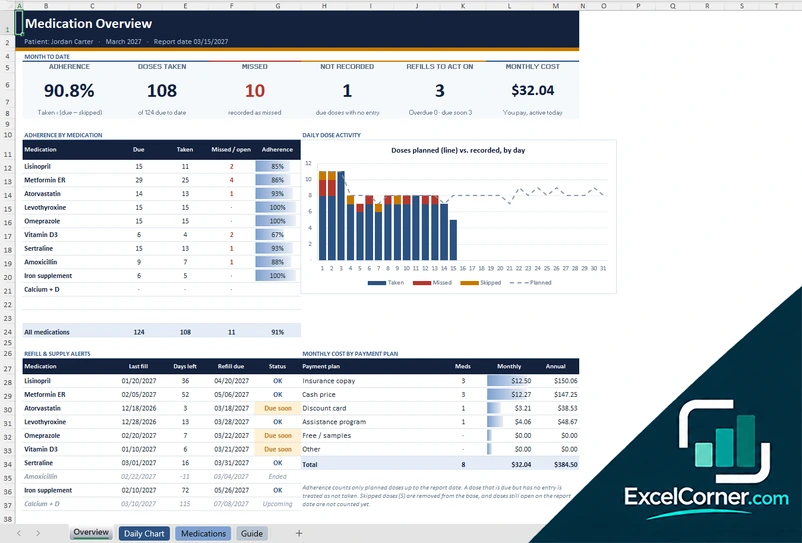
A daily medication chart with a printable monthly record, an overview of adherence by medicine, refill and supply alerts and monthly cost by payment plan.
OverviewDaily ChartMedicationsGuide
.xlsx · 50 KB
Version 2
Medication Tracker with Refill Radar
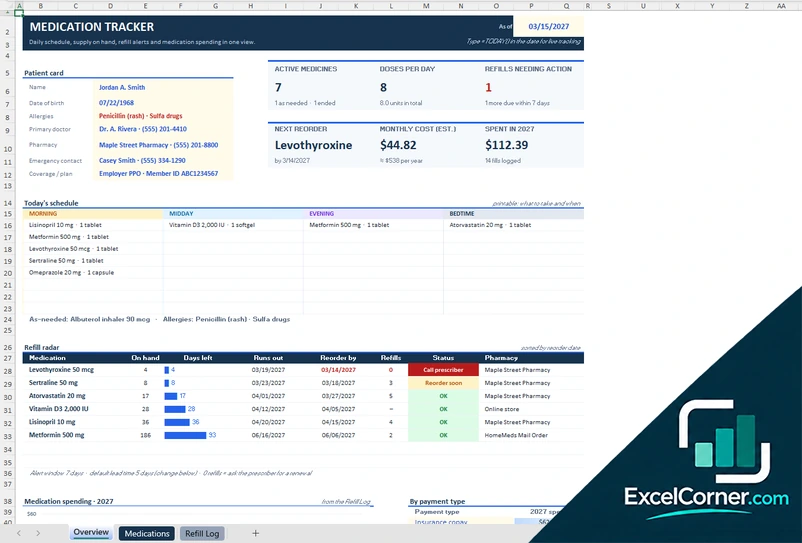
A medication tracker with a patient card, today’s schedule by time of day, a refill radar with days left, a refill log and a yearly spending report.
OverviewMedicationsRefill Log
.xlsx · 46 KB
Version 3
Monthly Daily Medication Chart
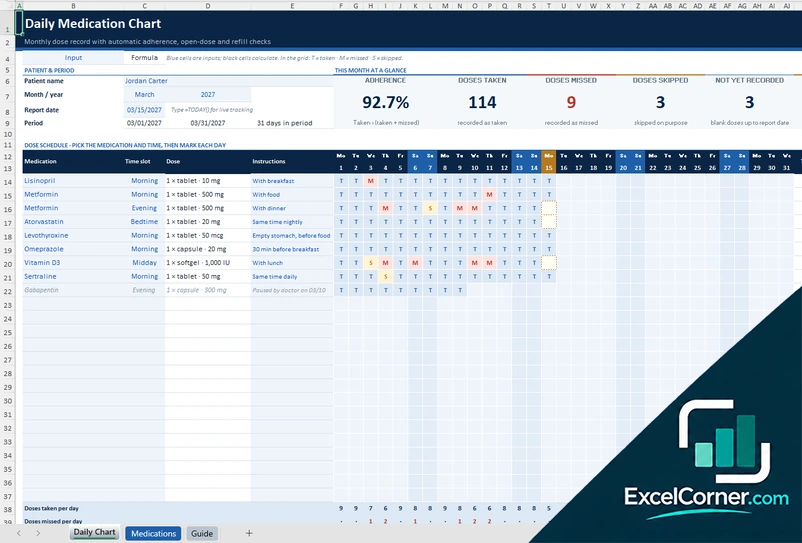
A monthly daily medication chart where you mark each dose as taken, missed or skipped, with automatic adherence and a medication list with supply and refills.
Daily ChartMedicationsGuide
.xlsx · 29 KB
Version 4
Medication Tracker with Dose Log and Dashboard
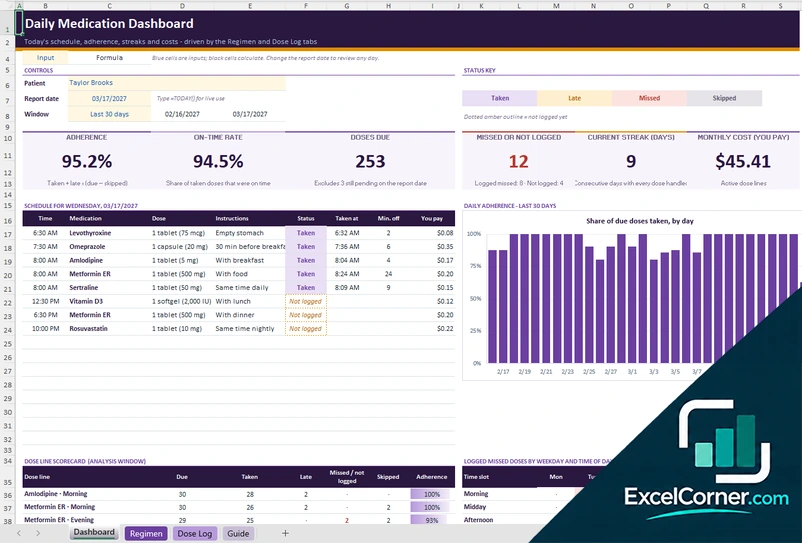
A medication tracker with up to 16 dose lines, a dose log of 1,000 rows and a dashboard with today’s schedule, adherence, streaks and costs.
DashboardRegimenDose LogGuide
.xlsx · 148 KB
Version 5
Weekly Medication Chart Tracker
A medication tracker with a dashboard, a medication list that calculates supply and cost, and a printable weekly chart to tick each dose.
DashboardMedicationsWeekly Chart
.xlsx · 31 KB
Version 6
Yearly Medication Tracker with Dose Grid
A yearly medication tracker with a dose grid for every day, a regimen sheet and an adherence report with a calendar, streaks and a monthly trend.
Adherence ReportDose GridRegimen
.xlsx · 151 KB
What is inside the medication chart and tracker templates
Version 1: Daily Medication Chart with Overview
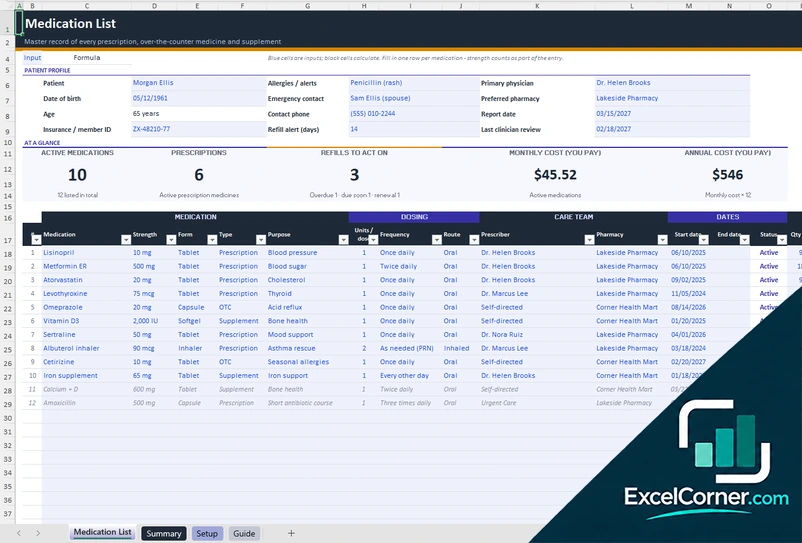
The Medications sheet is the master list: you enter each medicine once with its units per dose under each time of day, the supply per fill and the cost. The Daily Chart builds a printable monthly record from it, where you mark each dose as taken, missed or skipped.
The Overview shows adherence, doses taken, missed and not recorded, and the refills to act on. It also has adherence by medicine, a chart of doses planned and recorded by day, refill and supply alerts and the monthly cost by payment plan.
Version 2: Medication Tracker with Refill Radar
The Medications sheet lists each medicine with its strength, form, doses by time of day, supply, cost and contacts, and calculates the days left and the reorder dates. The Refill Log has 300 rows to record every fill, which feed the supply and the yearly spending.
The Overview has a patient card with the allergies, active medicines, doses per day, refills needing action and the next reorder. It shows today’s schedule by time of day, a refill radar sorted by reorder date and a chart of spending.
Version 3: Monthly Daily Medication Chart
The Medications sheet is the master list of every medicine with its strength, supply, refills and payment plan. On the Daily Chart you choose the patient, the month and the year, and the dose schedule builds itself.
You mark each dose in the grid as T for taken, M for missed or S for skipped. The top of the sheet shows adherence, doses taken, missed, skipped and not yet recorded, and checks for open doses and refills. A Guide sheet explains each tab.
Version 4: Medication Tracker with Dose Log and Dashboard
On the Regimen sheet you set up to 16 dose lines with the time, the weekdays, the start and end dates, the price and the payment plan. In the Dose Log you add one row per dose, pick the dose line and the status, and the check column flags problems.
The Dashboard shows today’s schedule with the status and the minutes off, adherence, the on-time rate, doses due, the current streak and the monthly cost. It has a chart of daily adherence for 30 days and a scorecard by dose line.
Version 5: Weekly Medication Chart Tracker
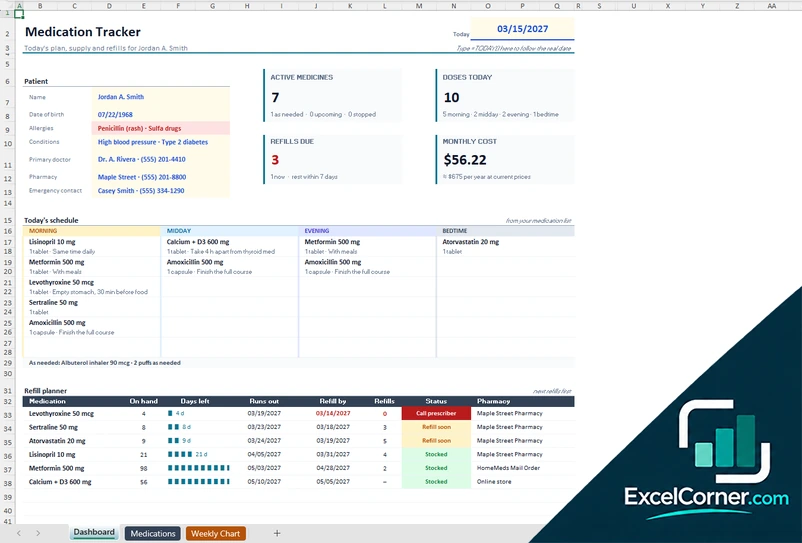
On the Medications sheet you enter each medicine with the strength, the form, the reason and the units to take at each time of day. It calculates the supply, the refill dates and the cost, and shows the allergies in the patient section.
The Dashboard shows active medicines, doses today, refills due and the monthly cost, with today’s schedule by time of day and a refill planner. The Weekly Chart is a printable week to tick each dose.
Version 6: Yearly Medication Tracker with Dose Grid
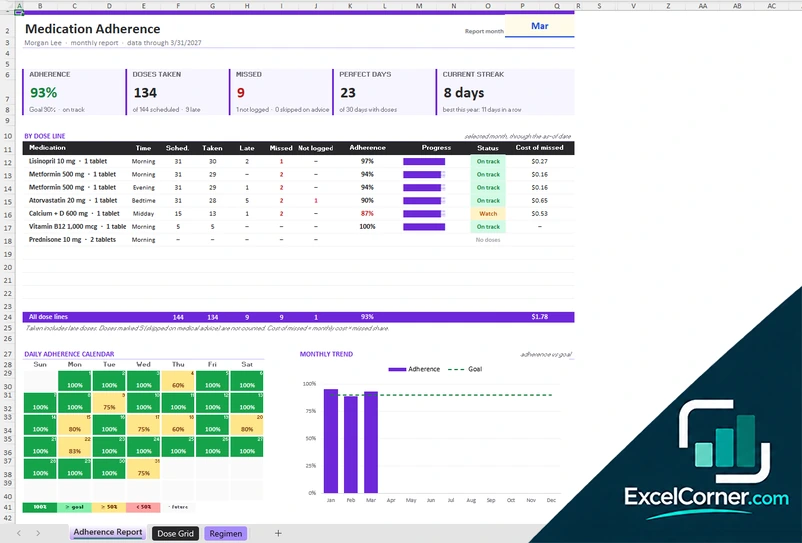
On the Regimen sheet you list each dose time and choose the dose codes: taken, late, missed or skipped. Each row creates a line on the Dose Grid, a year-long grid where you mark every scheduled dose, with the totals for the month and the year.
The Adherence Report picks a month and shows adherence, doses taken, missed, perfect days and the current streak. It has a table by dose line, a daily adherence calendar colored by result and a monthly trend chart against your goal.
How to use a daily medication chart in Excel
- Download
Pick the version that fits how you take your medicines and open it in Excel. Each file has a sample patient. - List the medicines
Enter each medicine once with the dose, the time of day and the days it applies to. Add the supply and the cost if you want refill alerts. - Pick the period
Choose the month, the week or the report date that you want to see. - Mark each dose
Mark every dose as taken, missed, late or skipped. In the log versions, add one row per dose. - Read the results
Look at the adherence, the missed doses, the streak and the refills that need action.
Replace the sample patient with your own data. The adherence, the alerts and the charts update on their own.
Which medication chart or tracker do you need?
| Daily Chart with Overview | Tracker with Refill Radar | Monthly Daily Chart | Tracker with Dose Log | Weekly Chart Tracker | Yearly Dose Grid | |
|---|---|---|---|---|---|---|
| You mark | Each planned dose in a monthly grid | Fills in a refill log | Each planned dose in a monthly grid | One row per dose event | Ticks in a weekly chart | A code per dose for the year |
| Best for | A printable chart with a full overview | Supply, refills and spending | A simple monthly chart | Daily status and on-time rate | A printable weekly chart | A year of adherence at a glance |
| You get | Adherence by medicine, refill alerts, cost | Schedule, refill radar, yearly spending | Adherence, open doses, refill checks | Dashboard, streak, scorecard by dose line | Today’s plan, refills due, cost | Adherence report, calendar, monthly trend |
| Sheets | 4 | 3 | 3 | 4 | 3 | 3 |
| Charts | 1 | 1 | No | 1 | No | 1 |
They are separate files, so you can use more than one.
Tips for tracking your medication
- Mark each dose right after you take it, not at the end of the day.
- Link the dose to a daily habit, such as breakfast or brushing your teeth.
- Use the missed doses to find the time of day that is hardest.
- Order a refill when the days left drop to about a week.
- Take the adherence report to your next appointment.
Frequently asked questions
Are these medication chart and tracker templates free?
Yes. All six versions are free to download as .xlsx files. You do not need an account or an email address.
Which version should I choose?
For a printable monthly chart, choose Version 1 or Version 3. For refills and spending, choose Version 2. For a dose log and a daily dashboard, choose Version 4. For a weekly chart, choose Version 5. For a whole year, choose Version 6.
What is the difference between a medication chart and a tracker?
A chart is a grid where you mark each dose on its day. A tracker also calculates results from your marks, such as the adherence, the streak, the refills and the cost. These templates do both.
How do I make a daily medication chart in Excel?
List the medicines in rows and the days of the month in columns, then mark each dose as taken, missed or skipped. Add a formula for the share of doses taken. The templates build the grid from your medication list.
How is adherence calculated?
Adherence is the number of doses taken divided by the doses due, without the doses you skipped on purpose. If 108 of 118 doses were taken, adherence is about 92 percent. The dashboards and reports show it for you.
More free health and planning templates
These templates use made-up sample patients and medicines. They are record-keeping tools and not medical advice. Always follow the instructions of your doctor or pharmacist, and never change a dose because of a spreadsheet. Excel is a trademark of Microsoft Corporation; Excel Corner is not affiliated with Microsoft.