
Home › Personal Life & Leisure › Excel Menu Template
Previewing: Version 1 · Menu Pricing and Printable Menu. Pick another version on the right.
Instant download · No sign-up · No email
Download these free Excel menu templates to price a restaurant menu and print it, or to plan a weekly menu at home. One prices each dish and prints the menu. One adds recipe costs and delivery fees. One plans seven days of meals against a budget.
Choose your version
- File
- .xlsx · 34 KB · 2 sheets
- Works with
- Microsoft Excel (.xlsx)
- Macros
- None · formulas only
- Price
- Free
Build a menu in an Excel spreadsheet
A menu is two jobs: deciding what to serve and what to charge. In Excel the dish list can calculate food cost, suggest prices and show which items earn their place. For home cooking, a weekly menu shows meals, cost and calories on one page, so the daily question of what is for dinner disappears.
These templates cover three needs. Version 1 prices a restaurant menu and prints it. Version 2 adds recipes, ingredient prices, card fees and delivery commission. Version 3 is a weekly menu planner for a household, with a budget and a dish library.
Best for
- Restaurant owners and chefs who want to price dishes and print a menu
- Cafes, caterers and food trucks that need food cost and margin per item
- Families who plan a weekly menu inside a food budget
Maybe not for
A point-of-sale system or online ordering. These are Excel files that price, plan and print a menu. They do not take orders.
Which version is right for you?
All three are free, formula-driven Excel files with sample data you can replace. They are independent, so you can download more than one.
Version 1
Menu Pricing and Printable Menu
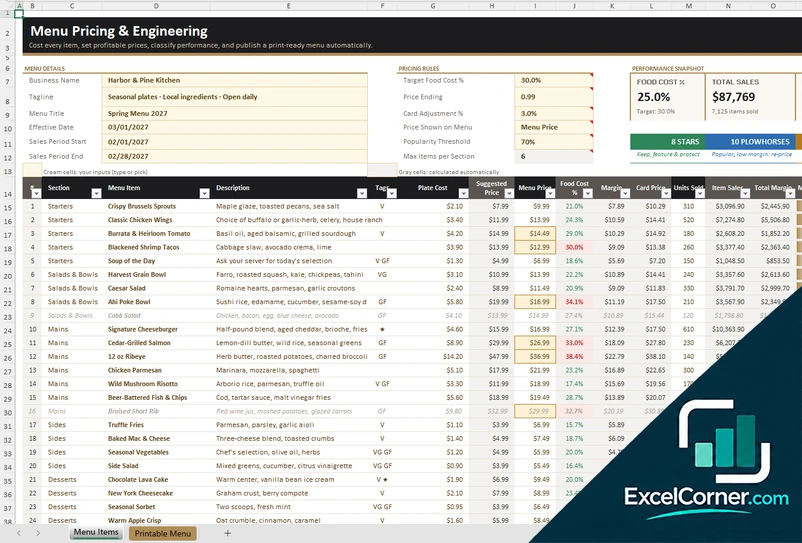
A menu pricing sheet with target food cost, suggested prices, dish classes by popularity and margin, and a printable menu built by section.
Menu ItemsPrintable Menu
.xlsx · 34 KB
Version 2
Menu Costing with Recipes
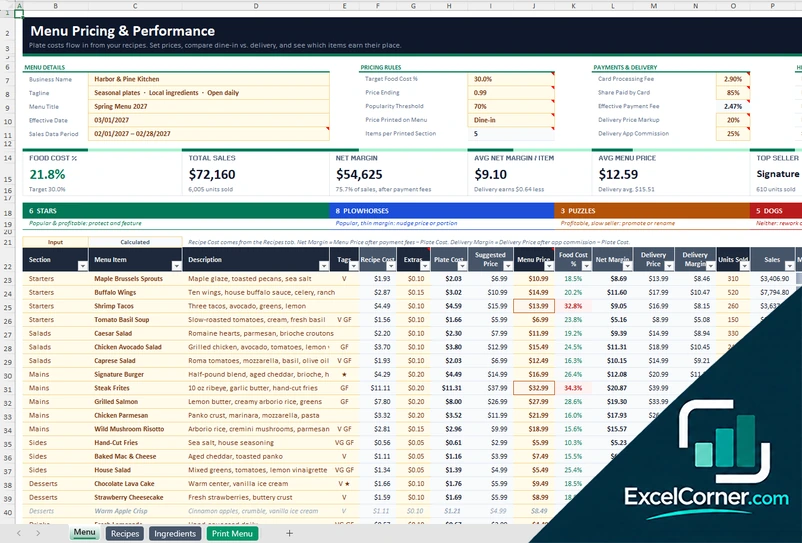
A menu costing workbook with recipes, supplier ingredient prices, card processing fees, delivery app commission, net margin by dish and a print menu.
MenuRecipesIngredientsPrint Menu
.xlsx · 80 KB
Version 3
Weekly Menu Planner
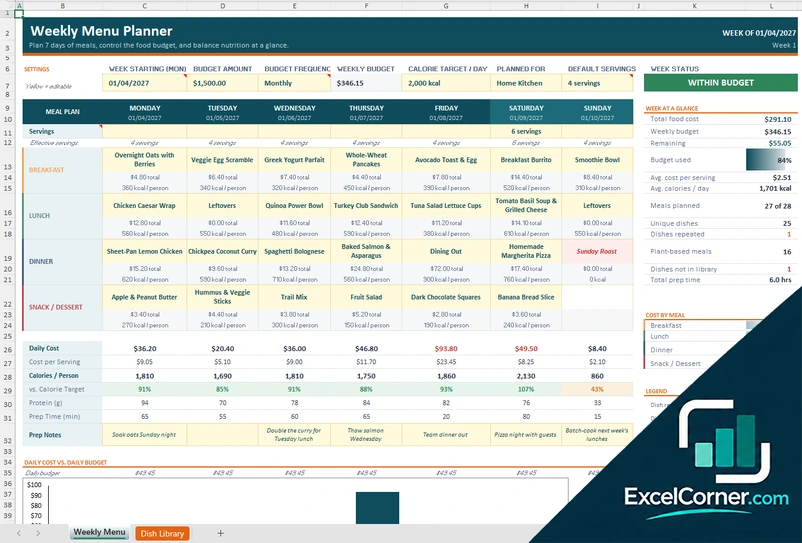
A weekly menu planner with drop-down dishes for each meal, daily cost and calories against your budget and target, and a library of dishes.
Weekly MenuDish Library
.xlsx · 34 KB
What is inside the menu Excel templates
Version 1: Menu Pricing and Printable Menu
The Menu Items sheet takes your business name, menu title, target food cost, price ending (such as .99), card adjustment and popularity threshold. Then you add a row for each dish with its section, tags, plate cost and units sold. It suggests a price and shows the food cost percentage.
It classifies each dish as a star, plowhorse, puzzle or dog from its popularity and margin. The Printable Menu sheet builds a print-ready menu by section, with prices, descriptions and diet tags.
Version 2: Menu Costing with Recipes
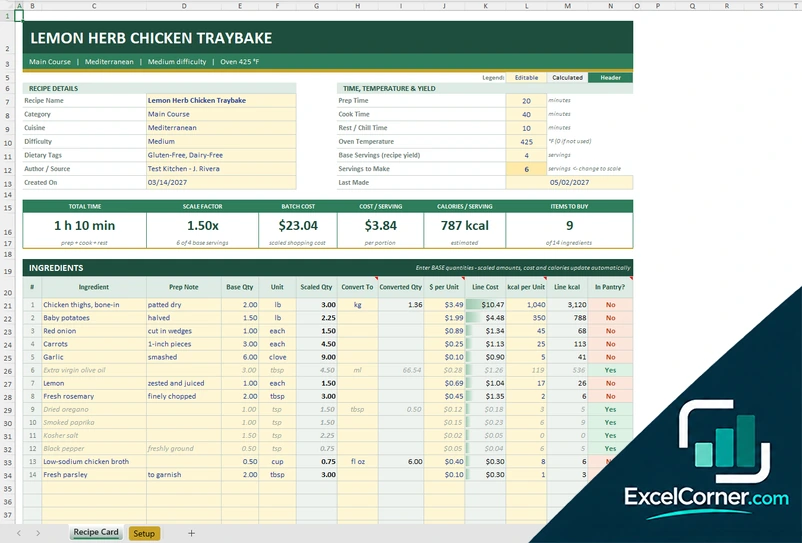
The Menu sheet holds the business details, pricing rules and payment and delivery settings: card processing fee, share paid by card, delivery markup and delivery app commission. The Recipes sheet lists ingredient quantities per portion, and the Ingredients sheet holds supplier pack prices and price changes.
Plate costs flow in from the recipes, so each dish shows its food cost percentage, net margin, delivery price and class. The top of the Menu sheet shows food cost, total sales, net margin and average menu price. The Print Menu sheet prints the menu.
Version 3: Weekly Menu Planner
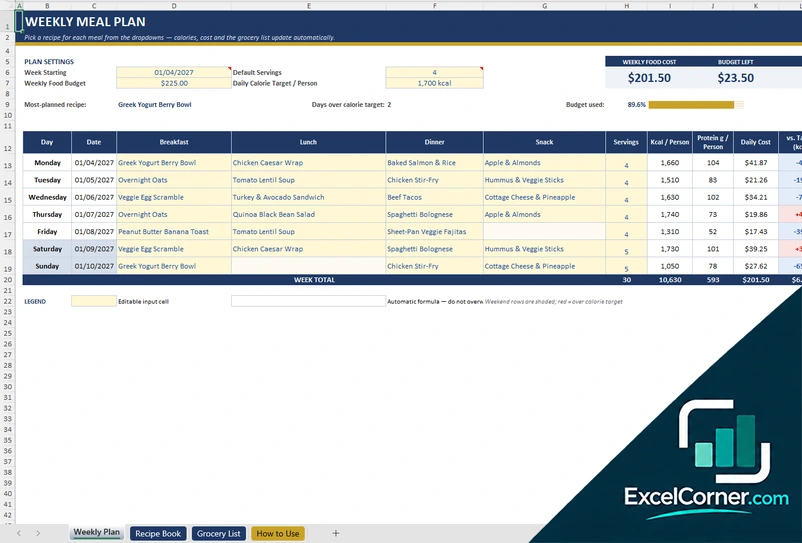
On the Weekly Menu sheet you set the week, a weekly or monthly budget, the daily calorie target, the household and the default servings. Then you pick a dish for each meal of each day from a drop-down. The Dish Library has room for about 150 dishes with meal type, diet, cost per serving, calories, protein and prep time.
The planner shows daily cost, calories, protein and prep time, whether the week is within budget, repeated dishes, plant-based meals and cost by meal, with a chart of daily cost against the daily budget.
How to use a menu template in Excel
- Download
Pick the version you want and open it in Excel. Each file has a sample menu or week, so you can see how it works. - Enter the basics
Add the business name, the menu title and your target food cost, or the week, the budget and the calorie target. - Add the dishes
List each dish with its cost and price, or pick dishes from the library for each meal of the week. - Check the results
Look at the food cost, the margin and the classification of each dish, or the cost and calories of each day. - Print
Print the menu or save it as a PDF from Excel.
Replace the sample dishes and prices with your own. The totals and the printed menu update on their own.
Which menu template do you need?
| Menu Pricing and Printable Menu | Menu Costing with Recipes | Weekly Menu Planner | |
|---|---|---|---|
| For | Pricing and printing a restaurant menu | Costing dishes from recipes and ingredients | A weekly menu at home with a budget |
| You enter | Dishes, plate costs and sales | Recipes, ingredient prices and sales | Dishes for each meal of the week |
| You get | Food cost %, suggested price, dish classes, printable menu | Net margin, delivery price, food cost %, printable menu | Daily cost, calories, budget check, cost by meal |
| Sheets | 2 | 4 | 2 |
| Charts | No | No | Yes |
They are separate files, so you can use more than one.
Tips for a menu that sells
- Cost every dish from its recipe, not from memory. Prices of ingredients change.
- Aim for a target food cost per dish and check the dishes that go over it.
- Keep each section short. Five or six items are easier to choose from than twelve.
- Promote the dishes that are popular and profitable and re-price the popular ones with a low margin.
- For a weekly menu at home, reuse the dishes that work and plan the leftovers.
Frequently asked questions
Are these Excel menu templates free?
Yes. All three versions are free to download as .xlsx files. You do not need an account or an email address.
Which version should I choose?
Choose Menu Pricing and Printable Menu (Version 1) to price and print a restaurant menu. Choose Menu Costing with Recipes (Version 2) if you also want recipe costs and delivery fees. Choose the Weekly Menu Planner (Version 3) to plan meals at home.
How do I make a menu in Excel?
List the dishes with a section, a description and a price, then add formulas for the cost and margin of each. Print the sheet or save it as a PDF. The templates do this and build a print-ready menu for you.
What is menu engineering?
Menu engineering sorts dishes by popularity and margin into stars, plowhorses, puzzles and dogs. Stars are popular and profitable. Plowhorses are popular with a low margin. Puzzles are profitable but slow sellers. Dogs are neither.
Can I plan a weekly menu with a budget?
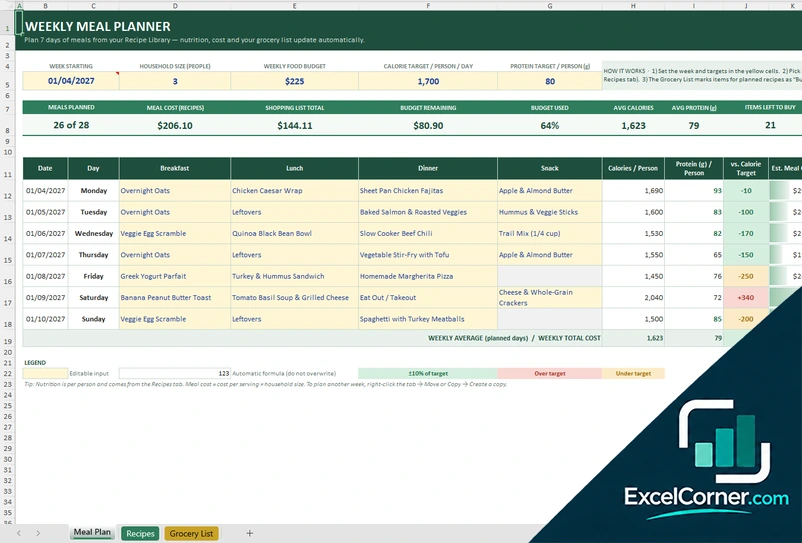
Yes. The Weekly Menu Planner takes a weekly or monthly budget and a daily calorie target, and shows the cost and calories of each day. For a plan with a grocery list, see the weekly meal planner template excel page.
These templates use made-up sample data. Prices, costs, calories and nutrients are examples that you replace with your own. Check allergen labelling and the food rules that apply to you. Excel is a trademark of Microsoft Corporation; Excel Corner is not affiliated with Microsoft.