
Home › Marketing, Sales & Customers › RFP Pricing Template Excel
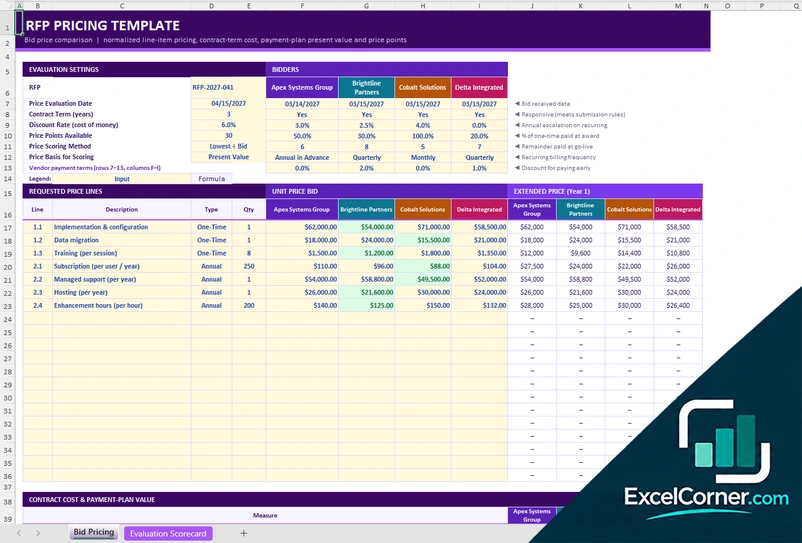
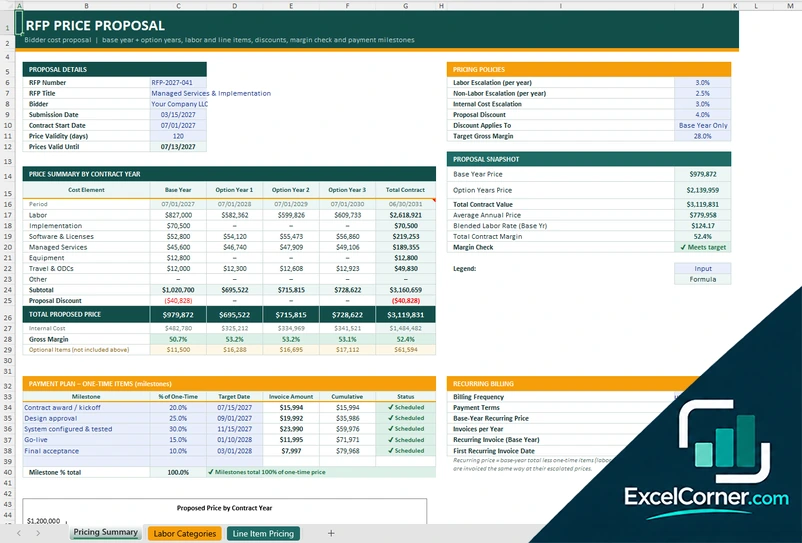
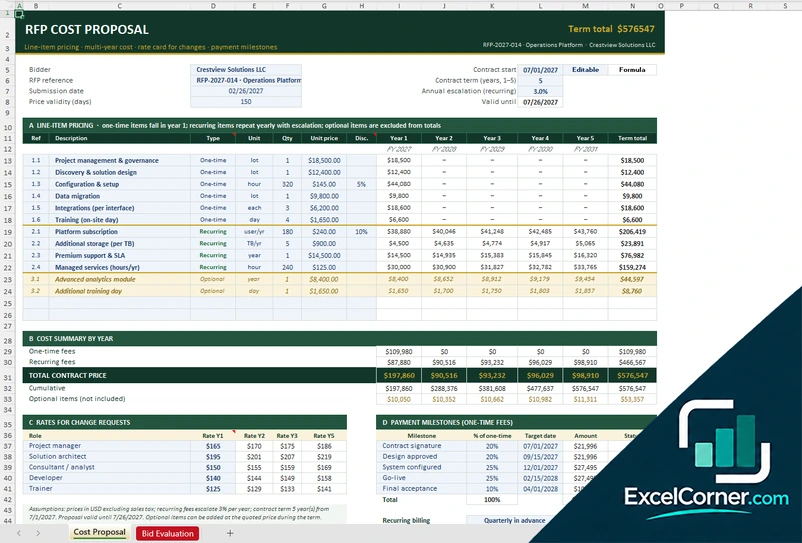
Previewing: Version 1 · RFP Bid Price Comparison with Evaluation Scorecard. Pick another version on the right.
Instant download · No sign-up · No email
Download these free RFP pricing templates in Excel. One compares vendor bids with a scorecard and a best-value result. One builds a bidder price proposal with base and option years. One builds a multi-year cost proposal and evaluates the bids.
Choose your version
- File
- .xlsx · 21 KB · 2 sheets
- Works with
- Microsoft Excel (.xlsx)
- Macros
- None · formulas only
- Price
- Free
Price an RFP in an Excel spreadsheet
An RFP asks vendors for a price, and each vendor prices it in a different way. Some bid a low price with extra fees, others bill monthly or in advance. In Excel you can put every bid on the same basis, work out the total cost over the contract and give points to the price, so the comparison is fair.
These three templates cover both sides. Version 1 is for the buyer: it compares bids and ranks the vendors with a scorecard. Version 2 is for the bidder: a price proposal with labor rates, line items and option years. Version 3 is a multi-year cost proposal with a bid evaluation.
Best for
- Procurement teams that compare vendor bids for an RFP
- Companies that answer an RFP and need a price proposal with a margin check
- Anyone who needs a multi-year cost with escalation and payment milestones
Maybe not for
A procurement platform that runs the whole bidding process online. These are Excel files: you type the bids and the scores, and the totals and the ranking are calculated from them.
Which version is right for you?
All three are free, formula-driven Excel files with sample data you can replace. They are independent, so you can download more than one.
Version 1
RFP Bid Price Comparison with Evaluation Scorecard
An RFP bid comparison with normalized line-item pricing, contract-term cost, the present value of payment plans, price points and an evaluation scorecard with a chart.
Bid PricingEvaluation Scorecard
.xlsx · 21 KB
Version 2
RFP Price Proposal with Base and Option Years
An RFP price proposal with escalation, labor categories with hours, non-labor line items, discounts, a margin check, payment milestones and a chart of price by year.
Pricing SummaryLabor CategoriesLine Item Pricing
.xlsx · 26 KB
Version 3
RFP Cost Proposal with Multi-Year Pricing and Bid Evaluation
An RFP cost proposal with one-time, recurring and optional line items by year, rates for change requests and payment milestones, plus a bid evaluation sheet.
Cost ProposalBid Evaluation
.xlsx · 23 KB
What is inside the RFP pricing templates
Version 1: RFP Bid Price Comparison with Evaluation Scorecard
On the Bid Pricing sheet you enter the RFP settings, the contract term, the discount rate and up to four bidders with their terms. You list the requested price lines and each vendor’s unit price. It works out the extended price, the contract cost and the present value of each payment plan.
The Evaluation Scorecard adds pass or fail gates, weighted technical scores and the price points. It combines them into a ranked best-value recommendation, with a chart.
Version 2: RFP Price Proposal with Base and Option Years
The Pricing Summary sheet has the proposal details and the pricing policies, such as labor and non-labor escalation, the discount and the target gross margin. It builds the price for the base year and three option years by cost element, with a margin check, payment milestones and a chart.
The Labor Categories sheet multiplies fully burdened hourly rates by year and estimated hours. The Line Item Pricing sheet holds the non-labor lines, one-time, annual or monthly, and optional items.
Version 3: RFP Cost Proposal with Multi-Year Pricing and Bid Evaluation
The Cost Proposal sheet has the bidder, the RFP reference, the contract term and the yearly escalation. Line items are one-time, recurring or optional, with a quantity and a unit price, and repeat each year with escalation. It adds a cost summary by year, rates for change requests and payment milestones.
The Bid Evaluation sheet normalizes every bid to total cost of ownership, scores the price and the quality criteria and ranks the vendors with a recommendation.
How to use an RFP pricing template in Excel
- Download
Pick the version for your side, buyer or bidder, and open it in Excel. Each file has a sample RFP. - Enter the RFP
Add the RFP number, the contract term, the dates and your pricing or scoring rules. - Enter the prices
Type each requested line with its unit price, or each vendor’s bid, and the labor rates if you need them. - Read the totals
Look at the total cost over the term, the price points, the margin and the ranking. - Decide or submit
Choose the best-value vendor, or check the margin and submit your price proposal.
Replace the sample RFP with your own. The totals, the points and the ranking update on their own.
Which RFP pricing template do you need?
| Bid Price Comparison with Scorecard | Price Proposal with Option Years | Cost Proposal with Bid Evaluation | |
|---|---|---|---|
| For | The buyer | The bidder | Bidder and buyer |
| You enter | Four vendors’ unit prices and terms | Labor rates, hours and line items | Line items and multi-year terms |
| You get | Contract cost, price points, best-value rank | Price by year, margin check, milestones | Cost by year, change rates, ranking |
| Sheets | 2 | 3 | 2 |
| Charts | 1 | 1 | No |
They are separate files, so you can use more than one.
Tips for RFP pricing
- Ask every vendor to price the same lines, so you can compare them.
- Compare the total cost over the contract, not only the first year.
- Include one-time fees, recurring fees and the yearly increase.
- Give points to the price, but weigh quality as well, not only the lowest bid.
- As a bidder, check your margin on every year before you submit.
Frequently asked questions
Are these RFP pricing templates free?
Yes. All three versions are free to download as .xlsx files. You do not need an account or an email address.
Which version should I choose?
Choose the Bid Price Comparison (Version 1) to compare vendors as a buyer. Choose the Price Proposal (Version 2) to price your bid with labor rates and option years. Choose the Cost Proposal (Version 3) for a multi-year price with a bid evaluation.
How do I compare RFP bids in Excel?
Put each requested line in a row and each vendor in a column, then add the one-time and recurring costs over the contract term. Work out the total cost and give price points. Version 1 and Version 3 do this and rank the vendors.
How are price points calculated?
A common rule gives the full points to the lowest bid and scales the others by lowest price divided by their price. Version 1 uses this rule and can also score on present value. The total score adds the technical points.
What goes in an RFP price proposal?
The price for each line or labor category, the contract term with option years, the yearly escalation, any discounts and the payment milestones. Version 2 and Version 3 have all of them, with a margin check.
More free sales and pricing templates
These templates use made-up sample companies, projects and prices. Check the scope, the taxes, the terms and the legal wording against your own rules before you send a proposal, an estimate or a bid. Excel is a trademark of Microsoft Corporation; Excel Corner is not affiliated with Microsoft.