
Home › Marketing, Sales & Customers › Price List Template Excel
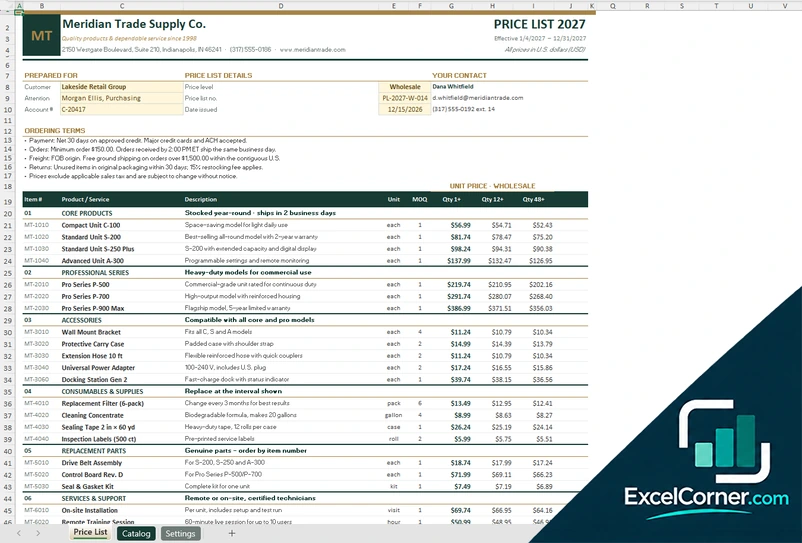
Previewing: Version 1 · Price List with Product Catalog and Margins. Pick another version on the right.
Instant download · No sign-up · No email
Download these free price list templates in Excel to build a clean price list for your customers. One prints a customer price list from a catalog with costs. One calculates list, wholesale and distributor prices. One is a service price sheet with quantity tiers and a quote.
Choose your version
- File
- .xlsx · 47 KB · 3 sheets
- Works with
- Microsoft Excel (.xlsx)
- Macros
- None · formulas only
- Price
- Free
Build a price list in an Excel spreadsheet
A price list tells your customers what you sell and what it costs. In Excel you can also keep the cost, the markup and the margin next to each price, so you see at once which items earn too little. When you change a cost or a markup, the selling prices and the margins update on their own.
These three templates work in different ways. Version 1 keeps a catalog with costs and prints a customer price list by category. Version 2 is a product price list with list, wholesale and distributor prices and margin checks. Version 3 is a price sheet with quantity tiers, plus a quote and a payment plan.
Best for
- Sellers of products who want to print a clean price list for each customer
- Wholesalers and distributors with different prices for each customer level
- Service businesses with packages, hourly rates and quantity discounts
Maybe not for
An e-commerce or ERP system that updates prices by itself. These are Excel files: you type your items and costs, and the prices and margins are calculated from what you enter.
Which version is right for you?
All three are free, formula-driven Excel files with sample data you can replace. They are independent, so you can download more than one.
Version 1
Price List with Product Catalog and Margins
A price list with an internal catalog of costs, markups and margins, a printable customer price list grouped by category and quantity breaks, and a settings sheet.
Price ListCatalogSettings
.xlsx · 47 KB
Version 2
Product Price List with Wholesale and Distributor Prices
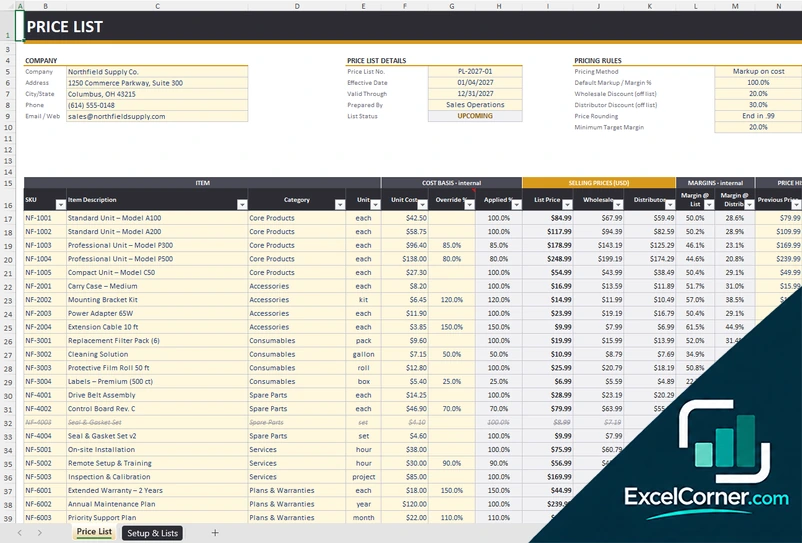
A product price list with a pricing method, wholesale and distributor discounts, margin checks, a price history column and a setup sheet for the lists.
Price ListSetup & Lists
.xlsx · 22 KB
Version 3
Service Price Sheet with Quantity Tiers and Quote
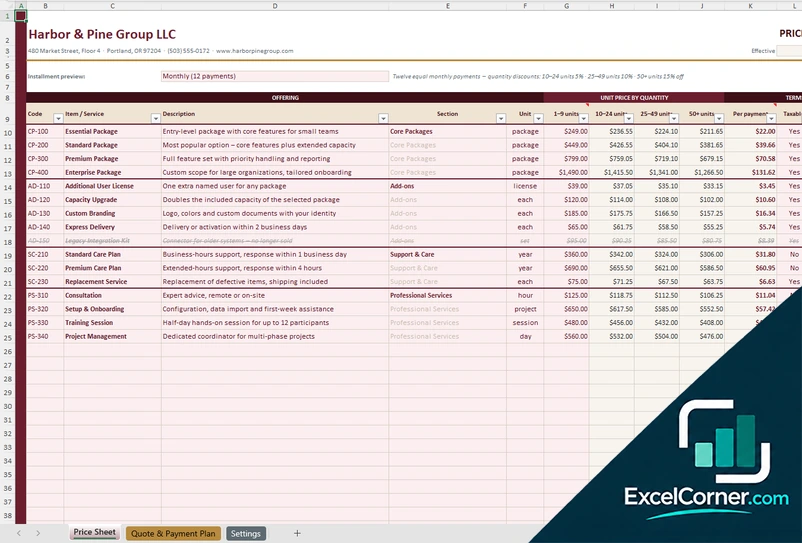
A service price sheet with four quantity tiers, a quote with a payment plan, and a settings sheet for the company, the tiers and the payment plans.
Price SheetQuote & Payment PlanSettings
.xlsx · 28 KB
What is inside the price list templates
Version 1: Price List with Product Catalog and Margins
The Catalog sheet is the internal master list: item number, name, description, category, unit, minimum order, unit cost, and a markup or a fixed base price. It builds the price, compares it with last year and flags items with a low margin or a price below cost. Cost and margin never print.
The Price List sheet is the customer version. It shows the company details, the customer, the price level and the ordering terms, then the items by category with a unit price for each quantity break. The Settings sheet holds the company profile, the price rules, the customer price levels and the terms.
Version 2: Product Price List with Wholesale and Distributor Prices
On the Price List sheet you enter the company, the price list number, the dates and the pricing rules. You choose the method, markup on cost or target margin on price, a default percentage, the wholesale and distributor discounts and the rounding. Each item has an SKU, description, category, unit and unit cost, with an optional override.
The template calculates the list, wholesale and distributor prices and the margin of each, and a margin check flags items below your minimum. A price history column shows the previous price. The Setup and Lists sheet holds the categories, units and statuses for the drop-down lists.
Version 3: Service Price Sheet with Quantity Tiers and Quote
The Price Sheet lists each package, add-on, support plan and service with a code, a description, a section and a unit, such as package, license, hour or day. It shows the unit price for four quantity tiers, from 1 to 9 units up to 50 or more, and the price per payment of a payment plan.
The Quote and Payment Plan sheet turns the price sheet into a quote. You pick the items and quantities, and it applies the tier discount, any extra discount and the tax, and shows the payment plan. The Settings sheet holds the company details, the quantity tiers and the payment plans.
How to use a price list template in Excel
- Download
Pick the version that fits your business and open it in Excel. Each file has a sample company and sample items. - Add your company
Enter your company details, the price list number, the dates it is valid and your payment and shipping terms. - Enter your items
List each item with a code, a description, a category, a unit and its cost or base price. - Set your pricing rules
Choose the markup or margin, the discounts for wholesale or quantity, and how prices are rounded. - Print or send
Check the margin flags, then print the price list or save it as a PDF to send to your customer.
Replace the sample items with your own. The prices, the margins and the totals update on their own.
Which price list template do you need?
| Price List with Catalog | Product Price List with Wholesale | Service Price Sheet with Quote | |
|---|---|---|---|
| You enter | Items with cost and markup | SKU, cost and pricing rules | Codes, services and tier prices |
| Best for | Printing a customer price list | List, wholesale and distributor prices | Packages and services with quotes |
| You get | Price list by category, margin flags, last-year comparison | Three price levels, margins, price history | Quantity tiers, quote and payment plan |
| Sheets | 3 | 2 | 3 |
| Charts | No | No | No |
They are separate files, so you can use more than one.
Tips for a price list that sells
- Group items by category, so customers find what they need fast.
- Show only the price columns your customer needs, and hide the cost and margin columns.
- Put the date it is valid and your payment terms at the top.
- Round prices in a consistent way, for example to end in .99 or in .00.
- Review the margin of each item whenever your costs change.
Frequently asked questions
Are these price list templates free?
Yes. All three versions are free to download as .xlsx files. You do not need an account or an email address.
Which version should I choose?
Choose the Price List with Catalog (Version 1) to print a customer price list from a master catalog. Choose the Product Price List (Version 2) for list, wholesale and distributor prices. Choose the Service Price Sheet (Version 3) for packages, quantity tiers and quotes.
How do I make a price list in Excel?
Make a table with a column for the item code, the description, the unit and the price. Add the cost and a markup column to calculate the price, and group the items by category. The templates already have this, with a print layout.
How do I set a price from my cost?
Add a markup to the cost: a cost of 10 with a 50 percent markup gives a price of 15. Or aim for a margin: a 50 percent margin on the price gives 20. The templates let you choose either method.
Can I hide the cost before I share the list?
Yes. In Version 1 the cost and margin columns do not print. In Version 2 the internal columns are grouped, so you click the minus button above the column letters to hide them. Then print or save the list as a PDF.
More free sales and customer templates
These templates use made-up sample companies, items and prices. Check taxes, discounts and terms against your own rules before you send a price list or a quote to a customer. Excel is a trademark of Microsoft Corporation; Excel Corner is not affiliated with Microsoft.