
Home › Marketing, Sales & Customers › Account Plan Template Excel
Previewing: Version 1 · Single Account Plan. Pick another version on the right.
Instant download · No sign-up · No email
Download these free account plan templates for Excel to plan how you grow your most important customers. One version is a complete account plan for a single customer, with revenue targets, a health scorecard, stakeholders, opportunities and actions. One is a key account portfolio that positions all your accounts on a strategy matrix. One is a strategic account plan with a one-page review, customer priorities, a SWOT, risks and a revenue plan by solution.
Choose your version
- File
- .xlsx · 51 KB · 5 sheets
- Works with
- Microsoft Excel (.xlsx)
- Macros
- None · formulas only
- Price
- Free
Plan your key accounts in an Excel spreadsheet
An account plan is a document in which a sales team states what it knows about an important customer and what it will do to grow the relationship: who the people are, what the customer needs, which opportunities are open, what revenue is planned and what the next actions are. Teams that plan their key accounts in a structured way tend to see the whole account, find the gaps and coordinate better than teams that work deal by deal. A spreadsheet is a practical place to start, because you can adapt the headings to the way you sell and the numbers are calculated for you.
These Excel templates give you three ways to plan. The first is a complete plan for one account: a profile, the revenue history and the target for the year with quarterly attainment, a health scorecard, a stakeholder map, the strategic objectives, the opportunities with their stage and probability, and an action plan. The second is a portfolio view for an account manager or a sales leader: you score every account on attractiveness and on your position, and the dashboard places each account on a strategy matrix, with the revenue by tier and by account manager, the whitespace and the accounts that need attention. The third is a strategic account plan in the form of a one-page plan review, with the revenue bridge to the target, the health of the account, the buying center, the top opportunities, the risks and the key takeaways, backed by sheets for the account strategy, the revenue plan, the opportunities, the stakeholders and the actions.
Best for
- Account managers and key account teams that manage a small number of large customers
- Sales leaders that want to see the whole portfolio and decide where to invest
- Customer success and business development teams that prepare account reviews
Maybe not for
A CRM with account planning features. These templates are Excel files that you fill in. They do not connect to a CRM, so you type or paste the data. They are useful when you want a plan that you can share, print and review in a meeting.
Which version is right for you?
All three are free, formula-driven Excel files with sample data you can replace. They are independent, so you can download more than one.
Version 1
Single Account Plan
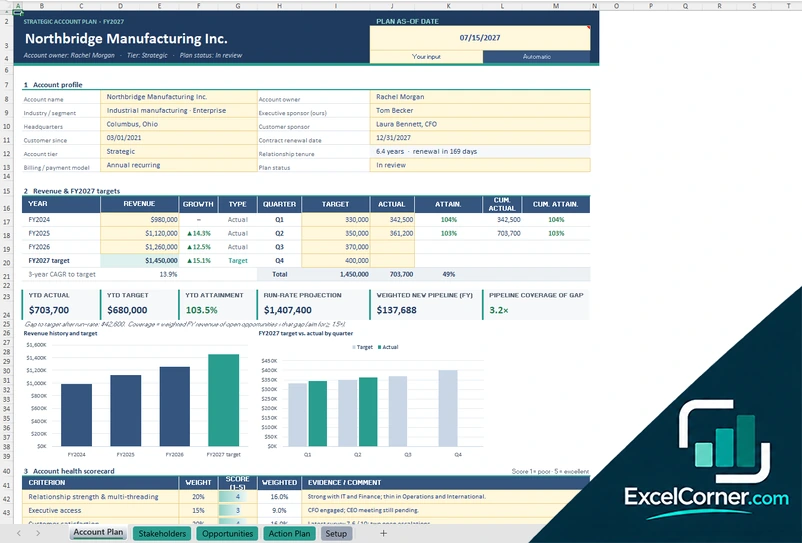
A complete plan for one account with a profile, revenue history and targets, a health scorecard, a power grid of relationships, strategic objectives, stakeholders, opportunities, whitespace and an action plan.
Account PlanStakeholdersOpportunitiesAction PlanSetup
.xlsx · 51 KB
Version 2
Key Account Portfolio
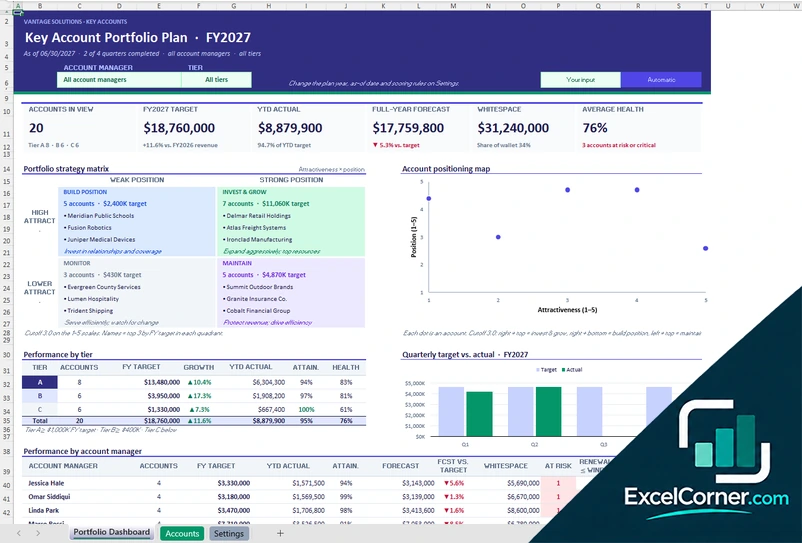
A portfolio dashboard that places each account on a strategy matrix and a positioning map, with performance by tier and by account manager, whitespace, renewals and the accounts that need attention.
Portfolio DashboardAccountsSettings
.xlsx · 46 KB
Version 3
Strategic Account Plan
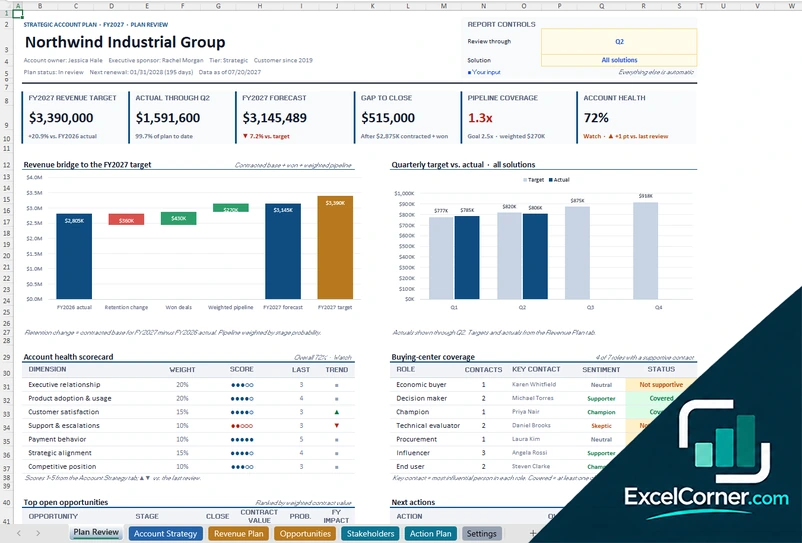
A one-page plan review with a revenue bridge to the target, a health scorecard, buying center coverage, top opportunities and risks, with sheets for the account strategy, the revenue plan, opportunities, stakeholders and actions.
Plan ReviewAccount StrategyRevenue PlanOpportunitiesStakeholdersAction PlanSettings
.xlsx · 72 KB
What is inside the account plan Excel templates
Version 1: Single Account Plan
The Account Plan sheet brings the plan together on one page. It has the account profile (account name, industry, headquarters, customer since, tier, billing model, owner, executive sponsor, customer sponsor, renewal date, relationship tenure and plan status), the revenue history with the growth by year and the target by quarter with the actual, the attainment and the cumulative figures, cards for the year-to-date actual and target, the attainment, the run-rate projection, the weighted new pipeline and the pipeline coverage of the gap, and two charts: the revenue history and target, and the target against actual by quarter. It continues with the account health scorecard, a power grid of the relationship coverage by influence and attitude, and the strategic objectives with progress, owner and status. The Stakeholders sheet maps the contacts with their buying role, influence, attitude, relationship, owner, last contact and cadence, and flags overdue follow-ups. The Opportunities sheet lists the deals by solution and business unit with stage, billing model, price, term, expected close, contract value, FY revenue and probability, and shows a whitespace map. The Action Plan sheet tracks the actions with owner, priority, dates, status and days left, and the Setup sheet holds the lists.
Version 2: Key Account Portfolio
On the Accounts sheet you list each account with its segment, region, account manager, revenue model, renewal date, target growth and estimated annual wallet, and score it from 1 to 5 on market potential, strategic fit, profitability, relationship and satisfaction. The sheet calculates the days to renewal, the share of wallet, the whitespace, the attractiveness, the position, a suggested strategy, the engagement, the payment behavior and the health. The Portfolio Dashboard has filters for the account manager and the tier and shows the accounts in view, the year-to-date actual, the full-year forecast, the whitespace and the average health, a portfolio strategy matrix with the accounts in each box (invest and grow, build position, maintain and monitor), an account positioning map, the performance by tier and by account manager with the forecast against the target, the accounts at risk, the renewals within the window and the overdue actions, the largest whitespace and the accounts that need attention. It has two charts. The Settings sheet holds the account managers, the regions, the segments, the revenue models and the weights of the scores.
Version 3: Strategic Account Plan
The Plan Review sheet is built for the account review meeting. You choose the review quarter and the solution, and six cards show the revenue target, the actual to date, the forecast, the gap to close, the pipeline coverage and the account health. Two charts show the revenue bridge to the target and the target against actual by quarter. Below them are the account health scorecard, the buying-center coverage by role, the top open opportunities, the next actions, the strategic objectives with progress, the top risks and the key takeaways. The Account Strategy sheet holds the account profile, the customer priorities and how you help, the strategic objectives with baseline, target and progress, the health scorecard with what good looks like, a SWOT and the risks with likelihood, impact and mitigation. The Revenue Plan sheet sets the quarterly targets and actuals by solution with the won revenue, the open and weighted pipeline, the forecast against the target, the gap and the pipeline coverage. The Opportunities, Stakeholders and Action Plan sheets keep the details, and the Settings sheet holds the plan basics, the solutions, the stages with win probability and the lists.
How to use an account plan template in Excel
- Download
Pick the version you want and open it in Excel. The files have a sample customer, so you can see how each sheet works. - Set it up
On the setup or settings sheet, enter the plan year, your account team, your solutions or product lines, your sales stages with their probability and your lists. - Describe the account
Fill in the profile, the revenue history and the targets for the year, and score the health of the account or the attractiveness and the position of each account. - Map the people and the opportunities
List the stakeholders with their role, influence and attitude, and the opportunities with their stage, value and expected close date. - Plan the actions and review
Add the strategic objectives and the actions with owners and dates, and use the dashboard or the plan review to check the gap to the target and the next steps.
Replace the sample customer with your own. The totals, the scores, the charts and the flags update on their own.
Which account plan template do you need?
| Single Account Plan | Key Account Portfolio | Strategic Account Plan | |
|---|---|---|---|
| For | One customer, in full detail | All your key accounts at once | A one-page plan review with a strategy |
| Best for | Account managers | Sales leaders and account managers with a portfolio | Teams that run account reviews |
| Data you enter | Profile, stakeholders, opportunities and actions | About 20 to 30 accounts with scores | Strategy, revenue plan, opportunities, stakeholders and actions |
| Main outputs | Revenue vs. target, health score, power grid, pipeline coverage, whitespace | Strategy matrix, positioning map, forecast vs. target, whitespace, accounts at risk | Revenue bridge, gap to close, coverage, health, buying center, risks |
| Sheets | 5 | 3 | 7 |
| Charts | 2 | 2 | 2 |
They are separate files, so you can use more than one.
Tips for a useful account plan
- Plan only the accounts that matter most. A plan takes time, so use it where the revenue or the potential is high.
- Start with the customer. Write down their business priorities before you write your own goals.
- Map the people, not only the contacts that you like. Include the decision makers, the champions and the skeptics.
- Be honest in the health scorecard. A plan is useful when it shows the weak spots.
- Look for whitespace: the products, the business units and the regions where you do not sell yet.
- Give every action an owner and a date, and review the plan every quarter.
- Keep the plan short enough that the team will read it before a customer meeting.
Frequently asked questions
Are these account plan templates for Excel free?
Yes. All three versions are free to download as .xlsx files. You do not need an account or an email address.
Which version should I choose?
Choose the Single Account Plan (Version 1) to plan one customer in detail. Choose the Key Account Portfolio (Version 2) to compare all your accounts on a strategy matrix and see where to invest. Choose the Strategic Account Plan (Version 3) for a one-page plan review with a revenue bridge, the buying center, the risks and the key takeaways.
What is an account plan?
An account plan is a document that describes a customer and sets out the strategy and the actions to grow the business with them. It usually has a profile, goals, stakeholders, opportunities, risks and an action plan.
What is strategic account planning?
Strategic account planning is the practice of planning the long-term development of your most important customers. Instead of looking at one deal at a time, you look at the whole account, the customer’s priorities and the value that you can create together.
What does the strategy matrix in the portfolio version show?
Each account is scored on how attractive it is and on how strong your position is. The matrix puts the accounts in four boxes, such as invest and grow, build position, maintain and monitor, with a suggested strategy for each.
How is the health score calculated?
You rate each dimension, such as executive relationship, adoption, satisfaction, support and payment behavior, from 1 to 5. The score of each one is multiplied by its weight, and the weighted total gives the overall health of the account. You can change the dimensions and the weights.
Can I use the templates for sales account planning in a team?
Yes. The plans have an owner for every account, contact, opportunity and action, and filters by account manager, so that a team can share one file or each person can keep their own.
Does the template work in Google Sheets?
The files are made for Microsoft Excel and use standard formulas with no macros. You can upload them to Google Drive and open them with Google Sheets, but some formatting or charts may look different.
Is my information stored online?
No. The templates are plain Excel files, so the names, addresses, dates and amounts you type stay in your own file on your own computer.
More free sales and marketing templates
These templates are reporting and planning tools with made-up sample data. The figures, probabilities and forecasts depend on what you enter and are not a guarantee of future sales. Check them against your accounting and CRM records before you rely on them. Excel is a trademark of Microsoft Corporation; Excel Corner is not affiliated with Microsoft.