
Home › Marketing, Sales & Customers › Excel Template for Sales Leads
Previewing: Version 1 · Lead Desk. Pick another version on the right.
Instant download · No sign-up · No email
Download these free Excel templates for sales leads to know who to call next and which sources bring customers. One version is a lead desk that scores every lead, queues the follow-ups and measures source performance. One is a lead generation scorecard that links campaigns to leads, cost and revenue. One is a lead command center with automatic routing, next best actions and speed-to-lead analysis.
Choose your version
- File
- .xlsx · 157 KB · 3 sheets
- Works with
- Microsoft Excel (.xlsx)
- Macros
- None · formulas only
- Price
- Free
Manage your sales leads in an Excel spreadsheet
A sales lead is a person or a company that may buy from you. Managing leads well means recording each one, deciding how good it is, following up on time and learning which sources and campaigns bring the best ones. Many small teams start in a spreadsheet because it is quick to set up, it costs nothing and everyone knows how to use it. The risk is a long list that nobody trusts. A good template solves that with a scoring system, a follow-up date for each lead and a dashboard that tells you what to do today.
These Excel templates give you three ways to manage leads. The first is a lead desk: you log each lead with its source, its size, its budget, its timeline and its engagement, and the sheet gives it a score and a grade from hot to cold, builds a follow-up queue with the overdue leads first, and shows the quality of your leads, the performance of each source and the workload of each rep. The second is a lead generation scorecard for marketing: you plan your campaigns with a budget and a lead target, log the leads that come in, and the workbook calculates the cost per lead, the cost per qualified lead, the qualification rate and the lead-to-customer rate month by month and by channel. The third is a lead command center for a sales team: leads are routed automatically to a rep by region and segment, each lead gets a score and a next best action, and the dashboard shows the actions due today, the service level for the first response and how the speed of the response affects the win rate.
Best for
- Small sales teams, founders and consultants that need a simple lead tracker
- Marketing teams that want to link campaigns to leads, cost and revenue
- Sales managers that route leads to reps and watch response times
Maybe not for
A CRM or a marketing automation tool. These templates do not connect to a CRM or a web form, so you type or paste your leads. They are a good start, or a good place to analyze an export from another system.
Which version is right for you?
All three are free, formula-driven Excel files with sample data you can replace. They are independent, so you can download more than one.
Version 1
Lead Desk
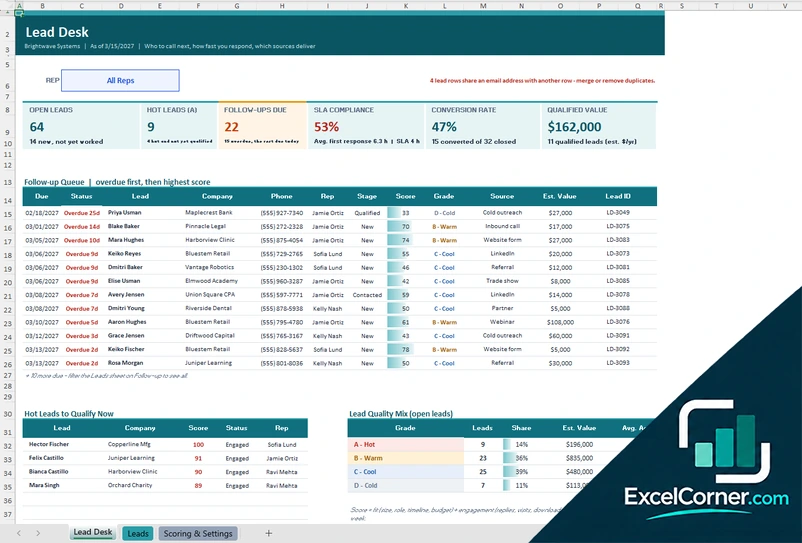
A lead desk with a score and grade for every lead, a follow-up queue, hot leads to qualify, a lead quality mix, source performance, rep workload and leads by status.
Lead DeskLeadsScoring & Settings
.xlsx · 157 KB
Version 2
Lead Generation Scorecard
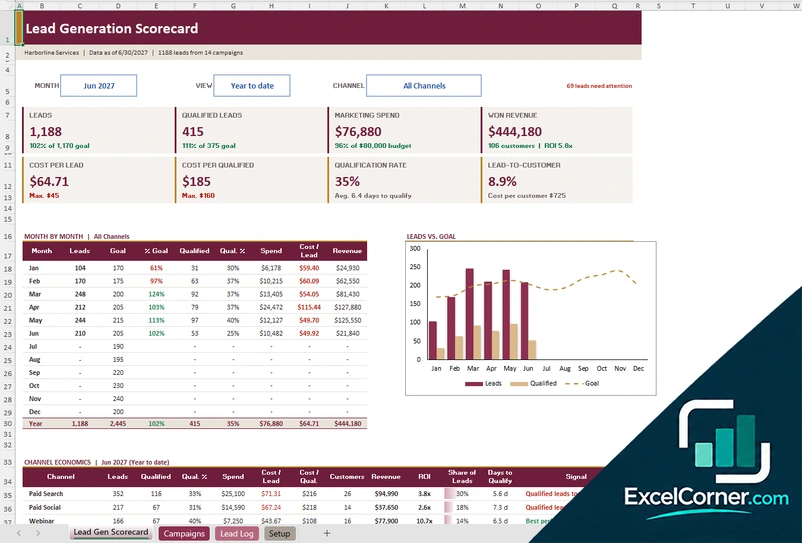
A lead generation scorecard with month, view and channel filters, monthly results against goals, channel economics, a campaigns sheet with budget and results and a lead log of about 1,200 leads.
Lead Gen ScorecardCampaignsLead LogSetup
.xlsx · 179 KB
Version 3
Lead Command Center
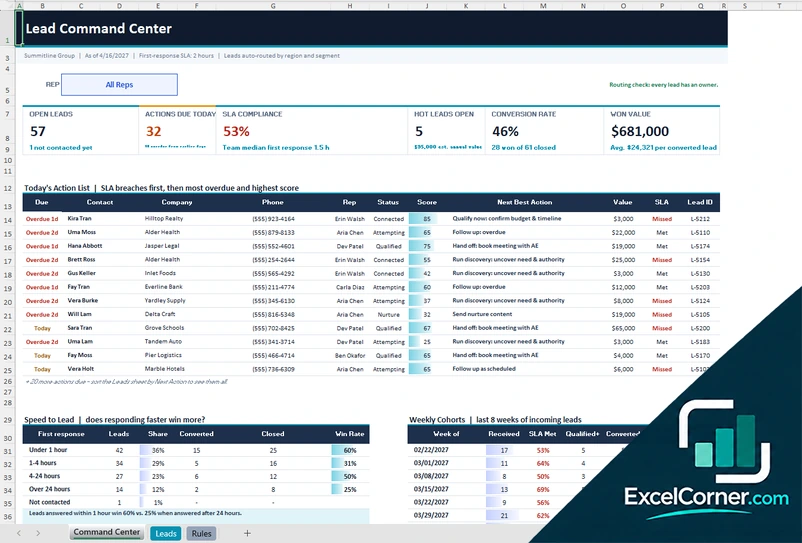
A lead command center with automatic routing by region and segment, a score and next best action for every lead, speed-to-lead analysis, weekly cohorts, source quality and rep capacity.
Command CenterLeadsRules
.xlsx · 156 KB
What is inside the sales leads Excel templates
Version 1: Lead Desk
The Lead Desk has a rep filter and cards for the open leads, the hot leads (grade A), the follow-ups due, the SLA compliance, the conversion rate and the qualified value. The follow-up queue puts the overdue leads first and then the highest score, with the status, the company, the phone, the rep, the stage, the score, the grade, the source, the estimated value and the lead ID. Below are the hot leads to qualify now, the lead quality mix by grade with the share and the average age, the performance of each lead source (leads, average score, percent hot, qualified, converted, disqualified, conversion rate, average response time, SLA met, converted value and a verdict), the workload of each rep and the leads by status. The Leads sheet holds about 600 leads with the contact, the source, the company size, the industry, the plan of interest, the estimated value, the budget, the timeline and the engagement (email replies, site visits, downloads, demo requests), the status, the first contact and the last touch, with a calculated score, grade, response time and follow-up date. The Scoring and Settings sheet holds the points for each factor, the grades, the lists and the follow-up cadence for each status.
Version 2: Lead Generation Scorecard
The Lead Gen Scorecard has filters for the month, the view (month or year to date) and the channel, and shows the leads, the qualified leads, the marketing spend, the won revenue, the cost per lead, the cost per qualified lead, the qualification rate, the lead-to-customer rate and the leads against the goal. A month-by-month table lists the leads, the goal, the percentage of the goal, the qualified leads, the qualification rate, the spend, the cost per lead, the revenue and the customers, and a chart compares the leads, the qualified leads and the goal. The channel economics table shows the cost per qualified lead, the customers, the share of leads, the days to qualify and a signal for each channel, and a lead hygiene block says what needs action in the lead log. On the Campaigns sheet you plan each campaign with its channel, owner, start date, budget and lead target, and the sheet calculates the spend, the leads, the qualified and converted leads, the revenue, the costs and a verdict. The Lead Log holds about 1,200 leads with the campaign, the status and the dates, and the Setup sheet holds the monthly goals and the lists.
Version 3: Lead Command Center
The Lead Command Center has a rep filter and cards for the open leads, the actions due today, the SLA compliance, the hot leads that are open, the conversion rate and the won value. Today’s action list puts the service level breaches first, then the most overdue and the highest score, with the contact, the company, the phone, the rep, the status, the score, the next best action, the value, the SLA and the lead ID. A speed-to-lead table shows the leads, the share, the converted and closed leads and the win rate by first response time (under 1 hour, 1 to 4 hours, 4 to 24 hours, over 24 hours and not contacted), and the weekly cohorts show the last eight weeks of incoming leads with the SLA met, the share qualified and the win rate. Further tables show the quality of each source with open leads by grade and win rate, and the capacity and performance of each rep. On the Leads sheet you enter about 700 leads with the qualification (budget, authority, timeline) and the engagement, and the workflow dates, and the sheet assigns the rep, calculates the response time and the score and suggests the next step. The Rules sheet holds the routing table by region and segment, the reps and their capacity, the lists, the score settings and the statuses with the follow-up cadence.
How to use a sales leads template in Excel
- Download
Pick the version you want and open it in Excel. The files have sample leads for a made-up company, so you can see how each sheet works. - Set up your rules
On the settings, setup or rules sheet, enter your company, your reps, your lead sources and statuses, and your scoring points or your goals and routing. - Add your leads
Enter one row for each lead with the date it was received, the contact, the company, the source and the details. Paste an export if you have one. - Update the status
Record the first contact, the last touch and the status of each lead. The score, the response time and the next follow-up date are calculated. - Work the list
Start with the follow-up queue or the action list. Look at the dashboard every week to see the hot leads, the overdue follow-ups and which sources work.
Replace the sample leads with your own. The scores, the follow-up dates, the dashboards and the flags update on their own.
Which sales leads template do you need?
| Lead Desk | Lead Generation Scorecard | Lead Command Center | |
|---|---|---|---|
| For | Scoring leads and working the follow-up queue | Measuring campaigns, cost and conversion | Routing leads and acting on the next best step |
| Best for | Small sales teams and founders | Marketing and demand generation teams | Sales managers with several reps |
| Data you enter | About 600 leads | Campaigns and about 1,200 leads | About 700 leads and routing rules |
| Main outputs | Lead score and grade, follow-up queue, source performance, rep workload, SLA | Cost per lead, cost per qualified lead, qualification rate, lead-to-customer rate | Actions due today, SLA compliance, speed to lead, weekly cohorts, rep capacity |
| Sheets | 3 | 4 | 3 |
| Charts | No | Yes | No |
They are separate files, so you can use more than one.
Tips for managing sales leads
- Record every lead the same day, with its source. A lead without a source tells you nothing about what works.
- Respond fast. The first response time has a large effect on whether a lead will convert.
- Score leads on facts, such as budget, timeline, company size and engagement, so that reps work the best ones first.
- Give every open lead a next step and a date, and review the overdue ones every day.
- Use clear statuses, and move leads that do not respond to a nurture list instead of letting them clog the pipeline.
- Disqualify with a reason. The reasons show you where the lead quality or the process is weak.
- Review the sources every month, and look at the cost and the conversion, not only the number of leads.
Frequently asked questions
Are these Excel templates for sales leads free?
Yes. All three versions are free to download as .xlsx files. You do not need an account or an email address.
Which version should I choose?
Choose the Lead Desk (Version 1) to log and score leads and work a follow-up queue. Choose the Lead Generation Scorecard (Version 2) to measure campaigns, the cost per lead and the conversion by channel. Choose the Lead Command Center (Version 3) if you have several reps and want automatic routing, next best actions and response-time analysis.
What is a sales lead?
A sales lead is a person or an organization that has shown interest in your product or that fits the profile of your customers. A lead becomes an opportunity when it is qualified and has a real chance of buying.
How does the lead score work?
Each template gives points for facts about the lead, such as its source, size, budget, timeline and engagement, and adds them up to a score from 0 to 100. In the lead desk the score gives a grade from A (hot) to D (cold). You can change the points on the settings sheet.
What is lead response time or SLA?
The response time is the time between the moment a lead is received and the first contact. The SLA is the target that you set, for example two hours. The templates calculate the response time and the share of leads that were contacted within the target.
Can I use the templates for lead generation reporting?
Yes. The Lead Generation Scorecard links every lead to a campaign and a channel and calculates the cost per lead, the cost per qualified lead, the qualification rate and the lead-to-customer rate, and it compares the leads with a monthly goal.
Is this a sales lead sheet or a CRM?
It is a spreadsheet that does what a lead sheet should do and more: it scores, queues and reports. It is not a CRM, so it does not send emails or sync with other tools. If your team grows, you can export the leads to a CRM.
Does the template work in Google Sheets?
The files are made for Microsoft Excel and use standard formulas with no macros. You can upload them to Google Drive and open them with Google Sheets, but some formatting or charts may look different.
Is my information stored online?
No. The templates are plain Excel files, so the names, addresses, dates and amounts you type stay in your own file on your own computer.
More free sales and marketing templates
These templates are reporting and planning tools with made-up sample data. The figures, probabilities and forecasts depend on what you enter and are not a guarantee of future sales. Check them against your accounting and CRM records before you rely on them. Excel is a trademark of Microsoft Corporation; Excel Corner is not affiliated with Microsoft.