
Home › Personal Life & Leisure › Weight Loss Tracker Excel Template
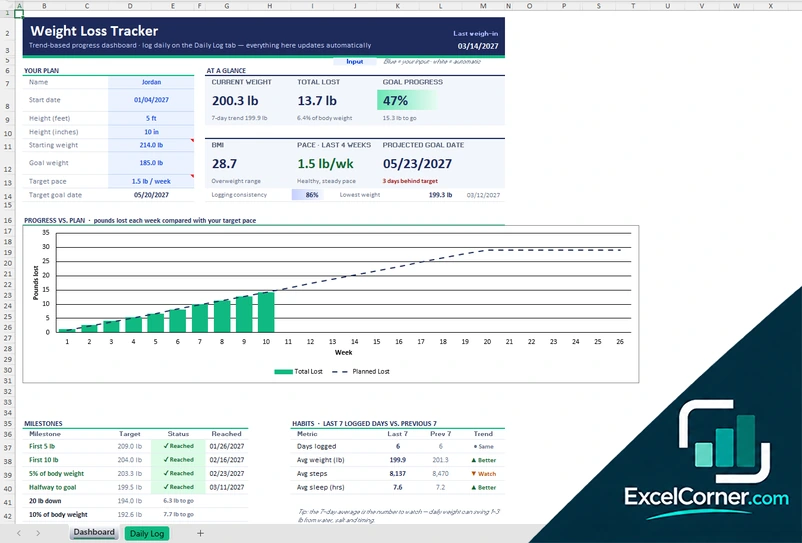
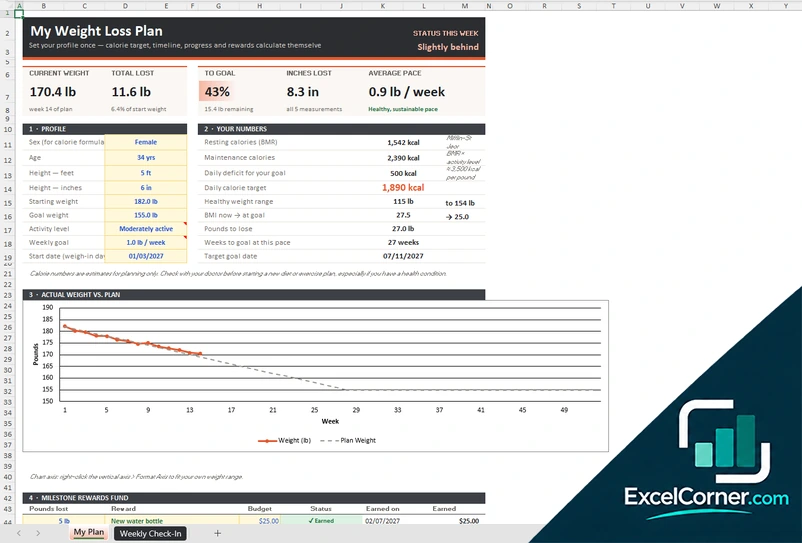
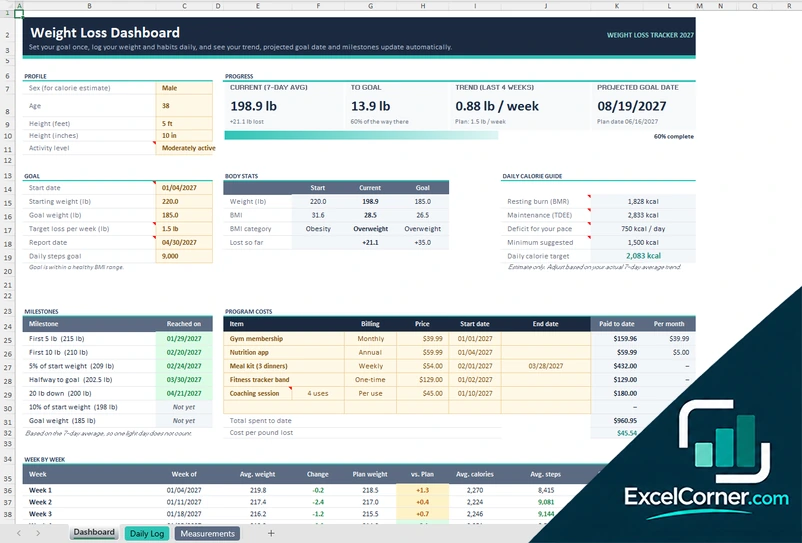
Previewing: Version 1 · Daily Weight Tracker with Trend. Pick another version on the right.
Instant download · No sign-up · No email
Download these free weight loss tracker Excel templates to log your weight and see your real progress. One uses a 7-day trend and a goal date. One is a weekly plan with calorie targets and check-ins. One adds calories, steps and body measurements.
Choose your version
- File
- .xlsx · 41 KB · 2 sheets
- Works with
- Microsoft Excel (.xlsx)
- Macros
- None · formulas only
- Price
- Free
Track your weight loss in an Excel spreadsheet
Your weight changes from day to day with water, salt and meals, so a single weigh-in tells you little. A spreadsheet can average the last seven days, compare you with your target pace and show how far you are from your goal. Seeing the trend is what keeps most people going.
These templates give you three ways to track. Version 1 is a daily log with a 7-day trend, BMI and a projected goal date. Version 2 is a weekly plan with calorie estimates and a weekly check-in. Version 3 adds calories, steps and body measurements.
Best for
- Anyone who wants to see the trend of their weight, not only the daily number
- People who follow a calorie target and a weekly plan
- Anyone who also wants to track waist, hips and other measurements
Maybe not for
A medical program or an app that connects to a scale. These are Excel files: you type your weight and the calculations are estimates, not medical advice.
Which version is right for you?
All three are free, formula-driven Excel files with sample data you can replace. They are independent, so you can download more than one.
Version 1
Daily Weight Tracker with Trend
A weight loss dashboard with a daily log, a 7-day trend, BMI, pace against your target, milestones, habits and a projected goal date.
DashboardDaily Log
.xlsx · 41 KB
Version 2
Weekly Plan and Check-In
A weekly weight loss plan with a calorie estimate, a weekly check-in for weight and measurements, a chart of weight against plan and milestone rewards.
My PlanWeekly Check-In
.xlsx · 29 KB
Version 3
Tracker with Calories and Measurements
A weight loss dashboard with a daily log of weight, calories and steps, body measurements, milestones, program costs and a projected goal date.
DashboardDaily LogMeasurements
.xlsx · 72 KB
What is inside the weight loss tracker Excel templates
Version 1: Daily Weight Tracker with Trend
On the Dashboard you enter your name, start date, height, starting weight, goal weight and target pace. The Daily Log records your weight each day with a 7-day average, the change, the total lost and the BMI.
The Dashboard shows current weight, total lost, goal progress, BMI, your pace over the last four weeks and the projected goal date, with a chart of pounds lost against your plan, milestones and a comparison of your last seven days with the seven before.
Version 2: Weekly Plan and Check-In
On the My Plan sheet you enter your sex, age, height, starting and goal weight, activity level and weekly goal. It estimates your resting and maintenance calories, the daily deficit and your calorie target, the weeks to goal and a healthy weight range.
The Weekly Check-In sheet has one row per week for your weight, the change, the plan weight and the status, plus body composition and measurements in inches. A chart compares your weight with the plan, and a milestone rewards fund tracks what you earn.
Version 3: Tracker with Calories and Measurements
On the Dashboard you enter your sex, age, height, activity level, start date, starting and goal weight and the loss per week that you want. The Daily Log records your weight, calories and steps each day with a 7-day average and your plan weight.
The Dashboard shows the current 7-day average, what is left to goal, the trend of the last four weeks and the projected goal date, with body stats, a daily calorie guide, milestones, program costs and a week-by-week table. The Measurements sheet holds waist, hips, chest, arm, thigh and neck.
How to use a weight loss tracker in Excel
- Download
Pick the version that you want and open it in Excel. Each file has sample data so you can see how it works. - Set your goal
Enter your start date, height, starting weight, goal weight and the pace you want, such as 1 lb a week. - Log your weight
Weigh in at the same time of day and type the weight in the log, daily or weekly. - Read the trend
Look at the 7-day average, the total lost, the progress against your plan and the projected goal date. - Adjust
If you are behind, change your calories or your activity and keep logging.
Replace the sample entries with your own. The averages, the charts and the goal date update on their own.
Which weight loss tracker do you need?
| Daily Weight Tracker with Trend | Weekly Plan and Check-In | Tracker with Calories and Measurements | |
|---|---|---|---|
| You log | Weight, and optionally waist, steps and sleep | One weigh-in and measurements each week | Weight, calories, steps and measurements |
| Best for | Seeing the 7-day trend and the goal date | Following a weekly plan and calories | A fuller picture of progress |
| You get | Trend, BMI, pace, milestones, goal date | BMR, calorie target, weight vs. plan, rewards | Projected goal date, calories vs. target, body stats |
| Sheets | 2 | 2 | 3 |
| Charts | Yes | Yes | Yes |
They are separate files, so you can use more than one.
Tips for tracking weight loss
- Weigh in at the same time of day, for example after waking up.
- Look at the 7-day average and not at a single day.
- Aim for a steady pace, around 1 to 2 lb a week for most adults.
- Take body measurements every two to four weeks, since the scale does not show everything.
- Log what you eat, even roughly, for the first weeks.
Frequently asked questions
Are these weight loss tracker Excel templates free?
Yes. All three versions are free to download as .xlsx files. You do not need an account or an email address.
Which version should I choose?
Choose the Daily Weight Tracker with Trend (Version 1) to log every day and see the 7-day trend. Choose the Weekly Plan and Check-In (Version 2) for a weekly plan with calorie estimates. Choose the Tracker with Calories and Measurements (Version 3) to log calories, steps and body measurements.
How do I make a weight loss tracker in Excel?
Make a table with a column for the date and one for your weight, add a 7-day average and a column for the total lost, and chart the weight against your goal. The templates already have this, with a dashboard.
How fast should I lose weight?
A pace of about 1 to 2 lb a week is common advice for most adults, but it depends on you. The templates show your pace and whether it is healthy and sustainable. Check your goal with a doctor.
Can I track measurements and calories as well?
Yes. Version 2 tracks measurements and body composition each week, and Version 3 tracks calories, steps and measurements such as waist, hips, chest, arm, thigh and neck.
More free health, habit and planning templates
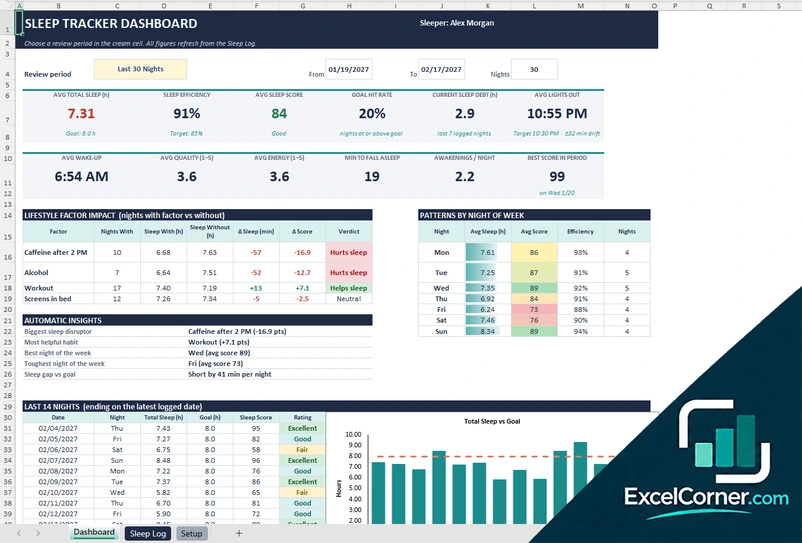
These templates use made-up sample data. They are tracking tools and not medical advice. Calorie and sleep figures are estimates, so check your plan with a doctor or a dietitian if you have a health condition. Excel is a trademark of Microsoft Corporation; Excel Corner is not affiliated with Microsoft.