
Home › Calendars, Schedules & Productivity › Goals Excel Template
Previewing: Version 1 · Yearly Goals Scorecard. Pick another version on the right.
Instant download · No sign-up · No email
Use these free goals templates for Excel to set goals and follow your progress. One version is a yearly goals scorecard with annual targets and monthly numbers, one is a goal tracker with milestones, key results and budget, and one is a SMART goals template with a goal card, an action plan and check-ins.
Choose your version
- File
- .xlsx · 24 KB · 2 sheets
- Works with
- Microsoft Excel (.xlsx)
- Macros
- None · formulas only
- Price
- Free
Set and track goals in an Excel spreadsheet
A goal is easier to reach when it has a number, a deadline and an owner. You also need to see, month after month, whether you are on pace and which goals are falling behind. A spreadsheet can compare progress with the time that has passed, forecast where you will end the year and flag the goals that need attention.
These Excel goals templates come in three versions. Version 1 is a yearly goals scorecard with an annual target, one number per month, pace and year-end forecast. Version 2 is a goal tracker with milestones and key results rolled up on a dashboard. Version 3 is a SMART goals template with a SMART score, an action plan and check-ins.
Best for
- Individuals and small teams who set yearly goals and want to see their pace each month
- Managers who track goals with milestones, owners and budgets and need to know which ones are at risk
- Anyone who wants to write clear SMART goals and follow the actions behind them
Maybe not for
A full OKR or performance management platform with reviews and comments. These templates are Excel files that you update yourself.
Which version is right for you?
All three are free, formula-driven Excel files with sample data you can replace. They are independent, so you can download more than one.
Version 1
Yearly Goals Scorecard
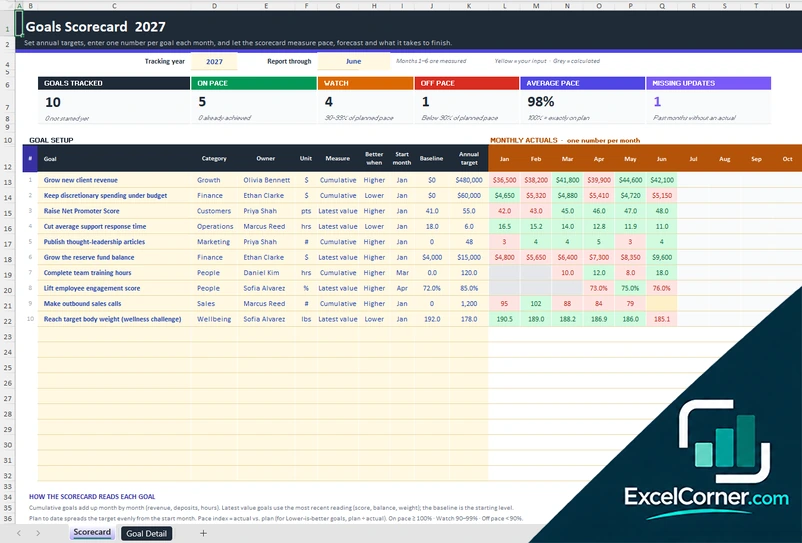
Set an annual target for each goal, enter one number per month and see the pace, the forecast for year end and what you need each month.
ScorecardGoal Detail
.xlsx · 24 KB
Version 2
Goal Tracker with Milestones
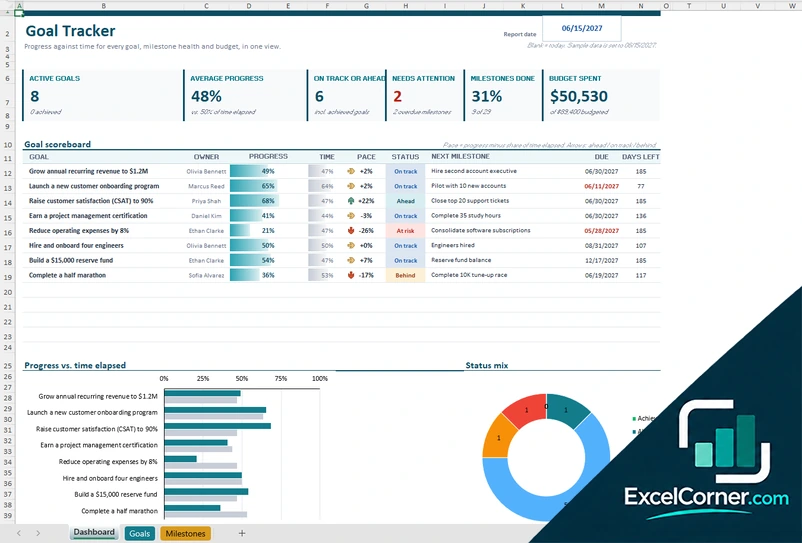
Define goals with an owner, dates and a budget, add milestones and key results, and see progress against time, pace and next milestone.
DashboardGoalsMilestones
.xlsx · 52 KB
Version 3
SMART Goals Template
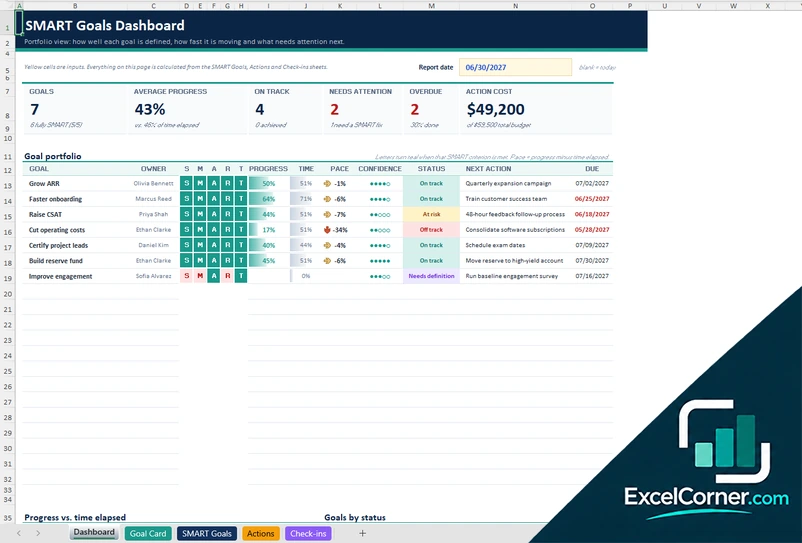
Describe each goal with the five SMART parts, get a SMART score and a goal card, and follow the action plan and the check-ins.
DashboardGoal CardSMART GoalsActionsCheck-ins
.xlsx · 101 KB
What is inside the goals Excel templates
Version 1: Yearly Goals Scorecard
On the Scorecard sheet you enter the tracking year and report month, then one row per goal with category, owner, unit, whether higher or lower is better, start month, baseline and annual target. Twelve monthly columns take one number per month. The Goal Detail sheet shows any goal month by month.
The scorecard calculates actual and plan to date, pace index, year-end forecast, the amount needed per month and a status of on pace, watch or off pace. A chart compares progress with the plan.
Version 2: Goal Tracker with Milestones
On the Goals sheet you define each goal with category, owner, priority, start and target date, budget and amount spent. The Milestones & Key Results sheet lists the steps for each goal with due date, weight, baseline, target and current value.
The workbook rolls them up into progress, time elapsed, pace, status and days to the target. The Dashboard shows active goals, average progress, overdue milestones, budget spent and a summary by category, with two charts.
Version 3: SMART Goals Template
The SMART Goals sheet has one row per goal, up to 20, where you fill in the five SMART parts: what will be achieved, the metric with baseline and target, owner, why it matters, and the deadline. The Actions sheet holds up to 200 action steps, and the Check-ins sheet logs the latest value and blockers.
Each goal gets a SMART score, progress, pace and status. The Goal Card shows one goal with an automatic SMART statement, and the Dashboard has three charts.
How to use a goals template in Excel
- Download
Pick the version you want and open it in Excel. The files have sample goals so you can see how they work. - Set the year and the report date
Enter the tracking year and the report month, or the report date. If you leave the report date blank in the tracker versions, it uses today. - Write your goals
Add one row for each goal with an owner, a category, a unit, a baseline and a target, and, in the tracker and SMART versions, a start date and a deadline. - Break them down
Add milestones and key results in the goal tracker, or the action steps in the SMART goals template, with an owner and a due date for each. - Update and review
Enter the monthly numbers or the latest value, mark the milestones that are done and read the status, the pace and the next action on the dashboard.
Replace the sample goals with your own. The pace, the forecast, the status and the charts update on their own.
Which goals template do you need?
| Yearly Goals Scorecard | Goal Tracker with Milestones | SMART Goals Template | |
|---|---|---|---|
| For | Annual targets with a number for each month | Goals broken into milestones and key results | Writing and following SMART goals |
| Best for | People who track a metric month by month | Managers of goals with owners and budgets | Anyone who wants clear, well-defined goals |
| Main outputs | Pace index, year-end forecast, needed per month, status | Progress, time elapsed, pace, next milestone, budget spent | SMART score, progress, confidence, overdue actions, action cost |
| Sheets | 2 | 3 | 5 |
| Charts | Yes | Yes | Yes |
They are separate files, so you can use more than one.
Tips for setting goals
- Write each goal with a number and a date, such as Raise customer satisfaction to 90% by June.
- Keep the list short. A few goals that you review often work better than a long list that you forget.
- Choose one owner for each goal, even when several people help.
- Split a big goal into milestones that you can finish in weeks, not months.
- Review your progress at the same time every month and look at the goals that are behind first.
- Change a goal when the facts change, and note why, instead of leaving it to fail in silence.
Frequently asked questions
Are these goals Excel templates free?
Yes. All three versions are free to download as .xlsx files. You do not need an account or an email address.
Which version should I choose?
Choose the Yearly Goals Scorecard (Version 1) if you track a number each month and want pace and a forecast. Choose the Goal Tracker with Milestones (Version 2) if each goal has steps, owners and a budget. Choose the SMART Goals Template (Version 3) to define each goal as specific, measurable, achievable, relevant and time-bound, with an action plan.
Is there a goal tracker template in Excel?
Yes. Version 2 is a goal tracker. Each goal has an owner, priority, start date, target date and budget, and its milestones and key results roll up into progress, time elapsed, pace and a status.
What are SMART goals?
SMART stands for specific, measurable, achievable, relevant and time-bound. In the SMART goals template you fill in each part for a goal, and the sheet gives it a SMART score and a statement you can copy.
How does the scorecard decide if a goal is on pace?
It compares progress to date with the plan to date, which spreads the target evenly from the start month, and shows a pace index. A goal is on pace at 100% or more, on watch from 90% to 99%, and off pace below 90%.
More free planning and productivity templates
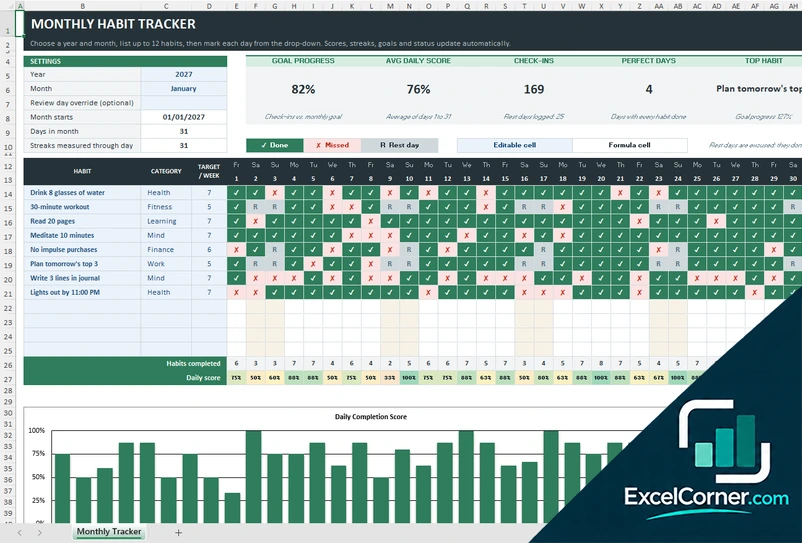
These templates are planning tools with sample data. They do not replace professional advice, and the results are only as good as the numbers you enter. Excel is a trademark of Microsoft Corporation; Excel Corner is not affiliated with Microsoft.