
Home › Personal Life & Leisure › Sleep Tracker Excel Template
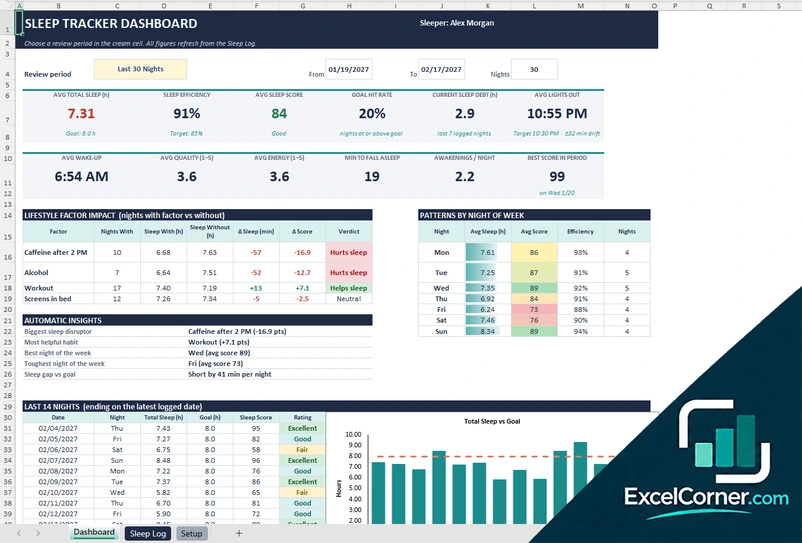
Previewing: Version 1 · Sleep Tracker with Dashboard and Sleep Score. Pick another version on the right.
Instant download · No sign-up · No email
Download these free sleep tracker Excel templates to log your nights and see what helps you sleep. One has a dashboard with a sleep score and sleep debt. One shows a whole year as a calendar heatmap. One is a monthly sleep review with a sleep schedule chart.
Choose your version
- File
- .xlsx · 90 KB · 3 sheets
- Works with
- Microsoft Excel (.xlsx)
- Macros
- None · formulas only
- Price
- Free
Track your sleep in an Excel spreadsheet
Sleep is easy to feel and hard to measure. If you log when you go to bed and when you wake up, a spreadsheet can work out your hours, how long you took to fall asleep, your sleep efficiency and your sleep debt against a goal. After a few weeks you can see patterns, such as the effect of caffeine or screens.
These templates give you three views. Version 1 is a nightly log with a dashboard and a score for each night. Version 2 shows the year as a calendar heatmap with a month-by-month summary and a sleep plan. Version 3 is a monthly review with charts of your sleep schedule.
Best for
- Anyone who wants to see their sleep hours and sleep debt
- People who want to find out which habits help or hurt their sleep
- Anyone who prefers a yearly view or a monthly review
Maybe not for
A wearable that records your sleep stages. These are Excel files: you type your bedtime and wake time, and the scores are calculated from what you enter.
Which version is right for you?
All three are free, formula-driven Excel files with sample data you can replace. They are independent, so you can download more than one.
Version 1
Sleep Tracker with Dashboard and Sleep Score
A sleep dashboard with a score for each night, sleep efficiency, sleep debt, lifestyle factor impact, patterns by night of the week and automatic insights.
DashboardSleep LogSetup
.xlsx · 90 KB
Version 2
Yearly Sleep Tracker with Calendar Heatmap
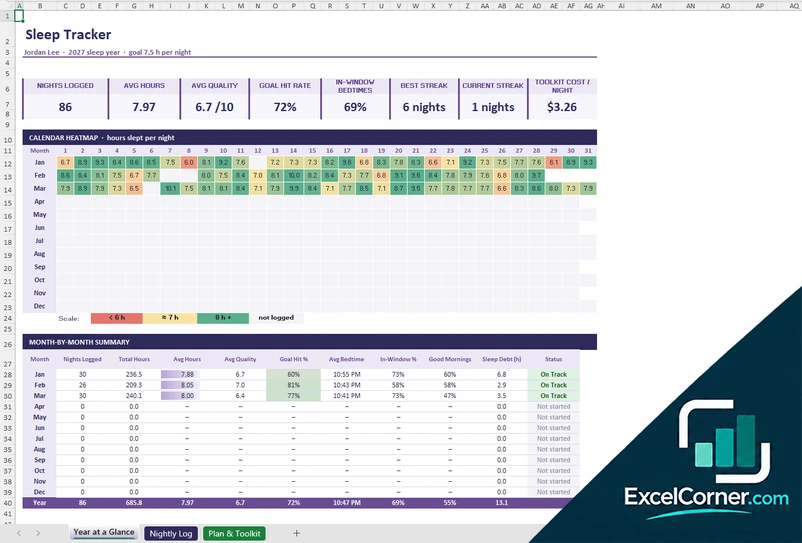
A yearly sleep tracker with a calendar heatmap of the hours you slept, a month-by-month summary, streaks and a plan with habits to track.
Year at a GlanceNightly LogPlan & Toolkit
.xlsx · 94 KB
Version 3
Monthly Sleep Review
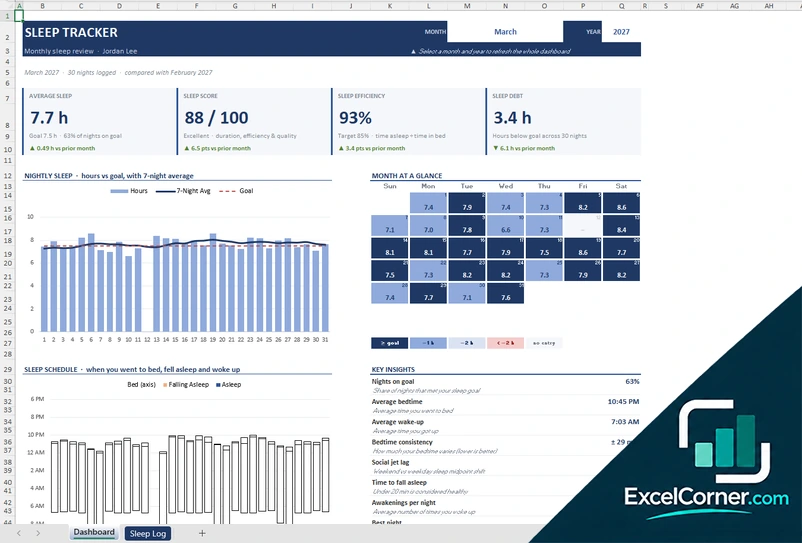
A monthly sleep review with a month selector, sleep score, efficiency and debt, a nightly chart against your goal, a sleep schedule chart and key insights.
DashboardSleep Log
.xlsx · 82 KB
What is inside the sleep tracker Excel templates
Version 1: Sleep Tracker with Dashboard and Sleep Score
On the Setup sheet you enter your name, your nightly goal, your target lights-out and wake-up times, an efficiency target and the lifestyle factors to track, such as caffeine, alcohol, a workout or screens in bed. The Sleep Log has one row per night with lights-out, wake-up, minutes to fall asleep, time awake, awakenings and naps.
The Dashboard covers a review period you choose, with average sleep, efficiency, sleep score, goal hit rate and sleep debt, the impact of each factor, patterns by night of the week, automatic insights and the last 14 nights with a chart.
Version 2: Yearly Sleep Tracker with Calendar Heatmap
The Plan & Toolkit sheet holds your tracking year, goal, bedtime window and the habits and morning moods to track. The Nightly Log has one row per night with bedtime and wake time, and calculates the hours slept and the difference from your goal.
Year at a Glance shows nights logged, average hours and quality, goal hit rate, best and current streak, a calendar heatmap of hours per night and a month-by-month summary with a status for each month.
Version 3: Monthly Sleep Review
On the Sleep Log you enter your name, goal and efficiency target, then log each night with bedtime, wake time, minutes to fall asleep, minutes awake, awakenings and a quality rating. The Dashboard has a month and year selector.
It shows average sleep, sleep score, efficiency and debt against the previous month, a chart of nightly hours against your goal with a 7-night average, a month-at-a-glance calendar, a sleep schedule chart and key insights.
How to use a sleep tracker in Excel
- Download
Pick the version that you want and open it in Excel. Each file has a sample log, so you can see how it works. - Set your goals
Enter your nightly sleep goal, your target bedtime and wake time and the habits that you want to track. - Log each night
Type the time that you went to bed and the time that you woke up, and optional details such as quality. - Read the results
Look at the average hours, the sleep score, the sleep debt and the goal hit rate. - Adjust
Change a habit that hurts your sleep and keep logging to see the effect.
Replace the sample nights with your own. The averages, the scores and the charts update on their own.
Which sleep tracker do you need?
| Sleep Tracker with Dashboard | Yearly Sleep Tracker with Heatmap | Monthly Sleep Review | |
|---|---|---|---|
| View | A review period of your choice | The whole year in one calendar | One month at a time |
| Best for | Scores, sleep debt and habit impact | Spotting patterns across the year | A monthly review with a schedule chart |
| You get | Sleep score, efficiency, habit impact, insights | Heatmap, month summary, streaks, plan | Sleep score, debt, schedule chart, key insights |
| Sheets | 3 | 3 | 2 |
| Charts | Yes | Yes | Yes |
They are separate files, so you can use more than one.
Tips for better sleep tracking
- Log your sleep every morning, while you still remember it.
- Keep a steady bedtime and wake time, even on weekends.
- Track one or two habits at a time, such as caffeine or screens in bed.
- Look at weeks, not single nights. One bad night means little.
- Use the sleep debt to plan an earlier night, not to catch up all at once.
Frequently asked questions
Are these sleep tracker Excel templates free?
Yes. All three versions are free to download as .xlsx files. You do not need an account or an email address.
Which version should I choose?
Choose the Sleep Tracker with Dashboard (Version 1) for a score for each night and the effect of your habits. Choose the Yearly Sleep Tracker with Heatmap (Version 2) for the whole year and a sleep plan. Choose the Monthly Sleep Review (Version 3) for a monthly view and a schedule chart.
How do I make a sleep tracker in Excel?
Make a table with a row for each night, a column for the bedtime and one for the wake time, and a formula for the hours slept that handles the night crossing midnight. Add a goal and a chart. The templates already do this.
What is sleep debt?
Sleep debt is the number of hours that you slept below your goal over a period. If your goal is 8 hours and you sleep 7, you add 1 hour of debt that night. The templates add it up for you.
What is sleep efficiency?
Sleep efficiency is the time you were asleep divided by the time you spent in bed, as a percentage. A common target is 85 percent or more. Version 1 and Version 3 calculate it from your log.
More free health, habit and planning templates
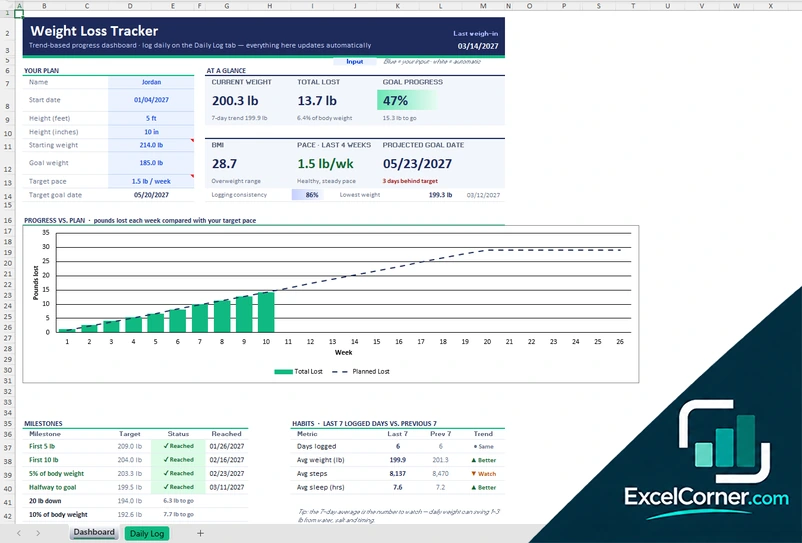
These templates use made-up sample data. They are tracking tools and not medical advice. Calorie and sleep figures are estimates, so check your plan with a doctor or a dietitian if you have a health condition. Excel is a trademark of Microsoft Corporation; Excel Corner is not affiliated with Microsoft.